Key takeaways
- Gain range: Look for 70dB+ for dynamics. The Rodecaster Pro II / Duo and Mackie DLZ Creator both provide 76-80dB, so you can run an SM7-style mic directly. Budget 60dB mixers will require an inline booster, adding cost and hiss.
- EIN (Equivalent Input Noise): Lower is better. -128 dBV or lower is clean enough for quiet speech. Above -122 dBV you will hear hiss when you normalize to podcast loudness (-16 LUFS).
- Combo jacks: Neutrik combo jacks accept both XLR and 1/4″ TRS, useful if you ever add a line-level device like a synth or external recorder.
The best audio mixers for podcasting are the Rode Rodecaster Pro II for feature-rich solo and duo shows, the Mackie DLZ Creator for adaptable multi-channel routing, and the Zoom PodTrak P8 for portable 4-to-6 person recording, with choice depending on how many microphones, headphone mixes, and USB channels you need.
Unlike a basic USB interface, a podcast mixer gives you hardware control over levels, muting, sound pads, mix-minus for remote guests, and independent headphone monitoring. The right one prevents the three most common podcast problems: noisy preamps when using gain-hungry mics, USB routing that can’t separate tracks in your DAW, and headphone sharing that makes co-hosts fight over volume.

Aveek 5 Channel Audio Mixer, Built-in PC Recording Interface Sound Board
Included for 'Best Audio Mixers for Podcasting' because the listing specifies Built-in PC Recording Interface Sound Board, details this guide uses to compare options.
View on Amazon
MAONO AME2 Audio Interface Mixer, Podcast Studio Console with XLR Input
Included for 'Best Audio Mixers for Podcasting' because the listing specifies Podcast Studio Console with XLR Input, details this guide uses to compare options.
View on Amazon
Also GO Podcast Equipment Bundle, F998 Audio Mixer with BM800 Microphone
Included for 'Best Audio Mixers for Podcasting' because the listing specifies F998 Audio Mixer with BM800 Microphone, details this guide uses to compare options.
View on Amazon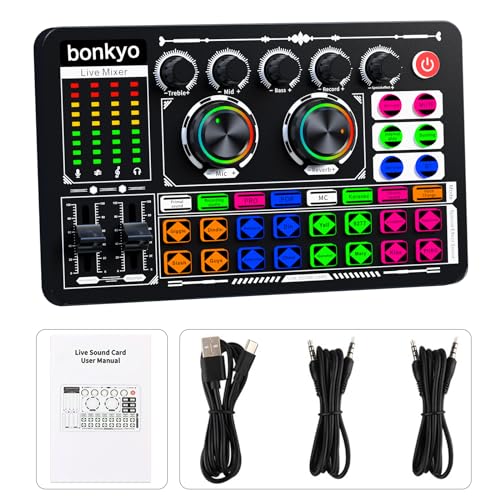
Bonkyo Professional Audio Mixer, F999 Live Sound Card With Dj Mixer For Streaming/Podcasting/Gaming, Professional Studio Equipment
Included for 'Best Audio Mixers for Podcasting' because the listing specifies Professional Studio Equipment, details this guide uses to compare options.
View on AmazonHow to Choose: Decision Matrix for Solo vs. Guest Setups
Start with headcount, not features. Mixers scale poorly if you buy too small and waste money if you buy too large.
| Your Setup | Ideal Mixer Class | Minimum Mic Inputs (XLR with 48V) | Headphone Outputs Needed | USB Multitrack Requirement |
|---|---|---|---|---|
| Solo host, one mic + remote guest via USB/Discord | Compact 1-2 channel mixer/interface | 1-2 | 1 | 2×2 minimum, mix-minus required |
| Co-hosts in the same room (2 mics) | 2-4 channel podcast mixer | 2 | 2 independent mixes | 4×4 or higher for separate DAW tracks |
| 3-4 hosts + occasional call-in guest | Full podcast console | 4-6 | 4 | 8+ channels, discrete Bluetooth/USB/phone channel |
| Mobile / on-location roundtable | Battery-capable recorder/mixer | 4-6 | 4-6 | Multitrack to SD + USB interface mode |
If you only need one XLR today but plan to add a co-host within a year, buy for two mic inputs now. Adding an external preamp or second interface later creates clocking and level-matching headaches that a single mixer avoids.
Comparison of the Best Audio Mixers for Podcasting in 2026
| Model | Mic Preamps (XLR Combo) | Max Gain / EIN | USB Audio | Headphone Outs | Key Podcast Feature | Typical Price Range |
|---|---|---|---|---|---|---|
| Rode Rodecaster Pro II | 4x Neutrik combo, 76dB gain | 76dB / -131.5 dBV EIN | USB-C 14-in / 14-out multitrack | 4x independent 1/4″ + headset | 8 programmable pads, APHEX processing, Bluetooth mix-minus + USB mix-minus | usually $600–$700 |
| Rode Rodecaster Duo | 2x combo, 76dB gain | 76dB / -131.5 dBV EIN | USB-C 12-in / 8-out multitrack | 2x independent + headset | Same processing as Pro II in compact chassis for 1-2 person shows | usually $400–$500 |
| Mackie DLZ Creator | 4x Onyx80, 80dB gain | 80dB / -130 dBV EIN | USB-C 14-in / 4-out + SD recording | 4x independent with separate mixes | Full touchscreen + AutoMix, NDI-like routing, extensive DLZ Mix Agent modes | usually $700–$900 |
| Yamaha AG08 | 2x D-PRE + 6 line/aux channels (8 total) | ~68dB / -128 dBV EIN | USB-C 8-in / 8-out + streaming mix modes | 2x independent 1/4″ + headset | 8-channel streaming mixer, 6 faders + sound pads, ideal for solo gaming/podcast hybrid | usually $700–$850 |
| Zoom PodTrak P8 | 6x XLR, 70dB gain | 70dB / -127 dBV EIN | USB-C 6-in / 2-out (2-track) + SD multitrack | 6x independent headphone outs | 6 sound pads, battery powered (4x AA), records 6 tracks to SD without computer | usually $350–$450 |
| Behringer Xenyx Q802USB (Budget Class) | 2x XENYX preamps | 60dB / -122 dBV EIN | USB 2.0 2-in / 2-out stereo only | 1x main (shared) | Simple analog mixer, no multitrack, no mix-minus | usually $70–$100 |
Microphone Inputs: Gain and Noise Matter More Than Channel Count
All the mixers above provide 48V phantom power, but usable gain separates them. Dynamic broadcast mics like the Shure SM7dB, Electro-Voice RE20, and Rode Procaster need 60-70dB of clean gain to reach -12 dBFS without a Cloudlifter.
What to check
- Gain range: Look for 70dB+ for dynamics. The Rodecaster Pro II / Duo and Mackie DLZ Creator both provide 76-80dB, so you can run an SM7-style mic directly. Budget 60dB mixers will require an inline booster, adding cost and hiss.
- EIN (Equivalent Input Noise): Lower is better. -128 dBV or lower is clean enough for quiet speech. Above -122 dBV you will hear hiss when you normalize to podcast loudness (-16 LUFS).
- Combo jacks: Neutrik combo jacks accept both XLR and 1/4″ TRS, useful if you ever add a line-level device like a synth or external recorder.
For solo creators using a condenser like the Rode NT1 or Audio-Technica AT2020, any of these preamps is overkill. The decision matters when you choose a low-sensitivity dynamic for untreated rooms.
USB Connectivity and Routing: The Difference Between Stereo and Multitrack
A common buying mistake is assuming “USB mixer” means each mic records to its own track. Many analog-USB mixers only send a stereo mix to your computer, which makes editing crosstalk or fixing one guest’s level impossible.
- Multitrack USB (recommended for editing): Rodecaster Pro II (14×14), Rodecaster Duo (12×8), Mackie DLZ Creator (14×4), and Yamaha AG08 (8×8) record each mic, sound pad, Bluetooth, and USB chat channel as separate WAV tracks in Audacity, Adobe Audition, Reaper, or Hindenburg. You can isolate, noise-reduce, and level each voice after the fact.
- Stereo USB only: Behringer Q802USB and similar analog mixers send one stereo file. Fine for live streaming, bad for post-production.
- Interface + SD redundancy: DLZ Creator, PodTrak P8 and Rodecasters record multitrack to microSD even if the computer crashes. This is essential for remote interviews.
- Mix-minus: If you bring in guests via Zoom, Discord, or phone, you need mix-minus to prevent the guest hearing their own echo. Rodecaster Pro II/Duo, DLZ Creator, AG08, and PodTrak P8 provide dedicated mix-minus on both USB channel 2 and Bluetooth. Budget analog mixers do not, requiring loopback workarounds.
Concrete Settings for Clean USB Recording
Set this once on any multitrack mixer and save it as a preset:
- Set mic gain so normal speech peaks at -12 dBFS to -9 dBFS on the mixer’s meter. This leaves 9-12 dB of headroom for laughs and avoids digital clipping.
- Enable high-pass filter at 80 Hz for male voices, 100 Hz for female voices to cut desk rumble and HVAC without thinning the voice.
- Use light hardware compression if available: Ratio 2.5:1, Threshold -18 dBFS, Attack 10-20ms, Release 150ms. This keeps levels even without audible pumping. Leave de-essing and loudness normalization for post.
- In your DAW, record at 48 kHz / 24-bit. Deliver podcast MP3 at 96 kbps mono for speech or 128 kbps stereo if you use music/sound pads.
Headphone Monitoring and Solo/Guest Workflows
Headphone count is a hard limit. Splitters degrade volume and don’t allow independent mixes.
- Solo + remote guest: One amplified headphone output is enough, but ensure it has enough power for 250-ohm headphones (Beyerdynamic DT 770 Pro). The Rodecaster Duo, AG08, and DLZ Creator all drive 250-ohm loads cleanly above 100mW per channel.
- 2-4 local guests: You need an independent headphone amp per person. The PodTrak P8 and Rodecaster Pro II give each guest a volume knob and can assign “listen to own mic only” or full mix. The Mackie DLZ Creator goes further and lets each headphone have a different sub-mix, so a producer can hear all mics while a guest hears only hosts.
- Latency: Hardware monitoring from the mixer is zero-latency. Do not monitor from your DAW through USB or you will hear a 15-40ms delay that makes speech difficult.
Controls, Pads, and Hands-On Workflow
- Faders vs. knobs: Motorized or long-throw faders (Pro II, DLZ Creator) make live riding of levels precise. Rotary knobs (Q802USB) are fine but harder to mute quickly. Look for dedicated mute and solo buttons per channel.
- Sound pads: If you run intro music, ads, or sound effects, 6-8 pads save you juggling a second computer. Rodecaster line and PodTrak P8 pads can be set to latch, one-shot, or loop, and are recorded to their own track so you can duck music under speech later.
- Processing: Onboard APHEX (Rode) or Onyx processing (Mackie) includes noise gate, compressor, and EQ presets voiced for broadcast. Use them lightly during recording; heavy processing is hard to undo.
Worked Calculation: Storage, Bandwidth, and Battery for Podcast Mixers
Spec sheets rarely show what multitrack recording actually costs in storage or power.
File size per hour: Formula = Sample Rate x Bit Depth x Channels x seconds / 8 / 1,073,741,824 to get GB.
- 1 hour stereo 48 kHz / 24-bit WAV (master): 48,000 x 24 x 2 x 3600 / 8 = 1,036,800,000 bytes = ~0.97 GB per hour
- 1 hour 6-track multitrack 48 kHz / 24-bit WAV (PodTrak P8): 0.97 GB x 3 = ~2.9 GB per hour
- 1 hour MP3 delivery at 128 kbps stereo: 128,000 bits/s x 3600 / 8 = 57,600,000 bytes = ~55 MB per hour
- 1 hour MP3 at 96 kbps mono (speech podcast standard): ~41 MB per hour
Practical takeaway: A 32 GB SD card holds about 11 hours of 6-track WAV or over 580 hours of final 96 kbps mono MP3. If you record weekly 2-hour 4-track shows in WAV and keep masters, budget ~6 GB per week, ~312 GB per year. Archive to external drive; do not leave masters on the SD card.
Battery runtime example – Zoom PodTrak P8 on AA: 4x AA alkaline (~2500 mAh each, 6V total) typically delivers 2-2.5 hours with 4 mics + phantom power off, or ~1.5 hours with 4 condensers needing 48V. Using 4x Eneloop Pro NiMH (2550 mAh) extends this to ~3 hours, while a 20,000 mAh USB-C PD power bank (5V 2A = 10W) will power the P8 or Rodecaster Duo for 6-8 hours continuously. For outdoor shows, a USB power bank is more reliable than AA.
Which Mixer Should You Buy?
Buy the Rode Rodecaster Duo if you are a solo creator or duo who wants pro-grade preamps, full multitrack, mix-minus, and sound pads without a large desk footprint.
Buy the Rode Rodecaster Pro II if you host 3-4 people in studio and want 4 mic inputs, 4 independent headphone mixes, and the largest pad bank.
Buy the Mackie DLZ Creator if you want the most flexible routing and AutoMix for panels where not everyone talks at once. Its learning curve is higher, but it replaces a separate interface, headphone amp, and recorder.
Buy the Yamaha AG08 if your podcast is tied to streaming or gaming and you need 8 channels to mix game audio, Discord, music, and mics with separate stream and chat mixes.
Buy the Zoom PodTrak P8 if you record outside a studio, need battery operation, and want 6 headphones without extra amps. Accept its 2-track USB limitation if you edit from the SD multitrack instead.
Consider a budget analog class like the Behringer Q802USB only if you stream live without editing and never need isolated tracks or mix-minus. For any edited podcast with remote guests, the lack of multitrack will cost more time than you save.
FAQ
Do I need a mixer or just a USB audio interface?
An interface like a Focusrite Scarlett 2i2 or MOTU M2 is enough if you only need clean mic recording and do all mixing in software. Choose a mixer when you need physical mutes, sound pads, multiple headphone mixes, or mix-minus for phone/Discord guests without software loopback.
Can I use XLR and USB mics together on these mixers?
No. Podcast mixers only accept analog XLR/TRS and headset mics. USB mics like the Blue Yeti bypass the mixer entirely. If you already own a USB mic, connect it directly to the computer and aggregate devices in software, but for consistency, use XLR mics into the mixer.
Will these mixers work with my computer without drivers?
On Windows 10/11 and macOS 13+, the Rodecaster series, DLZ Creator, AG08, and PodTrak P8 are class-compliant and appear as USB audio devices without extra drivers. For multitrack on Windows, install the manufacturer’s ASIO driver to see all discrete channels in your DAW.