
Our Top Picks
If you stream or record a PS5 and want 4K60 capture without fuss, the Elgato Game Capture 4K S is the straightforward choice; if you play at high refresh rates and want HDMI 2.1 on both sides, the Elgato Game Capture 4K X or the AVerMedia Live Gamer Ultra 2.1 fit better. Most PS5 streamers publish at 1080p60 anyway, so the real decision is how much passthrough headroom your TV or monitor needs and whether you want to record in 4K for editing.
What a PS5 Capture Card Needs to Do
The PS5 outputs up to 4K120 with HDR and variable refresh rate (VRR). A capture card sits between the console and the display: the signal passes through to your screen, and a copy is sent over USB to a PC or Mac. Three questions sort the options:

Elgato 4K S Capture Card for PS5, Xbox Series X/S, Switch 2 | 4K60 capture, 1440p120 or 1080p240 passthrough, HDR10 support, Near-zero latency, USB-C, Analog audio input
Chosen because it specifies Xbox Series X/S and Switch 2.
View on Amazon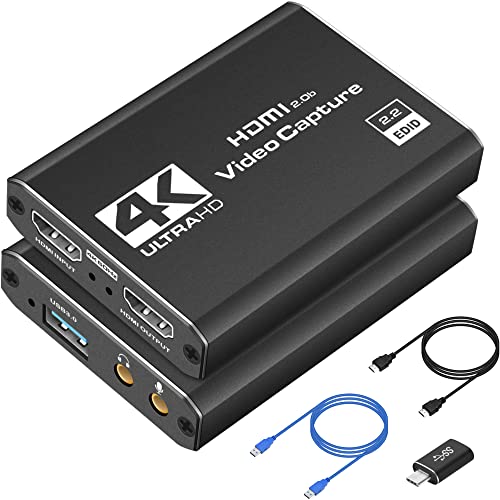
Capture Card 4K HDMI Video Streaming to USB 3.0 1080P 60FPS Capture Device | Audio Video Capture, 4K HDMI Loop-Out, Work for PS5/PS4/Switch/Xbox/PC/Camera/OBS, Game Screen Recorder Streaming Equipment
Chosen because it specifies Audio Video Capture and 4K HDMI Loop-Out.
View on Amazon
XIIXMASK USB 3.0 HDMI Capture Card, 1080P 60FPS Capture, 4K Pass-Through | Dual-Port USB-A/USB-C, 2K 30FPS/1080P 60FPS Video Capture & Streaming for PS4/PS5, Switch 1/2, Xbox, PC, Mac, Camera (black)
Chosen because it specifies 1080P 60FPS Capture and 4K Pass-Through.
View on Amazon
Guermok USB 3.0 HDMI Capture Card, 1080P 60FPS & 2K30 Video Capture Device | 4K HDMI Pass-Through, Mic Input & Audio Output, USB Video Game Capture for OBS Streaming, PS5, Switch 2/1, Xbox1, Camera, PC
Chosen because it specifies 1080P 60FPS & 2K30 Video Capture Device and 4K HDMI Pass-Through.
View on Amazon- Passthrough: can it pass your display’s best mode, such as 4K120 or 1440p120 with VRR, with no added lag?
- Capture: what resolution and frame rate can it record or stream? Capture is usually lower than passthrough.
- USB bandwidth: does it need USB 3.2 Gen 2 (10 Gbps), or does a slower port limit the capture resolution?
Capture Cards at a Glance
| Card | Best for | Stated capture and passthrough | Limits |
|---|---|---|---|
| Elgato Game Capture 4K S | 4K60 recording and streaming, HDMI 2.0 setups | Capture up to 2160p60; HDR10 passthrough up to 4K60; passthrough with VRR and ALLM; USB-C; HDMI 2.0 in and out | No HDMI 2.1; HDR capture limited to 1080p60 and Windows only |
| Elgato Game Capture 4K X | High-refresh PS5 and PS5 Pro setups | Maker lists recording up to 4K144 with HDR10 on Windows; HDMI 2.1 passthrough with VRR and ALLM; USB 3.2 Gen 2; 112 x 72 x 18 mm, 91 g | Needs a fast USB port for top modes; some reviewers cite 4K60 for capture, so read the specs for your use |
| AVerMedia Live Gamer Ultra 2.1 | HDMI 2.1 passthrough plus an alternative to Elgato software | USB 3.2 Gen 2; HDMI 2.1; passthrough up to 4K144 with HDR and VRR; 4K60 capture at launch, with newer firmware extending Windows capture | Reviewers say the software needs work; 4K144 capture has hardware requirements |
| Elgato HD60 X (previous generation) | 1080p60 streaming where stock exists | 1080p60 HDR10 or 4K30 capture; passthrough up to 4K60 HDR10 with VRR | Elgato lists it as no longer available; the 4K S fills its slot |
Elgato Game Capture 4K S: The Balanced Pick
Elgato’s own documentation lists capture up to 2160p60, with HDR10 passthrough to 4K60 and lag-free passthrough with VRR and auto low-latency mode. The card uses a USB-C port, with HDMI 2.0 in and out, and weighs about 90 g. Windows Central praised the passthrough and the clean 4K60 captures, while ZTGD scored it 9 and pointed to two weak spots: no HDMI 2.1, and HDR capture capped at 1080p60 on Windows.
For a PS5 owner whose display tops out at 4K60 or who is happy to run the console at that setting, the 4K S covers the job. If your TV runs 4K120 and you want to play at that refresh rate while capturing, you need an HDMI 2.1 card.
Elgato Game Capture 4K X: HDMI 2.1 for High Refresh
The maker lists passthrough via HDMI 2.1, including VRR and ALLM, and recording up to 4K144 with HDR10 on Windows. It connects through USB 3.2 Gen 2, with USB 3.2 Gen 1 working at reduced capture resolution. Elgato states it works with the PS5 and PS5 Pro. The card measures 112 x 72 x 18 mm and weighs 91 g, which suits compact desks and travel setups. The companion software is Elgato Studio, and the card works with OBS, Meld and Discord.
Reviews are not perfectly aligned on capture limits, with some describing 4K60 capture and 4K144 passthrough. Read the stated modes for the platform you use before buying, especially for Mac or iPad.
AVerMedia Live Gamer Ultra 2.1: Alternative HDMI 2.1 Option
The GC553G2 uses USB 3.2 Gen 2 Type-C with HDMI 2.1 in and out. Launch passthrough covered 2160p144, 1440p144 and 1080p240 with HDR and VRR, and the maker later listed additional passthrough modes such as 4K120. Launch capture topped out at 2160p60; a firmware update reportedly raises Windows capture to 4K144 through AVerMedia’s Streaming Center, with high-end hardware recommendations. Windows Central praised true 4K60 recording but said the software needs work, TweakTown highlighted full HDMI 2.1 passthrough and OBS integration, and GamesRadar called it competitive for console players who want 4K60 passthrough, VRR and recording.
It is the pick for players who want HDMI 2.1 outside the Elgato ecosystem, particularly in OBS-centered workflows. Mac users should note that HDR capture is not available on macOS.
Elgato HD60 X: Previous Generation, Still Common
The HD60 X captures at 1080p60 with HDR10, or 4K30, and passes through up to 4K60 HDR10 with VRR. TweakTown lists its cons as no 4K60 capture and no support for HDMI 2.1 refresh rates. Elgato’s page now marks it as no longer available, with the 4K S taking its place. If you find one in stock, it remains a workable 1080p streaming card, but buyers who want longer support should look at the newer 4K S.
Fit and Compatibility Notes
- PS5 and PS5 Pro: set the console’s video output and HDR options to match what the card passes through, and confirm 4K120 or VRR options appear.
- USB port: plug into a USB 3.2 Gen 2 (10 Gbps) port on the PC. A slower port can reduce the available capture resolution.
- HDMI cabling: use certified high-speed or ultra-high-speed cables on both sides, especially for HDMI 2.1 modes.
- Software: Elgato Studio, AVerMedia Streaming Center and OBS all work as capture sources, but HDR capture is limited to Windows on Elgato’s cards.
- Latency: use the passthrough output for playing, and expect preview windows on the PC to run with a small delay. Elgato cites about 30 ms for the 4K S preview.
Pick X If You Want Y
| Pick this | If you |
|---|---|
| Elgato 4K S | want 4K60 capture and VRR passthrough without HDMI 2.1 |
| Elgato 4K X | play PS5 at high refresh rates and want Elgato software |
| AVerMedia Live Gamer Ultra 2.1 | prefer HDMI 2.1 passthrough with an alternative software stack |
| Elgato HD60 X | stream at 1080p60 and can find one |
Budget Tiers
Budget: a 1080p60 card in the HD60 X class, if available, or a plain HDMI 2.0 card with 1080p capture. Mid-range: the Elgato 4K S for true 4K60 capture. Premium: the 4K X or Live Gamer Ultra 2.1 for HDMI 2.1 and high-refresh passthrough.
Alternatives
- Internal PCIe capture cards: offer high bandwidth and no USB limits but require a desktop slot and are overkill for most PS5 streamers.
- Built-in PS5 Share and broadcast features: the console can stream directly to supported services without extra hardware, at the cost of overlays and scene control.
- HDMI splitters with capture: cheaper cards exist, but passthrough lag and HDR handling vary widely, so read the stated limits carefully.
Setup Tips for a PS5 Capture Workflow
Connect the PS5 to the card’s HDMI input, then run a second HDMI cable from the card’s output to your display. Plug the USB cable into a fast port on the PC and install the maker’s software or add the card as a video device in OBS. In the PS5 video settings, review the output resolution and the HDR and VRR toggles, because some modes are only passed through and not recorded. If you hear no game audio in your stream, confirm the audio source in OBS is set to the card, and use a separate audio source for your microphone so you can balance levels. For streamers who play on a TV across the room, note that long HDMI runs can cause signal dropouts at high bandwidth modes, so use a certified cable.
Plan your PC as well. Reviewers note that 4K144 capture through some cards needs a capable processor, a recent graphics card and 16 GB of memory, so a modest laptop may cap out earlier than the card. Encoding on a GPU with hardware encoders keeps the CPU free for the game or overlays, and a wired network connection steadies live streams.
Frequently Asked Questions
Do I need a capture card to stream a PS5?
No. The PS5 can broadcast directly to services such as Twitch and YouTube. A capture card adds overlays, scene switching, a webcam mix and higher recording quality through software like OBS, which is why many creators use one.
Is 4K60 capture necessary for PS5?
Not for most streams, since platforms usually take 1080p or 1440p. 4K60 capture matters if you edit and publish 4K videos. Otherwise a card with strong passthrough and 1080p60 capture will serve most players.
Will a capture card add lag to my PS5 gameplay?
Passthrough is designed to be lag-free, so you play on the TV or monitor with no added delay. The preview on the PC lags slightly. Play on the passthrough screen, not the preview.
Do I need HDMI 2.1 for a PS5 capture card?
Only if you want 4K120 or high-refresh VRR passthrough. The Elgato 4K S works over HDMI 2.0 with 4K60 passthrough, while the 4K X and Live Gamer Ultra 2.1 use HDMI 2.1.
Can I capture PS5 HDR?
Elgato lists HDR capture as limited to 1080p60 and Windows-only on the 4K S and HD60 X. HDR passthrough to your TV is separate and works up to 4K60 on those cards.
Does a PS5 Pro change which capture card I need?
The PS5 Pro can output the same high-refresh modes, so the same HDMI 2.1 reasoning applies. Elgato states the 4K X works with the PS5 and PS5 Pro, and reviewers suggest HDMI 2.1 cards for Pro owners with high-refresh displays.
FAQ
Do I need a capture card to stream a PS5?
Is 4K60 capture necessary for PS5?
Will a capture card add lag to my PS5 gameplay?
Do I need HDMI 2.1 for a PS5 capture card?
Can I capture PS5 HDR?
Does a PS5 Pro change which capture card I need?
More from Amazon
Programs that pair well with the guide above. Offers and eligibility are set by Amazon and may change.
Free shipping on eligible items, Prime Video and more. Eligible new members can start with a free trial.
Start a Prime free trialAd-free music streaming. Eligible new subscribers can start with a free trial.
Try Music Unlimited freeA Prime membership for ages 18-24 with a trial period. Eligibility is set by Amazon.
See Prime for Young AdultsAudiobooks and podcasts to listen to on the go. Eligible new members can start with a free trial.
Try Audible freeAs an Amazon Associate we earn from qualifying purchases.


