Key takeaways
- Five keyboards that work with Xbox One for typing and supported games, from a couch-friendly wireless touchpad board to a hot-swappable mechanical pick.
The Xbox One accepts a USB keyboard, and that simple fact opens up a second way to use the console. Typing a long message, entering a redeem code, or searching the Microsoft Store with a real keyboard is far quicker than tapping letters with a controller stick. A small number of games also accept keyboard input directly, so a keyboard can change how those games feel to play.
The limits matter as much as the promise. Most Xbox One games do not accept keyboard input for gameplay at all, and the console has no Bluetooth pairing menu for keyboards, so a Bluetooth-only board will not connect. The boards in this guide all connect through USB or through a USB wireless receiver, which is the connection the Xbox One actually accepts. Every pick below has a verified Amazon listing, and each one covers a different kind of setup, from couch play to a desk next to the console.
As an Amazon Associate, we earn from qualifying purchases.
How Keyboard Support Works on Xbox One
A wired USB keyboard plugs into any USB port on the console and works at once for text entry across the dashboard, in messages, and in search fields. That is the part of keyboard support every Xbox One owner can count on, and it works with nearly any standard USB keyboard. Wireless keyboards that ship with their own USB receiver work the same way, because the console sees the receiver as a standard USB keyboard.
Gameplay is a different story. Only a small group of games accept keyboard input on Xbox One, and the list is set by each developer. Games known to accept keyboard and mouse on Xbox One include Fortnite and Warframe, plus a handful of others, while the large majority of the library ignores keyboard input during play. A keyboard still helps in those games for chat and menus, but it will not move a character in a game that does not support it.
One more practical point: the Xbox One has three USB ports, so a player who also uses an external drive and a headset adapter should plan the port layout before buying. A simple USB hub can help, though some hubs behave oddly with the console, so a direct connection is the safer first try.
The Razer Turret was the first wireless keyboard and mouse set built with Microsoft for the Xbox One, and it remains the reference point for couch play, but this guide covers five other boards that are easier to find today, each with its own strength.
1. Logitech K400 Plus Wireless Touch TV Keyboard
The Logitech K400 Plus is the couch pick. It is a compact wireless keyboard with a built-in touchpad on the right side, so it handles both typing and pointer movement from a sofa without a second device on the lap. The touchpad is a PC and TV feature, and on the Xbox One the keyboard itself is the part that types, while the touchpad stays quiet, so buy this board for its typing and its lap-friendly shape rather than for pointer control on the console.
The board connects through a tiny Logitech Unifying receiver on the 2.4 GHz band, with a stated range of up to 33 feet, which is more than enough to reach a console across a living room. Logitech states up to 18 months of battery life from two AA batteries, with an on/off switch that helps the board last longer in storage. The keys are quiet and low profile, and the layout is compact at under 14 inches wide, so it sits easily on a lap or a cushion. There is no backlight, and the keys are membrane rather than mechanical, so the feel is soft and muted instead of crisp. Its listing was confirmed in stock and shipped by Amazon in November 2026.
Specs
- Connectivity: 2.4 GHz wireless via Logitech Unifying USB receiver
- Layout: Compact full layout with integrated 3.5-inch touchpad
- Switches: Quiet membrane keys
- Backlight: None
- Battery: Two AA batteries, up to 18 months of stated life
- Range: Up to 33 feet
- Dimensions: 13.95 x 5.5 x 0.93 inches
- Weight: 13.8 ounces
- Model number: 920-007119
2. Logitech G413 TKL SE Mechanical Gaming Keyboard
The Logitech G413 TKL SE is the compact mechanical pick. It drops the number pad, so the board takes less desk space and leaves more room for a mouse, which suits a desk setup next to the console. The tactile mechanical switches give a clear bump on each press without the loud click of a clicky switch, and the brushed aluminum top plate keeps the board rigid when typing hard.
Lighting is a single white backlight rather than full RGB, which fits the board’s plain and serious look. The backlight makes the keys easy to find in a dark room, and the white glow suits a living room better than a rainbow effect for many players. Anti-ghosting keeps multiple simultaneous presses registering, which matters in games that do accept keyboard input and in fast typing alike.
The board is wired over USB, so it plugs straight into the console with no receiver and no battery to think about. It has no wrist rest and no number pad, so players who type long messages with numbers may miss the pad, and the cable is fixed rather than detachable. The listing was confirmed live on Amazon in November 2026 with a current tracker record, and the model number to match is 920-010442.
Specs
- Connectivity: Wired USB
- Layout: Tenkeyless, 87 keys
- Switches: Tactile mechanical switches
- Backlight: White LED backlight
- Keycaps: Standard height keycaps on a brushed aluminum top plate
- Anti-ghosting: Yes, for simultaneous key presses
- Cable: Fixed USB cable
- Model number: 920-010442
3. Redragon K556 RGB Mechanical Gaming Keyboard
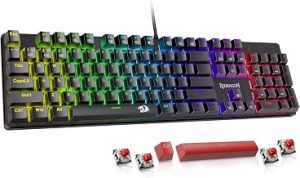
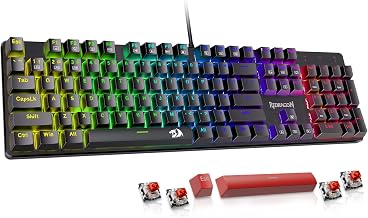
The Redragon K556 is the full-size mechanical pick with the most practical character. It is a 104-key board on a solid aluminum base, with hot-swappable sockets that let the owner pull a switch out and press a different one in without soldering. That makes it the only board in this guide that can change its feel after purchase, and it suits a player who wants to try a different switch type later.
This listing uses soft tactile brown switches, which give a gentle bump and a moderate sound, a middle ground between a quiet membrane board and a loud clicky one. The RGB backlight offers 18 lighting modes, and noise-absorbing foam inside the case damps the hollow sound that can make a metal board ring. N-key rollover means the board keeps up when several keys are held at once, which is useful in the games on Xbox One that accept keyboard input.
The K556 is wired and full size, so it needs desk space and a free USB port, and it has no wireless mode. Redragon also sells this board with linear red switches under a separate listing, so match the ASIN and the brown switch variant when ordering. The brown switch listing was confirmed in stock and fulfilled by Amazon in November 2026.
Specs
- Connectivity: Wired USB
- Layout: Full size, 104 keys
- Switches: Soft tactile brown mechanical switches, hot-swappable
- Backlight: RGB with 18 lighting modes
- Chassis: Aluminum base with noise-absorbing foam
- Rollover: N-key rollover
- Cable: Wired USB connection
- Model: K556
4. HyperX Alloy Origins Core Mechanical Gaming Keyboard
The HyperX Alloy Origins Core is the compact mechanical pick with the most polished build. Its body is aluminum, its layout is tenkeyless, and its HyperX Red linear switches travel straight down with no tactile bump, which many players prefer for fast repeated presses. The RGB backlight covers the full range of lighting effects, and the detachable USB-C cable means a worn cable can be swapped without replacing the board.
Linear switches are a matter of taste. They feel smooth and quick, but they give no bump to confirm a press, so a player who types long messages may prefer the tactile feel of the G413 TKL SE or the Redragon K556 brown switches instead. The Alloy Origins Core suits a player who already knows they like a linear switch and wants a small board that feels dense and solid on the desk.
Match the ASIN and the Red switch variant when ordering, because HyperX sells this same board with a tactile Aqua switch under a separate listing. The Red switch listing carries the model family HX-KB7RDX and was confirmed through the Amazon listing record.
Specs
- Connectivity: Wired USB-C, detachable cable
- Layout: Tenkeyless compact form factor
- Switches: HyperX Red linear mechanical switches
- Backlight: RGB LED backlight
- Chassis: Aircraft-grade aluminum body
- Keycaps: Standard HyperX keycaps
- Cable: Detachable USB-C cable
- Model family: HX-KB7RDX
5. Corsair K55 CORE TKL RGB Gaming Keyboard
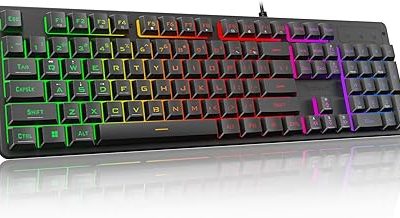
The Corsair K55 CORE TKL is the quiet tenkeyless pick. It uses membrane keys that are soft and muted, so it is the least likely board in this guide to disturb anyone else in the room, and it keeps the tenkeyless layout that leaves room for a mouse. Eight lighting zones give the board a colorful glow without the per-key lighting of a more elaborate board, and the spill-resistant design adds a margin of safety against a knocked-over drink.
Media keys sit within reach for volume and playback control, and the 1000 Hz polling rate keeps input response quick. The membrane feel is the trade-off: the keys are soft and lack the crisp bump of a mechanical switch, so a player who wants a tactile feel should look at the G413 TKL SE or the Redragon K556 instead. This board suits a player who wants a quiet, compact, and simple keyboard for typing and for the games that accept keyboard input.
This is the newest listing in the guide and the least corroborated, with a single listing link to the Amazon page, so confirm the listing is live before ordering. The North American layout is the one to match.
Specs
- Connectivity: Wired USB
- Layout: Tenkeyless
- Switches: Quiet membrane keys
- Backlight: Eight-zone RGB lighting
- Polling rate: 1000 Hz
- Spill resistance: Spill-resistant design
- Media keys: Dedicated media controls
- Layout variant: North American layout
How to Choose a Keyboard for Xbox One
Begin with the connection. A wired USB board is the simplest choice and works at once, while a wireless board must ship with its own USB receiver, because the Xbox One has no Bluetooth pairing menu for keyboards. A board that is Bluetooth-only will not connect, no matter how good it feels.
Next, decide where the keyboard will live. A couch setup favors a compact wireless board with a small footprint, such as the K400 Plus, while a desk setup favors a tenkeyless or full-size wired board that stays in one place. A full-size board gives a number pad for long codes and numbers, while a tenkeyless board leaves more room for a mouse hand.
Then think about feel and sound. Membrane boards are quiet and soft, tactile mechanical switches give a clear bump, and linear switches feel smooth and fast. Backlighting matters too: a white or RGB backlight helps in a dark room, while an unlit board is fine in a bright living room.
Finally, check the game list. A keyboard will always help with typing, messages, and search on the Xbox One, but only a small group of games accept keyboard input during play. Buy the board for typing first and treat game support as a bonus, and the purchase will not disappoint.
Frequently Asked Questions
Do all Xbox One games work with a keyboard?
No. Only a small group of games accept keyboard input on Xbox One, and each developer decides whether to support it. A keyboard always works for typing, messages, and search across the dashboard, but most games ignore keyboard input during play.
Can I use a Bluetooth keyboard with Xbox One?
No. The Xbox One has no Bluetooth pairing menu for keyboards, so a Bluetooth-only board will not connect. Use a wired USB keyboard or a wireless keyboard that ships with its own USB receiver.
Does the Xbox One support a mouse as well as a keyboard?
Yes, in the same limited way. The same small group of games that accept keyboard input also accept a mouse, and a mouse works in some apps and menus. Most games ignore mouse input during play, just as they ignore keyboard input.
Which keyboard is best for couch play on Xbox One?
The Logitech K400 Plus is the best couch pick in this guide. It is compact, wireless through a USB receiver, and small enough to sit on a lap, with a stated range of up to 33 feet. Its touchpad is a PC and TV feature, so buy it for typing from the sofa rather than for pointer control on the console.
More from Amazon
Programs that pair well with the guide above. Offers and eligibility are set by Amazon and may change.
Free shipping on eligible items, Prime Video and more. Eligible new members can start with a free trial.
Start a Prime free trialAd-free music streaming. Eligible new subscribers can start with a free trial.
Try Music Unlimited freeA Prime membership for ages 18-24 with a trial period. Eligibility is set by Amazon.
See Prime for Young AdultsAudiobooks and podcasts to listen to on the go. Eligible new members can start with a free trial.
Try Audible freeAs an Amazon Associate we earn from qualifying purchases.