Our Top Picks
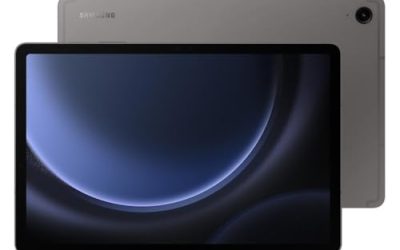
 Samsung Galaxy Tab A9+ Tablet 11” 64GB Android64 GB10.12 x 6.64 x 0.27 inches1.1 poundsCheck on Amazon
Comic pages are drawn to be seen clearly, so the tablet you read them on matters more than it does for plain text. A small or dull screen forces you to pinch, zoom, and scroll through every panel, while a sharp screen at the right size lets a page sit in view, with lettering that stays legible and colours that keep the art intact. Battery life matters too, because comic reading is often a long, relaxed session rather than a quick check of a page.
This guide covers three tablets that suit different kinds of comic readers. Casual readers who want a simple device for evening reading will find a strong match in the Amazon Fire HD 10. Readers who want a larger Android screen for a growing library will find it in the Samsung Galaxy Tab A9+. Readers who want the sharpest colour pages and a wide choice of comic apps will find it in the Apple iPad. Each pick comes from its Amazon title and specifications.
Quick Picks
As an Amazon Associate we earn from qualifying purchases
| Product | Best for | Key spec from title |
|---|---|---|
| Amazon Fire HD 10 Tablet | Everyday comic reading | 10.1-inch Full HD screen, octa-core processor, 3 GB RAM, 64 GB |
| Samsung Galaxy Tab A9+ Tablet | Large-screen reading and multitasking | 11-inch display, 64 GB storage, quad speakers, US Version |
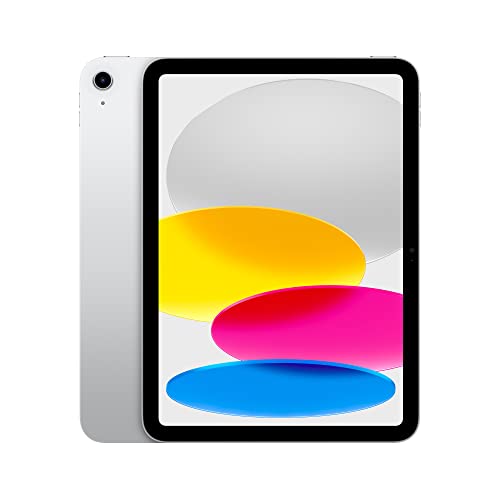
| Apple iPad (10th Generation) | Sharp colour pages and Apple apps | 10.9-inch Liquid Retina Display, A14 Bionic chip, 64 GB, Wi-Fi 6 |
How to Choose
Screen Size and Sharpness
Comic pages are wider and more detailed than a normal book page, so size and sharpness decide how much zooming you will need. A tablet around 10 to 11 inches shows a full comic page at a readable size, while a smaller screen often forces you to read panel by panel. Look for a resolution of 1920 x 1200 or higher, because fine lines, small lettering, and background detail stay clear at that level. A sharp screen also helps with black-and-white manga, where grey tones and thin lines can blur on a low-resolution panel. Hold the tablet in portrait mode for single pages and landscape mode for double-page spreads, and check that text stays legible at the edges.
Colour and Brightness
Colour is a large part of comic art, so a screen that renders colour cleanly makes a real difference to how a page looks. A bright screen keeps colours vivid in a well-lit room and keeps dark panels readable, while a dim screen can wash out detail in shadows. Look for a display described as Full HD or Liquid Retina, and pay attention to brightness in the listed specifications when it is given. If you read at night, a screen with comfortable brightness control and a warm reading mode helps your eyes during long sessions. Avoid choosing a tablet on screen size alone, because a larger screen with weak colour will still make art look flat.
Battery Life and Weight
Long comic sessions reward a tablet that lasts through a whole evening or a full day of travel without a charger. Look for a battery life of around 10 hours or more for reading and video, and check the battery capacity when it is listed. Weight matters just as much, because you will often hold the tablet in one hand while you tap to turn pages. A tablet around 15 ounces or less is easier to hold for a long stretch, while a heavier tablet suits a stand or a lap better than a hand. A slim body also makes the tablet easier to carry in a bag with a book or two.
Storage and Comic Apps
Digital comics take up space, especially collected editions and high-resolution files, so storage decides how much of your library you can keep on the device. A tablet with 64 GB of storage holds a useful collection, and a microSD slot for up to 1 TB of additional storage gives you room to grow without deleting books. Check that your preferred comic apps are available on the tablet, including apps for major publishers, subscription libraries, and your own files. A tablet that supports common comic file formats and cloud syncing makes it easier to move between a phone, a tablet, and a computer without losing your place.
The 3 Best Options
Amazon Fire HD 10 Tablet

The Amazon Fire HD 10 is a straightforward choice for readers who want a comfortable comic screen without a complicated setup. Its 10.1-inch Full HD display shows a full page at a readable size, and the 13-hour battery life suits long reading sessions at home or on a journey. The 64 GB of storage holds a solid comic collection, and the microSD slot lets you add more room as your library grows. Kindle and other reading apps are easy to reach, and the light body is easy to hold while you turn pages.
Specs
- 10.1-inch Full HD display, 1920 x 1200 resolution, 224 ppi
- Octa-core processor with 3 GB RAM
- 64 GB internal storage, microSD slot for up to 1 TB of additional storage
- Up to 13 hours of reading, browsing the web, watching videos, and listening to music
- 5 MP front and rear-facing cameras with 1080p HD video recording
- USB-C connector, 9W power adapter included in the box
Best for: Everyday comic reading at home and on the move.
Watch out for: The 3 GB of RAM suits reading and light apps, so keep background apps closed during long sessions.
ASIN: B0CD142QK2
Samsung Galaxy Tab A9+ Tablet
The Samsung Galaxy Tab A9+ gives comic readers a larger 11-inch screen, which helps when a page has small panels or dense lettering. Its 1920 x 1200 display runs at a 90Hz refresh rate, so page turns and scrolling feel smooth, and the quad speakers add sound when you switch from comics to video. The 7,040 mAh battery supports long sessions, and the 64 GB of storage can be expanded with a microSD card, which suits readers who keep whole series on the device. Android also gives you a wide choice of comic apps and file readers.
Specs
- 11-inch display, 1920 x 1200 resolution, 90Hz refresh rate, 480 nits, TFT LCD
- Snapdragon 600 Series processor, 1.8 and 2.2 GHz
- 4 GB RAM and 64 GB storage, up to 1 TB expandable storage
- 7,040 mAh battery
- Quad speakers powered by Dolby Atmos
- Model SM-X210NZAAXAR
Best for: Readers who want a larger Android screen for comics and video.
Watch out for: The 64 GB of storage fills up fast with collected editions, so plan on a microSD card for a large library.
ASIN: B0CLF3VPMV
Apple iPad (10th Generation)
The Apple iPad (10th Generation) is the sharpest pick in this guide for readers who care most about colour and detail. Its 10.9-inch Liquid Retina display makes comic art look clean and vivid, with lettering that stays crisp even in small panels. The A14 Bionic chip keeps page turns and app switching smooth, and Wi-Fi 6 helps when you download new issues or sync a library. Touch ID makes unlocking quick, and the all-day battery life suits readers who move between home, work, and travel with the same device.
Specs
- 10.9-inch Liquid Retina display
- A14 Bionic chip
- 64 GB storage
- Wi-Fi 6
- 12MP front camera and 12MP back camera
- Touch ID
- All-day battery life
Best for: Readers who want sharp colour pages and a wide choice of Apple comic apps.
Watch out for: There is no microSD slot, so manage storage carefully if you keep many large collected editions on the device.
ASIN: B0BJLCWFNM
Which One Fits Your Situation
If You Read Comics Every Day at Home
Choose the Amazon Fire HD 10 if your reading happens mainly on a sofa or in bed. Its 10.1-inch screen is large enough for full pages, its battery lasts through long evening sessions, and its simple layout keeps reading apps easy to reach. The light body is easy to hold for an hour or more, and the microSD slot gives you room to grow your collection without replacing the tablet.
If You Carry a Large Digital Library
Choose the Samsung Galaxy Tab A9+ if you keep whole series and collected editions on your tablet. Its 11-inch screen shows dense pages clearly, and its expandable storage lets you carry far more books than the built-in 64 GB alone would hold. The larger screen also suits double-page spreads in landscape mode, and Android file readers make it easy to organise your own comic files.
If You Travel or Commute With Comics
Choose a tablet with long battery life and a size that fits your bag, and all three picks here can work. The Fire HD 10 is the lightest of the three for one-handed reading on a train, while the Galaxy Tab A9+ gives you a larger screen for longer journeys. Download your comics before you leave, keep a charger in your bag for long days, and use a case that protects the screen in transit.
If You Already Use Apple Apps and Services
Choose the Apple iPad (10th Generation) if your books, apps, and files already live in the Apple system. Its Liquid Retina display shows colour pages at their best, and its app library includes major comic publishers and subscription services. Syncing keeps your reading position and library consistent across your phone, tablet, and computer, which helps if you switch devices during the day.
Common Mistakes
- Choosing a tablet smaller than 10 inches, then having to zoom into every panel to read the lettering.
- Picking a screen on size alone, without checking resolution, brightness, and colour.
- Buying a tablet with only a small amount of storage and no way to expand it, then deleting comics to make room.
- Ignoring battery life and weight, then finding the tablet too heavy or too short-lived for long reading sessions.
- Forgetting to check that your preferred comic apps and file formats work on the tablet before you buy it.
Frequently Asked Questions
What size tablet is best for reading comics?
A tablet around 10 to 11 inches is a good fit for most comic readers. That size shows a full page at a readable scale in portrait mode, and it handles double-page spreads well in landscape mode. Smaller tablets can work for manga and single panels, but they often need more zooming and scrolling through a normal comic page.
Is a Full HD screen enough for comic art?
Yes, a Full HD screen is enough for most comic art when the resolution is 1920 x 1200 or higher. Fine lines, small lettering, and background detail stay clear at that level, and colour pages look clean. A sharper display, such as the Liquid Retina display on the iPad, adds extra clarity, but a good Full HD screen is a solid starting point.
How much storage do I need for comics?
A tablet with 64 GB of storage holds a comic collection, especially if you read single issues and delete them after finishing. Collected editions and high-resolution files take more room, so a microSD slot for up to 1 TB of additional storage is useful for a library. If your tablet has no card slot, keep your library in the cloud and download what you plan to read next.
Can I read comics on a tablet without Wi-Fi?
Yes, you can read comics without Wi-Fi once the files are downloaded to your tablet. Download the issues you want before a flight or a commute, and check that your comic app supports offline reading. Keep enough free storage for the books you download, and sync your reading position when you are back on Wi-Fi.
FAQ
What size tablet is best for reading comics?
Is a Full HD screen enough for comic art?
How much storage do I need for comics?
Can I read comics on a tablet without Wi-Fi?
More from Amazon
Programs that pair well with the guide above. Offers and eligibility are set by Amazon and may change.
Free shipping on eligible items, Prime Video and more. Eligible new members can start with a free trial.
Start a Prime free trialAd-free music streaming. Eligible new subscribers can start with a free trial.
Try Music Unlimited freeA Prime membership for ages 18-24 with a trial period. Eligibility is set by Amazon.
See Prime for Young AdultsAudiobooks and podcasts to listen to on the go. Eligible new members can start with a free trial.
Try Audible freeAs an Amazon Associate we earn from qualifying purchases.