Our Top Picks


The SanDisk Extreme PRO UHS-I is the best SD card for the Sony A7S II for most shooters, with the Lexar Professional 1066x as the best value alternative. Kingston Canvas Go Plus suits photographers who want a fast reader speed at a lower tier, while the Sony TOUGH-G is the pick for owners who want the most consistent card in this camera. SanDisk Extreme PRO UHS-II rounds out the set for shooters who offload through a UHS-II reader. Every card here is a 128 GB full-size SDXC card, and each one clears the camera’s 100 Mbps XAVC S recording requirement with room to spare.

This guide is for A7S II owners who shoot 4K video, stills photographers who want reliable burst storage, and creators who record long sessions without swapping cards. Every pick below was chosen from the card’s Amazon listing title and specifications, with the camera’s single UHS-I slot and its 100 Mbps recording ceiling kept front of mind throughout.
Quick Picks
As an Amazon Associate we earn from qualifying purchases
| Product | Best for | Key spec from title |
|---|---|---|
| SanDisk Extreme PRO UHS-I 128GB | Everyday 4K shooting | 200 MB/s read, V30, UHS-I |
| Lexar Professional 1066x 128GB | Best value for photo and video | 160 MB/s read, V30, UHS-I |
| Kingston Canvas Go Plus 128GB | Fast transfers on a budget | 200 MB/s read, V30, UHS-I |
| Sony TOUGH-G 128GB | Most consistent card for this camera | 300 MB/s read, V90, UHS-II |
| SanDisk Extreme PRO UHS-II 128GB | Fastest offloads through a reader | 300 MB/s read, V90, UHS-II |
How to Choose
Match the Card to the UHS-I Slot
The A7S II has one full-size SD slot that supports UHS-I only, and that single fact shapes every choice in this guide. UHS-II cards still work in the camera because the format is backward compatible, yet they write at UHS-I speed once inserted, with measured in-camera writes landing near 30 MB/s for every card tested. Paying extra for a UHS-II card buys nothing inside the camera itself. Its real payoff comes later, when the card goes into a UHS-II reader and transfers finish far sooner. Choose a UHS-I card if the card rarely leaves the camera, and save UHS-II for a workflow built around a fast reader.
Pick the Speed Class for the Video You Shoot
XAVC S 4K on the A7S II tops out at 100 Mbps, which works out to 12.5 MB/s of sustained writing, and that number decides the speed class. A V30 card guarantees 30 MB/s of minimum sustained write speed, so it already clears the camera’s hardest recording mode with headroom to spare. V60 and V90 cards raise that guaranteed floor to 60 and 90 MB/s, yet the camera cannot use the extra headroom while recording. Their value sits elsewhere: faster reader transfers and readiness for a future camera that can actually write that fast. Treat the headline read speed as a burst figure, and let the V-class do the deciding for video work.
Choose 128 GB for Long Sessions
Sony’s manual sets 64 GB as the minimum card size for XAVC S recording, and that floor rules out every 32 GB card at once. A 128 GB card doubles that minimum, which means long 4K sessions, long interviews, and full-day shoots without stopping to swap cards mid-take. Going larger has a downside worth weighing: one card failure takes a bigger share of the day’s work with it, so many shooters prefer two 128 GB cards over a single huge one. Capacity is also pinned to the listing, so a 64 GB or 256 GB version of the same model is a different product with its own listing. Buy the exact 128 GB card named in this guide.
Buy Genuine Cards From Trusted Sellers
Memory cards rank among the most counterfeited camera accessories, and a fake card fails exactly when the footage matters most. Buy from the brand’s own store on Amazon or from a listing that ships from and is sold by Amazon, and steer clear of marketplace sellers with no track record. Test every new card the day it arrives: fill it completely, confirm the full capacity shows up, and copy a large file without errors before trusting it with a shoot. A counterfeit often reports the right size yet corrupts files once it passes its real capacity. If a listing looks too cheap beside the brand store, treat that gap as a warning rather than a bargain.
The 5 Best Options
SanDisk Extreme PRO SDXC UHS-I 128GB
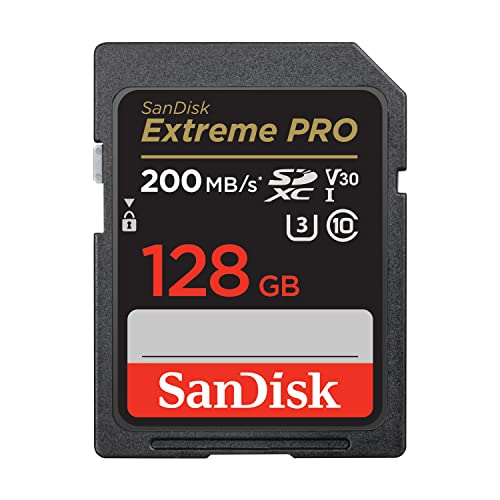
SanDisk Extreme PRO UHS-I is the safest all-round pick for the A7S II because it matches the camera’s slot exactly. Its UHS-I interface, V30 rating, and read speed up to 200 MB/s cover every recording mode the camera offers, while the write speed up to 140 MB/s keeps burst shooting smooth. The card also carries shock, temperature, water, and X-ray proofing, plus RescuePRO Deluxe software for recovering files after an accidental format. For owners who want one card that simply works in this camera, this is the default choice.
Specs
- 128 GB SDXC, UHS-I, V30, U3, C10
- Read speed up to 200 MB/s; write speed up to 140 MB/s (shot speed up to 90 MB/s)
- Shock, temperature, water, and X-ray proof
- RescuePRO Deluxe recovery software included
Best for: Everyday 4K shooting and stills in the A7S II.
Watch out for: Do not confuse this 200 MB/s revision with the older 170 MB/s Extreme PRO; buy the exact model SDSDXXD-128G-GN4IN.
Lexar Professional 1066x SDXC UHS-I 128GB
Lexar Professional 1066x gives A7S II owners the same V30 guarantee as the top pick at a friendlier tier, with a read speed up to 160 MB/s and a write speed up to 120 MB/s. Those figures sit comfortably above the camera’s 100 Mbps ceiling, so 4K recording runs without a hiccup, and the card handles long sessions as steadily as pricier rivals. It belongs to Lexar’s SILVER Series and suits DSLR and mirrorless bodies alike. Owners who want dependable performance without paying for speed the camera cannot use will find little to fault here.
Specs
- 128 GB SDXC, UHS-I, V30, U3, C10
- Read speed up to 160 MB/s; write speed up to 120 MB/s
- SILVER Series, for DSLR and mirrorless cameras
Best for: Best value for photo and video work in the A7S II.
Watch out for: Skip the microSD version of the 1066x; this camera takes full-size SD cards only.
Kingston Canvas Go Plus SDXC UHS-I 128GB
Kingston Canvas Go Plus Gen4 is the quiet overachiever of this roundup, pairing a read speed up to 200 MB/s with a V30 rating that already exceeds what the A7S II demands. The listing states no headline write speed, so the honest figure to trust is the V30 guarantee of 30 MB/s minimum sustained writing, which clears XAVC S 4K with room to spare. Its Gen4 revision is the faster of the two Canvas Go Plus generations, so confirm the listing shows SDG4/128GB before buying. Photographers who offload often will notice the fast reader speed most.
Specs
- 128 GB SDXC, UHS-I, V30, U3, C10
- Read speed up to 200 MB/s; Gen4 (SDG4/128GB)
- V30 guarantees 30 MB/s minimum sustained write
Best for: Fast transfers and reliable 4K recording on a budget.
Watch out for: Do not buy the older Gen3 SDG3/128GB version, which tops out at 170 MB/s read; the listing must show SDG4/128GB.
Sony TOUGH-G Series SDXC UHS-II 128GB
Sony TOUGH-G is the card for A7S II owners who value consistency above all else, and owner reports call Sony-brand cards the most reliable in this camera. Its one-piece molded body resists bending, dust, and water, which suits field shoots where cards get handled roughly. The V90 rating and read speed up to 300 MB/s matter mainly for a UHS-II reader, since the camera itself caps writes near 30 MB/s. What this card really buys is peace of mind: fewer card errors, a tougher shell, and a brand the camera seems to like best.
Specs
- 128 GB SDXC, UHS-II, V90, U3, C10
- Read speed up to 300 MB/s; write speed up to 299 MB/s
- One-piece molded TOUGH construction, bend-proof, dust and waterproof
- Sony SF-G128T/T1
Best for: Owners who want the most consistent card for the A7S II.
Watch out for: Check live availability before ordering — recent signals point to third-party-only supply, so confirm a new-condition US offer from a trusted seller.
SanDisk Extreme PRO SDXC UHS-II 128GB

SanDisk Extreme PRO UHS-II is the pick for shooters who pair the A7S II with a UHS-II card reader and want the fastest offloads in this guide. Its V90 rating and read and write speeds up to 300 MB/s make large 4K files move quickly once the card leaves the camera, even though in-camera writes stay capped near 30 MB/s like every other card here. The card also covers future cameras that can actually use UHS-II speeds, so it ages better than a UHS-I-only card. Buy it for the reader speed, not for faster recording in this camera.
Specs
- 128 GB SDXC, UHS-II, V90, U3, C10
- Read speed up to 300 MB/s; write speed up to 300 MB/s
- SDSDXDM-128G-GN4IN, for 8K and 4K UHD recording
Best for: Fastest card-reader offloads after a shoot.
Watch out for: Do not expect faster in-camera recording — the A7S II writes at UHS-I speed regardless of card.
Which One Fits Your Situation
You Shoot 4K Video All Day
Pick the SanDisk Extreme PRO UHS-I or the Lexar 1066x and carry a second 128 GB card as a spare. Both clear the camera’s 100 Mbps ceiling with headroom, and their V30 ratings keep long takes recording without a hiccup. The SanDisk adds tougher proofing and recovery software, while the Lexar costs less for the same recording reliability. Either way, the camera writes near 30 MB/s, so neither card leaves performance on the table.
You Offload Footage Through a Reader Every Night
Choose the Sony TOUGH-G or the SanDisk Extreme PRO UHS-II, and pair it with a UHS-II reader to see the difference. Both read at up to 300 MB/s through a reader, which shortens long 4K transfers considerably. The Sony card adds the toughest body and the most consistent behaviour in this camera, while the SanDisk UHS-II matches its reader speed. Keep a UHS-I card in the camera as a spare for the next shoot.
You Want the Card That Rarely Throws Errors
Buy the Sony TOUGH-G. Owner reports consistently name Sony-brand cards as the most reliable in the A7S II, and the one-piece molded body adds protection against bending and weather on location. Its V90 speed is overkill for the camera’s recording modes, so treat that as a bonus for reader transfers rather than the reason to buy. If a card ever misbehaves in this camera, a factory reset sometimes restores recognition, though that is no guarantee.
You Shoot Photos and Video on a Budget
Take the Lexar 1066x or the Kingston Canvas Go Plus Gen4. Both carry a V30 rating and read speeds well above what the camera needs, so stills bursts and 4K clips record cleanly without paying for V90 speed the camera cannot use. The Lexar offers the lowest tier of the two for the same recording reliability, while the Kingston reads faster through a reader. Confirm the Kingston listing shows SDG4/128GB, and skip the microSD versions of either card.
Common Mistakes
- Buying a microSD card with an adapter instead of a full-size SD card — the A7S II takes full-size SD only, and adapters add a failure point.
- Paying for a V90 or UHS-II card expecting faster recording in the camera — in-camera writes cap near 30 MB/s no matter the card.
- Choosing a 32 GB card for XAVC S 4K — the manual requires 64 GB or larger, so a 32 GB SDHC card will not record.
- Buying from an unknown marketplace seller — counterfeit cards are common, so use the brand store or a listing shipped from and sold by Amazon.
- Mixing up look-alike models, such as the SanDisk Extreme PRO 170 MB/s revision or the Kingston Gen3 card, instead of the exact 128 GB ASINs in this guide.
Frequently Asked Questions
Does a UHS-II card write faster inside the Sony A7S II?
No. The camera has a single UHS-I slot, so every card writes at UHS-I speed inside the body, measured near 30 MB/s. A UHS-II card only shows its speed in a UHS-II card reader, where transfers run far faster. Buy UHS-II for offload speed and future cameras, not for faster recording in this camera.
Is V90 needed for 4K recording on the A7S II?
No. XAVC S 4K tops out at 100 Mbps, which is 12.5 MB/s, while a V30 card guarantees 30 MB/s of minimum sustained writing. V30 already clears the camera’s hardest mode with headroom. V60 and V90 cards help only with reader transfers and future cameras, so they are a convenience here rather than a requirement.
What size card should I use for XAVC S 4K?
Use a 64 GB card at minimum, since Sony’s manual requires 64 GB or larger for XAVC S recording. This guide recommends 128 GB because it holds long 4K sessions without a mid-take swap, yet one failure does not wipe a whole shoot the way a single huge card could. Carry two 128 GB cards rather than one very large card.
Why do some SD cards fail to record 4K on the A7S II?
Some cards that look fine on paper have failed this camera’s 4K recording in real-world tests, including Samsung PRO Plus and PRO Ultimate cards, which is why they are absent from this guide. Sony-brand cards have the most consistent record in owner reports. If a card misbehaves, a camera factory reset sometimes fixes recognition, though that is no guarantee.
FAQ
Does a UHS-II card write faster inside the Sony A7S II?
Is V90 needed for 4K recording on the A7S II?
What size card should I use for XAVC S 4K?
Why do some SD cards fail to record 4K on the A7S II?
More from Amazon
Programs that pair well with the guide above. Offers and eligibility are set by Amazon and may change.
Free shipping on eligible items, Prime Video and more. Eligible new members can start with a free trial.
Start a Prime free trialAd-free music streaming. Eligible new subscribers can start with a free trial.
Try Music Unlimited freeA Prime membership for ages 18-24 with a trial period. Eligibility is set by Amazon.
See Prime for Young AdultsAudiobooks and podcasts to listen to on the go. Eligible new members can start with a free trial.
Try Audible freeAs an Amazon Associate we earn from qualifying purchases.