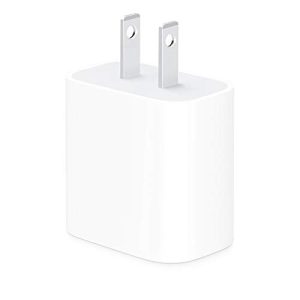
Key takeaways
- Learn how to pick a compact charger for your iPhone: GaN wall bricks, foldable prongs, wattage, ports, and cable tips for travel, desks, and small bags.
As an Amazon Associate we earn from qualifying purchases.
A compact charger earns its place by disappearing into your day. It slips into a jacket pocket, shares a crowded power strip without blocking the next socket, and still tops up an iPhone fast enough that you stop thinking about battery levels. The real decision is not simply picking the smallest brick on the shelf. Size only helps when the charger also delivers the right wattage, fits the outlets you actually use, and pairs with a cable that can carry the power it promises.
This guide is written for travellers packing light, commuters who charge between meetings, students carrying one small bag, and anyone whose bedside table has run out of space. It explains how to judge a compact iPhone charger on size, wattage, ports, and safety, so you can choose with confidence even before comparing individual models.
How to Choose
Judge Size by Where the Charger Lives
A charger that stays on a nightstand can be a little larger than one that rides in a pocket every day, so start with the place it will spend most of its time. A brick that looks small in a product photo may still cover two sockets on a power strip. Foldable prongs matter most for travel, because they stop the charger snagging bag linings and make the whole package flatter in a pouch. Before settling on a model, picture it plugged into your worst outlet — the one behind the sofa or the low socket in a hotel room — and ask whether it would fit without an awkward adapter.
Match Wattage to How You Charge
An iPhone fast charges when paired with a USB-C power adapter rated at twenty watts or higher, together with a cable that supports USB Power Delivery. A twenty-watt charger suits most owners, because it unlocks the faster top-up without adding much bulk, and it handles a single phone comfortably overnight or during a short stop. A thirty-watt charger adds useful headroom when you also top up earbuds or a tablet from the same brick, or when you want the phone to recover quickly between outings. If you plan to charge a tablet or a laptop from the same brick, check how the wattage splits when several ports are busy, since some chargers cut each port sharply under load.
Count Ports and Check the Split
One port keeps things simple, and a single-port brick is usually the smallest option of all, which makes it ideal for a pocket or a minimalist desk. Two ports earn their place when you regularly charge a phone and earbuds together, or share one outlet with a partner at a hotel. Three ports sound generous, but in a compact body they often mean a larger brick and a split that leaves each device charging more slowly than the headline wattage suggests. Read the listing for the per-port and combined output, not just the biggest number in the title, because that figure usually describes one port working alone.
Check Safety Marks and Heat Behaviour
A charger lives plugged into mains power, so safety deserves the same attention as size. Look for recognised certification marks on the listing and on the product itself, and favour brands that publish clear specifications rather than vague claims. Gallium nitride, usually shortened to GaN, lets a small charger deliver useful wattage without growing into a heavy block, and it generally runs cooler than older silicon designs. Avoid bricks that feel loose in the socket, hum audibly, or smell of hot plastic, and replace any charger whose prongs wobble or whose casing has cracked. Never cover a charging brick with fabric or bury it under bedding, since trapped heat is the most common way a safe charger becomes a hazard.
What Compact Really Means
Compact is a promise about three things at once: the footprint on the wall, the depth it sticks out from the socket, and the weight in your bag. A charger can be short in one direction and awkward in another, so a single dimension never tells the whole story. The most useful comparison is against something you already carry, such as a matchbox, a lip balm, or the phone itself, because that gives you a physical sense of whether the brick will vanish into a pocket or dominate it.
Depth matters more than most shoppers expect. A brick that juts far out from the wall can be knocked loose by a passing foot or a curtain, and it looks untidy on a visible outlet. A flatter design that hugs the wall tends to stay put and leaves the room looking neater, which matters on a desk or a kitchen counter. Width matters on power strips, where a wide brick can steal the neighbouring socket, turning a four-way strip into a three-way one. Foldable prongs solve a different problem: they protect the prongs from bending in a bag and stop them scratching a phone screen or a laptop lid. When you weigh these factors together, the best compact charger is rarely the absolute smallest; it is the one whose shape fits your outlets, your bag, and your habits at the same time.
The Main Compact Charger Types
Not every small charger works the same way, and the right type depends on whether you value speed, convenience, or carrying nothing at all. The categories below cover the realistic choices for an iPhone owner, and each one trades something away to stay small.
Single-Port GaN Wall Bricks
This is the purest form of a compact charger: one USB-C port, a gallium nitride circuit, and a body barely larger than the plug itself. It suits anyone who charges one device at a time and wants the smallest possible brick for a pocket or a travel pouch. Because all of its output goes to one port, a twenty or thirty-watt single-port brick delivers its full speed to your iPhone without sharing. The drawback is obvious: when a second device needs power, you need a second outlet or a second charger. If your routine is one phone, one cable, and one socket, this is the type to start with.
Dual-Port Compact Bricks
A dual-port brick adds a second USB-C port, or one USB-C and one USB-A, in a body only slightly larger than a single-port model. It fits travellers who charge a phone and earbuds overnight, and households where two people share one bedside outlet. The key detail is the power split: a brick rated at thirty watts total might give the full thirty to one port alone, then divide it when both ports are busy, so overnight charging works well while simultaneous fast charging does not. Dual-port bricks also make a good backup charger for a bag, because they cover the common case of a phone plus one accessory without adding a second brick. They are the most versatile shape for most buyers, provided you accept a little extra bulk.
Magnetic and Foldable Charging Pads
Some compact chargers skip the cable entirely and hold the phone with magnets, snapping into place on a nightstand or folding flat for travel. A magnetic pad is convenient because you simply set the phone down, and a foldable three-in-one stand can charge a phone, a watch, and earbuds from one small footprint. The trade-off is speed: wireless charging is slower than a wired connection, and it generates more heat, which can slow the charge further on a warm day. These pads also need their own power brick and cable, so the total travel kit may not be smaller than a wired setup once everything is counted. They suit bedside use and desk use best, where convenience matters more than raw speed.
Cables, Ports, and Power: Getting the Chain Right
A compact charger is only one link in a chain, and the chain fails at its weakest part. The cable matters as much as the brick, because a cable that cannot carry USB Power Delivery will throttle even the best adapter. Modern iPhones use a USB-C port, so a USB-C to USB-C cable is the straightforward choice, while older models with a Lightning port need a USB-C to Lightning cable for fast charging. Check the cable length too: a short cable suits a bedside or a power bank, while a longer one reaches outlets behind furniture without dragging the phone off the table.
The port on the charger decides what the cable can do. A USB-C port with Power Delivery is the route to fast charging, while a USB-A port serves older accessories and slower top-ups. Some chargers mix the two, which is useful in a household with a drawer full of legacy cables, but the USB-A port will not fast charge a modern iPhone. Finally, remember that the phone itself controls the final speed, drawing more power when the battery is low and easing off as it fills. That is why the last stretch to full always feels slower, whatever charger you use, and why judging a charger by the first half hour gives a fairer picture than judging it by a full charge.
Which One Fits Your Situation
The Frequent Traveller
Pick a single-port or dual-port GaN brick with foldable prongs, in the twenty to thirty-watt range, because it packs flat and covers a phone plus earbuds. Pair it with one short USB-C cable and leave the bulky multi-port station at home. The goal is a kit that fits in a jacket pocket and works in any hotel room without hunting for extra outlets.
The Minimalist Commuter
Choose the smallest single-port brick that still delivers twenty watts, and keep it permanently in your work bag with a short cable. You charge one device at a time, usually during a meeting or a lunch break, so a second port would only add weight. A brick that stays in the bag is one you never forget at home.
The Shared Bedside Table
Go for a dual-port compact brick so a phone and a partner’s device can share one outlet overnight. Overnight charging does not need maximum speed, so a sensible power split is acceptable, and the smaller footprint leaves room on the table for a lamp or a book. A magnetic pad also works here if you prefer setting the phone down without fumbling for a cable in the dark.
The Small Desk or Dorm Room
Pick a compact dual-port brick that hugs the wall and leaves neighbouring sockets free, since desk outlets are always in demand. Add a slightly longer cable so the phone can sit on the desk while it charges, rather than dangling from the wall. Avoid wide bricks that block the socket your lamp or laptop already uses, because a charger that steals an outlet creates a new problem every day.
Common Mistakes
- Buying the smallest brick available without checking its wattage, then wondering why the phone charges slowly.
- Using an old USB-A cable with a new USB-C charger and expecting fast charging from a combination that cannot deliver it.
- Judging a charger by its headline wattage alone, without reading how that power splits across ports when several devices are plugged in.
- Choosing a wide brick that blocks the neighbouring socket on a power strip, then blaming the strip for the lost outlet.
- Leaving a compact charger buried under bedding or inside a closed bag while it charges, trapping heat and shortening the life of both charger and battery.
Frequently Asked Questions
How many watts does a compact iPhone charger need?
Twenty watts is the practical starting point, because that is the level at which an iPhone fast charges with a USB-C Power Delivery adapter and a suitable cable. A thirty-watt brick adds headroom for earbuds or a tablet sharing the charger, but a phone alone gains little from going much higher.
Is a GaN charger better than a regular compact charger?
Gallium nitride lets a charger deliver the same wattage from a smaller, cooler-running body than older silicon designs, which is why most genuinely compact bricks use it. The benefit is size and heat, not a different charging speed, so a well-made standard charger still works fine if it meets the wattage and safety marks you need.
Can one compact charger fast charge an iPhone and earbuds together?
It can, provided the total output covers both devices and you understand the split. A dual-port brick may give full power to one port alone and divide it when both are busy, so overnight charging works well while simultaneous fast charging is slower. Check the per-port figures on the listing before you assume both devices charge at full speed.
Do I need a special cable for a compact charger?
You need a cable that matches the charger port and the phone port, and one rated for USB Power Delivery if you want fast charging. Modern iPhones use USB-C to USB-C, while older Lightning models need USB-C to Lightning. A cheap or damaged cable can throttle the whole setup, so replace frayed cables before blaming the charger.
FAQ
How many watts does a compact iPhone charger need?
Is a GaN charger better than a regular compact charger?
Can one compact charger fast charge an iPhone and earbuds together?
Do I need a special cable for a compact charger?
More from Amazon
Programs that pair well with the guide above. Offers and eligibility are set by Amazon and may change.
Free shipping on eligible items, Prime Video and more. Eligible new members can start with a free trial.
Start a Prime free trialAd-free music streaming. Eligible new subscribers can start with a free trial.
Try Music Unlimited freeA Prime membership for ages 18-24 with a trial period. Eligibility is set by Amazon.
See Prime for Young AdultsAudiobooks and podcasts to listen to on the go. Eligible new members can start with a free trial.
Try Audible freeAs an Amazon Associate we earn from qualifying purchases.