Our Top Picks
 iBUYPOWER Element Gaming PC Desktop Computer AMD Ryzen20 x 9.1 x 17.4 inches36 poundsCheck on Amazon
The best 1440p gaming PC for most buyers is a system built around a 16GB graphics card such as the RTX 5070 Ti or Radeon RX 9070 XT, with 32GB of DDR5 and a 1TB NVMe drive, while an RTX 5070 or RX 9070 class machine covers 1440p at a lower tier and an RTX 5060 class machine suits 1440p only with upscaling and reduced settings. The graphics card decides the result, so this guide is organized by GPU class first and prebuilt models second.
Choose the GPU class first
Review outlets report that the RTX 5070 Ti and RX 9070 XT land almost level at 1440p. Tom’s Hardware’s 1440p ultra index, as summarized in roundups, shows them within a tenth of a percent, and TechSpot’s 52-game average puts the RTX 5070 Ti about 1.4 percent ahead. The differences show in specific features: roundups say the NVIDIA card pulls ahead in path tracing and has the DLSS ecosystem, while the AMD card is usually the better value. Gamers Nexus is cited as finding a lead of roughly 16 percent for the RTX 5070 Ti in Dying Light 2 with ray tracing at 1440p.

KOTIN Gaming PC, Ryzen 7 9700X, RX 9070 XT 16GB, 32GB DDR5, 1TB SSD | Prebuilt Gaming Computer, 11.3In Smart Display, 360mm Liquid Cooler, WiFi 7, 850W Gold PSU, Windows 11, ARGB, 1440p 4K
Chosen because it specifies Ryzen 7 9700X and RX 9070 XT 16GB.
View on Amazon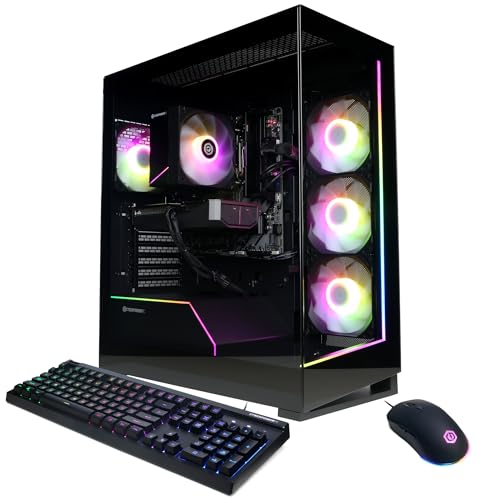
CyberPowerPC Gaming PC, AMD Ryzen 7 8700F, GeForce RTX 5060 Ti 8GB | Gamer Master, 16GB DDR5, 1TB PCIe 4.0 SSD, WiFi Ready & Windows 11 Home (GMA2900A3)
Chosen because it specifies AMD Ryzen 7 8700F and GeForce RTX 5060 Ti 8GB.
View on AmazoniBUYPOWER Element Gaming PC Desktop Computer AMD Ryzen 9 7900X CPU, NVIDIA GeForce RTX 5070 12GB GPU, 32GB DDR5 RAM, 1TB NVMe SSD, Windows 11 Home, Gamer Keyboard and Mouse - EWA9N5702
Chosen because it specifies NVIDIA GeForce RTX 5070 12GB GPU and 32GB DDR5 RAM.
View on Amazon
KOTIN Gaming PC Desktop, Ryzen 7 8700F, RTX 5060 Ti 8GB, 16GB DDR5, 1TB SSD | Prebuilt Gaming Tower with WiFi 7, Windows 11 Home, DLSS 4, ARGB Cooling, 650W Gold PSU for 1080p/1440p PC Gaming & Streaming
Chosen because it specifies Ryzen 7 8700F and RTX 5060 Ti 8GB.
View on AmazonSeveral roundups recommend 16GB of video memory for 1440p, which points to the RX 9070, RX 9070 XT and RTX 5070 Ti. They also suggest 32GB of DDR5 system memory and a 1TB NVMe SSD as the sensible baseline for a new build.
At a glance
| Machine or class | Best for | Reported configuration | Limits |
|---|---|---|---|
| Skytech King 95 | High-refresh 1440p with headroom | One roundup lists a Ryzen 7 9800X3D with RTX 5070 Ti; another lists an RX 9070 XT variant with a Ryzen 7 7800X3D and 32GB DDR5 | Boutique brand; confirm PSU, cooling and warranty terms |
| Lenovo Legion Tower 5 | Buyers who want an established brand warranty | Roundups describe a 9800X3D and RTX 5070 Ti configuration as best value | Proprietary parts can limit later upgrades |
| ZOTAC MEK and other RTX 5070 Ti prebuilts | Compact or styled builds | Listed among RTX 5070 Ti systems | Specs vary by retailer listing |
| RTX 5070 with Ryzen 7 and 32GB | Mid-range 1440p | Called the sweet spot in one roundup | 12GB class memory is less future-proof than 16GB |
| RTX 5060 with Ryzen 5 or Core i5 | Entry to 1440p with DLSS | Roundups say it handles 1440p with upscaling | Needs lowered settings in demanding titles |
Skytech King 95
This line appears in several roundups at the high-value end. pcbuildhelper names a 9800X3D plus RTX 5070 Ti version its best overall for 1440p, and a Black Friday roundup lists an RX 9070 XT version with a Ryzen 7 7800X3D and 32GB DDR5 as its best-performance pick. The Ryzen X3D processors are known for strong gaming results at lower resolutions, though at 1440p the GPU is the main limiter, so a cheaper CPU loses less than people expect.
These are roundup claims rather than independent lab reviews of each prebuilt, so read the exact specification sheet. Look for dual-channel memory in two sticks, a named-brand PSU with adequate wattage and a case with front intake.
Lenovo Legion Tower 5
Roundups, including Fateka, describe the Legion Tower 5 with a 9800X3D and RTX 5070 Ti as a best-value brand-name option, with the same core silicon as boutique rivals and an OEM warranty. The usual caveat with big-brand towers applies: proprietary motherboards, power supplies and cases can restrict how much you can swap later. If you intend to upgrade the GPU in a few years, check PSU wattage and connector availability.
Other RTX 5070 Ti systems
Roundups also list the Skytech Azure 3, Aqua and Rampage, plus the ZOTAC MEK, among prebuilt options. Specs differ across configurations and retailers, so compare the actual list: GPU model, CPU, RAM capacity and speed, SSD size, PSU rating and cooler type.
Mid-range: RTX 5070 and RX 9070 class
An RTX 5070 system with a Ryzen 7 and 32GB of RAM is called the 1440p sweet spot in one roundup. The RX 9070 and RX 9070 XT are the 16GB alternatives from AMD. The main trade-off versus the RTX 5070 Ti tier is raw speed in the most demanding games at maximum settings, and, for the 12GB class card, video memory headroom in games that use large textures.
Entry to 1440p: RTX 5060 class
RTX 5060 prebuilts are described as the best entry point to PC gaming and as able to handle 1440p with DLSS, though the maker’s 8GB class memory can become a limit at high texture settings. They pair best with 1080p high refresh and use 1440p as a stretch goal.
Pick this if
| Your situation | Pick | Why |
|---|---|---|
| You want high settings and ray tracing at 1440p | RTX 5070 Ti system | Roundups report stronger ray tracing and path tracing |
| You care about raster performance per cost | RX 9070 XT system | Near-equal to the RTX 5070 Ti at 1440p in review indexes |
| You want a standard warranty and support | Lenovo Legion Tower 5 | Brand warranty, reported value |
| You want a middle path | RTX 5070 with Ryzen 7 and 32GB | Reported 1440p sweet spot |
| Your budget is tight | RTX 5060 system with DLSS | Usable at 1440p with lowered settings |
Specs to check before buying
- Video memory: 16GB is the recommended target for 1440p in several roundups.
- System memory: 32GB of DDR5 in two sticks for dual-channel operation.
- Storage: at least a 1TB NVMe SSD, since modern games are large.
- Power supply: a named-brand unit with wattage meeting the GPU maker’s recommendation.
- Cooling and case: front mesh or intake fans, and room for upgrades.
- Monitor: a 1440p display at 144Hz or higher is needed to benefit from the hardware.
Budget tiers
- Budget: RTX 5060 class with a six-core CPU. Plan on DLSS and medium to high settings.
- Mid-range: RTX 5070 or RX 9070 class with 32GB RAM.
- Premium: RTX 5070 Ti or RX 9070 XT with a fast gaming CPU and quality cooling.
Alternatives
If you are comfortable with assembly, building the same parts yourself usually gives you a better choice of PSU, case and motherboard, and the option of reusing parts. A gaming laptop with a similar GPU class is another route, though laptop chips are tuned lower than desktop ones. Buyers who only occasionally play demanding titles can also save by choosing a lower GPU tier and relying on upscaling.
What 1440p demands from the rest of the system
At 1440p the screen has about 78 percent more pixels than at 1080p, so frame rates drop unless the graphics card is stronger. That is why guides focus on the GPU, but the other parts still matter. A weak cooler can throttle a CPU in long sessions, an underpowered PSU can cause crashes under load, and a single stick of memory halves bandwidth. When comparing prebuilts, ask whether the maker lists the PSU model and rating, the cooler type and the memory configuration, as listings that hide these often cut corners there.
Upscaling tools change the math. DLSS on NVIDIA cards and FSR on AMD cards render at a lower internal resolution and reconstruct the image, which lets a mid-range card feel like a higher tier at 1440p. Roundups note that the RTX 5070 Ti’s advantage comes partly from this ecosystem and from stronger ray tracing performance, while the RX 9070 XT offers similar raw speed at a lower price class.
Monitor pairing
- 144Hz to 180Hz 1440p panels pair well with RTX 5070 and RX 9070 class cards.
- 240Hz 1440p panels reward the RTX 5070 Ti and RX 9070 XT in esports titles.
- Adaptive sync (G-Sync Compatible or FreeSync) smooths frame rate dips.
- If you also want 4K occasionally, plan on upscaling, since 4K needs far more GPU power.
Frequently Asked Questions
Is an RTX 5070 Ti or RX 9070 XT better for 1440p?
They perform almost the same in review averages. The RTX 5070 Ti is reported to lead in ray tracing and path tracing and offers DLSS, while the RX 9070 XT is usually the better value.
How much RAM does a 1440p gaming PC need?
Several roundups recommend 32GB of DDR5. 16GB can work, but 32GB leaves headroom for background apps and newer games.
Is an RTX 5060 enough for 1440p?
It can run 1440p with DLSS and reduced settings according to roundups. Its smaller video memory is the most common limit, so expect to lower textures in demanding titles.
Do I need an expensive CPU for 1440p?
Not necessarily. At 1440p the GPU is typically the limiting part, so a mid-range modern CPU is a reasonable choice. X3D chips help most in CPU-heavy games and at high refresh rates.
Are prebuilt gaming PCs worth it?
They can be if the parts are good and the warranty is solid. Check that the PSU and cooling are well-known brands and that memory runs in dual channel, as roundups advise.
Do I need a special monitor?
A 1440p monitor with a high refresh rate lets the system show its speed. Variable refresh rate support also helps smooth out frame rate dips.
FAQ
Is an RTX 5070 Ti or RX 9070 XT better for 1440p?
How much RAM does a 1440p gaming PC need?
Is an RTX 5060 enough for 1440p?
Do I need an expensive CPU for 1440p?
Are prebuilt gaming PCs worth it?
Do I need a special monitor?
More from Amazon
Programs that pair well with the guide above. Offers and eligibility are set by Amazon and may change.
Free shipping on eligible items, Prime Video and more. Eligible new members can start with a free trial.
Start a Prime free trialAd-free music streaming. Eligible new subscribers can start with a free trial.
Try Music Unlimited freeA Prime membership for ages 18-24 with a trial period. Eligibility is set by Amazon.
See Prime for Young AdultsAudiobooks and podcasts to listen to on the go. Eligible new members can start with a free trial.
Try Audible freeAs an Amazon Associate we earn from qualifying purchases.