Key takeaways
- This guide explains how to choose the best budget pc case for airflow, comparing fan setups, clearance, and noise trade-offs across the top picks.
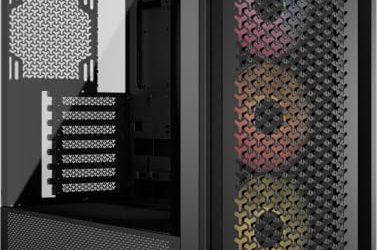
The best budget airflow cases are mesh-front models that ship with fans already installed, and the options reviewers name most often are the Lian Li Lancool 207, the Phanteks XT Pro Ultra, the Montech AIR 903 MAX and the Lian Li Lancool 216. Pick the Lancool 207 for balanced temperatures at a low outlay, the XT Pro for glass and ARGB fans, the AIR 903 MAX for four included fans and long-GPU room, and the Lancool 216 if you want larger front fans and more headroom.
Updated November 2026 – case revisions and fan bundles change often, so confirm the fan count and panel type on the listing before you order.
How we chose: this list comes from comparing manufacturer specifications, published reviewer coverage and recurring buyer feedback. We have not run thermal tests on these cases. A case made the list if it has a mesh or perforated front, ships with at least two fans and sits at a budget price, usually under $100.
What makes a case good for airflow
Airflow depends on three things: how open the intake path is, how many fans come in the box, and whether there is room for the components you plan to use. A solid or tinted-glass front restricts intake, whereas a full mesh front lets fans pull in air directly. Cases that include three or four fans out of the box usually cost less overall because fans are one of the larger hidden expenses in a build.
- Front panel. Look for full or large mesh, or perforations with a generous open area. Montech lists a 51 percent ventilation rate for the AIR 903 MAX front panel.
- Included fans. Two intake fans at the front and one exhaust fan at the rear is the minimum for a balanced gaming PC. Four included fans cover most builds without extra purchases.
- Top and side ventilation. Vented top panels help exhaust hot air, but remember that a vented top also lets dust settle on the motherboard.
- GPU and cooler clearance. Modern graphics cards are long. Check the maker’s maximum GPU length and CPU cooler height against the parts you intend to install.
- Dust filters. Mesh fronts need removable filters on the front, top and power-supply intake.
At a glance
| Case | Best for | Reviewer-reported highlights | Limits |
|---|---|---|---|
| Lian Li Lancool 207 | Best overall budget airflow | Full mesh front, four pre-installed fans, room for long triple-fan GPUs per Newegg’s guide | Simple styling; fewer premium touches |
| Phanteks XT Pro / XT Pro Ultra | Glass panel with strong cooling | Tom’s Hardware lists four 140 mm ARGB fans and a glass side panel on the Ultra version | Glass panel adds weight; ARGB must be configured |
| Montech AIR 903 MAX | Value with four fans and long GPUs | Four pre-installed 140 mm fans, 51 percent mesh front, GPUs up to 400 mm | Larger footprint than compact cases |
| Lian Li Lancool 216 | Highest airflow under mid-range | 160 mm front fans and all-mesh front and top panels, per one guide | Mesh top lets in dust; louder at high fan speed |
| NZXT H5 Flow | Easy build with tidy cable routing | Reviewers praise cable management for its tier | Perforated rather than full mesh front |
| Corsair 4000D Airflow | Classic mid-tower | Two pre-installed fans, good dust filters, 360 mm GPU clearance per roundups | Fewer included fans than competitors |
| Montech X3 Mesh | Lowest budget with lighting | Six included RGB fans, mesh front | Basic materials |
| GAMDIAS AURA GC1 ELITE | Entry-level | Four pre-installed 120 mm ARGB fans and mesh front | Entry-tier build quality |
Check the maker’s page for the exact dimensions and clearances of any revision you intend to buy.
The main contenders in more detail
Lian Li Lancool 207
Newegg’s guide names it the best budget airflow case, and MaxMyBuild’s thermal database puts it first of the 85 cases it tested for the balance of CPU and GPU temperatures. It has a full mesh front and four pre-installed fans, with enough clearance for the longest triple-fan cards. The compromise is the plain look and typical budget material finish.
Phanteks XT Pro and XT Pro Ultra
Tom’s Hardware describes the Ultra as having four 140 mm ARGB fans and a glass side panel, making it one of the better values. MaxMyBuild ranks it second only to the Lancool 207 for thermals. It suits builders who want to show off components and still keep temperatures in check.
Montech AIR 903 MAX
Under the mid-range tier, it includes four 140 mm fans, a mesh front with a stated 51 percent ventilation rate and room for graphics cards up to 400 mm. That graphics card room matters for current high-end cards, which are often long and thick.
Lian Li Lancool 216
One guide names it the best overall for its tier because its 160 mm front fans and all-mesh front and top panels leave nothing restricting intake or exhaust. It suits builders with a hot GPU or CPU who want maximum ventilation and accept more dust exposure.
NZXT H5 Flow and Corsair 4000D Airflow
These are well-known mid-towers. The NZXT is praised for cable management, while the Corsair offers 360 mm of GPU clearance and good filters with two pre-installed fans. They are good picks when you already own spare fans or want a particular look.
Best Budget PC Case for Airflow: Pick-by-Pick Specs
The best budget PC case for airflow gives intake air a straight path through a mesh front and includes enough fans that you do not need to buy more. The picks below add the spec lines that the table above does not cover. Spec lines come from the product listings and maker pages.
Lian Li Lancool 207 – Best Overall Budget Airflow Case
The Lancool 207 is a compact ATX case with a full mesh front and four pre-installed fans, two of them 140mm ARGB fans at the front. It suits builders who want strong temperatures from a small, plain case without buying extra fans.
- Form factor: compact ATX mid-tower
- Fans: four pre-installed, two 140mm ARGB at the front
- Front panel: full mesh
- Price tier: around $80-$90
Pros: fans included; open mesh intake; room for long GPUs. Cons: plain styling; the mesh front collects dust. Skip it if you want a glass front or a showpiece look.
Phanteks XT Pro Ultra – Best Budget Airflow Case With Glass
The XT Pro Ultra pairs a high-airflow mesh front with a tempered glass side panel and four M25 140mm fans in the box. It suits builders who want to show off the parts and still keep cooling headroom.
- Fans: four M25-140 included
- Front panel: performance mesh
- Side panel: tempered glass
- Price tier: around $80
Pros: four large fans included; glass side panel; plenty of fan positions. Cons: glass adds weight; ARGB lighting needs setup. Skip it if you want the cheapest possible case.
Lian Li Lancool 216 – Best for Maximum Ventilation
The Lancool 216 uses two 160mm ARGB fans at the front and mesh panels to keep intake and exhaust unrestricted. It suits hot-running graphics cards and builders who plan a large cooler or radiator.
- Fans: two 160mm ARGB front fans
- Form factor: ATX mid-tower
- Front panel: mesh
- Price tier: around $100
Pros: large front fans move air quietly; strong ventilation. Cons: sits at the top of the budget range; mesh lets in dust. Skip it if your budget is under $80.
NZXT H5 Flow – Best for an Easy Build
The NZXT H5 Flow is a compact ATX mid-tower with two included 120mm fans and room for a 360mm radiator at the front. It suits first builds where cable routing and a clean look matter as much as raw airflow.
- Form factor: compact ATX mid-tower
- Fans: two 120mm included
- Radiator support: 360mm front
- Price tier: around $70
Pros: neat cable management; compact footprint; 360mm radiator support. Cons: perforated rather than full mesh front; only two fans in the box. Skip it if you want four fans included.
Montech X3 Mesh – Best Low-Cost Case With Many Fans
The X3 Mesh includes six fixed RGB fans behind a mesh front, which makes it one of the cheapest ways to get a fully fanned airflow case. It suits entry-level builds with a mid-range graphics card.
- Fans: six fixed RGB (3 x 140mm and 3 x 120mm)
- GPU support: up to 305mm
- Radiator support: 240mm
- Price tier: around $70
Pros: six fans included; mesh front; low cost. Cons: 305mm GPU limit excludes long cards; the lighting is fixed rather than addressable. Skip it if you own a long, triple-fan graphics card.
Fractal Design Pop 2 Air – Best for a Clean, Quiet Look
The Pop 2 Air has a mesh front panel and three 120mm fans in the box, with a simpler look than the RGB-heavy cases above. It suits buyers who want airflow without a lot of lighting.
- Fans: three 120mm included
- Front panel: mesh
- Style: solid side panel, no RGB
- Price tier: around $90
Pros: restrained styling; mesh front; three fans. Cons: costs more than similar mesh cases; no glass window on this version. Skip it if you want visible components.
Cooler Master TD500 Mesh – Best Value With Four ARGB Fans
The TD500 Mesh pairs a polygonal mesh front with four CF120 ARGB fans and a tempered glass side panel. It suits builders who want four included fans and a standard ATX layout at a value price.
- Fans: four CF120 ARGB included
- Front panel: polygonal mesh
- Form factor: ATX mid-tower
- Price tier: around $60
Pros: four fans included; low price tier; glass side panel. Cons: 120mm fans are louder than larger ones at high speed. Skip it if you want 140mm or 160mm fans.
GAMDIAS AURA GC1 ELITE – Best Entry-Level Mesh Case
The GAMDIAS AURA GC1 ELITE has a front airflow mesh, tempered glass and four built-in 120mm ARGB fans. It suits a first build where the goal is to get airflow and lighting without paying for extra fans. Pros: four fans included; mesh front; low price tier. Cons: entry-level materials and cable routing. Skip it if you want a premium finish.
MOROVOL and RAIDMAX V217 – Two More Budget Mesh Options
The MOROVOL case pairs a diamond-pattern mesh front and tempered glass side with four pre-installed RGB fans, and the RAIDMAX V217 offers a mesh front with four pre-installed 120mm ARGB fans and tempered glass. Both sit around $60, so they are alternatives to the GAMDIAS when you want the same four-fan layout. Check the exact parts and return terms, because budget brands vary in build quality and support. Skip them if you want a well-known brand with a long track record.
Compatibility and fit notes
- Radiators. If you plan a 240 mm or 360 mm AIO, check the maker’s radiator support list for the front and top mounts and note that thick radiators plus fans can reduce memory clearance.
- Motherboard size. Mid-towers accept ATX, micro-ATX and mini-ITX boards. Micro-ATX cases such as compact mesh models are smaller but limit expansion.
- Power supply length. Check the PSU bay length if you use a long, high-wattage unit with modular cables.
- Front I/O. If you need USB-C on the front panel, confirm that both the case and board offer the header.
- Fan hubs. Cases with many fans may use a built-in controller or require headers. Count fan headers on the motherboard.
Pick X if you…
| Pick this if you… | Choose | Why |
|---|---|---|
| Want the best thermal value | Lian Li Lancool 207 | Top thermal balance in MaxMyBuild’s database, four fans included |
| Want a glass side panel and ARGB | Phanteks XT Pro Ultra | Four 140 mm ARGB fans and glass |
| Own a very long graphics card | Montech AIR 903 MAX | Stated 400 mm GPU room |
| Want maximum ventilation | Lian Li Lancool 216 | Large front fans and mesh top |
| Care about cable routing | NZXT H5 Flow | Reviewers praise it |
| Have the tightest budget | Montech X3 Mesh or GAMDIAS AURA GC1 ELITE | Fans included, mesh front |
Fan layout for a gaming PC
A simple, effective layout for these cases is two or three fans pulling cool air in at the front, one fan exhausting at the rear, and optional top exhaust fans if the case has them. Slightly positive pressure, meaning more intake than exhaust, reduces dust entering through gaps. If the case ships with four fans, place three on intake and one on exhaust, or follow the maker’s installation diagram.
Set fan curves in the BIOS so fans respond to CPU and GPU temperatures rather than running at full speed at all times. This often reduces noise noticeably with very little temperature change.
Which Budget PC Case for Airflow Fits Your Build?
- Hot graphics card or large GPU: choose the Montech AIR 903 MAX for long-card room or the Lian Li Lancool 216 for maximum ventilation.
- Tightest budget: the Cooler Master TD500 Mesh, RAIDMAX V217 or GAMDIAS AURA GC1 ELITE each include four fans at around $60.
- Glass and ARGB: the Phanteks XT Pro Ultra gives glass plus four 140mm fans.
- Quiet, plain look: the Fractal Design Pop 2 Air or NZXT H5 Flow.
- Small desk: the Lian Li Lancool 207, a compact ATX case.
Alternatives
- Fractal Design North and Torrent come up often in reviews but sit in a higher price tier; they suit buyers who prioritise materials and airflow together.
- Compact mesh micro-ATX cases for small desks, trading expansion room for footprint.
- Older but still-sold mesh mid-towers from major makers, which may be discounted and still perform well.
Budget tiers and what to expect
Entry tier
The cheapest mesh cases, such as the Montech X3 Mesh and the GAMDIAS AURA GC1 ELITE, focus on fans and ventilation rather than materials. Expect thinner steel, simpler cable routing and fewer tool-free features. They suit a first build where cooling matters more than looks, and the included fans save a separate purchase.
Value tier
The Lancool 207, Montech AIR 903 MAX, Phanteks XT Pro and Corsair 4000D Airflow sit here. These cases usually add better dust filters, more room behind the motherboard tray, glass or mesh side panels and stronger front fans. This tier gives the best balance, because the extra spend buys real usability rather than just styling.
Upper-budget tier
The Lancool 216 and the NZXT H5 Flow sit near the top of the budget range. They add larger fans or finer cable management and are worth considering if you plan to keep the case through several upgrades. Cases beyond this point, such as the Fractal Design North and Torrent, are a step up in materials and are covered by reviewers as a separate class.
Noise and dust trade-offs
An open mesh front is quieter in some ways because the fans do not strain against a restrictive panel, but it also lets more fan and component sound escape. If you sit close to the PC, choose fans with a PWM header so they can slow down at idle, and enable a gentle fan curve. Dust builds up faster in mesh cases, so plan to clean the filters every month or two and give the interior a light blow-out every few months. Place the case on a hard surface rather than carpet so the bottom intake is not blocked.
Specs Side-by-Side: Front Panel and Fan Setup
The biggest spec difference between budget airflow cases is not the price, it is what sits behind the front panel and how many fans ship pre-installed. Lining the main contenders up this way makes the trade-offs easier to see than reading each review in isolation.
| Case | Front panel | Fan setup | Where it fits |
|---|---|---|---|
| Lian Li Lancool 207 | Full mesh | Balanced pre-installed count | Lowest-cost all-rounder |
| Phanteks XT Pro Ultra | Hybrid mesh and glass | ARGB fans included | Wants a glass side panel without giving up airflow |
| Lian Li Lancool 216 | Full mesh, larger opening | Highest fan count of this group | Prioritizes ventilation over looks |
| NZXT H5 Flow | Mesh front | Simple two or three-fan layout | First-time builders |
| Montech X3 Mesh | Full mesh | Many fans at a low price point | Stretching a fixed budget to more fans |
| Fractal Design Pop 2 Air | Mesh with a styled front | Fewer, quieter-tuned fans | A clean look with acceptable noise |
| Cooler Master TD500 Mesh | Mesh front | Four ARGB fans included | RGB builds on a budget |
| GAMDIAS AURA GC1 ELITE | Mesh front | Entry-level fan count | Lowest entry price in a mesh case |
How Much Airflow Do You Actually Need?
Airflow needs scale with the heat your components produce, not with the fan count printed on the box. A build around a sub-200W graphics card and a stock or single-tower air cooler runs comfortably on the two or three fans that ship with most budget mesh cases; the mesh panel itself matters more here than adding a fourth fan. Once a build moves to a 300W-class card, or a liquid cooler is added to the front or top, the extra heat and the radiator’s own airflow restriction both raise the bar, and a case with four or more mounting positions, like the Lancool 216 or the Montech X3 Mesh, gives more room to add fans later without a case swap.
Static pressure matters more than raw CFM once a radiator or a dense dust filter sits in front of the fan. Thin, high-CFM fans optimized for open airflow lose much of that rating pushing air through a 240mm or 280mm radiator, so a case bought specifically to pair with liquid cooling benefits from fans rated for both airflow and static pressure, not either alone. Checking a case’s own published fan specs against the radiator you plan to install avoids buying a “high airflow” case that quietly underperforms once a radiator is in the way.
Common Mistakes When Buying a Budget Airflow Case
- Chasing CFM numbers without checking static pressure. A fan optimized for open airflow can lose much of its rated performance once it is pushing air through a radiator or a dense filter.
- Buying the cheapest mesh-labeled case without checking the opening size. Some “airflow” cases use mesh over a mostly solid panel, which caps the real intake area regardless of the fan count behind it.
- Matching a large radiator to a case that was reviewed for its small-build fan layout. Fan mount counts and radiator thickness limits vary a lot between these cases even at similar price points.
- Skipping filter maintenance. Mesh fronts collect dust faster than glass fronts; a clogged filter undoes most of the airflow advantage these cases are chosen for.
- Ignoring case depth for long graphics cards. Budget cases sometimes trim internal depth to cut material cost, so a card that fits a full-size ATX case is not guaranteed to fit a smaller or lower-cost model in the same lineup.
Positive vs Negative Air Pressure: What Changes Inside the Case
Air pressure balance is one of the most misunderstood parts of case airflow, and it matters more for a budget build than a premium one, since budget cases often ship with fewer fans to balance. A case runs positive pressure when intake fans move more air in than exhaust fans move out, and negative pressure when the reverse is true.
Negative pressure pulls in dust through every seam, gap, and unfiltered opening, not just the front intake. Positive pressure forces incoming air through the filtered front and top panels, so dust collects where it is easy to clean rather than settling inside the power supply or on the motherboard. On cases like the Lian Li Lancool 207 or the NZXT H5 Flow, adding one extra intake fan over the stock exhaust count, or removing a single rear exhaust fan, is usually enough to tip the balance toward positive without sacrificing noticeable cooling.
Dust Filters and Long-Term Airflow Maintenance
Airflow numbers published at launch assume clean filters and open mesh. Six months of use rarely matches that assumption. A front filter clogged with household dust can cut intake airflow noticeably before it looks obviously dirty to the eye.
- Magnetic or slide-out filters, common on mesh-front cases such as the Lian Li Lancool 216 and Montech AIR 903 MAX, take under a minute to remove and rinse.
- Fixed mesh panels without a separate filter layer need a vacuum or compressed air pass roughly monthly in dusty rooms, since there is no filter to pull and clean separately.
- PSU and bottom intake filters get skipped most often during cleaning, yet they feed the power supply and sometimes a bottom-mounted radiator directly.
A cleaning schedule tied to a calendar reminder, rather than visible dust, keeps airflow closer to the numbers a case was reviewed with on day one.
Case Size vs Airflow: Does a Bigger Case Always Run Cooler?
A larger interior volume gives hot air more room to disperse before it recirculates back into an intake fan, which is part of why full towers often test a few degrees cooler than compact mid-towers running the same components. But volume is not the only variable, and a well-designed compact case can outperform a larger one with poor fan placement.
What matters more than raw liters is the distance between intake and exhaust paths and whether hot air has a clear route out before it mixes back in. A case like the Phanteks XT Pro, sized as a standard mid-tower rather than a full tower, achieves competitive thermals through front-to-top-and-rear airflow routing rather than sheer size. Buying a bigger case purely for cooling is rarely worth the desk space unless the fan layout is already comparable.
Airflow Myths vs Facts
| Myth | Fact |
|---|---|
| More fans always means cooler temperatures | Past a certain point, added fans mostly add noise; airflow path and filter cleanliness matter more than fan count alone |
| Tempered glass panels always hurt airflow | A glass side panel paired with a mesh front, the layout on the Fractal Design Pop 2 Air, barely changes intake airflow since the side panel is not the primary intake path on most cases |
| RGB fans move less air than non-RGB fans | RGB lighting does not change a fan’s airflow rating; any difference comes from the fan’s blade design and motor, not the LEDs |
| A mesh front is always louder than a solid front | Open mesh is usually louder at the same fan speed, but a mesh case run at a lower fan curve can match a solid-front case’s noise while still improving temperatures |
GPU Sag and Support in Budget Airflow Cases
Open-mesh budget cases rarely include a GPU support bracket in the box, unlike some higher-priced models. A long, heavy graphics card resting only on the PCIe slot can sag enough over months of use to stress the slot and visibly tilt the card.
A simple support bracket, sold separately from the case or 3D-printed, resolves most sag without needing a different case. For builders choosing between similarly priced options, checking the manufacturer listing for a reinforced PCIe slot bracket or an included vertical GPU mount before buying removes the need for an aftermarket fix later.
Thermal Paste and Airflow: A Connected but Separate Factor
An airflow-optimized case cannot fully compensate for a poor thermal interface at the CPU or GPU. Builders sometimes credit or blame a case for temperature results that actually trace back to thermal paste application, cooler mounting pressure, or an aged thermal pad on a graphics card.
Before concluding that a case’s airflow is underperforming its reputation, confirm the cooler is mounted evenly and the thermal paste coverage is even, not pooled to one side. A case swap will not fix a mounting issue, and a mounting fix can make a budget case perform closer to its rated potential.
Front I/O and Daily-Use Features Beyond Airflow
Airflow is the headline feature on every case in this price range, but the front-panel ports and switches get touched far more often than the mesh panel does. A front USB-C port, now common on newer releases such as the Lian Li Lancool 207 and Lian Li Lancool 216, matters more each year as controllers, phones, and accessories move away from USB-A cables.
A fan or lighting control switch built into the front panel, when present on a case like the NZXT H5 Flow, saves a trip to software just to change a fan curve preset or turn off RGB lighting before a video call. These small conveniences do not show up in airflow benchmarks, but they shape how pleasant the case is to live with once the build is finished and the focus shifts from assembly to daily use.
Cable Routing and Its Effect on Airflow
A budget case with tight cable routing channels can end up with loose cables draped across the front intake path, partially blocking the same airflow the mesh front was chosen for. This is less about the case’s design and more about how cables are dressed during the build.
Routing cables behind the motherboard tray and through the included grommets, rather than letting SATA or fan cables cross in front of intake fans, keeps the airflow path the case was designed around clear. On cases with limited routing space, such as some configurations of the GAMDIAS AURA GC1 ELITE, grouping fan cables with a short extension or splitter before they reach the motherboard reduces clutter in the one area where it matters most for airflow: directly behind the front fans.
Water Cooling Readiness: Radiator Space in Budget Airflow Cases
Most buyers in this price range start with air cooling, but checking radiator room now avoids a second purchase later. The usable radiator footprint depends on three things: the fan-mount length at the front or top, the clearance between the motherboard tray and the panel, and whether the power supply shroud intrudes on the bottom mount. A front mount that accepts a 240mm or 280mm radiator without removing drive cages is a better long-term bet than a case that only fits a 240mm unit at the top.
Thicker radiators (38mm and up) combined with push-pull fans can push total front-panel thickness past 70mm, which crowds out front-mounted drive bays in several of the cases above. Measure your planned radiator plus fan stack against the published front clearance before assuming an upgrade path exists.
Storage Drive Cooling: M.2 and SATA Placement in Open-Mesh Cases
An open-mesh front helps the GPU and CPU more than it helps storage, because most M.2 slots sit under the motherboard tray or beneath a chipset heatsink where front intake air barely reaches. A primary NVMe drive used for the OS and current games rarely needs extra airflow if the motherboard shipped with a stock heatsink, but a second or third M.2 drive used for heavy, sustained transfers benefits from sitting in a slot that faces an open area of the case rather than being sandwiched against the back of a GPU.
SATA SSDs and hard drives tolerate case temperature swings well and do not need dedicated airflow, so they are a reasonable place to save a slot for a case with limited drive cages.
Power Supply Shrouds and Lower-Chamber Airflow
Budget airflow cases almost always isolate the power supply in a bottom shroud to keep cabling out of sight and to stop the PSU fan from drawing hot air from the GPU area. That isolation is good for GPU temperatures but means the PSU pulls its own air from vents in the case floor or side. If the case sits directly on carpet or a cable, those floor vents can starve, and the PSU fan works harder than it should for no visible reason.
Raising the case slightly off carpet, or choosing a model with adjustable feet, keeps the lower chamber’s intake path clear without adding any new fans.
Upgrading a Budget Airflow Case Later: What Carries Over
Buyers who expect to upgrade the GPU or add a cooler in a year or two should weigh how much of the current case still fits the next build. Fan mounting holes follow a standard spacing across 120mm and 140mm sizes, so stock fans usually bolt straight into a replacement case if you decide to switch later. Dust filters, front I/O headers, and cable ties rarely transfer, since those parts are sized to the specific chassis.
The clearance numbers matter most for longevity: a case that already fits today’s longest graphics cards and tallest air coolers with 10 to 15mm of spare room is more likely to still fit a future upgrade than one that is an exact match today.
Frequently Asked Questions
Is a mesh front always better for cooling?
For temperatures, yes in most cases, because it reduces intake restriction. The trade-offs are more dust and slightly more fan noise reaching your ears, so use dust filters and clean them periodically.
How many case fans do I need?
Three fans, two in front and one at the rear, handle most gaming builds. A fourth top exhaust fan helps in warm rooms or with high-wattage graphics cards.
Do bigger fans work better than smaller ones?
Larger fans move more air at lower speed, which tends to be quieter. A case with 140 mm or 160 mm front fans can therefore be quieter at the same airflow than one with 120 mm fans.
Will a glass panel hurt temperatures?
The side panel is not the airflow path, so a glass panel matters little when the front is mesh. A glass front panel, on the other hand, restricts airflow noticeably.
Can I fit a 360 mm radiator in a budget case?
Many can, usually at the front or top. Check the maker’s radiator support list, because clearance with memory and the motherboard heatsink varies between models.
Do I need extra dust filters?
Most of these cases include filters for the front, top and power supply intake. If a mesh area has none, add magnetic filters and clean them every few months.
What is the best budget PC case for airflow?
The Lian Li Lancool 207 is the best budget PC case for airflow for most builds, because it combines a full mesh front with four pre-installed fans. The Montech AIR 903 MAX and Phanteks XT Pro Ultra are strong alternatives if you want more GPU room or glass.
Which budget PC case has the best airflow with fans included?
Cases with four or more included fans, such as the Montech AIR 903 MAX, Phanteks XT Pro Ultra and Montech X3 Mesh (six fans), need no extra fan purchases. Check the listing for the exact fan count of the revision you buy.
Is a case with a perforated front as good as a full mesh front?
A perforated front such as the NZXT H5 Flow restricts intake a little more than full mesh, but it is still far better than a solid or glass front. Add a faster fan curve if temperatures run high.
Should I buy a case with ARGB fans or plain fans?
Choose by airflow first. Lighting adds no cooling, so pick ARGB only if you like the look and check that the case lighting controller works with your motherboard header.
FAQ
How Much Airflow Do You Actually Need?
Case Size vs Airflow: Does a Bigger Case Always Run Cooler?
Is a mesh front always better for cooling?
How many case fans do I need?
Do bigger fans work better than smaller ones?
Will a glass panel hurt temperatures?
Can I fit a 360 mm radiator in a budget case?
Do I need extra dust filters?
More from Amazon
Programs that pair well with the guide above. Offers and eligibility are set by Amazon and may change.
Free shipping on eligible items, Prime Video and more. Eligible new members can start with a free trial.
Start a Prime free trialAd-free music streaming. Eligible new subscribers can start with a free trial.
Try Music Unlimited freeA Prime membership for ages 18-24 with a trial period. Eligibility is set by Amazon.
See Prime for Young AdultsAudiobooks and podcasts to listen to on the go. Eligible new members can start with a free trial.
Try Audible freeAs an Amazon Associate we earn from qualifying purchases.