Our Top Picks
 ASUS ROG Zephyrus G14 5060 Gaming Laptop 14.0"16GB RAM|1TB SSD12.25 x 8.75 x 0.75 inches3.3 PoundsCheck on Amazon
Gaming laptops that look normal have a plain lid, muted colors, little visible RGB and a slim body that passes for a work or school laptop. The strongest understated picks right now are the Razer Blade 14, ASUS ROG Zephyrus G14 and G16, MSI Stealth 16 AI+ and Stealth A16 AI+, Gigabyte AERO X16 and Lenovo Legion 5.
Quick answer: Pick a black, gray or white laptop with a small logo, no light bars and a slim chassis. The Razer Blade 14 and ASUS Zephyrus G14 are the easiest to pass off as ordinary ultrabooks. Judge the final look from the maker’s photos, because styling changes by model year and color.
Understated Gaming Laptops at a Glance
| Laptop | Color (as listed) | GPU | Screen | Why it looks normal |
|---|---|---|---|---|
| Razer Blade 14 (2025) | Black | RTX 5060 / 5070 | 14″ 3K 120Hz OLED | Slim, one-color body |
| ASUS ROG Zephyrus G14 | Platinum White | RTX 5060 | 14″ 2.8K OLED 120Hz | Compact, light-colored |
| ASUS ROG Zephyrus G16 | Eclipse Gray | RTX 5070 | 16″ 2.5K OLED 240Hz | Gray metal look |
| MSI Stealth 16 AI+ | Charcoal Black | RTX 5070 Ti | 16″ QHD+ OLED 240Hz | Dark, minimal styling |
| MSI Stealth A16 AI+ | Black | RTX 5070 Ti | 16″ QHD+ 240Hz | Same family, AMD CPU |
| Gigabyte AERO X16 | Lunar White | RTX 5070 | 16″ WQXGA 165Hz | Creator-laptop styling |
| Lenovo Legion 5 Gen 10 | Eclipse Black | RTX 5060 | 15.1″ WQXGA | Toned-down Legion look |
What Makes a Gaming Laptop Look Normal?
A laptop looks normal when nothing about it announces “gaming” from across a room. That is a design judgment, not a spec, so use these cues rather than relying on a brand name alone.
- Color: black, silver, gray or white read as office hardware. Neon accents, red vents and camouflage patterns do not.
- Lid: a small, single-color logo is better than a large glowing emblem or an angular graphic.
- Vents: hidden or slim intake grilles look like a normal laptop. Huge rear exhaust blocks look like a gaming rig.
- RGB: a white or single-color backlit keyboard looks like an office keyboard. Per-zone rainbow lighting does not. Most of these laptops let you set the keyboard light to a solid color or turn it off.
- Thickness and weight: a body around the size of a premium ultrabook is easy to carry into class or a meeting.
- Charger: large power bricks give gaming hardware away. Check whether a USB-C charger can top up the laptop for light use.
The 7 Best Gaming Laptops That Look Normal
1. Razer Blade 14 (2025)

Razer Blade 14 (2025) Gaming Laptop, RTX 5060, 16GB DDR5 RAM, 1TB, Black | AMD Ryzen AI 9 365, 3K 120Hz OLED Display, Thin & Lightweight, Chroma RGB, Windows
Chosen because it specifies RTX 5060 and 16GB DDR5 RAM.
View on AmazonThe Blade 14 listing shows a black chassis, an AMD Ryzen AI 9 365, an RTX 5060 with 16GB DDR5 and a 1TB SSD, plus a 14-inch 3K 120Hz OLED panel and Chroma RGB. Razer also lists a 32GB RTX 5070 version of the same body.
- Display: 14-inch 3K OLED, 120Hz
- CPU: AMD Ryzen AI 9 365
- Memory/storage: 16GB DDR5, 1TB
Best for: people who want a slim all-black laptop that is easy to carry every day. Skip if: you want the most GPU power for the money; thin Razer builds sit at a premium tier.
Pros: plain all-black body; sharp OLED; compact. Cons: 16GB RAM on this version; Chroma RGB keyboard needs to be set to a solid color to look discreet; premium cost.
2. ASUS ROG Zephyrus G14
ASUS ROG Zephyrus G14 5060 Gaming Laptop 14.0" OLED 2.8K, Ryzen 9, 16GB/1TB | AMD 8-Core Ryzen 9 270 4.0GHz, GeForce RTX 5060 8GB, 39 TOPS, Copilot, 120Hz, RGB KYB, WiFi 7, W11P, Platinum White w/USB Hub
Chosen because it specifies Ryzen 9 and 16GB/1TB.
View on AmazonThe Zephyrus G14 listing in Platinum White shows a 14-inch 2.8K OLED panel at 120Hz, AMD Ryzen 9 270, RTX 5060 with 8GB, 16GB of memory, 1TB storage and Wi-Fi 7. A light-colored body is rarely associated with gaming laptops, which is exactly why it passes as an everyday ultrabook.
- Display: 14-inch 2.8K OLED, 120Hz
- GPU: RTX 5060, 8GB
- Connectivity: Wi-Fi 7
Best for: students and travelers who want a small, light-colored laptop that still plays modern games. Skip if: you want a larger screen; the 14-inch size is compact.
Pros: compact; OLED; light color. Cons: 16GB RAM; 120Hz; ASUS sells several G14 variants, so check the GPU and RAM line in each.
3. ASUS ROG Zephyrus G16

ASUS ROG Zephyrus G16 16" 2.5K OLED 240Hz Gaming Laptop, Intel Core Ultra 9 285H, RTX5070, 16GB LPDDR5X 1TB SSD, Wi-Fi7, Backlit KB, Win11, Thunderbolt4, Eclipse Gray, w/USB Hub, W/GaLiMu
Chosen because it specifies Intel Core Ultra 9 285H and RTX5070.
View on AmazonThe Zephyrus G16 in Eclipse Gray is listed with a 16-inch 2.5K OLED at 240Hz, Intel Core Ultra 9 285H, RTX 5070, 16GB LPDDR5X, a 1TB SSD, Wi-Fi 7 and Thunderbolt 4. It trades the compact size of the G14 for a larger screen and higher refresh rate.
- Display: 16-inch 2.5K OLED, 240Hz
- CPU: Intel Core Ultra 9 285H
- Ports: Thunderbolt 4
Best for: buyers who want a bigger screen and a more serious GPU in a gray, restrained body. Skip if: you need 32GB RAM; this listing shows 16GB of soldered-style LPDDR5X.
Pros: gray metal look; fast OLED; Thunderbolt 4. Cons: 16GB RAM; some listings bundle accessories you may not need.
4. MSI Stealth 16 AI+

msi Stealth 16 AI+ 16” 240Hz QHD+ OLED Gaming Laptop: Intel Core Ultra 9 386H, NVIDIA Geforce RTX 5070Ti, 32GB DDR5, 1TB NVMe SSD, Wi-Fi 7, Win 11 Home: Charcoal Black B3WH-036US
Chosen because it specifies NVIDIA Geforce RTX 5070Ti and 32GB DDR5.
View on AmazonMSI’s Stealth line is aimed at players who want power without a gamer look. The listing shows a Charcoal Black finish, Intel Core Ultra 9 386H, RTX 5070 Ti, 32GB DDR5, a 1TB NVMe SSD, Wi-Fi 7 and a 16-inch 240Hz QHD+ OLED panel.
- Display: 16-inch QHD+ OLED, 240Hz
- GPU: RTX 5070 Ti
- Memory/storage: 32GB DDR5, 1TB
Best for: people who want high performance and a dark, minimal look. Skip if: budget is tight; the RTX 5070 Ti and OLED place it in a higher tier.
Pros: strong GPU; 32GB RAM; OLED. Cons: premium tier; larger than the 14-inch picks.
5. MSI Stealth A16 AI+
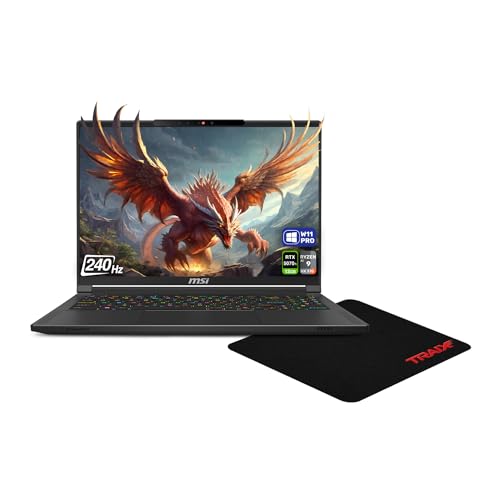
MSI Stealth A16 AI+ Gaming Laptop, AMD Ryzen AI 9 HX-370, 32 GB LPDDR5x RAM, 2 TB PCIe SSD, 16" QHD+ (2560x1600) 240Hz, Nvidia G-Force RTX 5070Ti, RGB Backlit Keyboard, W11 Pro, Black + Traix MousePad
Chosen because it specifies AMD Ryzen AI 9 HX-370 and 32 GB LPDDR5x RAM.
View on AmazonThe AMD version of the same family. The listing shows a Ryzen AI 9 HX 370, 32GB LPDDR5x, a 2TB PCIe SSD, RTX 5070 Ti, a 16-inch QHD+ 240Hz display, RGB backlit keyboard and Windows 11 Pro in black. It adds more storage than the Intel model.
- CPU: AMD Ryzen AI 9 HX 370
- Memory/storage: 32GB LPDDR5x, 2TB
- Display: 16-inch QHD+ (2560×1600), 240Hz
Best for: buyers who prefer AMD and want 2TB of storage. Skip if: you want a specific panel type; the listing does not state it.
Pros: 2TB SSD; Windows 11 Pro; black finish. Cons: panel type not listed; keyboard RGB should be set to a solid color to stay discreet.
6. Gigabyte AERO X16

GIGABYTE AERO X16 - AMD Ryzen AI 7 350 GeForce RTX 5070 16" Laptop | Copilot+ PC, 165Hz, 2560x1600 WQXGA, 1TB SSD, 32GB DDR5 RAM, Windows 11 Home, Lunar White
Chosen because it specifies AMD Ryzen AI 7 350 GeForce RTX 5070 16" Laptop and Copilot+ PC.
View on AmazonGigabyte’s AERO line is built for creators, so the styling reads like a work laptop. This Lunar White listing shows an AMD Ryzen AI 7 350, RTX 5070, a 16-inch 2560×1600 display at 165Hz, 32GB DDR5, a 1TB SSD and Copilot+ PC branding. Gigabyte lists lower-GPU versions of the same body too.
- Display: 16-inch WQXGA, 165Hz
- GPU: RTX 5070
- Memory/storage: 32GB DDR5, 1TB
Best for: people who edit photos or video during the week and game at night. Skip if: you want a 240Hz screen; this one tops out at 165Hz.
Pros: light color; 32GB RAM; strong GPU for the class. Cons: 165Hz; panel type not listed.
7. Lenovo Legion 5 Gen 10

Lenovo Legion 5 Gen 10 Gaming Laptop, AMD Ryzen 7-260, 32 GB DDR5 RAM, 1 TB PCIe SSD, 15.1" WQXGA (2560x1600) Display, Nvidia G-Force RTX 5060, 24-Zone RGB Backlit Keyboard, W11 Pro, Eclipse Black
Chosen because it specifies AMD Ryzen 7-260 and 32 GB DDR5 RAM.
View on AmazonThe Legion 5 is the most conventional design here. The listing shows an Eclipse Black finish, AMD Ryzen 7 260, RTX 5060, 32GB DDR5, 1TB SSD and a 15.1-inch WQXGA display, plus a 24-zone RGB keyboard. It is not a thin ultrabook, but the styling is toned down.
- Display: 15.1-inch WQXGA
- CPU: AMD Ryzen 7 260
- Memory/storage: 32GB DDR5, 1TB
Best for: value-minded buyers who want a plain laptop with real GPU power. Skip if: you want the thinnest body; this is thicker than the Blade or Zephyrus.
Pros: 32GB RAM; simple black styling; balanced specs. Cons: thicker; refresh rate not stated in this listing.
Also Consider
- Razer Blade 14 with RTX 5070 and 32GB: same look as pick 1, with a stronger GPU and double the RAM.
- Acer Nitro V 16S AI: 16-inch 180Hz IPS, Ryzen 7 260, RTX 5060, 32GB DDR5, 1TB SSD. Check Acer’s photos to judge the styling.
- ASUS ROG Zephyrus G14 with RTX 5080: same compact body with a top GPU for 14-inch buyers who need more power.
How We Chose
This is a research-based guide. We did not use these laptops ourselves. We started with gaming laptops that list an RTX 50-series GPU, then filtered for slim or conventional bodies, muted color options and creator-style or “stealth” product lines. We compared listing titles with maker pages, limited the list to two models per brand, and excluded renewed and unavailable listings. Because “looks normal” is subjective, we flag design cues and recommend checking maker photos before you buy. Prices change often, so we use tier words only.
Buying Guide: Getting the Look Without Losing Performance
Match the size to your use
14-inch laptops are the easiest to pass as normal, but they hold less cooling. 16-inch models run cooler and offer bigger screens. 15-inch Legion-style laptops are thicker but cheaper per unit of performance.
Set the keyboard light
Most RGB keyboards can be set to a single color or off. A white or off backlight is the quickest way to make any gaming laptop look like a regular one.
Check RAM before you buy
16GB is workable for games today, but 32GB is more comfortable if you multitask. Some thin models use soldered memory that cannot be upgraded, so choose the right amount up front.
Look at the screen
OLED panels look great for video and gaming, but not all listings state the panel type. 120Hz is fine for most single-player games, and 240Hz benefits competitive shooters.
Think about battery and charging
Thin laptops are not great at gaming away from a charger, so battery life under load is short. If you want less bulk, check whether the laptop supports USB-C charging for everyday use.
Remember the trade-offs
Looking normal usually means a thinner chassis, which can run hotter and louder at full load than a thick gaming laptop. If sustained performance matters more than looks, a thicker chassis wins.
Where a Normal-Looking Gaming Laptop Makes Sense
Looking normal is not just about taste. It matters in specific places, and the right model depends on which place you spend the most time in.
School and campus
A laptop that looks like an ordinary notebook raises fewer questions in a lecture hall and is less likely to draw attention in a shared space. The 14-inch Blade 14 and Zephyrus G14 are the easiest to carry. Check that the weight suits a backpack, and use a plain sleeve.
Office and hybrid work
If one laptop must handle spreadsheets in the morning and games in the evening, a muted body and a white or off keyboard light keep it professional. The Stealth series and AERO X16 are designed with that dual use in mind. Windows 11 Pro, listed on the Stealth A16 AI+ and Legion 5 here, also helps with work-managed features.
Travel and shared rooms
A discreet laptop is easier to use in a hotel, a hostel or a shared flat. Fan noise is the other giveaway, so a quiet profile helps. Remember that thin laptops are noisier than they look when running at full load.
Gifts and family use
If the laptop will be shared with someone who does not want a gamer look, a gray or white body is a safer pick than a black-and-red one.
Normal Look vs. Gamer Look: A Quick Comparison
| Trait | Understated laptop | Typical gamer laptop |
|---|---|---|
| Lid | Single-color logo or plain metal | Large logo, light bar or pattern |
| Body color | Black, gray, white | Black with red, blue or neon accents |
| Keyboard light | Solid color or off | Zone or per-key rainbow |
| Thickness | Slim, near ultrabook | Thick, with large rear exhaust |
| Power brick | Smaller; some USB-C support | Large, heavy |
| Trade-off | Less cooling headroom | More sustained power |
Picking the Right GPU Tier for a Slim Laptop
Slim laptops cannot cool the highest-power GPUs well, so the middle of the range gives the best experience. The RTX 5060 and RTX 5070 in the Blade 14, Zephyrus G14, G16 and AERO X16 handle current games at high settings on their native screens, using upscaling where needed. The RTX 5070 Ti in the Stealth models is a good step up for 16-inch screens with higher resolutions.
If you only play older games, esports titles or indie games, the lower tiers are plenty. If you want the newest releases on high settings at the screen’s native resolution, aim for the 5070 or 5070 Ti. Because thin bodies run their GPUs at lower power, a higher-tier GPU in a slim laptop does not always outrun a lower-tier GPU in a thick one, so read the maker’s power rating if it is listed.
Small Changes That Make Any Gaming Laptop Look Normal
- Set the keyboard backlight to white or turn it off in the maker’s software.
- Turn off any lid or light-bar effects if the model has them.
- Use a plain sleeve or backpack with no gamer branding.
- Remove or avoid stickers and bold skins.
- Use a quiet fan profile while on battery or in a shared room.
- If the charger is large, carry it in a separate pouch, and use a USB-C charger for light work if the laptop allows it.
Display, Battery and Port Checklist for Slim Laptops
- Display type: OLED looks best for video and games, but check whether the maker states a matte or glossy finish. Glossy screens show reflections in bright rooms.
- Refresh rate: 120Hz suits most games and daily use. 240Hz helps competitive shooters but needs a strong GPU to take advantage of it.
- Battery: slim gaming laptops can last through a day of office work, but not through gaming. Battery capacity is listed on maker pages, not always in the listing.
- Ports: look for HDMI, USB-C with display output and Thunderbolt if you plan to dock the laptop at a desk.
- Webcam and microphones: useful for school and meetings. Listings often omit them, so check the maker’s page.
- Fingerprint reader and keyboard: small touches that make a laptop feel like a work machine.
FAQ
What gaming laptops look like normal laptops?
The Razer Blade 14, ASUS ROG Zephyrus G14 and G16, MSI Stealth line, Gigabyte AERO X16 and Lenovo Legion 5 all use restrained styling with muted colors and small logos.
Can I make a gaming laptop look less like a gaming laptop?
Yes. Set the keyboard backlight to white or turn it off, choose a black, gray or white model and avoid skins with bold graphics. A plain sleeve or backpack also helps.
Are slim gaming laptops worse at gaming?
Not at everyday use, but they often run the GPU at lower power than thick laptops. That can mean a little less performance in long sessions with the same GPU name.
Which has the most discreet design, Blade 14 or Zephyrus G14?
Both are compact and plain. The black Blade 14 looks like a premium ultrabook, and the white or gray Zephyrus G14 looks like a creator laptop. Pick the color you prefer.
Are MSI Stealth laptops good for school or work?
They suit it well. Dark minimal styling blends in, and the OLED screens and 32GB RAM configurations also handle study and office software easily.
Do normal-looking gaming laptops run hot?
They can under full load, because thin bodies have less cooling. Use a performance mode only when plugged in, and keep vents clear on a hard surface.
Which One Should You Buy?
- Most invisible: Razer Blade 14 (black) or ASUS ROG Zephyrus G14 (white).
- Bigger screen, still plain: ASUS ROG Zephyrus G16.
- Most GPU power in a dark body: MSI Stealth 16 AI+ or Stealth A16 AI+.
- Creator-style look: Gigabyte AERO X16.
- Best simple value: Lenovo Legion 5 Gen 10.
Sources
- Razer Blade 14 maker product page
- ASUS ROG Zephyrus G14 and G16 product pages
- MSI Stealth series product pages
- Gigabyte AERO X16 product page
- Lenovo Legion 5 Gen 10 product page
Last updated: November 2026
FAQ
What Makes a Gaming Laptop Look Normal?
What gaming laptops look like normal laptops?
Can I make a gaming laptop look less like a gaming laptop?
Are slim gaming laptops worse at gaming?
Which has the most discreet design, Blade 14 or Zephyrus G14?
Are MSI Stealth laptops good for school or work?
Do normal-looking gaming laptops run hot?
More from Amazon
Programs that pair well with the guide above. Offers and eligibility are set by Amazon and may change.
Free shipping on eligible items, Prime Video and more. Eligible new members can start with a free trial.
Start a Prime free trialAd-free music streaming. Eligible new subscribers can start with a free trial.
Try Music Unlimited freeA Prime membership for ages 18-24 with a trial period. Eligibility is set by Amazon.
See Prime for Young AdultsAudiobooks and podcasts to listen to on the go. Eligible new members can start with a free trial.
Try Audible freeAs an Amazon Associate we earn from qualifying purchases.