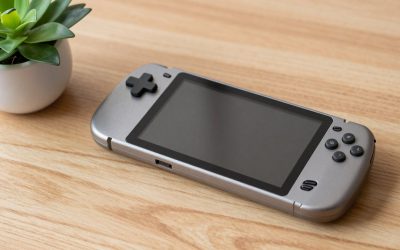
Our Top Picks
A gaming handheld is worth it if you have a game library you already own, you play in short sessions away from your desk or TV, and you can live with two to four hours of battery in demanding games. It is not worth it if you mostly play at a desk, want maximum graphics, or rely on multiplayer games that block handheld PCs. This guide shows how to test that decision with numbers: battery math, game compatibility, storage and the accessories that are worth buying. It ends with four Steam Deck accessories for readers who have already decided.
Quick Verdict
| Your situation | Our verdict |
|---|---|
| Large Steam library, commute or couch gaming | Worth it. A Steam Deck turns an existing library into a portable one. |
| Mostly Nintendo first-party games | Worth it, but the right handheld is a Nintendo system, not a handheld PC. |
| You only play at your desk | Skip it. A gaming PC or laptop gives more performance and no battery limits. |
| Competitive multiplayer with strict anti-cheat | Check compatibility first; some games are listed as unsupported. |
| You want 60 fps in the newest demanding games | Probably not. Expect lower resolution and frame rate settings on this class of device. |
| Parent buying for a younger player | Worth it if durability and offline play matter; budget for a case and screen protection. |
What You Need to Know
Battery: a simple formula beats the marketing range
Runtime in hours is roughly battery capacity in watt-hours divided by the average power the device draws in watts. That is a rule of thumb, but it makes published figures easy to sanity-check. The Steam Deck OLED carries a 50 Wh battery and the original LCD model 40 Wh. At the default 15 W power limit, a demanding game would drain the 50 Wh battery in a little over three hours, while the 40 Wh battery lasts closer to two and a half. Third-party guides report about two to three hours in demanding games, and the quoted ranges for light games and emulation run much longer. The Nintendo Switch 2’s battery is 19.74 Wh, and Nintendo rates it at 2 to 6.5 hours, which implies an average draw somewhere between roughly 3 W and 10 W depending on the game. Those wattage figures are derived arithmetic, not measurements.

JSAUX 2-Pack Ultra HD Screen Protector for Steam Deck OLED/LCD | with Guide Frame, Easy to Install, 99.99% Clarity, Full-Screen Coverage, 9H Glass, Anti-Fingerprint, Scratch Resistant
Picked as a relevant option in this category.
View on Amazon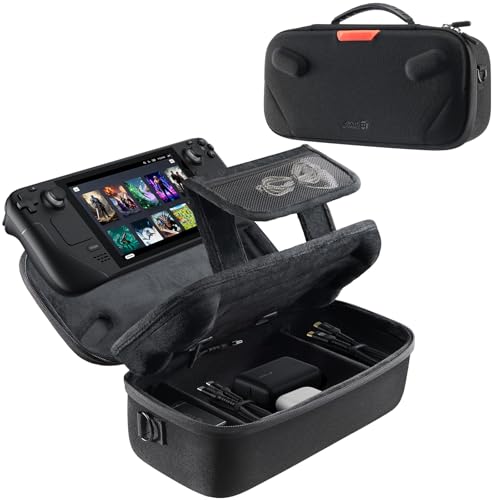
JSAUX Carrying Case for Steam Deck/Steam Deck OLED, Hard Shell Travel Case | Dual-layer Storage, USB C Cable Included, Built-in Cable Port, Fits Charger and Accessories
Chosen because it specifies Hard Shell Travel Case.
View on Amazon
JSAUX ModCase for Steam Deck/Steam Deck OLED, PC0104 Modular Valve Steam Deck Case Include Protective Case, Face Cover, Cooling Fan, Metal Bracket and Strap - Cooler Set
Chosen because it specifies PC0104 Modular Valve Steam Deck Case Include Protective Case and Face Cover.
View on Amazon
JSAUX Cooling Fan for Steam Deck/Steam Deck OLED, Innovative Stand Cooler | Innovative Cooler with Stand-GP0201
Chosen because it specifies Innovative Stand Cooler.
View on AmazonThe practical takeaway is that battery life is set mainly by what you play. Capping the frame rate at 30 or 40 fps and lowering the power limit extends runtime noticeably on Steam Deck, and the settings can be saved per game.
Compatibility: your library decides everything
Valve’s Steam Deck Verified program sorts games into four groups. Verified means the game passes Valve’s checks with no manual adjustments. Playable means it works but may need tweaks such as using the on-screen keyboard. Unsupported means it does not function properly, often because of anti-cheat software or missing Windows features in the Proton compatibility layer. Unknown means Valve has not yet reviewed it. Before buying, check the games you play most. If half of your favorite games are Unsupported, the device will disappoint.
Nintendo’s system has a different rule set. The Switch 2 plays nearly all original Switch games, but its own cartridges use a new format, and some physical Switch 2 releases are game-key cards: a card that holds only a license, with the full game downloaded to internal storage, often 20 GB or more. That affects how much storage you need.
Screen, size and comfort
The Steam Deck OLED has a 7.4-inch 1280×800 HDR OLED running up to 90Hz; the LCD model has a 7-inch 60Hz IPS screen. The Switch 2 has a 7.9-inch 1080p LCD at up to 120Hz with HDR10 and variable refresh rate. In your hands, the Steam Deck is a thick device at 49 mm, about 640 g for the OLED model. The Switch 2 is roughly 13.9 mm thick and about 534 g with Joy-Con 2 attached. If you have small hands or play lying down, weight and thickness matter more than the spec sheet.
Storage and the hidden cost of games
Storage is the most common surprise. The Steam Deck OLED ships with 512 GB or 1 TB, and the Switch 2 has 256 GB of internal UFS storage with expansion by microSD Express cards, not ordinary microSD. A handful of large modern games can fill either. Plan on a memory card or deleting titles you finished, and remember that the real cost of a handheld includes the games you will buy for it.
Do you need accessories?
| Accessory | Useful when | Skip when |
|---|---|---|
| Hard carrying case | You travel with it or put it in a bag | It lives on a couch |
| Screen protector | You have kids or toss it in a backpack; check your screen type first | Your screen has an etched anti-glare finish you like |
| Cooling fan | You play long sessions in a warm room and notice heat or fan noise | Games run fine at default settings |
| Modular case with stand | You want a kickstand and a strap for accessories | You prefer the naked device |
The main rule is to buy accessories after you know how you use the device.
How to Decide
- Count your away-from-desk hours. If you will play fewer than about three hours a week away from your main setup, the handheld is mostly a second, weaker console. Five or more hours a week of couch, bed or travel play is where handhelds pay off.
- Check your top ten games. Look each up in the Steam Deck Verified list or the Nintendo eShop. If seven or more work well, go ahead. If fewer than five do, wait.
- Do the battery math. Divide battery watt-hours by the average watts you expect. A 50 Wh battery at 12 W is roughly four hours, and at 8 W with a 40 fps cap it approaches six. These are rules of thumb, not guarantees.
- Budget storage. Add up the install sizes of your five main games. If they total more than half the internal drive, plan for a memory card from the start.
- Decide where it docks. A handheld that connects to a TV and a keyboard replaces a console for some households. The Switch 2 outputs up to 4K at 60Hz when docked, per Nintendo’s specifications. Check what your TV and dock need.
- Look at your fallback. If a laptop or phone already meets your portable gaming needs, the handheld must offer something extra: better controls, a bigger library or lower per-session cost.
Worked example: you commute 40 minutes each way, five days a week. That is about 6.7 hours of potential play weekly. A 50 Wh handheld at a moderate 10 W gives about five hours per charge, which covers roughly three days of commuting. That usage justifies the purchase. If your daily usage is 30 minutes at home on the couch, the device is a luxury.
Products That Fit
The four items below are accessories for the Steam Deck, which is the handheld most readers of this guide are weighing. They are not handhelds themselves. Choose them only if you already own, or have decided on, a Steam Deck or Steam Deck OLED. Specifications come from listing fields and manufacturer pages; anything unstated is marked “confirm on listing”.
JSAUX 2-pack Ultra HD screen protector – for parents and bag-throwers
As an Amazon Associate we earn from qualifying purchases at no extra cost to you.

This suits the buyer who carries the device in a backpack or lets a child use it, since a replaceable glass layer is cheaper to replace than the screen. It is a glossy clear protector, which matters because some Steam Deck screens ship with an etched anti-glare surface, and a glossy layer can cover that finish.
- Two-pack designed for Steam Deck LCD and OLED
- Tempered glass; JSAUX’s spec table for its clear protector lists about 0.33 mm thickness
- Clear finish rather than matte; JSAUX offers a separate anti-glare version
- Installation frame included in the JSAUX range; confirm on listing
Caveat: if your screen has etched anti-glare glass, a clear protector can add reflections, and the adhesive may fill the texture. In that case consider a matte version or none at all.
JSAUX hard shell carrying case – for commuters and travelers

This fits the commute example above. A hard shell protects against pressure in a bag, and a travel case is the accessory most users actually keep using. JSAUX sells several sizes, and only the larger ones fit a dock and charger, so confirm the interior dimensions for this listing.
- Hard shell travel case for Steam Deck and Steam Deck OLED
- Accessory space for cables and small items; dock fit: confirm on listing
- JSAUX’s larger case lists 13.4 x 6 x 3.9 inches, while the slim version fits only small accessories
- Check that your Deck fits with any protective case or grips attached
Caveat: a slim case will not take a dock or charger, so read the exact model’s interior size.
JSAUX ModCase (Cooler Set) – for tabletop play and strap-on accessories

This is for someone who wants a protective shell, a built-in kickstand and optional cooling in one package. The Cooler Set includes a back case with a metal bracket stand, a strap, a face cover for when the Deck is idle and a cooling fan, and the modular slider lets you swap the stand for other JSAUX accessories.
- PC-ABS and silicone case with TPU on the edges for drop absorption
- Includes face cover, cooling fan, metal bracket and strap in the Cooler Set
- Fan model GP0200 is powered by USB-C and has no internal battery
- Other bundles exist; the fan only comes with the Cooler Set
Caveat: it adds bulk and may not fit every carrying case, and the fan only matters if heat or noise bothers you.
JSAUX cooling fan stand – for long sessions in warm rooms

This clip-on stand cooler suits the narrow case where you play long sessions at the default power limit and notice heat. JSAUX claims an 8 to 15 degree Celsius drop after four to eight minutes, and XDA’s review found roughly 10 degrees, so treat the benefit as modest and device-dependent.
- Model GP0201 with a built-in battery plus USB-C power, per third-party descriptions
- Adjustable speed up to about 6,000 rpm; louder at higher speeds
- Roughly 190 g with a built-in stand
- Works with Steam Deck and Steam Deck OLED per the listing
Caveat: the Deck already has a fan, so many players will notice little difference. Do not cover the intake vents, avoid leaving the fan’s lithium battery charging unattended, and stop using it if it swells or becomes hot.
Common Mistakes
- Buying a handheld without checking whether your most-played games are supported.
- Expecting desktop-level frame rates from a device that draws 15 W at its default limit.
- Ignoring storage until the first large game fails to install.
- Putting a glossy screen protector over an etched anti-glare screen.
- Buying a slim case that cannot hold the charger or dock.
- Leaving a battery-powered fan accessory charging unattended or blocking the device’s vents.
Questions
How long does a gaming handheld last on a charge?
Demanding games typically run for around two to three hours on a Steam Deck, while lighter games last much longer. Battery capacity divided by the average power draw gives a good estimate.
Is a Steam Deck better than a gaming laptop?
It is easier to carry and holds your library in your hands, but a laptop offers far more performance and a keyboard. The Deck wins for couch and travel play; the laptop wins for demanding games.
Can I play games from other stores on a Steam Deck?
The Steam Deck runs a desktop mode, so you can install other launchers, but compatibility varies and Valve’s Verified ratings only cover Steam. Check each game individually before assuming it will work.
Do I need a cooling fan for a handheld?
Not for most players. It helps only if you play for long periods in warm conditions and notice thermal or fan noise. Maintaining clear vents is more important.
Is the Switch 2 a good alternative?
Yes, if you want Nintendo games and a lighter device. Its library and storage rules differ from a PC handheld, so choose it for the games rather than the hardware.
Update History
- October 14, 2026 – Initial publication.
- Check the product page for current specifications and availability before buying.
Sources
- Valve Steam Deck specifications and Steam Deck Verified documentation
- Nintendo Switch 2 hardware specifications
- JSAUX product pages and retailer listing fields for each accessory
- XDA Developers review notes on stand-style cooling fans