
Our Top Picks
 msi Gaming RTX 3050 Ventus 2X 6G OC1.7" x 4.3" x 7.4"7.4 x 4.3 x 0.1 Inches1.3 poundsCheck on Amazon
 ASUS Dual NVIDIA GeForce RTX 5060 8GB GDDR7RTX5060|8GB|OC9 x 4.8 x 2 inches1.4 PoundsCheck on Amazon
Pros & cons
- SFF-ready design fits small-form-factor builds
- 3-year coverage backs the card over time
- Axial-tech fans aim for quieter sustained cooling
- 8GB GDDR7 memory trails higher-tier RTX 50-series cards
- AI performance figure is modest versus flagship models
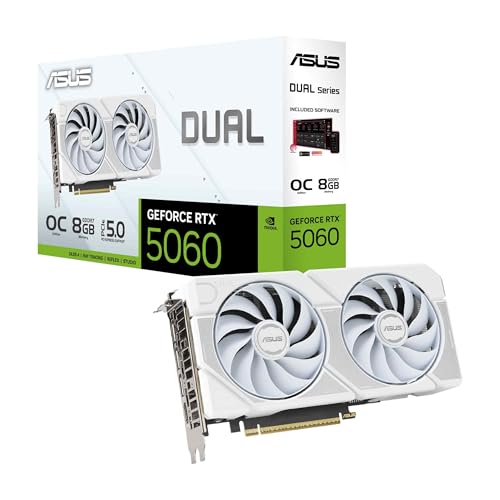 ASUS Dual GeForce RTX 5060 8GB GDDR7 WhiteRTX5060|8GB|OC9 x 4.8 x 0.1 inches2.4 PoundsCheck on Amazon
My Time at Sandrock launched on PC on November 2, 2023, and it is not a demanding game. This crafting and life-sim title asks for a DirectX 11 graphics card as old as the GeForce GTX 760 or AMD Radeon 7950 at minimum, and its recommended GPU — the GeForce GTX 1060 or Radeon RX 580 — is a 1080p-class part from 2016. If your PC was built at any point in the last decade, there is a good chance it already meets or beats what Sandrock needs. This guide walks through the official requirements, what each GPU tier realistically gets you at 1080p, 1440p and 4K, how much CPU, RAM and storage the game actually uses, and complete build suggestions.
How Demanding Is My Time at Sandrock?
Not very, and the official specifications back that up. The minimum GPU, a GeForce GTX 760 or Radeon 7950, launched back in 2013, and the recommended card is the GTX 1060 / RX 580. The number that stands out is the 50 GB install footprint, which is large for a game that looks this light, along with the developer’s note recommending an SSD. On the processor side, the recommended CPUs (Core i7-9700K / Ryzen 7 2700X) sit a tier above what such a modest recommended GPU would normally suggest, so the town simulation and its many NPCs do make some use of the CPU — but any modern quad-core or better clears that bar easily. In practice: integrated graphics will struggle, but almost any discrete GPU from the last several years runs Sandrock at 1080p, and 1440p and 4K are within reach of mid-range cards rather than requiring a flagship.

MSI GeForce RTX 4060 Ventus 2X Black 8G OC Gaming Graphics Card - 8GB GDDR6X, PCI Express Gen 4, 128-bit, 3X DP v 1.4a, HDMI 2.1a (Supports 4K & 8K HDR)
One of the home product options compared in this guide.
View on Amazonmsi Gaming RTX 3050 Ventus 2X 6G OC Graphics Card (NVIDIA RTX 3050, 96-Bit, Boost Clock: 1492 MHz, 6GB GDDR6 14 Gbps, HDMI/DP, Ampere Architecture)
One of the home product options compared in this guide.
View on AmazonASUS Dual NVIDIA GeForce RTX 5060 8GB GDDR7 OC Edition (PCIe 5.0, 8GB GDDR7, DLSS 4, HDMI 2.1b, DisplayPort 2.1b, 2.5-Slot Design, Axial-tech Fan Design, 0dB Technology), 3 Year Warranty
One of the home product options compared in this guide.
View on AmazonASUS Dual GeForce RTX 5060 8GB GDDR7 White OC Edition Gaming Graphics Card | PCIe 5.0, HDMI 2.1b, DisplayPort 2.1b, 2.5-slot design, Axial-tech Fans, 0dB Technology
One of the home product options compared in this guide.
View on AmazonMy Time at Sandrock Official PC System Requirements
| Component | Minimum (official) | Recommended (official) |
|---|---|---|
| OS | Win 10 | Win 10 |
| Processor | Intel Core i3-2100 | AMD FX-6300 | Intel Core i7-9700K | AMD Ryzen 7 2700X |
| Memory | 8 GB RAM | 16 GB RAM |
| Graphics | Nvidia GeForce GTX760 | AMD Radeon 7950 | Nvidia GeForce GTX1060 | AMD Radeon RX 580 |
| DirectX | Version 11 | Version 11 |
| Storage | 50 GB available space | 50 GB available space |
Source: the official My Time at Sandrock Steam store listing (app 1084600), checked October 2026. Publishers can update these specs after patches.
Those are the developer’s own published figures. The only thing worth flagging beyond the table is storage: Sandrock needs 50 GB of free space and the developers recommend installing it on an SSD. They also note that the requirements may change in future updates.
Best GPU for My Time at Sandrock by Resolution
1080p
1080p is where Sandrock is happiest and where the official recommended spec lands: a GeForce GTX 1060 or Radeon RX 580 with 16 GB of RAM is enough to run the game at 1080p with settings turned up. If you want headroom for high-refresh play or for other games in your library, the AMD Radeon RX 7600 is far beyond the official recommendation, and current-generation options such as the GeForce RTX 5060 or Radeon RX 9060 XT do the same job. Older cards including the GTX 1060, GTX 1650 and RX 570 all meet or beat the recommended target.
1440p
1440p is a modest step up rather than a wall. Cards around the official recommended tier can handle it if you trim a few settings, and a mid-range current card — GeForce RTX 5060 Ti, Radeon RX 9060 XT, or something in the NVIDIA GeForce RTX 4070 SUPER class — gives you comfortable high-refresh 1440p with room to spare. This is the resolution most PC players should target for Sandrock, and you do not need a flagship to get there.
4K
4K is the only resolution where Sandrock starts to ask for real GPU muscle, and even there the bar is lower than for a modern AAA release. A NVIDIA GeForce RTX 4070 Ti SUPER will drive 4K comfortably, as will current cards such as the GeForce RTX 5070 or Radeon RX 9070. If you are on an older GPU, dropping to 1440p or reducing your resolution is a far cheaper route to a smooth frame rate than buying a new card for a game this light.
CPU, RAM and Storage for My Time at Sandrock
The official CPU minimum is ancient — an Intel Core i3-2100 or AMD FX-6300 — and the recommended parts are an Intel Core i7-9700K or AMD Ryzen 7 2700X. That means a modern six-core such as the AMD Ryzen 5 7600 is already well past what Sandrock needs, the AMD Ryzen 7 7800X3D is far beyond it, and Intel owners will find the Intel Core i5-14600K more than sufficient. If you are building fresh, choose the CPU that suits the rest of your library — Sandrock will not be the limiting factor. Memory is straightforward: 8 GB is the official minimum, 16 GB is the recommended figure and the sensible target, and a 32 GB kit such as Corsair Vengeance DDR5 32GB is nice-to-have rather than necessary. Storage is the one area where the official notes are emphatic: Sandrock needs 50 GB of space and the developers recommend installing it on an SSD, so a drive like the Samsung 990 Pro 2TB NVMe SSD is ideal, though any SATA SSD is perfectly adequate for a game this light.
Recommended PC Builds for My Time at Sandrock
1080p budget build: AMD Radeon RX 7600 + AMD Ryzen 5 7600 + 16 GB DDR5 — well above the official recommended spec, so high-settings 1080p is easy and you get headroom for other games. If you already own a GTX 1060, RX 580 or anything newer, you can skip this build entirely for Sandrock.
1440p sweet-spot build: NVIDIA GeForce RTX 4070 SUPER + AMD Ryzen 7 7800X3D + 32 GB DDR5 + 2TB NVMe SSD — comfortable high-refresh 1440p, though for Sandrock alone a cheaper mid-range card would do the job just as well.
4K build: NVIDIA GeForce RTX 4070 Ti SUPER + AMD Ryzen 7 7800X3D + 32 GB DDR5 + fast NVMe SSD — for 4K in Sandrock and for heavier games elsewhere.
Is It Worth Upgrading Your PC for My Time at Sandrock?
For Sandrock alone, probably not. The game runs on graphics hardware from 2013, so if you can already play modern titles at all, you can play this one. If you are upgrading anyway because your library has moved on, the graphics card still delivers by far the biggest jump in performance, and a mid-range GPU will carry you through Sandrock at any resolution you like. The two cheap wins specific to this game are more RAM — 16 GB, matching the official recommendation — and an SSD, since the developers recommend installing Sandrock on one and the 50 GB footprint makes a mechanical drive feel slow. Beyond that, target the weakest link in your existing build rather than replacing everything at once.
Can You Play My Time at Sandrock on a Laptop or Handheld?
Sandrock is a good fit for laptops and handhelds. On the laptop side, the official recommended GPU is a GTX 1060, so a notebook with a GTX 1060, GTX 1650, RTX 3050 or anything newer will run the game well at 1080p; expect the usual trade-offs in battery life and fan noise rather than any trouble from the game itself. Handhelds such as the Steam Deck and ROG Ally comfortably clear the official minimum and sit near or above the recommended tier on their 800p–1080p screens, which makes Sandrock a natural portable pick. Keep it on the internal SSD or a fast microSD card, and remember the 50 GB install size when budgeting storage.
How to Boost FPS in My Time at Sandrock
Because Sandrock is light, most players will not need to do much here. If frame rates are lower than you would like, start by lowering resolution — going from 4K to 1440p, or 1440p to 1080p, is the single biggest gain — then reduce the more expensive graphics options such as shadows, draw distance and effects quality. Check the in-game graphics menu for any resolution-scaling or upscaling option your build supports and use it if available. Keep your GPU drivers current, close background applications, and leave the game installed on an SSD as the developers recommend. A stable, slightly lower setting almost always feels better than a maxed-out one that stutters.
Frequently Asked Questions
Can my PC run My Time at Sandrock?
The official minimum is an Intel Core i3-2100 or AMD FX-6300, 8 GB of RAM, a GeForce GTX 760 or Radeon 7950, and 50 GB of free space. The recommended spec is a Core i7-9700K or Ryzen 7 2700X, 16 GB of RAM and a GeForce GTX 1060 or Radeon RX 580. If your PC has a discrete GPU from the last several years and 16 GB of memory, you are comfortably above the recommended line.
Is My Time at Sandrock demanding on PC?
No. It is a DirectX 11 crafting and life-sim game whose recommended graphics card is a GTX 1060 / RX 580 and whose minimum GPU dates back to 2013. The main practical consideration is the 50 GB install size and the developer’s recommendation to use an SSD.
What GPU do I need for My Time at Sandrock at 1440p 60fps?
Less than you might expect. A mid-range card such as a Radeon RX 9060 XT or GeForce RTX 5060-class GPU — or the NVIDIA GeForce RTX 4070 SUPER if you want headroom for other games — is comfortably above the official recommendation and gives you plenty of room at 1440p. Even the official recommended GTX 1060 / RX 580 tier can handle 1440p with some settings reduced.
How much RAM does My Time at Sandrock need?
The official minimum is 8 GB and the recommended figure is 16 GB. 16 GB is the sensible target for a modern gaming PC generally, and it leaves headroom for the game’s town simulation. 8 GB will run Sandrock at minimum settings, but 16 GB is what the developers list for their recommended configuration.
Do I need an SSD for My Time at Sandrock?
The developers recommend installing Sandrock on an SSD, and the game needs 50 GB of free space. It is a recommendation rather than a hard requirement, but an SSD noticeably reduces load times — an NVMe drive like the Samsung 990 Pro is ideal, though a SATA SSD is perfectly adequate for a game this light.









