Our Top Picks
 ASUS Dual GeForce RTX 4060 Ti EVO OCRTX4060Ti|OC|8GB|EVO8.9 x 4.9 x 2 inches1.4 poundsCheck on Amazon
On average the desktop RTX 3060 Ti is faster than the RTX 4060 Laptop GPU, but the gap is anywhere from nothing to large depending on the game and on the laptop’s power limit, and the 4060 Laptop uses far less power and adds DLSS 3 frame generation. Notebookcheck’s aggregate ranking puts the 3060 Ti about 16 percent above the average 4060 Laptop, yet individual games in the same review show everything from a tie to a wide lead.
Spec sheet comparison
| Spec | Desktop RTX 3060 Ti | RTX 4060 Laptop GPU |
|---|---|---|
| Architecture | Ampere, GA104 | Ada Lovelace |
| CUDA cores | 4,864 | 3,072 |
| Memory | 8 GB GDDR6 | 8 GB GDDR6 |
| Memory bus | 256-bit | 128-bit |
| Memory bandwidth | 448 GB/s | lower, tied to the 128-bit bus |
| Boost clock | about 1.67 GHz | 1,470 to 2,370 MHz range, set by the laptop maker |
| Power | 200 W, 600 W supply recommended | 35 to 115 W |
| DLSS | DLSS 2 upscaling | DLSS 3 with frame generation |
| Upgradable | Yes, plug-in card | No, soldered |
The card with 58 percent more shader cores and double the bus width keeps a basic advantage in raw throughput. The laptop chip counters with higher clocks, a larger cache, and the newer feature set at about half the power ceiling or less.

Acer Nitro 16S AI Copilot+ PC Gaming Laptop | AMD Ryzen AI 7 350 Processor | NVIDIA GeForce RTX 5070 Ti Laptop GPU | 16" WQXGA IPS 180Hz Display | 16GB DDR5 | 1TB Gen 4 SSD | Wi-Fi 6E | AN16S-61-R5FY
Chosen because it specifies AMD Ryzen AI 7 350 Processor and NVIDIA GeForce RTX 5070 Ti Laptop GPU.
View on Amazon
maxsun Graphics Card GeForce RTX 3060 Ti OC Edtion 8G GDDR6 Vidoe Gaming Computer Graphics Cards GPU for Copmputer Gaming PC PCI Express 4.0 x16 HDMI 2.1
Picked as a relevant option in this category.
View on Amazon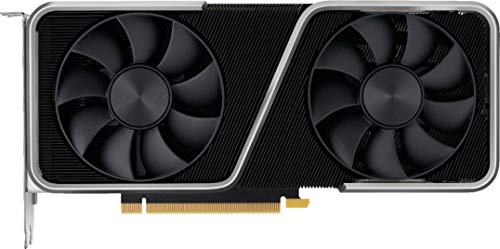
NVIDIA GeForce RTX 3060 Ti Founders Edition 8GB GDDR6 PCI Express 4.0 Graphics Card (Renewed)
Picked as a relevant option in this category.
View on AmazonASUS Dual GeForce RTX 4060 Ti EVO OC Edition 8GB GDDR6 (PCIe 4.0, 8GB GDDR6, DLSS 3, HDMI 2.1a, DisplayPort 1.4a, Axial-tech Fan Design, Auto-Extreme Technology), 3 Year Warranty
Chosen because it specifies 8GB GDDR6 and DLSS 3.
View on AmazonWhat the benchmark sites say
Notebookcheck’s comparison pages list the 3060 Ti at roughly 116 percent with the 4060 Laptop at 100 percent in the aggregate. Game-by-game results in the same tool are mixed. In some titles the two are separated by a frame or two, while in others the desktop card pulls well ahead, which is consistent with a wider memory bus helping where bandwidth matters. NanoReview likewise lists the 3060 Ti with a lead at 1440p. These are published aggregate results and individual figures depend on the test machines, so treat them as a direction, not as a promise for any given laptop.
Reviewers also say the average 4060 Laptop sits between the 3070 Laptop and 3070 Ti Laptop in synthetic tests. That is useful context because those older laptop chips are cut-down parts that run well below their desktop namesakes.
The power limit changes the answer
Notebookcheck’s tables list RTX 4060 Laptop machines at power targets from around 75 W in budget designs to 140 W in a high-end 16-inch model, which counts combined boost power. The same chip name therefore covers a wide spread. A 140 W 4060 laptop narrows the gap to the 3060 Ti, while a 75 W model widens it. If you shop on a budget, look for the stated graphics wattage in the maker’s spec sheet. Many listings omit it, and a fair comparison is impossible without it.
| Laptop power setting | Likely relation to a desktop 3060 Ti |
|---|---|
| Low (around 60 to 80 W) | Noticeably slower in most games |
| Mid (around 90 to 105 W) | Behind on average, close in some titles |
| High (115 W and above with boost) | Closest, ties in some games, still behind in bandwidth-heavy ones |
This table is a qualitative reading of how reviewers describe the trend, not a measured chart.
Which games and resolutions each suits
Both have 8 GB of video memory, so they hit the same texture ceiling. Publisher store pages for recent releases commonly list 8 GB-class cards in their recommended tiers for 1080p, and some list more for the top texture settings. At 1080p, both handle current games at high settings with sensible adjustments. At 1440p, the desktop card’s wider bus gives it a consistent advantage, and the laptop leans more on DLSS upscaling and frame generation. At 4K, neither is a native-resolution card for new releases.
- Esports and older games: both far exceed a typical 144 Hz target, and the laptop’s power efficiency means less fan noise.
- Demanding single-player titles: the desktop card keeps the lead; the laptop can narrow it if frame generation is supported by the game.
- Ray tracing: the 4060 Laptop’s newer RT cores help, but 8 GB limits what settings fit.
- Creative work: both are usable for editing and light 3D work.
Platform and socket differences
A desktop 3060 Ti needs a case with space for the card, a PCIe slot, and a power supply of about 600 W as NVIDIA’s guidance suggests. In return, it can move into a new system later. The 4060 Laptop GPU is part of the motherboard and comes with the machine’s processor, display and cooling already chosen. The processor matters: a gaming laptop with a weak CPU can hold back either GPU, and desktops allow CPU swaps. Laptops also share the thermal budget between CPU and GPU, so a hot processor can reduce graphics power.
Upgrade logic
If you own a desktop 3060 Ti, buying a 4060 laptop to gain speed makes no sense; buy it only to gain portability. If you own an older laptop with a 3050 or 3060 Laptop GPU, the 4060 Laptop is an improvement: Notebookcheck says it beats the RTX 3060 Laptop by a notable margin, with 27 percent mentioned in a preliminary review. If you are on a desktop with an older card and are considering used options, the 3060 Ti is still an acceptable mid-range choice for 1080p, but newer cards such as the RTX 50 series offer better efficiency and features. NVIDIA’s laptop table also lists the RTX 5060 Laptop with 3,328 cores, 8 GB of GDDR7 and a 45 to 100 W range, which is the current successor to the 4060.
Common mistakes
- Treating the two as the same class because both have 8 GB. The memory bus, core count and power rating differ widely.
- Ignoring wattage. A model-to-model difference can be larger than the difference between GPU names.
- Expecting a laptop to match the desktop card at sustained load in a thin chassis. Cooling limits show up after long sessions.
- Counting on frame generation in every game. It only works in titles that include it, and it adds some latency.
- Forgetting the cost of the rest of the desktop system, including monitor and peripherals, when comparing against a laptop.
Pick one if …
| Pick this if | Choice |
|---|---|
| You game at a desk and want the best speed per spend | Desktop with a 3060 Ti or newer card |
| You need to carry the machine | RTX 4060 Laptop |
| You like DLSS 3 frame generation | RTX 4060 Laptop |
| You want to upgrade piece by piece | Desktop |
| You want lower noise and power draw | RTX 4060 Laptop |
Alternatives
- RTX 4070 Laptop GPU: 4,608 cores, which reviewers report as equal to a desktop 3060 Ti within a few percent.
- RTX 5060 Laptop GPU: the current-generation laptop equivalent.
- A used desktop RTX 3070 or a newer mid-range card: for desk users who want more headroom than a 3060 Ti.
Frequently Asked Questions
Is the RTX 4060 laptop as good as a desktop 3060 Ti?
Not on average. Notebookcheck’s aggregate puts the desktop card ahead, though some games show a tie and a high-wattage laptop comes closest.
Why does the laptop 4060 lose with newer architecture?
It has fewer cores and half the memory bus width, and it runs at a much lower power limit. Architecture improvements recover part of the gap but not all of it.
Do both have the same VRAM?
Yes, both carry 8 GB of GDDR6, though the desktop card moves data over a 256-bit bus compared with 128-bit on the laptop part.
Does DLSS 3 make up the difference?
In supported games, frame generation raises displayed frame rates a lot, but it is a different measure than native rendering. It is available only on the laptop chip of the two.
Can the laptop be upgraded?
Almost never. The GPU is soldered to the board in nearly every gaming laptop, so choose the model with your needs for the next few years in mind.
Which is better value for 1080p gaming today?
Both handle 1080p well. A used or discounted desktop system gives more speed, while the laptop wins on portability and low power use.
FAQ
Is the RTX 4060 laptop as good as a desktop 3060 Ti?
Why does the laptop 4060 lose with newer architecture?
Do both have the same VRAM?
Does DLSS 3 make up the difference?
Can the laptop be upgraded?
Which is better value for 1080p gaming today?
More from Amazon
Programs that pair well with the guide above. Offers and eligibility are set by Amazon and may change.
Free shipping on eligible items, Prime Video and more. Eligible new members can start with a free trial.
Start a Prime free trialAd-free music streaming. Eligible new subscribers can start with a free trial.
Try Music Unlimited freeA Prime membership for ages 18-24 with a trial period. Eligibility is set by Amazon.
See Prime for Young AdultsAudiobooks and podcasts to listen to on the go. Eligible new members can start with a free trial.
Try Audible freeAs an Amazon Associate we earn from qualifying purchases.