Key takeaways
- Ultra-smooth motion and reduced latency on high-refresh displays.
- Exceptionally light bodies, several under 40 grams.
- Top-tier sensors with flawless tracking at any DPI.
- Long battery life on the best wireless models despite hyperpolling.
An 8000Hz polling rate means your mouse reports its position to the PC eight thousand times per second, eight times more often than the old 1000Hz standard. For competitive FPS players, that translates to smoother cursor motion and lower click-to-photon latency, especially on high-refresh monitors. The catch is that not every mouse implements it cleanly, and not every system benefits equally.
This review cuts through the marketing to look at the best 8000Hz gaming mice available now, from the featherweight Razer Viper V3 Pro to the value-driven HyperX Pulsefire Haste 2, so you can decide whether hyperpolling belongs in your setup.
Our top picks
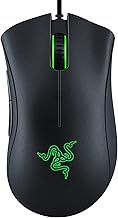
 Razer DeathAdder V3 Wired Gaming Mouse
- Enjoy a level of speed and control favored…
- Flawless tracking performance on a wider variety of…
- From an improved 90-million click lifecycle with zero…
| Product | Key specs | |
|---|---|---|
 Razer Viper V3 Pro Wireless Esports Gaming Razer Viper V3 Pro Wireless Esports Gaming | Check price | |
 Corsair Sabre v2 PRO Ultralight FPS Wireless Corsair Sabre v2 PRO Ultralight FPS Wireless | Check price | |
| Razer DeathAdder V3 Wired Gaming Mouse | Enjoy a level of speed and control favored… Flawless tracking performance on a wider variety of… From an improved 90-million click lifecycle with zero… | Check price |
 Rapoo VT7 Wireless Gaming Mouse Rapoo VT7 Wireless Gaming Mouse | 【53g Ultra Lightweight】Featuring optimized hand grip and more… 【Up to 750 Hours Battery Life】Upgraded with Nordic… 【True 8K Wireless Polling Rate】Enjoy top-tier native 8000Hz… | Check price |
 HyperX Pulsefire Haste 2 HyperX Pulsefire Haste 2 | Easier mouse movement for easier wins: Game at… Incredibly precise HyperX 26K Sensor: Say hello to… 8000Hz polling rate for maximum performance: The HyperX… | Check price |
 ENDGAME GEAR XM2 8k Gaming Mouse ENDGAME GEAR XM2 8k Gaming Mouse | Blazing-Fast 8000Hz Polling Rate: Experience next-level responsiveness with… Precision PixArt PAW3395 Sensor: Featuring up to 26,000… Kailh GX Switches: Exclusive to Endgame Gear, these… | Check price |
 Rapoo VT7 Wireless Gaming Mouse Rapoo VT7 Wireless Gaming Mouse | 【53g Ultra Lightweight】Featuring optimized hand grip and more… 【Up to 750 Hours Battery Life】Upgraded with Nordic… 【True 8K Wireless Polling Rate】Enjoy top-tier native 8000Hz… | Check price |
 G59 Wireless Gaming Mouse G59 Wireless Gaming Mouse | 【Never-Ending Power System】This wireless gaming mouse features a… 【8000Hz Polling Rate & 68g Lightweight】Dominate the competition… 【PRO-GRADE PAW3950 SENSOR】Experience flawless, pixel-perfect tracking with the… | Check price |
As an Amazon Associate we earn from qualifying purchases at no extra cost to you.
🎮 Get More From Your Setup — Free
Prime Gaming gives you free PC games every month, in-game loot, and a free Twitch channel sub — plus fast free shipping on all the gear above. New members get a 30-day free trial.
Watch: 8000hz Mouse: Review & Buyer’s Guide — Video Review
Design & Build
The standout theme across this category is weight. The Corsair Sabre v2 Pro tips the scales at just 36 grams and the Razer Viper V3 Pro at 54 grams, both achieving that without the honeycomb shells of earlier ultralights. The ATTACK SHARK R5 Ultra uses carbon fiber to hit 39 grams while staying wireless, and the Rapoo VT7 packs true 8K wireless into a 53-gram body with a claimed 750-hour battery.
Shapes vary from the safe ergonomic curve of the Razer DeathAdder V3 to the neutral symmetry of the Corsair and Rapoo. Switch quality is uniformly high, with optical or mechanical switches rated for tens of millions of clicks.
Performance
Sensor performance is elite across the board. The Viper V3 Pro’s 35K optical sensor and the ATTACK SHARK’s 42K PAW3950 track flawlessly at any sane DPI, and tracking precision is not the differentiator here, polling stability is. Wired mice like the DeathAdder V3 and Pulsefire Haste 2 deliver rock-solid 8KHz without wireless dongle overhead, while the best wireless units maintain it without the battery cratering.
In practice, 8000Hz feels most tangible during fast flicks and tracking on 240Hz-plus displays. On lower-refresh monitors or older CPUs the benefit shrinks, and the higher USB load can even hurt weaker systems, so headroom matters.
Pros & Cons
- Ultra-smooth motion and reduced latency on high-refresh displays.
- Exceptionally light bodies, several under 40 grams.
- Top-tier sensors with flawless tracking at any DPI.
- Long battery life on the best wireless models despite hyperpolling.
- Diminishing returns on sub-240Hz monitors or older CPUs.
- Higher system load at 8KHz can stress weaker PCs.
- Premium pricing on the flagship wireless options.
Alternatives to Consider
If wireless 8K feels like overkill, the wired HyperX Pulsefire Haste 2 delivers the same polling benefit for far less by skipping the battery and dongle. Players who want maximum battery endurance alongside true 8K wireless should look at the Rapoo VT7, while grip-shape traditionalists will feel most at home on the Razer DeathAdder V3.
Frequently Asked Questions
Do I need a special monitor for 8000Hz to matter?
The benefit scales with refresh rate. On a 240Hz or 360Hz display the smoothness is noticeable; on a 60Hz or 144Hz panel it’s far harder to perceive.
Will 8000Hz slow down my PC?
It can on older or weaker CPUs, since the higher report rate increases USB polling overhead. Modern mid-range and high-end systems handle it comfortably.
Is wired or wireless better for 8KHz?
Wired guarantees stable 8KHz with no dongle. Modern flagship wireless mice match it, but budget wireless models sometimes drop the rate to save battery.
Does 8000Hz drain the battery faster?
Yes, hyperpolling is more power-hungry, though top models like the Rapoo VT7 still deliver hundreds of hours by optimizing their MCU and power design.
Verdict
An 8000Hz mouse is a worthwhile upgrade if you run a high-refresh monitor and a capable PC. The Razer Viper V3 Pro is the all-round flagship pick, the Corsair Sabre v2 Pro the choice for weight obsessives, and the Pulsefire Haste 2 the smart value entry into hyperpolling.