Key takeaways
- Choose SteamOS if you want a handheld-first, plug-and-play experience with superb battery life on a device like the Steam Deck OLED.
- Choose Windows if you play competitive multiplayer titles that rely on anti-cheat systems SteamOS cannot yet support.
- Choose SteamOS if you value low maintenance and dislike managing drivers, updates, and background software.
- Choose Windows if you want maximum compatibility, modding, and access to every storefront and the newest releases.
- Consider both if you own a powerful AMD machine, since dual-booting lets you enjoy the strengths of each platform.
What's inside
The rivalry between SteamOS and Windows has never been more relevant than in 2026. Valve’s Linux-based platform, proven on the Steam Deck, has shown that console-like simplicity and strong performance are possible without Windows, while Microsoft’s OS still holds the crown for compatibility. Choosing between them shapes which hardware you buy and how you play.
This comparison breaks down where each platform genuinely wins, using the devices that best represent them. If you are torn between a Steam Deck-style handheld and a full Windows gaming laptop, the sections below will help you decide with confidence.
As an Amazon Associate we earn from qualifying purchases at no extra cost to you.


![It Takes Two - Standard - Steam PC [Online Game Code]](https://m.media-amazon.com/images/I/71WOIg3U9hL._AC_UY218_.jpg)
⚡ Save on Your Next PC — Amazon Prime
Prime members get fast free shipping on the systems above, plus early access to Prime Day & Black Friday PC deals. New members get a 30-day free trial.
Watch: Steamos Vs Windows For Gaming — Video Review
Quick Verdict
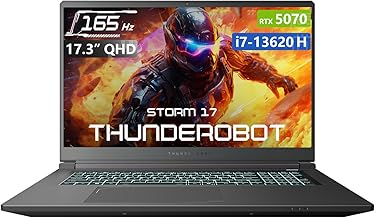
SteamOS is the better choice for players who want a streamlined, handheld-first experience with great battery life and zero maintenance, exemplified by the Steam Deck OLED. Windows remains the pick for maximum compatibility, competitive multiplayer, and raw desktop-class power, as delivered by machines like the Thunderobot Storm 17. Your dominant game library and how much tinkering you enjoy will settle the debate.
SteamOS
SteamOS turns gaming into a console-like ritual. Boot the Steam Deck OLED and you are dropped straight into a polished, controller-friendly interface with suspend-and-resume, excellent power management, and a curated Verified badge system that tells you exactly what runs well. The 1TB and 2TB OLED models offer a gorgeous 90Hz HDR screen and long battery life that make handheld sessions genuinely relaxing.
The trade-off is compatibility. SteamOS relies on Proton to translate Windows games, and while the majority of single-player titles run flawlessly, some anti-cheat multiplayer games remain blocked. For a huge slice of the modern library, though, the experience is effortless and low-maintenance, with no driver updates or background bloat to manage.
Windows
Windows is the universal key to PC gaming. On a machine like the Thunderobot Storm 17 with an RTX 5070 and a 165Hz display, or a value-focused HP Victus build, virtually every game, storefront, and anti-cheat system simply works. Competitive shooters, modding communities, and the newest releases all target Windows first, so you rarely wait or worry about support.
That flexibility comes with responsibility. Windows asks you to manage updates, drivers, and the occasional bloat, and it lacks the instant, console-like flow of SteamOS out of the box. But for players who want the widest possible library and desktop-grade horsepower, no platform matches its reach in 2026.
Which Should You Choose?
- Choose SteamOS if you want a handheld-first, plug-and-play experience with superb battery life on a device like the Steam Deck OLED.
- Choose Windows if you play competitive multiplayer titles that rely on anti-cheat systems SteamOS cannot yet support.
- Choose SteamOS if you value low maintenance and dislike managing drivers, updates, and background software.
- Choose Windows if you want maximum compatibility, modding, and access to every storefront and the newest releases.
- Consider both if you own a powerful AMD machine, since dual-booting lets you enjoy the strengths of each platform.
Frequently Asked Questions
Can SteamOS run all my Windows games?
Most single-player titles run well through Proton, but some anti-cheat multiplayer games are still blocked. Check ProtonDB or the Steam Deck Verified rating before relying on it.
Is Windows faster than SteamOS for gaming?
On identical hardware, performance is often comparable, and SteamOS can even edge ahead in some titles. Windows wins on breadth of compatibility rather than raw speed.
Do I need a Steam Deck to use SteamOS?
The Steam Deck offers the most polished SteamOS experience, but Valve has expanded SteamOS to more devices, and adventurous users can install it on compatible hardware.
Which is better for competitive gaming?
Windows is the safer choice for competitive multiplayer because it supports the widest range of anti-cheat systems that many popular online shooters require.
Final Verdict
SteamOS and Windows now serve two clear kinds of gamer. If you crave a simple, handheld-first, low-maintenance experience, the Steam Deck OLED running SteamOS is a joy. If you demand total compatibility, competitive multiplayer, and desktop power, a Windows machine like the Thunderobot Storm 17 is unbeatable. Let your library and your appetite for tinkering make the final call.