
A 60% keyboard strips away the numpad, function row, arrow cluster, and navigation keys, leaving a compact block that frees enormous desk space for wide, low-sensitivity mouse swings. For competitive FPS players that extra room is a real advantage, and the smaller footprint also travels well to LAN events. The trade-off is a learning curve: those missing keys move onto a function layer you access with a modifier.
In 2026 the 60% category is thriving, with Hall effect magnetic switches, hot-swap PCBs, and doubleshot keycaps trickling down to affordable prices. This roundup picks the compact boards worth your desk space, weighing switch quality, build, and how sensibly each maps the keys a 60% layout leaves out. Whether you prioritize speed or budget, there is a tiny board here for you.
Our top picks
 MageGee Portable 60% Mechanical Gaming Keyboard
- Mini portable 60% compact layout: MK-BOX is a…
- Mechanical red switch: characterized for being linear and…
- Classic charming blue LED backlit: Customize multiple illuminated…
 Aula WIN60 HE
- High-Performance Hall Effect Magnetic Switch Keyboard: The AULA…
- Optimized for FPS Games: Designed for FPS titles…
- Rapid Trigger Gaming Keyboard: Featuring an ultra-low RT…
 60% Wired Mechanical Gaming Keyboard with Blue
- 🌟【60% Keyboard: 61 Keys Compact Design】Ultra-compact layout with…
- 🌟【Mechanical keyboard: Responsive Blue Switches】CACKBIRD gaming keyboard features…
- 🌟【Rainbow LED Backlit Accompanies Your Night】18 LED Rainbow…
| Product | Key specs | |
|---|---|---|
| MageGee Portable 60% Mechanical Gaming Keyboard | Mini portable 60% compact layout: MK-BOX is a… Mechanical red switch: characterized for being linear and… Classic charming blue LED backlit: Customize multiple illuminated… | Check price |
| Aula WIN60 HE | High-Performance Hall Effect Magnetic Switch Keyboard: The AULA… Optimized for FPS Games: Designed for FPS titles… Rapid Trigger Gaming Keyboard: Featuring an ultra-low RT… | Check price |
| 60% Wired Mechanical Gaming Keyboard with Blue | 🌟【60% Keyboard: 61 Keys Compact Design】Ultra-compact layout with… 🌟【Mechanical keyboard: Responsive Blue Switches】CACKBIRD gaming keyboard features… 🌟【Rainbow LED Backlit Accompanies Your Night】18 LED Rainbow… | Check price |
 HyperX Alloy Origins 60 HyperX Alloy Origins 60 | [Petite 60% form factor]: Free up more room… [Full aircraft-grade aluminum body]: The aluminum casing keeps… [Double shot PBT keycaps with side printing]: The… | Check price |
 Snpurdiri 60% Wired Gaming Keyboard Snpurdiri 60% Wired Gaming Keyboard | Classic 60% Compact Design: This 60% gaming keyboard… Ergonomic Design and Mechanical Feel: The mini gaming… Cool RGB Backlit Effect: The 60% rgb keyboard… | Check price |
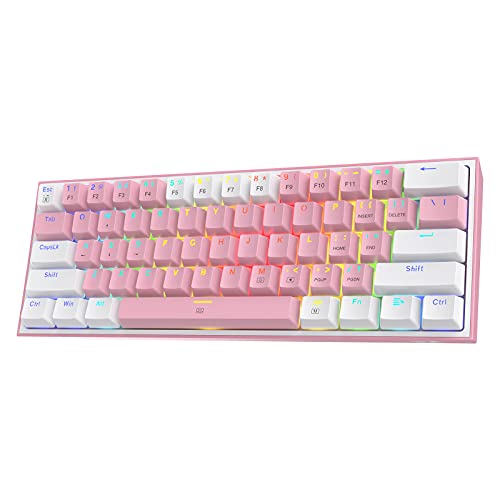 Redragon K617 Wired 60% Compact Hot-Swap RGB Redragon K617 Wired 60% Compact Hot-Swap RGB | 60% Compact, More Room to Aim - Ditching… Swap Switches Without Soldering, Smooth and Quiet -… Vibrant RGB for a True eSports Vibe -… | Check price |
 AULA WIN68 HE Mechanical Gaming Keyboard 60% AULA WIN68 HE Mechanical Gaming Keyboard 60% | Fast Trigger Gaming Keyboard: AULA WIN68 HE magnetic… Hall Effect Keyboard with Magnetic Switch: Equipped with… Customizable Web Driver: The mechanical gaming keyboard is… | Check price |
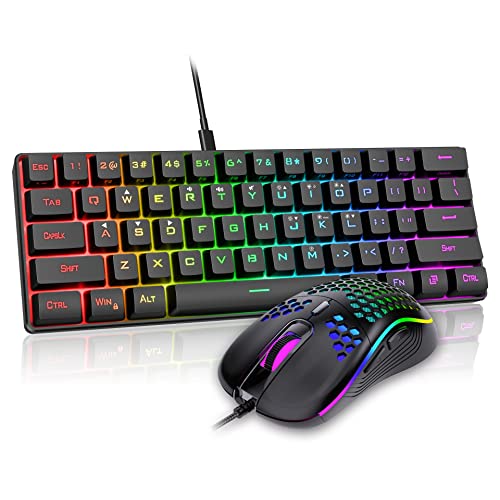 RedThunder 60% Gaming Keyboard and Mouse Combo RedThunder 60% Gaming Keyboard and Mouse Combo | 【60% Compact Layout Keyboard】Ultra-compact layout makes you a… 【Light Up Keyboard】A variety of light colors and… 【Professional Gaming Keyboard】All "core" water-resistant, triple protection design | Check price |
As an Amazon Associate we earn from qualifying purchases at no extra cost to you.
⚡ Save on Your Next PC — Amazon Prime
Prime members get fast free shipping on the systems above, plus early access to Prime Day & Black Friday PC deals. New members get a 30-day free trial.
Watch: Best Compact 60% Keyboard for Gaming — Video Review
How to Choose
- Switch technology: Hall effect magnetic switches enable adjustable actuation and rapid trigger for competitive play; standard mechanical switches cost less and feel familiar.
- Keycap quality: Doubleshot PBT caps resist shine and never lose their legends, a worthwhile upgrade over thin ABS on cheaper boards.
- Function layer: Since arrows and F-keys move to a layer, check that the secondary mapping is logical and, ideally, remappable in software.
- Hot-swap support: A hot-swappable socket lets you change switch feel later without soldering, extending the board’s usefulness.
- Connection: Wired keeps latency lowest for tournaments; some compact boards add wireless for flexibility on the go.
The Best Picks Reviewed
HyperX Alloy Origins 60
The premium mainstream pick. Its aircraft-grade aluminum body, doubleshot PBT keycaps, and reliable mechanical switches make it feel far sturdier than typical 60% boards. A dependable choice for players who want brand support and durability.
Aula WIN60 HE Magnetic
The competitive standout. Its Hall effect magnetic switches offer adjustable actuation and hot-swap sockets, letting you tune trigger depth for faster inputs. If you chase every millisecond in shooters, this is the one to beat.
AULA WIN68 HE Hall Effect
A slightly expanded 60%-class board that keeps magnetic switches and fast trigger while squeezing in a few extra keys. It bridges pure 60% minimalism and everyday usability for players who miss dedicated arrows.
Redragon K617 60% Hot-Swap RGB
The value favorite. It packs a hot-swappable PCB and per-key RGB into a very affordable compact board, making it a superb entry point for anyone curious about the 60% life without a big outlay.
MageGee MK-Box 60% Wireless
The cheapest way in. This 68-key mini board adds wireless convenience and LED backlighting at a rock-bottom price. It is basic, but it is a low-risk way to test whether a compact layout suits you.
Frequently Asked Questions
How do I use arrow keys on a 60% keyboard?
You hold a function key (often Fn) and press mapped keys, commonly WASD or IJKL, to act as arrows. Many boards let you customize this in software.
Are 60% keyboards good for gaming?
Yes, especially for FPS. The compact size frees mouse space for low-sensitivity aiming, and all the gaming-critical keys remain on the base layer.
What are Hall effect switches?
Magnetic switches that sense key position continuously, enabling adjustable actuation points and rapid trigger. They give competitive players faster, tunable inputs.
Do 60% keyboards work for everyday typing?
They can, but the missing number row navigation and arrows take adjustment. If you do heavy spreadsheet work, a 65% or 75% may suit you better.
Final Thoughts
For competitive players the Aula WIN60 HE is the pick to beat, bringing magnetic-switch speed to a compact frame. Want brand-name build quality? The HyperX Alloy Origins 60 delivers. And if you just want to try the format cheaply, the Redragon K617 offers hot-swap flexibility at a beginner price. Any of them reclaims your desk for the mouse.









