Key takeaways
- 16GB works for 1080p projects, simple cuts, and smaller canvases, but it leaves little room for multitasking.
- 32GB is the sensible baseline for 4K editing, Photoshop, Krita, Clip Studio Paint, DaVinci Resolve, and Adobe Premiere Pro.
- 64GB is recommended for long 4K timelines, RAW footage, After Effects compositions, large Photoshop files, and editing while recording or streaming.
- 128GB is useful for 8K work, multicamera editing, complex motion graphics, virtual machines, 3D applications, or multiple demanding creative programs open together.
What's inside
- Quick recommendation by workload
- How much RAM do video editing and drawing actually use?
- Choose RAM capacity from your complete workflow
- What RAM speed is best for editing?
- Compatibility checks before buying
- Decision matrix for common creator setups
- Capacity versus speed: where should the budget go?
- Final recommendation
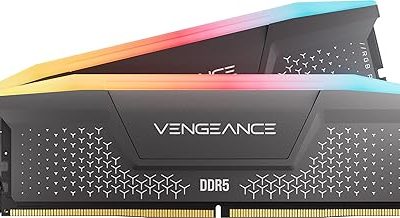
The RAM best for video editing and drawing is 32GB of dual-channel DDR5-6000 for most creators, while 64GB is the better long-term choice for 4K/6K editing, large Photoshop or Krita canvases, and heavy multitasking.
- Quick recommendation by workload
- How much RAM do video editing and drawing actually use?
- Choose RAM capacity from your complete workflow
- What RAM speed is best for editing?
- Compatibility checks before buying
- Decision matrix for common creator setups
- Capacity versus speed: where should the budget go?
- Final recommendation
Quick recommendation by workload
| Workload | Recommended capacity | Practical speed | Best fit |
|---|---|---|---|
| 1080p editing and moderate drawing | 16GB minimum, 32GB preferred | DDR4-3200 or DDR5-5600 | Basic editing PC or affordable laptop |
| 4K editing, RAW photos, large illustrations | 32GB minimum, 64GB preferred | DDR5-5600 to DDR5-6000 | Mainstream creator desktop or workstation laptop |
| 6K/8K footage, multicamera timelines, 3D, animation | 64GB to 128GB | DDR5-5600 to DDR5-6000 | High-end desktop or professional workstation |
| Serious drawing with many apps open | 32GB to 64GB | DDR5-5600 or faster | Digital artist who also browses, records, and edits |
Capacity matters more than small speed differences. A 64GB system that avoids paging to an SSD will usually feel faster than a 32GB system with slightly faster memory. Once you have enough RAM, speed and latency affect timeline responsiveness, exports, brush performance, and general system smoothness.
How much RAM do video editing and drawing actually use?
Video software does not load only the current video frame. It also holds decoded frames, effects data, audio, previews, project metadata, and background caches. Your operating system, browser, plugins, and communication apps need memory at the same time.
- 16GB works for 1080p projects, simple cuts, and smaller canvases, but it leaves little room for multitasking.
- 32GB is the sensible baseline for 4K editing, Photoshop, Krita, Clip Studio Paint, DaVinci Resolve, and Adobe Premiere Pro.
- 64GB is recommended for long 4K timelines, RAW footage, After Effects compositions, large Photoshop files, and editing while recording or streaming.
- 128GB is useful for 8K work, multicamera editing, complex motion graphics, virtual machines, 3D applications, or multiple demanding creative programs open together.
Large drawing files can consume more memory than their pixel dimensions initially suggest. A 10,000 × 10,000-pixel canvas contains 100 million pixels. At four bytes per pixel, one flattened RGBA layer is roughly 381MiB before application overhead. Ten such full-size layers can approach 3.8GiB, and editable programs may keep undo states, masks, previews, and temporary copies as well. A richly layered canvas can therefore use several gigabytes by itself.
Choose RAM capacity from your complete workflow
16GB: workable, but no longer comfortable
Choose 16GB only when your projects are mainly 1080p, your canvases are moderate, and your budget is tight. It can run an editor and drawing application, but opening a browser with many tabs, a music application, and a video call may push the system into virtual memory. Storage-based paging is dramatically slower than physical RAM, causing pauses when switching documents or scrubbing a timeline.
32GB: the practical mainstream choice
32GB is the best starting point for most creators. It gives the operating system enough room while leaving approximately 20GB or more for creative applications, depending on background software. It suits 4K projects, ordinary RAW photo work, layered illustrations, and simultaneous browser use.
For a new desktop, use two matching 16GB modules rather than one 32GB module when possible. Dual-channel operation increases memory bandwidth and helps integrated graphics, which may share system RAM with the processor.
64GB: the safer professional recommendation
Move to 64GB if you edit 4K regularly, work with 6K footage, use After Effects, keep several source files open, or create very large canvases. It is also valuable when you record gameplay, run a browser full of research tabs, or keep Lightroom, Photoshop, an editor, and a screen recorder open together.
Two 32GB modules are generally preferable to four 16GB modules on a DDR5 desktop. Fewer modules can be easier for the memory controller to run at its rated speed, and they leave two motherboard slots available for a future upgrade.
128GB: for sustained heavy workloads
Choose 128GB when your projects are consistently memory-heavy rather than occasionally demanding. Examples include 8K timelines, large After Effects compositions, high-resolution texture work, professional 3D scenes, or editing while running virtual machines. It will not make a simple 1080p export faster if the application was already using less than 32GB.
What RAM speed is best for editing?
For a modern DDR5 desktop, DDR5-6000 is a strong balance of bandwidth, latency, stability, and price. DDR5-5600 is also a sound choice, especially in laptops or systems whose processor officially supports that speed. Very high-rated kits can provide benchmark gains, but they often require more tuning and may not be worth sacrificing capacity.
For older DDR4 systems, DDR4-3200 is a sensible target. Do not buy DDR5 for a DDR4 motherboard: the modules use different physical notches and electrical standards. They are not interchangeable.
Here is the theoretical bandwidth calculation for a dual-channel kit:
DDR5-6000 transfers 6,000 million transfers per second. Each channel is 64 bits, or 8 bytes, wide. Therefore, 6,000 × 8 = 48,000MB/s per channel, and two channels provide approximately 96GB/s of theoretical bandwidth. Real application bandwidth is lower because of latency, overhead, and workload behavior. Capacity still comes first when the alternative is paging to storage.
Memory timings also matter, but they should be considered after capacity and compatibility. A lower latency kit can improve responsiveness slightly, yet doubling RAM from 32GB to 64GB usually has a much larger effect on a memory-constrained editing workflow.
Compatibility checks before buying
| Check | What to verify | Why it matters |
|---|---|---|
| Memory generation | DDR4 or DDR5 | They cannot be mixed or substituted |
| Motherboard limit | Maximum capacity, module count, and supported speeds | A high-capacity kit may not be supported at its advertised speed |
| Processor support | Official memory speed and channel configuration | The CPU’s memory controller affects stability |
| Form factor | DIMM for desktops, SO-DIMM for many laptops | The wrong physical module will not fit |
| Upgrade layout | Open slots and maximum supported module size | Determines whether a future upgrade is practical |
| Profile support | XMP or EXPO compatibility | The advertised speed may require a firmware profile |
Check the motherboard or laptop manufacturer’s memory support list before purchasing. A kit can be electrically compatible but still need a lower setting for reliable operation. On desktops, enable the supported XMP or EXPO profile in firmware after installation; otherwise, the system may run the memory at a conservative default speed.
Many laptops have soldered memory, and some use one soldered portion plus a single SO-DIMM slot. Confirm the upgrade path before buying. If memory cannot be upgraded, 32GB should be treated as a minimum for a serious creative laptop, and 64GB is preferable for long-term use.
Decision matrix for common creator setups
- If you edit 1080p, draw on canvases under 5,000 pixels, and use one major application at a time, buy 32GB if your system supports it; 16GB is acceptable only for a tight budget.
- If you edit 4K while browsing, recording, or using Photoshop, buy 64GB DDR5-5600 or DDR5-6000.
- If you use an integrated GPU, prioritize dual-channel memory and capacity because the graphics processor borrows system RAM.
- If you already own 32GB and your memory usage rarely exceeds 24GB, a faster kit is unlikely to transform your workflow.
- If the operating system frequently reports 90% or more memory usage during editing, upgrade capacity before buying faster RAM.
- If your desktop has four occupied slots, replace the existing modules with a larger matched kit rather than mixing unrelated kits.
Capacity versus speed: where should the budget go?
Use the operating system’s performance monitor while opening your largest project, scrubbing demanding sections, and switching between applications. If memory usage approaches the installed capacity and disk activity rises sharply, buy more RAM. If memory usage remains comfortably below capacity but the system feels sluggish during effects or exports, investigate CPU, GPU, storage, and software configuration before blaming memory speed.
For most buyers, the sensible order is 32GB first, dual-channel operation second, DDR5-5600 or DDR5-6000 third, and tighter timings or extreme frequencies last. A balanced 64GB kit is generally a better creative investment than a very fast 32GB kit.
Final recommendation
The best RAM for video editing and drawing in 2026 is 32GB for mainstream work and 64GB for a creator system intended to last several years. Select DDR5-6000 for a compatible desktop, DDR5-5600 when stability or laptop limits make it more appropriate, and DDR4-3200 for an older platform. Match the memory generation, use two-channel operation, preserve upgrade slots where possible, and spend on capacity whenever your projects include 4K or larger video, layered high-resolution artwork, or frequent multitasking.