Our Top Picks
 Best overallCORSAIR Vengeance RGB DDR5 RAM 32GB32GB (2 x 16GB)5.43 x 0.27 x 1.77 inches0.11 PoundsCheck on Amazon
 Corsair Vengeance RGB RS DDR5 64GB64GB (2 x 32GB)5.43 x 0.27 x 1.77 inches0.11 poundsCheck on Amazon
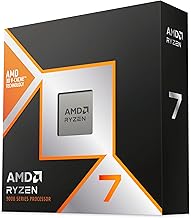
The Ryzen 7 9800X3D loves fast, well-tuned memory, and choosing the right RAM kit can meaningfully improve gaming performance and system responsiveness. Thanks to AMD’s EXPO profiles, getting high speeds with tight timings is easier than ever, but you still need to pick a kit that hits the sweet spot for the 9800X3D’s memory controller.
This roundup gathers excellent DDR5 kits for the 9800X3D from Corsair, G.SKILL, Kingston, TEAMGROUP, Patriot and Lexar, ranging from efficient 32GB dual-channel sets to spacious 64GB configurations. Below you will find how to choose the right memory, followed by a closer look at each recommended kit.
CORSAIR Vengeance RGB DDR5 RAM 32GB (2x16GB) Up to 6000MHz CL30-36-36-76 1.40V AMD EXPO Intel XMP Desktop Computer Memory - Gray (CMH32GX5M2B6000Z30K)
One of the home product options compared in this guide.
View on AmazonCorsair Vengeance RGB RS DDR5 64GB (2 x 32GB) Up to 6000MHz AMD Intel RAM | Desktop Gaming Memory, AMD EXPO & Intel XMP 3.0 Compatible, CL40, Grey, CMG64GX5M2D6000Z40
One of the home product options compared in this guide.
View on Amazon
Lexar Thor Z RGB DDR5 RAM 32GB Kit (2x16GB) 6000MHz CL38 DRAM 288-Pin UDIMM | Supports Intel XMP 3.0 & AMD EXPO On-die ECC, PMIC, 1.35V High-Performance PC Computer Memory for Gaming, AI
One of the home product options compared in this guide.
View on AmazonVerdict at a glance
- Best overall: Corsair Vengeance RGB DDR5-6000 CL30 32GB (2x16GB), the standard sweet-spot kit for the 9800X3D.
- Best low-profile, no-RGB kit: G.SKILL Flare X5 DDR5-6000 CL30 32GB. It clears large air coolers and uses AMD EXPO timings.
- Best 64GB for creators: Kingston FURY Beast DDR5-6000 CL30 64GB (2x32GB).
- Best for tight timings: G.SKILL Trident Z5 Royal Neo DDR5-6000 CL28.
The short version from independent data: the 9800X3D’s large 3D V-Cache makes it far less sensitive to memory speed than other CPUs. TechPowerUp found only about a 2 percent spread in average 1080p frame rates between DDR5-4800 and DDR5-8000. A dual-channel 2x16GB DDR5-6000 CL30 kit with EXPO is still the right target, but there’s no need to pay extra for exotic kits. Ryzen 7 9850X3D owners: the same advice applies. It uses the same memory controller and the same DDR5-6000 sweet spot.
How we compared: kit specifications (speed, CAS latency, voltage, EXPO support, module height) and published memory-scaling data from TechPowerUp, Tom’s Hardware, TechSpot and ComputerBase. We did not bench-test these kits ourselves.
🎮 Get More From Your Setup — Free
Prime Gaming gives you free PC games every month, in-game loot, and a free Twitch channel sub — plus fast free shipping on all the gear above. New members get a 30-day free trial.
Watch: Best Ram For 9800x3d — Video Review
How to Choose RAM for the 9800X3D
- Speed sweet spot: DDR5-6000 is the ideal target for Ryzen 9000, balancing bandwidth with a stable Infinity Fabric ratio.
- Low latency: Look for tight CL28-CL30 timings, which improve the low-latency performance games crave.
- Capacity: 32GB (2x16GB) suits most gamers, while 64GB benefits creators and heavy multitaskers.
- EXPO support: AMD EXPO profiles make it easy to enable rated speeds with one BIOS setting.
- Kit configuration: Always use a matched dual-channel kit rather than mixing single sticks for best stability.
The Best 9800X3D RAM Reviewed
Corsair Vengeance RGB DDR5-6000 CL30
This Corsair Vengeance RGB kit hits the ideal DDR5-6000 target with CL30 timings and EXPO support in a clean 32GB (2x16GB) package. Its balance of speed, low latency, and tasteful RGB makes it an outstanding all-around choice for a 9800X3D gaming build.
G.SKILL Trident Z5 Royal Neo CL28
For enthusiasts chasing the tightest timings, the G.SKILL Trident Z5 Royal Neo delivers DDR5-6000 at an impressive CL28 with EXPO in a striking silver design. This 32GB kit is a premium option that squeezes extra performance from the 9800X3D’s memory controller.
G.SKILL Trident Z5 Neo RGB 64GB
Creators and multitaskers who want capacity will appreciate the Trident Z5 Neo RGB 64GB (2x32GB) kit at DDR5-6000 CL30. It pairs generous headroom with strong speed and RGB flair, making it ideal for gaming plus heavy productivity workloads.
Corsair Vengeance RGB RS 64GB
The Corsair Vengeance RGB RS 64GB kit offers another high-capacity option at DDR5-6000 with EXPO and XMP support. With 2x32GB modules, it gives you plenty of memory for content creation and future-proofing while keeping speeds in the ideal range.
G.SKILL Flare X5 DDR5-6000 CL30 32GB (2x16GB)

G.SKILL Flare X5 Series DDR5 RAM (AMD EXPO) 32GB (2x16GB) Up to 6000MT/s* CL30-36-36-96 1.35V Desktop Computer Memory U-DIMM - Matte Black (F5-6000J3036F16GX2-FX5)
One of the home product options compared in this guide.
View on AmazonThe Flare X5 is G.SKILL’s AMD-focused, low-profile line, and this 32GB kit hits the ideal 9800X3D target: DDR5-6000 at CL30-36-36-96 and 1.35V, with an AMD EXPO profile. The plain black aluminium heat spreaders have no RGB and sit much lower than the Trident Z5 modules above. That matters with big dual-tower air coolers like the Peerless Assassin or NH-D15, whose front fans can overhang the first DIMM slot.
Its 1.35V rating is slightly lower than the 1.40V many CL30 kits need, which means a little less heat. Because it’s an EXPO kit tuned for AMD, it usually trains easily on AM5 boards with an up-to-date BIOS. In practical gaming terms it performs like the Corsair Vengeance CL30 kit. TechPowerUp’s data shows the difference between DDR5-6000 kits with similar timings is within measurement noise on the 9800X3D.
Strengths: the ideal speed and latency, low profile for cooler clearance, lower voltage than many CL30 kits, and a clean look.
Drawbacks: no RGB for showcase builds, and a single colour option.
Choose this over the Corsair Vengeance RGB kit if you run a large air cooler or simply don’t want lighting.
Kingston FURY Beast RGB DDR5-6000 CL30 32GB (2x16GB)

Kingston FURY Beast RGB 32GB (2x16GB) 6000MT/s DDR5 CL30 Desktop Memory | AMD EXPO | Kit of 2 | KF560C30BBEAK2-32
One of the home product options compared in this guide.
View on AmazonKingston’s FURY Beast RGB kit (KF560C30BBEAK2-32) is a mainstream alternative to the Corsair Vengeance RGB. It’s a 2x16GB DDR5-6000 CL30 kit with an AMD EXPO profile, RGB lighting controlled through Kingston’s FURY CTRL software, and Kingston’s limited lifetime warranty. The modules are moderately tall because of the light bar, so check clearance under air coolers.
Kingston is one of the few memory makers that builds its own modules end to end, and FURY Beast EXPO kits appear on many AM5 motherboard qualified vendor lists (QVLs). On a 9800X3D, performance matches other DDR5-6000 CL30 kits. Your choice between this, the Corsair kit and the TEAMGROUP kit below should come down to price, looks and lighting software.
Strengths: the ideal speed and timings, broad QVL coverage, a lifetime warranty and attractive lighting.
Drawbacks: RGB needs Kingston’s software or motherboard sync to customise, and the light bar adds height.
TEAMGROUP T-Force Delta RGB DDR5-6000 CL30 32GB (2x16GB)
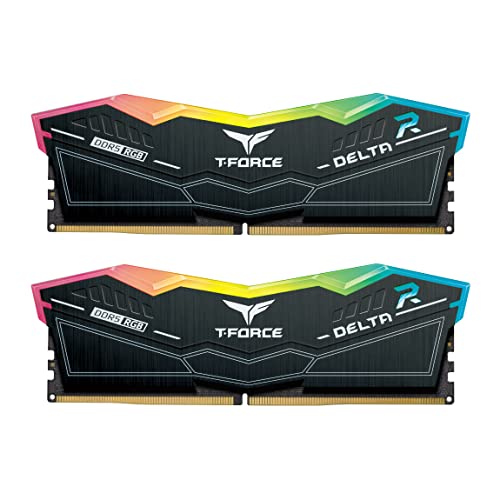
TEAMGROUP T-FORCE DELTA RGB DDR5 Ram 32GB (2x16GB) 6000MHz PC5-48000 CL30 Intel XMP 3.0 AMD Expo Compatible Desktop Memory Black FF3D532G6000HC30DC01
One of the home product options compared in this guide.
View on AmazonThe T-Force Delta RGB is known for its wide, full-length diffuser that lights the whole top edge of each module. This version runs at DDR5-6000 CL30 with both AMD EXPO and Intel XMP 3.0 profiles. Note that TEAMGROUP also sells Delta RGB kits at DDR5-6000 CL38 under very similar names, so check that the listing says CL30 before you buy.
Performance on the 9800X3D matches the other CL30 kits here. The Delta’s appeal is its lighting and its frequent availability in white as well as black, which makes it a good match for showcase builds. As with every kit here, make sure the BIOS is current, since AMD’s AGESA updates have improved DDR5 memory training on AM5.
Strengths: the ideal speed and latency, bright and even RGB, and both EXPO and XMP profiles.
Drawbacks: tall modules, and confusingly similar CL38 versions sold under nearly the same name.
Patriot Viper Venom DDR5-6000 CL30 32GB (2x16GB)

Patriot Viper Venom DDR5 RAM 32GB (2X16GB) 6000MHz CL30 Desktop Memory | Voltage: 1.35v; Supports Intel XMP and AMD EXPO; Module type: UDIMM.
One of the home product options compared in this guide.
View on AmazonThe non-RGB Viper Venom is Patriot’s no-frills performance kit: DDR5-6000 CL30 in a 2x16GB configuration with EXPO and XMP support, under a black aluminium heat spreader. It’s usually one of the more affordable CL30 kits, which makes sense in 2026, when DDR5 prices have risen sharply and memory is a much bigger share of a build than it used to be.
For a 9800X3D, it gives up nothing meaningful to the premium kits in games. The extra money for a CL28 kit like the Trident Z5 Royal Neo buys measurable latency improvements in AIDA64, but frame-rate gains on an X3D chip are within a percent or so. The Viper Venom is the practical value pick for builders who would rather put that money into the graphics card.
Strengths: CL30 timings at a value-oriented tier, a simple design without RGB, and Patriot’s lifetime warranty.
Drawbacks: the heat spreader is taller than the Flare X5’s, and there’s no lighting for windowed builds.
Kingston FURY Beast DDR5-6000 CL30 64GB (2x32GB)

Kingston FURY Beast 64GB (2x32GB) 6000MT/s DDR5 CL30 Desktop Memory | AMD EXPO | Kit of 2 | KF560C30BBEK2-64
One of the home product options compared in this guide.
View on AmazonFor streamers, video editors and anyone who runs heavy workloads alongside games, a 2x32GB kit keeps the 9800X3D in dual channel with plenty of room. This FURY Beast kit (KF560C30BBEK2-64) holds DDR5-6000 at CL30 with an AMD EXPO profile. That’s tighter than the CL40 Corsair Vengeance RGB RS 64GB kit and on par with the G.SKILL Trident Z5 Neo 64GB.
The key point with 64GB is to buy it as a single matched 2x32GB kit rather than four 16GB sticks. On AM5, running four DIMMs usually forces the memory down well below DDR5-6000, because two modules per channel are harder for the memory controller to drive. Two higher-capacity sticks avoid that problem entirely. For gaming alone, 32GB remains enough in 2026, and 64GB won’t raise frame rates.
Strengths: 64GB at full DDR5-6000 CL30 speed, dual-channel stability, and no RGB to clash with workstation builds.
Drawbacks: clearly premium pricing given 2026 memory costs, and no benefit for pure gaming.
Lexar Thor Z RGB DDR5-6000
Rounding out the list, the Lexar Thor Z RGB 32GB kit provides DDR5-6000 CL38 performance with XMP and EXPO support, on-die ECC, and a PMIC for reliability. It is a solid, value-oriented choice for a dependable high-performance system.
9800X3D RAM tiers: 32GB vs 64GB comparison
| Kit | Capacity | Speed / CAS | RGB | Best for | Price tier |
|---|---|---|---|---|---|
| G.SKILL Trident Z5 Royal Neo | 32GB (2x16GB) | 6000 / CL28 | Yes | Enthusiasts, showcase builds | Premium |
| Corsair Vengeance RGB | 32GB (2x16GB) | 6000 / CL30 | Yes | Most gamers | Mid-range |
| Kingston FURY Beast RGB | 32GB (2x16GB) | 6000 / CL30 | Yes | Most gamers | Mid-range |
| TEAMGROUP T-Force Delta RGB | 32GB (2x16GB) | 6000 / CL30 | Yes | RGB-focused builds | Mid-range |
| G.SKILL Flare X5 | 32GB (2x16GB) | 6000 / CL30 | No | Big air coolers, clean builds | Mid-range |
| Patriot Viper Venom | 32GB (2x16GB) | 6000 / CL30 | No | Value CL30 | Budget to mid-range |
| Lexar Thor Z RGB | 32GB (2x16GB) | 6000 / CL38 | Yes | Budget | Budget |
| Kingston FURY Beast 64GB | 64GB (2x32GB) | 6000 / CL30 | No | Streaming, editing | Premium |
| G.SKILL Trident Z5 Neo RGB 64GB | 64GB (2x32GB) | 6000 / CL30 | Yes | Creators who want RGB | Premium |
| Corsair Vengeance RGB RS 64GB | 64GB (2x32GB) | 6000 / CL40 | Yes | Capacity first | Mid-range to premium |
How much does memory speed matter on the 9800X3D?
Less than on almost any other modern CPU. Here’s what independent testing shows:
- TechPowerUp (eight games, eight memory configurations): the spread between the slowest (DDR5-4800 CL40 JEDEC) and fastest kit was about 2 percent in average frame rate at 1080p, and about 1.1 percent at 1440p. JEDEC DDR5-4800 and DDR5-5600 landed within roughly 1.5 percent of a tuned DDR5-6000 CL30 kit. DDR5-8000 didn’t meaningfully beat DDR5-6000 CL30, because it forces a 2:1 memory controller ratio. The 1 percent lows varied more, by up to about 6 to 7 percent in some games.
- AMD’s own data for the 9850X3D: about a 1 percent average difference between DDR5-4800 and DDR5-6000 across more than 30 games, with Cyberpunk 2077 and Far Cry 6 among the titles that gain most.
- By contrast, non-X3D chips: TechSpot measured up to a 12 percent gain in Cyberpunk 2077 on a Ryzen 7 9700X moving from DDR5-6000 CL30 to DDR5-8000. That shows how much the 3D V-Cache hides memory latency.
The practical advice: buy DDR5-6000 at CL30 to CL36 with EXPO, and spend any savings on the graphics card. That’s especially sensible in 2026, when DDR5 prices have climbed steeply.
Single channel vs dual channel
Always aim for two matched sticks, one per channel in slots A2 and B2. Your motherboard manual labels these, and they’re usually the second and fourth slots from the CPU. Tom’s Hardware tested 13 games and found that one 16GB DDR5 stick cut the 9800X3D’s gaming performance by only 2.8 percent on average compared with 2x16GB. That’s much less than the 8 to 10 percent drop seen on regular CPUs. Some memory-heavy games lost more, and ComputerBase showed a 9850X3D on a single 16GB stick roughly keeping pace with a dual-channel 9800X3D. So if memory prices force you to start with one 16GB module, it works, but plan to add a matching second stick soon. Mixing different kits later can cause instability and stop EXPO speeds from working.
EXPO, QVL and first-boot tips
- Update the BIOS first. Newer AGESA versions improve DDR5 training and stability on AM5.
- Enable EXPO. Out of the box, DDR5 runs at a slower JEDEC speed. Select the EXPO profile (some boards call it DOCP) to run the kit at its rated 6000 MT/s.
- Expect a long first boot. AM5 boards train memory on the first boot after a change, which can take a minute or more with a black screen. Don’t power off. Enabling Memory Context Restore afterwards shortens later boots.
- Check the QVL. Your motherboard maker’s qualified vendor list shows the kits validated at their rated speed. Most mainstream DDR5-6000 EXPO kits are listed, but checking avoids surprises.
- Stick to two modules. Four sticks on AM5 usually means lower speeds. For 64GB, buy a 2x32GB kit.
- Don’t buy DDR4. The 9800X3D and every AM5 motherboard support DDR5 only. DDR4 kits won’t fit or work.
How we compared
We ranked these kits on published specifications (speed, CAS latency, voltage, EXPO and XMP support, module height and warranty) and independent memory-scaling data. Our sources were TechPowerUp’s 9800X3D memory scaling review, Tom’s Hardware’s single-DIMM testing, TechSpot’s DDR5-8000 analysis, ComputerBase’s 9850X3D single-channel results and AMD’s published 9850X3D memory data. We also considered owner reports on stability and EXPO compatibility. We did not bench-test these kits ourselves.
Frequently Asked Questions
What memory speed is best for the 9800X3D?
DDR5-6000 is the sweet spot for Ryzen 9000 chips, offering the best balance of bandwidth and a stable 1:1 memory-to-fabric ratio for gaming performance.
Is 32GB or 64GB better?
32GB is plenty for gaming, while 64GB benefits creators, streamers, and heavy multitaskers. Choose based on your workload and budget.
Do lower CL timings matter?
Yes, tighter timings like CL30 or CL28 reduce latency, which the 3D V-Cache chip can leverage for slightly higher frame rates in some games.
What is EXPO?
EXPO is AMD’s memory profile standard, letting you enable a kit’s rated speed and timings with a single BIOS toggle for easy, stable performance.
Is DDR5-8000 worth it for the 9800X3D?
No. TechPowerUp found DDR5-8000 doesn’t meaningfully outperform DDR5-6000 CL30 on the 9800X3D in games. At that speed the memory controller drops to a 2:1 ratio, which cancels out much of the gain. Save the money for the GPU.
Can I use DDR4 with the 9800X3D?
No. The 9800X3D uses the AM5 platform, which supports DDR5 only. DDR4 modules are physically keyed differently and won’t fit an AM5 board.
What is the best RAM for the Ryzen 7 9850X3D?
The same as for the 9800X3D: a 2x16GB DDR5-6000 CL30 kit with EXPO for gaming, or 2x32GB DDR5-6000 for creators. AMD’s own data shows the 9850X3D gains only about 1 percent on average from DDR5-6000 over DDR5-4800, so any kit in this guide works well.
Is one 16GB stick OK while I wait to buy another?
Yes, as a temporary step. Tom’s Hardware measured an average loss of just 2.8 percent on the 9800X3D with a single 16GB stick versus 2x16GB, though some memory-heavy games lose more. Add a matching second module from the same kit line as soon as you can.
Final Thoughts
The best RAM for the Ryzen 7 9800X3D is a DDR5-6000 kit with low CL timings and EXPO support. The Corsair Vengeance RGB CL30 and G.SKILL Trident Z5 Royal Neo CL28 are excellent 32GB choices, while the 64GB Trident Z5 Neo and Vengeance RS suit creators. Stick to the 6000MHz sweet spot, and your 9800X3D will deliver its full gaming potential.