Our Top Picks
The best portable monitor for Nintendo Switch 2 is a 1080p or 1200p-class screen with an HDMI input, a stand that works on a tray table, and a title that actually names Switch support. Of the eight listings below, five mention Switch in the title (one spells it “Swich”) and only one names Switch 2. The rest name PlayStation, Xbox or laptops, which does not rule them out but does mean you should check the listing before buying. Higher refresh rates and QHD panels are listed too, so the table separates what each title says from what you will need to verify.
Side-by-side table of all eight screens

InnoView Portable Monitor, 15.6 Inch FHD 1080P HDMI USB C Second External Monitor for Laptop, Desktop, MacBook, Phones, Tablet, PS5/4, Xbox, Switch, Built-in Speaker with Protective Case
One of the product options compared in this guide.
View on Amazon
ARZOPA 16" 2.5K Portable Monitor, 2560x1600 QHD IPS Display 123% sRGB | Built-in Stand USB-C HDMI Eye Care External Second Screen for Mac Laptop Phone PS4/5 Xbox Switch -Z1RC
One of the product options compared in this guide.
View on Amazon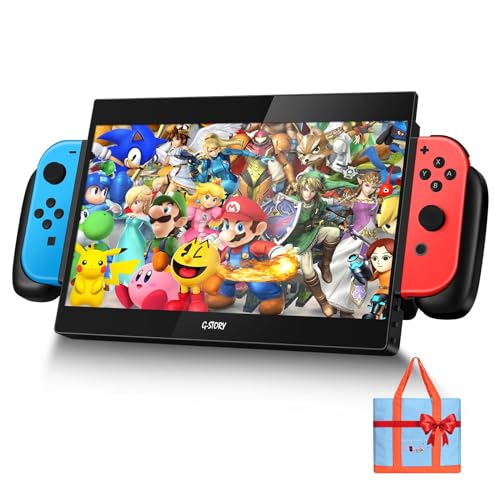
G-Story 10.1" 1080P Portable Gaming Monitor for Switch, IPS USB-C Travel Monitor
One of the product options compared in this guide.
View on Amazon
ARZOPA 16.1'' 144Hz Portable Gaming Monitor 106% sRGB - Z1FC | 1080P FHD Kickstand Portable Monitor with HDR, Ultra Slim, Eye Care, External Second Screen for Laptop, PC, PS5, Mac, Xbox
One of the product options compared in this guide.
View on Amazon
ForHelp 15.6inch Portable Monitor,1080P USB-C HDMI Second External Monitor for Laptop,PC,Mac Phone,PS,Xbox,Swich,IPS Ultra-Thin Zero Frame Gaming Display/Premium Smart Cover
One of the product options compared in this guide.
View on Amazon
cocopar Portable Monitor 15.6 Inch 1080P FHD 60Hz 85% sRGB Travel Monitor with Speaker HDMI USB-C Second Screen for Laptop MacBook Surface PC Xbox PS4/5, VESA Mountable, with Cover Stand
One of the product options compared in this guide.
View on Amazon
VisionOwl Portable Monitor 16 Inch 2.5K QHD 144Hz 16:10 Second Screen, USB-C HDMI HDR Travel Monitor for Laptop PC MacBook PS5 Xbox, VESA Mountable, with Speakers, Built-in Kickstand
One of the product options compared in this guide.
View on Amazon
S123E 12.3 Inches Portable Monitor Touchscreen Monitor for Switch/Switch 2 | 1920 x1280 Ultra Slim Mini Travel Monitor 1280P IPS Display 100% sRGB for Laptop Surface PC Xbox PS4/5 and Office
One of the product options compared in this guide.
View on Amazon| Model | Key point from title | Price tier | Best for |
|---|---|---|---|
| InnoView 15.6″ FHD | 1080p, HDMI and USB-C, speaker, case; Switch named | Budget | Value travel screen |
| ARZOPA 16″ Z1RC | 2560×1600 IPS, 123% sRGB, stand; Switch named | Mid-range | Sharper picture |
| G-Story 10.1″ Gaming | 1080p IPS, USB-C; “for Switch” | Mid-range | Smallest bag footprint |
| ARZOPA 16.1″ Z1FC | 144Hz, 1080p, HDR, kickstand; Switch not named | Mid-range | PC and PS5 gaming |
| ForHelp 15.6″ | 1080p IPS, smart cover; “Swich” typo | Budget | Lowest cost |
| cocopar 15.6″ | 1080p 60Hz, 85% sRGB, speaker, VESA; Switch not named | Mid-range | Desk or wall mounting |
| VisionOwl 16″ | 2.5K QHD 144Hz, 16:10, VESA; Switch not named | Premium | Laptop plus console |
| S123E (HAILESI) 12.3″ | Touchscreen, 1920×1280; Switch/Switch 2 named | Mid-range | Switch 2 specifically |
InnoView 15.6-Inch FHD Portable Monitor
InnoView lists a 15.6-inch 1080p panel with HDMI and USB-C inputs, a built-in speaker and a protective case, and its title names Switch among the supported devices. A case in the box counts for a traveler, because screens this thin scratch easily in a bag. At 1920×1080 on 15.6 inches, the pixel density is roughly 141 ppi (our arithmetic, not a listed spec), which is a sensible match for a 1080p video source. Whether the speaker is loud enough for a plane is a listing question.
Pros
- Case and speaker included per title
- Switch named in the title
Cons
- Refresh rate not stated in the title
- Mounting options not stated
Who it’s for: travelers who want a bundled, low-cost screen.
ARZOPA 16-Inch 2.5K Portable Monitor (Z1RC)
This ARZOPA model pairs a 16-inch 2560×1600 IPS panel with 123% sRGB, a built-in stand and USB-C plus HDMI. Switch appears in the title list. The resolution works out to roughly 189 ppi by our own arithmetic, the sharpest of the larger panels here. But a game rendered below the panel’s native resolution is upscaled, so the extra pixels help text and desktop use more than gameplay. Check Nintendo’s documentation for the resolutions the console can output. The 16:10 shape is a good fit if the same screen doubles as a laptop display.
Pros
- High pixel density for a 16-inch screen
- Built-in stand per title
Cons
- Resolution exceeds what a console outputs
- Mid-range price for a second-screen use
Who it’s for: buyers who also work from a laptop.
G-Story 10.1-Inch Portable Gaming Monitor
G-Story is the smallest listing, a 10.1-inch 1080p IPS screen with USB-C and a “for Switch” label. At 1920×1080 on 10.1 inches the density is about 218 ppi (our arithmetic), so it looks crisp at arm’s length. The size is the draw: it slips into a packed bag and fits a seat-back tray better than a 16-inch panel. The cost is a smaller picture, and the title does not mention a stand, speaker or case, so confirm what is in the box and how it sits on a table.
Pros
- Smallest and easiest to pack
- Switch targeted directly
Cons
- Small picture for shared viewing
- Stand and speaker not named
Who it’s for: carry-on packers who value space over screen size.
ARZOPA 16.1-Inch 144Hz Portable Gaming Monitor (Z1FC)
The title advertises 144Hz, 1080p, 106% sRGB, HDR, a kickstand and an ultra-slim body, aimed at laptops, PCs, PS5, Mac and Xbox. Switch is not named. That does not make it incompatible, but it does mean you should check the listing for console support before buying. A 144Hz panel pays off most with a gaming PC; the console you plan to attach decides how much of that refresh rate it can use, and Nintendo’s documentation sets that limit.
Pros
- 144Hz and HDR in the title
- Kickstand built in
Cons
- Switch not named in the title
- High refresh may go unused on a console
Who it’s for: players who also connect a gaming PC or PS5.
ForHelp 15.6-Inch Portable Monitor
ForHelp offers a 1080p IPS panel with USB-C and HDMI, a zero-frame look and a “premium smart cover”; check the listing for whether that cover also works as a stand. The title mentions “Swich”, an obvious typo, which tells you to read the listing carefully rather than trusting the headline. This is the lowest price tier here, which suits someone who wants a screen for occasional trips. The title says nothing about speakers, brightness or color coverage, so those are questions for the product page.
Pros
- Lowest price tier of the eight
- Smart cover included per title
Cons
- Typo in the title is a mild red flag
- No speaker or brightness data in the title
Who it’s for: occasional travelers on a tight budget.
cocopar 15.6-Inch 1080P Portable Monitor
cocopar lists 1080p at 60Hz, 85% sRGB, a speaker, HDMI and USB-C, VESA mounting and a cover stand. The 85% sRGB figure signals more muted colors than the higher-coverage panels here, and the title says 60Hz, which matches a typical console output anyway. The VESA mount is the useful extra: you can hang it on an arm at home and carry it on trips. Xbox and PS4/5 are named, but Switch is not, so confirm console support in the listing.
Pros
- VESA mounting per title
- Speaker and cover stand included
Cons
- 85% sRGB suggests muted colors
- Switch not named in the title
Who it’s for: buyers who want one screen for desk and travel.
VisionOwl 16-Inch 2.5K QHD 144Hz Portable Monitor
VisionOwl is the top specification sheet here: 2.5K QHD, 144Hz, 16:10, HDR, speakers, a built-in kickstand and VESA mounting. It is aimed at laptops, PC, MacBook, PS5 and Xbox; the title does not name Switch. If the console cannot send QHD at 144Hz over your connection, much of this goes unused, and the premium price reflects it. It is a better match for someone who treats the monitor as a laptop second screen first and a console screen second.
Pros
- QHD and 144Hz in the title
- VESA mount and kickstand
Cons
- Premium tier for console use alone
- Switch not named in the title
Who it’s for: laptop users who also game on a console.
S123E (HAILESI) 12.3-Inch Touchscreen Portable Monitor
This listing is the one that names both Switch and Switch 2. It is a 12.3-inch IPS touchscreen with a 1920×1280 resolution and 100% sRGB, which works out to about 188 ppi (our arithmetic). The 3:2 shape is taller than a 16:9 screen, which may leave bars when a console shows 16:9 video. Touch is a bonus for a laptop or Surface; on a console it is unlikely to matter, since the title does not say the touch input works with Switch.
Pros
- Switch 2 named in the title
- Compact 12.3-inch size
Cons
- Taller shape may letterbox console video
- Touch use with Switch not confirmed
Who it’s for: Switch 2 owners who want a compact, console-named screen.
How we picked these
This is an editorial comparison built from product titles. We read each title for screen size, resolution, refresh rate, ports and stated console support, then sorted listings by whether Switch is named. Nobody on the team used or measured these units. Our sources are published specifications, manufacturer documentation and buyer reviews, and every pixel-density figure above is our own arithmetic from the listed resolution and diagonal. Anything the title does not state is marked “check the listing”, and price tiers are relative within this set.
What to look for in a portable monitor for a handheld console
Console support and the connection path
A monitor can accept HDMI or USB-C, but a console only works if it can send video out over the connection you plan to use. Check Nintendo’s documentation and the listing for whether the official dock, a compatible third-party dock or a direct USB-C link is required. Our InnoView connection and power notes cover one example of those caveats.
Size and resolution
Larger screens show more detail at a distance but take more bag space. A 1080p panel is a safe fit for most console video, and QHD mainly adds sharper text and desktop use. Look up the output resolutions Nintendo documents for TV mode before paying for more pixels than the console can send. Compare ppi: about 141 for 1080p at 15.6 inches, about 189 for 2560×1600 at 16 inches.
Refresh rate and color
144Hz helps only if the source supplies it. Treat 60Hz as the baseline for a console; sRGB coverage from 85% to 123% in these titles affects color richness more than speed.
Cables, cases and screen care
Cable quality decides whether a monitor lights up at all. A USB-C cable that only carries power will not carry video, so confirm what is in the box and keep the cable in your bag. Keep the panel in the case from the listing, and never pack it loose against keys or chargers.
Stand, mounting and speakers
A built-in kickstand or cover stand saves carrying a separate one. VESA mounting suits desk arms. Speakers are handy but usually modest; headphones are better on a plane.
Power budget: a worked travel estimate
Suppose the monitor draws 8 W (an assumption; check the listing). A four-hour flight needs 32 Wh. A 20,000 mAh power bank holds roughly 74 Wh at a nominal 3.7 V; if about 65% is usable (assumption), that gives 48 Wh, enough for the screen but leaving about 16 Wh for the console. Airlines generally cap carry-on batteries near 100 Wh each, so check your carrier’s rules, and see portable chargers for Nintendo Switch.
Mistakes buyers make
The biggest error is assuming a monitor that works with a laptop will work with a console; confirm the connection path and any dock requirement. Another is paying for 144Hz or QHD that the source cannot use. Many buyers also forget power: a monitor that draws from the console’s port can shorten play time sharply. Some skip checking whether a cable is included, and USB-C cables vary in what video they carry. Finally, a thin panel in a loose bag is easy to crack; a case or sleeve like those in our travel carrying cases guide is cheap insurance.
Verdict
For a Switch 2 buyer who wants fewer unknowns, the S123E is the one whose title names the console, and the InnoView 15.6-inch gives the best value with a case and speaker listed. G-Story is the pick for space-saving trips. The ARZOPA Z1RC suits someone who also works on a laptop, while VisionOwl and the ARZOPA Z1FC make more sense with a gaming PC. Whatever you choose, confirm console support and cable type on the listing.
Frequently asked questions
Can any portable monitor work with Switch 2?
Not automatically. The monitor needs a video input the console can feed, and the console may need its official dock or a compatible alternative for video output. Titles that name Switch or Switch 2 reduce the risk, but check the listing and Nintendo’s documentation for connection and power requirements before you buy.
Is 144Hz worth it for a portable monitor on a console?
Only if the console and the game send a high refresh rate over the connection you use. For many games and modes the output is lower, so a 60Hz panel works fine. A 144Hz screen is more useful with a gaming PC or if you want one monitor for both uses.
What size portable monitor is best for travel?
Smaller screens such as the 10.1-inch and 12.3-inch listings pack easily and fit tray tables, while 15.6 to 16 inches offer a bigger picture for shared viewing. Choose by the space you actually have: a seat-back tray, a hotel desk or a backpack laptop sleeve. If you share the screen with a friend, the larger sizes win.
Do portable monitors need their own power?
Many draw power over USB-C from the source or a charger, and some accept a separate power input. Draw varies by brightness and model, so the listing and manual are the places to confirm. A power bank can help, but check its capacity, the cable rating and your airline’s carry-on rules before you travel.
Are speakers on portable monitors any good?
They are usually small and fine for casual use rather than rich sound. Several titles here list speakers, but none give wattage or volume, so treat the feature as a backup rather than a selling point. Wired or Bluetooth headphones are the safer choice for flights and shared spaces, and they save battery too.