Key takeaways
- Buying first-generation Switch accessories that do not fit the larger Switch 2 body.
- Choosing a standard microSD card and expecting it to hold Switch 2 games.
- Using an unrated charger or cable, which can charge slowly or stress the port.
- Putting a bulky grip on the console and then finding it no longer fits the case.
- Applying a screen protector over dust. Take your time and use the alignment tray.
- Skipping a case because the console feels solid. A single drop onto a hard floor can crack the screen.
The best Nintendo Switch 2 accessories to buy first are a matte tempered-glass screen protector, a microSD Express card, a charging case or power bank, and a full-size controller such as the Switch 2 Pro Controller. The 7.9-inch touchscreen is the most exposed part, and Switch 2 requires microSD Express cards, not the older microSD cards used by the first Switch. This guide ranks the essentials by what they protect or add, includes a runtime calculation for portable power, and notes which items also work with the original Switch.
Quick Comparison of the Picks
| Accessory | Best for | Key specs | Price range |
|---|---|---|---|
| Spigen Glas.tR EZ Fit or amFilm OneTouch | Screen protection | Tempered glass, installation tray, matte or clear options | Budget |
| Belkin Charging Case Pro | Case with built-in power | Removable 10,000 mAh power bank, up to 30 W, about 1.5 charges, cartridge storage | Upper-mid |
| Samsung microSD Express (256 GB class) | Storage | microSD Express standard, required for Switch 2 games | Mid to upper-mid |
| Nintendo Switch 2 Pro Controller | Best controller | Full-size layout, rumble, motion controls, USB-C | Mid |
| 8BitDo Ultimate 2C | Budget controller | Hall effect sticks, Bluetooth, rumble and motion | Budget |
| JSAUX ergonomic charging grip | Comfort with power | Grip shell with battery, adds hold comfort for long sessions | Budget to mid |
| Anker Nano 10,000 mAh or 25,000 mAh 100 W bank | Travel power | USB-C PD output, 30 W and 100 W classes | Mid |
| SUPCASE or hard travel case | Bag protection | Rigid shell, game cartridge slots, cable pocket | Budget to mid |
Details come from maker pages and published roundups from outlets like Engadget and GamesRadar, not personal use. Always confirm that an item lists Switch 2 compatibility, since many first-generation accessories do not fit.
Best Screen Protector: Spigen Glas.tR EZ Fit or amFilm OneTouch
A tempered-glass protector is the cheapest safeguard for the 7.9-inch display. Roundups name Spigen’s Glas.tR EZ Fit for its installation tray and amFilm’s OneTouch as a budget alternative. Matte versions reduce glare but can add a slight texture.
The trade-off is installation. Dust bubbles are common if you apply it in a dusty room, so apply it after a shower steams away dust or with the included dust sticker.
Best Case with Power: Belkin Charging Case Pro
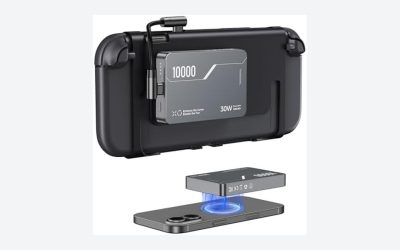
Belkin’s Charging Case Pro is a hard case with a removable 10,000 mAh power bank that charges up to 30 W. According to Belkin, it charges the console about 1.5 times, and it adds a flip-up stand, space for game cards and a pouch for a tracker. Nintendo Life’s published review describes it as a good upgrade over the first version, though heavy when the Switch 2 is plugged in.
The trade-off is weight and price. It is about 815 g on its own, and Nintendo Life notes no cable is included in the box.
Best Storage: Samsung microSD Express
Switch 2 uses microSD Express cards, a faster standard than regular microSD. GamesRadar recommends Samsung’s 256 GB microSD Express card. The console has its own internal storage, but game libraries fill it quickly.
The trade-off is cost per gigabyte, which is higher than normal microSD cards, and old cards from the original Switch will not work in the Switch 2 slot for Switch 2 games.
Best Controller: Nintendo Switch 2 Pro Controller
The Switch 2 Pro Controller is the official full-size option and is ranked as the top controller by GadgetFee and GamesRadar. It provides a comfortable layout for docked play, rumble and motion controls.
The trade-off is price compared with third-party controllers, and potentiometer-based sticks can eventually wear.
Best Budget Controller: 8BitDo Ultimate 2C
The 8BitDo Ultimate 2C connects over Bluetooth, includes Hall effect joysticks, rumble and six-axis motion control, and costs about a third as much as the official pad according to published coverage. It is a good second controller for guests.
The trade-off is feature gaps. Some features specific to Nintendo’s controllers may not be supported, so check compatibility notes.
Best Comfort Add-On: Charging Grip
A grip with a built-in battery adds hand comfort and extends play time. JSAUX’s ergonomic charging grip is a budget option named in a major roundup. These grips suit long handheld sessions, especially for larger hands.
The trade-off is bulk. The grip makes the console harder to fit into slim cases, so check case compatibility.
Best Travel Power: Anker Power Banks
Engadget recommends Anker’s 100 W, 25,000 mAh bank for laptop and console use, and another guide suggests the compact Nano 10,000 mAh 30 W bank. A 30 W USB-C PD bank is enough for the console, while 100 W covers a laptop as well.
The trade-off is airline limits, since banks above 100 Wh need airline approval.
Best Travel Case: Hard Shell Case
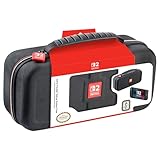
Rigid cases such as the SUPCASE models protect the console in a backpack. Look for cartridge slots, a cable pocket and a snug interior so the console does not rattle.
Worked Calculation: How Much Power Do You Need?
The Switch 2 battery is about 19.74 Wh (5,220 mAh), according to published teardown coverage. A 10,000 mAh power bank at 3.7 V holds about 37 Wh. Conversion losses typically leave around 70 to 80 percent usable, or roughly 26 to 30 Wh. Divide by the console battery size: 26 / 19.74 is about 1.3 charges and 30 / 19.74 is about 1.5, which matches Belkin’s 1.5-charges claim at the upper end. A 25,000 mAh bank holds about 92 Wh, giving roughly 3.5 to 4 full charges after losses.
If you play for 3 to 5 hours per battery in demanding games, a 10,000 mAh bank adds roughly 4 to 7 more hours. Treat this as an estimate, since runtime changes with the game, screen brightness and Wi-Fi use.
Choosing by Play Style
| How you play | Priority purchases | Reason |
|---|---|---|
| Handheld on commutes | Protector, charging case, small power bank | Protects the screen and extends sessions between outlets |
| Docked on a TV | Pro Controller, extra controller, microSD Express | Comfortable play and room for a bigger library |
| Family or kids | Silicone case, protector, budget controllers | Drop protection and low-cost spares |
| Frequent travel by air | Hard case, 30 W power bank under 100 Wh | Fits airline rules and keeps the console safe in a bag |
| Collector with many physical games | Case with cartridge slots | Keeps cards organized and protected |
Common Mistakes When Buying Switch Accessories
- Buying first-generation Switch accessories that do not fit the larger Switch 2 body.
- Choosing a standard microSD card and expecting it to hold Switch 2 games.
- Using an unrated charger or cable, which can charge slowly or stress the port.
- Putting a bulky grip on the console and then finding it no longer fits the case.
- Applying a screen protector over dust. Take your time and use the alignment tray.
- Skipping a case because the console feels solid. A single drop onto a hard floor can crack the screen.
Which Accessories Work with the Original Switch?
| Accessory | Switch 2 | Original Switch / OLED / Lite |
|---|---|---|
| Tempered-glass protector | Model-specific | Model-specific |
| Power bank (USB-C PD) | Yes | Yes |
| 8BitDo Ultimate 2C | Yes | Often yes |
| Standard microSD | No for Switch 2 games | Yes |
| microSD Express | Yes | Generally no |
| Cases and charging cases | Model-specific | Model-specific |
What to Buy First
- Screen protector, because it protects the most fragile part.
- Case or charging case, depending on whether you travel.
- microSD Express card once internal storage runs low.
- Pro Controller or budget controller for docked play.
- Power bank or grip if you play away from outlets.
Frequently Asked Questions
What accessories do I need for Switch 2?
A screen protector, a case and a microSD Express card cover most needs. Add a controller and power bank based on how you play.
Do old Switch microSD cards work in Switch 2?
Switch 2 uses microSD Express for its own games. Standard cards may work for some content, but you should check Nintendo’s guidance for details.
Is the Pro Controller worth it?
If you play docked often, yes. It is comfortable and fully supported. A budget controller like the 8BitDo Ultimate 2C is a lower-cost alternative.
Can I charge Switch 2 with any USB-C charger?
Use a Power Delivery charger from a reputable brand. Cheap or uncertified chargers can charge slowly or behave unpredictably.
Do Bluetooth headsets work on Switch 2?
Audio works, but one roundup warns that Bluetooth headsets may not support GameChat voice. Use a wired headset or a compatible dongle for chat.
Do I need a case if I only play at home?
Not strictly, but a case protects the console from drops and keeps accessories organized if you move between rooms.