Our Top Picks
 msi Vector 16 HX AI Gaming Laptop 16"16GB RAM | 1TB SSD19 x 12.4 x 3.5 Inches7 poundsCheck on Amazon
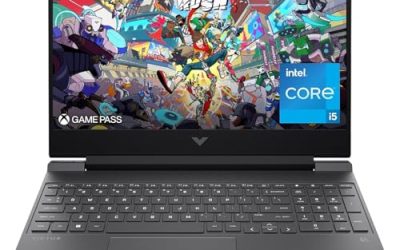
 msi Thin 15 15.6” 144Hz FHD Gaming Laptop:i7-13620H14.13 x 9.99 x 0.85 Inches7.43 PoundsCheck on Amazon
Shopping for the best MSI gaming laptop means sorting through a catalog where the model names do half the work. Thin, Katana, Crosshair, Vector, and Stealth are not interchangeable labels. Each sits on a different rung of MSI’s ladder, from an entry-level RTX 4050 machine to a thin-and-light OLED model with a high-end RTX 5070 Ti. The question is not which one is “the” best, but which rung matches how you game and how much weight you are willing to carry.
This guide is for buyers who have decided on MSI and want to avoid paying for hardware they will not use. It compares six laptops across the line, from a 15.6-inch budget-tier option to 18-inch performance machines, and it judges each only on the specifications named in its listing title. For anyone buying in 2026, the main variables are the GPU tier, the display refresh rate and resolution, memory type, and the physical size of the machine.
Quick Picks

msi Crosshair 18 HX AI 18" 2560x1600 240Hz Display Gaming Laptop, Intel Core Ultra 9 275HX, NVIDIA RTX 5070 8GB GDDR7, 32GB RAM, 2TB NVMe SSD, Windows 11 Home, w/ZYN HDMI Cable
One of the consumer electronics options compared in this guide.
View on Amazon
msi Katana 15 HX 15.6” 165Hz QHD+ Gaming Laptop: Intel Core i9-14900HX, NVIDIA Geforce RTX 5070, 32GB DDR5, 1TB NVMe SSD, RGB Keyboard, Win 11 Home: Black B14WGK-016US
One of the consumer electronics options compared in this guide.
View on Amazonmsi Vector 16 HX AI Gaming Laptop 16" 144Hz Display Intel Core Ultra 7 255HX 16GB DDR5 RAM 1TB PCIe SSD NVIDIA GeForce RTX 5070 Ti 12GB Windows 11 Cosmos Gray VECTOR16HXA2275
One of the consumer electronics options compared in this guide.
View on Amazonmsi Thin 15 15.6” 144Hz FHD Gaming Laptop: Intel Core i7-13620H, NVIDIA Geforce RTX 4050, 16GB DDR4, 512GB NVMe SSD, WiFi 6E, Win 11: Black B13VE-2678US
One of the consumer electronics options compared in this guide.
View on Amazon
msi Stealth 16 AI+ 16” 240Hz QHD+ OLED Gaming Laptop: Intel Core Ultra 9 386H, NVIDIA Geforce RTX 5070Ti, 32GB DDR5, 1TB NVMe SSD, Wi-Fi 7, Win 11 Home: Charcoal Black B3WH-036US
One of the consumer electronics options compared in this guide.
View on Amazon
msi Crosshair A16 HX 16” 2.5K QHD+ 240Hz Gaming Laptop – AMD Ryzen 9 8940HX, NVIDIA GeForce RTX 5070, 32GB DDR5, 1TB NVMe SSD, Wi-Fi 6E, USB-C, Windows 11 Home: Gunmetal Grey E8WGK-009US
One of the consumer electronics options compared in this guide.
View on Amazon| Product | Best for | Key spec from the title |
|---|---|---|
| MSI Crosshair 18 HX AI | Large-screen performance and storage | 18-inch 2560×1600 240Hz, RTX 5070 8GB GDDR7, 32GB RAM, 2TB SSD |
| MSI Katana 15 HX | Compact QHD+ gaming | 15.6-inch 165Hz QHD+, Core i9-14900HX, RTX 5070, 32GB DDR5 |
| MSI Vector 16 HX AI | High-end 16-inch graphics | 16-inch 144Hz, Core Ultra 7 255HX, RTX 5070 Ti 12GB, 16GB DDR5 |
| MSI Thin 15 | Entry-level gaming on a tighter budget | 15.6-inch 144Hz FHD, Core i7-13620H, RTX 4050, 16GB DDR4 |
| MSI Stealth 16 AI+ | Premium portability and display quality | 16-inch 240Hz QHD+ OLED, Core Ultra 9 386H, RTX 5070 Ti, Wi-Fi 7 |
| MSI Crosshair A16 HX | AMD-based high-refresh gaming | 16-inch 2.5K QHD+ 240Hz, Ryzen 9 8940HX, RTX 5070, 32GB DDR5 |
How to Choose
Match the GPU tier to your target resolution
The graphics card sets the ceiling for what you can play and at what quality. An RTX 4050 like the one in the Thin 15 targets 1080p gaming. The RTX 5070 cards in the Katana, Crosshair 18, and Crosshair A16 are a comfortable step up and fit QHD-class panels, while the RTX 5070 Ti in the Vector and Stealth gives extra headroom for demanding titles. A good rule is to pair 1080p screens with an entry GPU, and QHD or 2.5K screens with at least an RTX 5070. Do not ignore video memory either: the 8GB GDDR7 listed on the Crosshair 18 and the 12GB on the Vector give you a clear way to compare cards that share a similar name.
Refresh rate and panel type matter more than they look
All six listings advertise 144Hz or higher, and that is the baseline to insist on for fast shooters and racing games. Moving from 144Hz to 240Hz helps most when your GPU can actually produce that many frames, so it pays off on the higher-tier models. The Stealth 16 AI+ stands apart with an OLED panel, which typically offers deeper blacks and richer color than standard IPS. If you also edit photos or watch films on the laptop, panel type is worth weighing alongside speed.
Memory type and capacity: where budget models cut corners
Look for 16GB of RAM as the minimum and 32GB if you stream, mod games, or keep many apps open. Memory type matters too: DDR5, listed on most models here, is faster than the DDR4 in the Thin 15. Budget machines also trim storage, so a 512GB SSD fills quickly once a few modern games are installed. The listings with 1TB or 2TB drives give far more breathing room.
Size, connectivity, and processor family
An 18-inch laptop is a desk machine, a 16-inch model is a reasonable compromise, and a 15.6-inch laptop is the easiest to carry. Check wireless standards if you play online: Wi-Fi 7 on the Stealth and Wi-Fi 6E on the Thin 15 and Crosshair A16 are both modern. Processor choices include Intel Core i9, Core Ultra, and AMD Ryzen 9. HX-series chips are aimed at sustained performance rather than battery life, so expect to stay near an outlet for heavy sessions. Also look at the ports: a USB-C connection, listed on the Crosshair A16, is handy for docks, fast storage, and some monitors, and it is easy to overlook until you need it.
The 6 Best Options
MSI Crosshair 18 HX AI
The Crosshair 18 HX AI pairs an 18-inch 2560×1600 display running at 240Hz with an Intel Core Ultra 9 275HX, an RTX 5070 with 8GB of GDDR7, 32GB of RAM, and a 2TB NVMe SSD. It is a big-screen, big-storage machine for players who plan to stay at a desk.
- Strength: 2TB of NVMe storage lets you install a sizable game library without deleting titles.
- Strength: the 2560×1600 panel at 240Hz suits smooth, sharp play.
- Trade-off: an 18-inch chassis is not meant to be carried every day.
Skip it if portability matters, or if you would rather spend on a thinner machine with a stronger GPU.
MSI Katana 15 HX
The Katana 15 HX is the compact option for QHD gaming. It has a 15.6-inch 165Hz QHD+ display, a Core i9-14900HX, an RTX 5070, 32GB of DDR5, a 1TB NVMe SSD, and an RGB keyboard, running Windows 11 Home.
- Strength: 32GB of DDR5 and an RTX 5070 are strong specs in a 15.6-inch body.
- Strength: a 165Hz QHD+ screen gives a sharper image than typical 1080p panels.
- Trade-off: the smaller chassis can limit sustained performance compared with 18-inch designs.
Skip it if you prefer a larger display or need more than 1TB of storage.
MSI Vector 16 HX AI
The Vector 16 HX AI places an RTX 5070 Ti with 12GB of memory inside a 16-inch laptop with a 144Hz display. It uses a Core Ultra 7 255HX, 16GB of DDR5, and a 1TB PCIe SSD.
- Strength: the RTX 5070 Ti matches the graphics tier of the Stealth and sits above every RTX 5070 model in this list.
- Strength: 1TB of PCIe storage covers a good number of installed games.
- Trade-off: 16GB of RAM is lower than the 32GB found on most competing models in this list.
Skip it if you plan heavy multitasking, since a memory upgrade may be worth planning for.
MSI Thin 15
The Thin 15 is the entry point: a 15.6-inch 144Hz Full HD display, a Core i7-13620H, an RTX 4050, 16GB of DDR4, a 512GB NVMe SSD, and Wi-Fi 6E. It targets players who want real gaming hardware without stepping into premium territory.
- Strength: an RTX 4050 and 144Hz screen handle 1080p gaming.
- Strength: Wi-Fi 6E gives a modern wireless connection for online play.
- Trade-off: DDR4 memory and 512GB of storage are the clearest places this model economizes.
Skip it if you want QHD resolution or the newest GPU generation.
MSI Stealth 16 AI+
The Stealth 16 AI+ is the premium pick, built around a 16-inch 240Hz QHD+ OLED display, a Core Ultra 9 386H, an RTX 5070 Ti, 32GB of DDR5, a 1TB NVMe SSD, and Wi-Fi 7. It is meant for people who want display quality and top-tier features in a single package.
- Strength: the OLED panel at 240Hz stands out for both gaming and media.
- Strength: Wi-Fi 7 and 32GB of DDR5 make it forward-looking.
- Trade-off: it sits at the premium end, so you pay for the display and features.
Skip it if you only play at 1080p or want to keep spending modest.
MSI Crosshair A16 HX
The Crosshair A16 HX is the AMD-based option, pairing a Ryzen 9 8940HX with an RTX 5070, 32GB of DDR5, and a 1TB NVMe SSD behind a 16-inch 2.5K QHD+ 240Hz display. It also lists Wi-Fi 6E and USB-C.
- Strength: 32GB of DDR5 and a 240Hz QHD+ screen suit high-refresh play.
- Strength: a Ryzen 9 HX processor gives plenty of multi-core power.
- Trade-off: its RTX 5070 sits below the Ti-class cards found on the Vector and Stealth.
Skip it if you prefer an Intel platform or want the most powerful graphics available in a 16-inch frame. Buyers who simply want the cheapest way into high-refresh QHD gaming should compare it directly with the Katana, which trades screen size for a smaller footprint.
Which One Fits Your Situation
You game on a limited budget
The MSI Thin 15 is the practical choice. It delivers 144Hz Full HD gaming with an RTX 4050 and keeps the price tier lower than the rest of the list. Pair it with an external drive if you collect large games, because its 512GB internal SSD is the smallest in the group.
You want QHD gaming in a smaller body
The MSI Katana 15 HX fits well. Its 15.6-inch QHD+ screen, RTX 5070, and 32GB of DDR5 make it a compact performance option for dorms and small desks. It is also the only 15.6-inch model here with a QHD+ panel, which sets it apart from the Thin 15.
You want the best graphics in a 16-inch laptop
The MSI Vector 16 HX AI and Stealth 16 AI+ both carry an RTX 5070 Ti. Choose the Vector for a more conventional gaming build, or the Stealth for its OLED display and Wi-Fi 7.
You want a big screen and lots of storage
The MSI Crosshair 18 HX AI is the answer. With a 2TB SSD and an 18-inch display, it works as a desktop replacement for players who rarely move it. If you want the same chassis family with different memory, the listings show other Crosshair 18 configurations, but the 2TB version is the one with the roomiest drive.
Common Mistakes
- Buying a high-refresh screen without checking that the GPU can produce matching frame rates.
- Assuming all RTX 5070 laptops perform the same, ignoring the chassis size and cooling design.
- Choosing 512GB of storage and running out of space after installing a handful of large games.
- Overlooking memory type, since DDR4 and DDR5 are not equivalent.
- Ordering an 18-inch machine without considering that it is too bulky to move frequently.
Related guides
- How To Extend Battery Life On A Handheld Gaming Pc
- Gen4 Nvme M2 Ssds For High Performance Pc
- Racing Wheels And Flight Sticks For Pc
Frequently Asked Questions
Is an RTX 5070 Ti worth choosing over an RTX 5070?
It gives extra graphics headroom for demanding games and higher settings. If you play mostly at 1080p or QHD with moderate settings, the standard RTX 5070 is usually sufficient.
Does OLED matter on a gaming laptop?
It improves contrast and color, which helps for movies and creative work as well as games. It matters less if you only care about raw frame rates.
Is 16GB of RAM enough for gaming?
Yes for most current games, but 32GB gives better headroom for streaming, multitasking, and future titles. It is worth considering if the laptop must last several years, particularly on models like the Vector 16 HX AI that ship with 16GB.
Which MSI line is easiest to carry?
The 15.6-inch Thin and Katana models are the most compact in this group, and the Stealth is positioned as the more portable premium option. The 18-inch Crosshair is best kept on a desk.