Our Top Picks
A starter gaming PC in 2026 should be built around an RTX 5060 class graphics card, a modern six to eight core CPU, 16GB to 32GB of dual-channel memory and a 1TB NVMe drive, and buyers who can stretch to an RTX 5070 with a Ryzen 7 and 32GB get a noticeably longer-lasting machine for 1440p. Reviews of entry-level prebuilts agree on that order of priority, so this guide ranks by what matters most for a first gaming desktop.
What matters, in order
One prebuilt guide ranks specs in this order: the graphics card first, then a current-generation CPU with six to eight cores, then 32GB of memory in dual channel, then a 1TB or larger NVMe SSD. Another reviewer says to look for two memory sticks, a power supply from a named brand and a decent case. Those three details separate good starter machines from weak ones, because manufacturers often save money on the parts that do not show on the spec headline.

YAWYORE Gaming PC Desktop Computer AMD R5 5600GT 16GB 1TB NVMe Towers WiFi | 16GB DDR4 3200MHz, 1TB M.2 NVMe PCIe, 550W 80PLUS PSU, WiFi BT, Game Design Office Console
Chosen because it specifies 16GB DDR4 3200MHz and 1TB M.2 NVMe PCIe.
View on Amazon
ZYNEEX Prebuilt Gaming Desktop PC, AMD Ryzen 5 5500, GeForce RTX 3050 6GB,16GB DDR4 3200MHz RAM, 1TB NVMe SSD, ARGB Air Cooling, Wi-Fi,Tower Computer for Gaming, Streaming, Editing
Chosen because it specifies AMD Ryzen 5 5500 and GeForce RTX 3050 6GB.
View on Amazon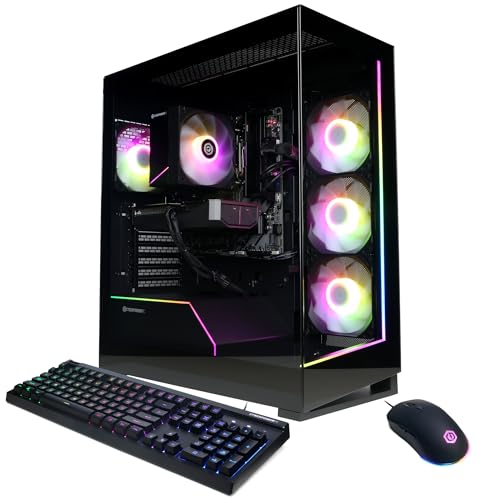
CyberPowerPC Gaming PC, AMD Ryzen 7 8700F, GeForce RTX 5060 Ti 8GB | Gamer Master, 16GB DDR5, 1TB PCIe 4.0 SSD, WiFi Ready & Windows 11 Home (GMA2900A3)
Chosen because it specifies AMD Ryzen 7 8700F and GeForce RTX 5060 Ti 8GB.
View on Amazon
STGAubron Gaming PC Desktop,Core I5,RX 550 4G,16G RAM,512G SSD | Gaming Computer Tower for Streaming,Video Editing,Home,School,I5 up to 3.6G,ARGB Fan,WiFi 6,BT 5.0,4K DP,HDMI,Win11 Home
Chosen because it specifies Core I5 and RX 550 4G.
View on AmazonAt a glance
| Machine or class | Best for | Reported configuration | Limits |
|---|---|---|---|
| Skytech Archangel 5 | Lowest-cost start with 1080p focus | Reported as Core i5-14400F, 16GB DDR5 and RTX 5060 8GB | 16GB RAM leaves little headroom; older-generation CPU |
| Skytech Nebula | Budget buyers who want PSU details listed | Reported as i5-14400F, RTX 5060 and 650W Gold PSU | Same CPU generation caveat |
| MSI Codex Z2 | First-time buyers wanting a known brand | Recommended as a beginner pick in one roundup | Confirm exact configuration for the listing you see |
| iBUYPOWER RTX 5060 series | Most people looking for a balanced build | Named as a top pick for most buyers in one roundup | Specs vary by model number |
| CyberPowerPC Gamer Xtreme VR | Tight budgets | RTX 5060 system named for low budgets | Case and PSU quality vary by listing |
| RTX 5070 with Ryzen 7 and 32GB | Stretch buyers wanting 1440p | Called the 1440p sweet spot in one roundup | Costs noticeably more |
Why the RTX 5060 class is the entry point
Roundups say an RTX 5060 build pairs a Ryzen 5 or Core i5 with 16GB to 32GB of memory, suits 1080p high-refresh play and can reach 1440p with DLSS upscaling. The caution is video memory. The version cited in a budget listing has 8GB, which is enough for most esports and many current games at 1080p, but demanding new titles may need lower texture settings.
Skytech Archangel 5 and Nebula
Virtual-pc.com names the Archangel 5 its best budget choice, listing an i5-14400F, 16GB DDR5 and an RTX 5060 8GB, rated for solid 60-plus fps in AAA games at 1080p. Pcbuildhelper picks the Nebula as its budget winner, listing a 650W Gold power supply. These roundups are affiliate-style rather than lab reviews, and the CPU is a previous-generation Intel part, so for longevity compare it with Ryzen systems at similar tiers.
MSI Codex Z2
Virtual-pc.com recommends this model for someone buying their first gaming PC. The appeal of a major-brand desktop is simpler support and a recognizable warranty. Look at the exact CPU and GPU in the listing you are considering, because brands sell several variants under one name.
iBUYPOWER and CyberPowerPC options
Everydaytechreviews picks the iBUYPOWER RTX 5060 series for most buyers and the CyberPowerPC Gamer Xtreme VR with an RTX 5060 for tight budgets. Another roundup also suggests a Thermaltake RTX 5060 system or a Ryzen 7 with RTX 5060 Ti tower. Because these companies make many models, compare the actual component list rather than the series name.
The step-up: RTX 5070 with Ryzen 7 and 32GB
One roundup calls an RTX 5070 prebuilt with a Ryzen 7 and 32GB of memory the 1440p sweet spot. If your monitor is 1440p or you expect to keep the PC for several years, stepping up one GPU tier is usually more useful than adding RAM or storage to a weaker card.
Pick this if
| Your situation | Pick | Why |
|---|---|---|
| 1080p monitor and a tight budget | RTX 5060 system such as Skytech Archangel 5 or CyberPowerPC Gamer Xtreme VR | Reported solid 1080p performance |
| First PC and you want a familiar brand | MSI Codex Z2 | Recommended for beginners in one roundup |
| You want a balanced everyday build | iBUYPOWER RTX 5060 series | Named for most buyers |
| You want 1440p and longer life | RTX 5070 with Ryzen 7 and 32GB | Reported 1440p sweet spot |
| You like to tinker | Build it yourself | Control over PSU, case and upgrade path |
Checklist for a first purchase
- Memory in two sticks, so it runs in dual channel.
- A named-brand power supply with a stated efficiency rating and enough wattage for the GPU.
- An NVMe SSD of at least 1TB.
- A case with a mesh or ventilated front panel.
- Standard parts that you can upgrade later, rather than proprietary boards.
- A clear warranty and support policy.
Budget tiers
- Budget: RTX 5060 class with a six-core CPU and 16GB RAM, aimed at 1080p.
- Mid-range: RTX 5060 Ti or RTX 5070 class with a Ryzen 7 and 32GB, aimed at 1440p.
- Premium: higher GPU classes, which go beyond what a first PC requires.
Peripherals you will still need
A PC alone does not play games. You need a monitor with a suitable refresh rate, a keyboard, a mouse and a headset or speakers. Many starter prebuilts include basic peripherals, but their quality is typically modest. If the budget is tight, put money into the GPU and a decent monitor first.
Alternatives
A gaming laptop in the same GPU class is portable, but laptop chips run at lower power and are harder to upgrade. Building a PC from parts often gives better components for the same spend. A used desktop can stretch a budget further, though warranty and wear are concerns.
Avoiding common prebuilt traps
Entry-level prebuilts are where companies are most tempted to save money in places buyers do not see. Reviewers repeatedly flag a few: single-channel memory from one stick, no-name power supplies, tiny SSDs, cases with solid front panels that trap heat and proprietary parts that block upgrades. A system that lists the PSU brand and model, shows two memory modules and names the motherboard chipset is usually a safer bet than one with a vague specification list.
Also watch for outdated platforms. The Core i5-14400F in some budget systems is a previous-generation chip. It still plays current games well, but the platform may offer less upgrade room than newer sockets, so buyers planning a long ownership may favor a current Ryzen platform. Whether that matters depends on how long you plan to keep the PC.
Where a first-time buyer should put money
- Graphics card first, since it determines frame rates.
- Memory to 32GB if possible, in two sticks.
- A 1TB or larger NVMe SSD.
- A reliable PSU with a stated efficiency rating.
- A monitor that matches the GPU, usually 1080p at 144Hz or 1440p at a similar refresh.
Setup and care
After delivery, check that all cables are seated, update the graphics driver from the GPU maker, enable the memory’s rated speed profile in the BIOS if it is not on, and keep the vents clear of dust. Many starter machines include a warranty with limits, so register the product and keep your receipt.
Matching the PC to the games you play
Esports titles such as Counter-Strike, Valorant, League of Legends and Rocket League run very well on an RTX 5060 class system, and the goal there is a high refresh rate, so a 144Hz or faster 1080p monitor makes sense. Large open-world and ray-traced games ask much more of the GPU, and on an entry card they will usually need DLSS and medium to high settings to stay smooth. If your favorite games are demanding single-player titles, the step-up RTX 5070 tier is easier to justify. If you mostly play older or lighter games, the entry tier will feel fast for years.
Storage needs grow quickly. Several current games each take a large share of a 1TB drive, so a buyer with a big library should plan for a second drive slot on the motherboard. Check that the board has a free M.2 slot, since that is the simplest later upgrade.
Frequently Asked Questions
Is 16GB of RAM enough for a starter gaming PC?
It can be, especially for 1080p gaming. Roundups increasingly recommend 32GB in dual channel for headroom, so choose 32GB if the budget allows.
Is an 8GB graphics card enough?
For most games at 1080p it is workable, but newer titles at high textures can exceed it. If you plan to play at 1440p, a card with more video memory is a safer buy.
Should I buy a prebuilt or build my own?
A prebuilt is easier and includes a warranty, while building gives better control over parts. Check the PSU, memory configuration and case in any prebuilt.
Which matters more, the CPU or the GPU?
The GPU, according to prebuilt guides. A six to eight core current-generation CPU is enough for most gaming.
Can I upgrade a prebuilt later?
Often yes, but proprietary motherboards, power supplies and cases can limit options. Standard parts make later upgrades easier.
Can a starter PC handle 1440p?
An RTX 5060 can with DLSS and lowered settings, according to roundups. For more comfortable 1440p, step up to an RTX 5070 class machine.
FAQ
Is 16GB of RAM enough for a starter gaming PC?
Is an 8GB graphics card enough?
Should I buy a prebuilt or build my own?
Which matters more, the CPU or the GPU?
Can I upgrade a prebuilt later?
Can a starter PC handle 1440p?
More from Amazon
Programs that pair well with the guide above. Offers and eligibility are set by Amazon and may change.
Free shipping on eligible items, Prime Video and more. Eligible new members can start with a free trial.
Start a Prime free trialAd-free music streaming. Eligible new subscribers can start with a free trial.
Try Music Unlimited freeA Prime membership for ages 18-24 with a trial period. Eligibility is set by Amazon.
See Prime for Young AdultsAudiobooks and podcasts to listen to on the go. Eligible new members can start with a free trial.
Try Audible freeAs an Amazon Associate we earn from qualifying purchases.