Our Top Picks


The first decision at this end of the market is an honest one: under this bracket you are buying a screenless pen tablet, not a pen display. No model in this roundup has a built-in screen, so you draw on the tablet surface while watching your monitor. Once that is settled, the real choice is about active area, pressure response, shortcut keys and how well the tablet fits the way you already work.
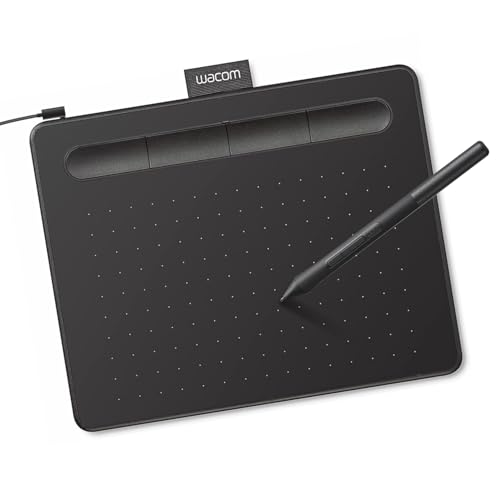
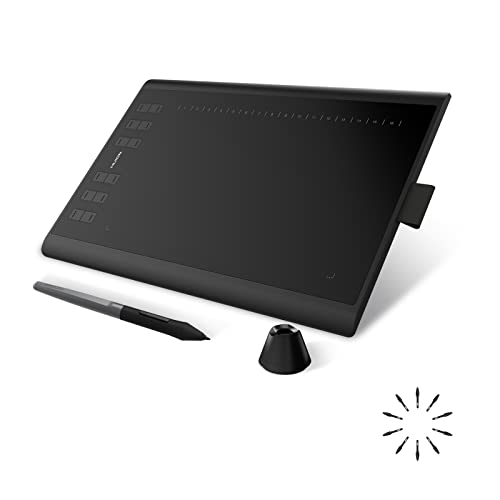
These four suit different buyers. Beginners get the most guided start from the Wacom Intuos Small, artists short on budget but not on ambition get the largest drawing surface from the Huion Inspiroy H1060P, and compact-desk or Android users are covered by the XPPen Deco 01 V2 and the smaller Huion Inspiroy H640P. Each pick was chosen from the names and specifications on its own product page.
Quick Picks
As an Amazon Associate we earn from qualifying purchases.
| Product | Best for | Key spec |
|---|---|---|
| Wacom Intuos Small (CTL4100) | Beginners who want the most guided first tablet | 4,096 pressure levels with a battery-free Pen 4K |
| Huion Inspiroy H1060P | Artists who want the largest drawing area | 10 × 6.25 in active area and 8,192 pressure levels |
| XPPen Deco 01 V2 | Shortcut-heavy workflows on a slim tablet | 8 customisable shortcut keys in an 8 mm body |
| Huion Inspiroy H640P | Small desks and drawing with an Android phone | 6 press keys with an OTG adapter included |
How to Choose
Active Area and Desk Fit
Active area is the part of the surface the pen actually reads, and it decides how large your hand movements feel. A 10 × 6.25 in surface suits broad sketching strokes and dual-monitor setups, while a compact area around 6 × 4 in fits a laptop desk, a dorm room or a bag you carry daily. Match the tablet to your screen size too: a small tablet mapped to a large monitor makes fine cursor movements twitchy, so illustrators working zoomed-out usually prefer the bigger surfaces in this group.
Pressure Levels and Tilt Support
Pressure levels describe how many steps of force the pen can report, which shapes line weight and opacity in most drawing apps. The 8,192-level models here give smoother gradations on soft brushes than the 4,096-level Wacom, though technique matters more than the number once you pass a few thousand levels. Tilt support is separate: the H1060P and the Deco 01 V2 read pen angle up to ±60°, which shading brushes use heavily, while the Intuos Small and the H640P do not offer it, so check your favourite brush set before deciding.
Shortcut Keys and Workflow
Physical keys keep your other hand off the keyboard for undo, brush size and canvas rotation. The counts here range from four ExpressKeys on the Wacom to twelve hot keys on the H1060P, with the Deco 01 V2 offering eight and the H640P six. More keys help only if your software lets you remap them, so think about the two or three commands you repeat constantly and whether the tablet’s driver exposes them. Soft on-screen keys add flexibility but interrupt drawing flow more than a raised physical button.
Compatibility and Bundled Software
Every tablet here connects by USB and works with Windows and Mac, and several add Chromebook, Linux or Android support, which matters if you draw on more than one machine. Check the exact list for your operating system before ordering, especially for Android, where an OTG adapter may be required. Bundled software changes the value calculation as well: the Intuos Small includes a two-year Clip Studio Paint Pro bundle in its current listing, while the Huion and XPPen models rely on the free or paid art apps you already own.
The 4 Best Options
Wacom Intuos Small Graphics Drawing Tablet (CTL4100)
The Intuos Small is the easiest first tablet to live with. Its 4,096 pressure levels sit below the other picks on paper, yet the battery-free Pen 4K tracks accurately across the 6.0 × 3.7 in active area, and the four ExpressKeys cover the commands beginners use most. Wacom’s driver maturity shows in plug-and-play support across Windows, Mac, Chromebook and Android, and the bundled Clip Studio Paint Pro access means a new artist can start drawing properly without buying software on day one.
Specs
- 4,096 pressure levels
- Battery-free Wacom Pen 4K
- Active area: 6.0 × 3.7 in
- Tablet size: 7.87 × 6.3 in, 8.1 oz
- 4 customisable ExpressKeys
- USB-A wired connection
- Works with Windows, Mac, Chromebook and Android
- 3 replacement nibs stored in the pen
Best for: Beginners and students who want a dependable first tablet with bundled software.
Watch out for: This ASIN is the wired model, not the Bluetooth version, which is sold under a different ASIN, so do not expect wireless use from this listing.
ASIN: B079HL9YSF
Huion Inspiroy H1060P Graphics Drawing Tablet
The H1060P gives you the most drawing room in this group, with a 10 × 6.25 in active area that suits longer strokes and larger monitors. Its battery-free stylus reports 8,192 pressure levels and ±60° tilt, so shading brushes behave naturally, and twelve customised hot keys plus a row of soft keys keep common commands under your fingers. It connects by USB and covers Mac, Windows PC and Android, making it a strong pick for artists who split time between a desktop setup and a phone or tablet.
Specs
- Active area: 10 × 6.25 in
- 8,192 pressure levels
- Battery-free stylus with ±60° tilt support
- 12 customised hot keys plus 16 soft keys
- USB connection
- Works with Mac, Windows PC and Android
Best for: Artists who want a large active area and tilt-sensitive shading on a tight budget.
Watch out for: Availability signals for this ASIN conflict between sources, so confirm a live featured offer for the exact ASIN B01FTE9HS2 on the product page before ordering.
ASIN: B01FTE9HS2
XPPen Deco 01 V2 Drawing Tablet
The Deco 01 V2 pairs the same generous 10 × 6.25 in active area as the larger Huion with a body only 8 mm thin, so it slides into a laptop sleeve without complaint. The battery-free stylus delivers 8,192 pressure levels and ±60° tilt, and eight customisable shortcut keys handle undo, zoom and brush changes. Support spans Windows, Mac, Android and Chromebook, which makes it a flexible choice for households and classrooms where the tablet moves between machines with different operating systems during the week.
Specs
- Active area: 10 × 6.25 in
- 8,192 pressure levels
- Battery-free stylus with ±60° tilt support
- 8 customisable shortcut keys
- 8 mm thin body
- USB connection
- Works with Windows, Mac, Android and Chromebook
Best for: Users who want a large, slim tablet with plenty of shortcut keys for several computers.
Watch out for: Listing data for this ASIN has been mixed with the newer V3 version, so confirm the live listing for B077P6BQP7 is the Deco 01 V2 with 8,192 pressure levels, and that a live featured offer is showing, before ordering.
ASIN: B077P6BQP7
Huion Inspiroy H640P Drawing Tablet
The H640P is the compact option, built around a 6.3 × 3.9 in active area that fits small desks, lecture halls and travel bags. The battery-free PW100 pen still reports 8,192 pressure levels, and six customisable press keys cover the basics without crowding the frame. Resolution of 5,080 LPI and a 233 PPS report rate keep fast strokes tracking cleanly, and the included OTG adapter means Android phones connect without extra purchases. At roughly 0.61 lb it is the easiest of the four to carry everywhere.
Specs
- Active area: 6.3 × 3.9 in
- 8,192 pressure levels
- Battery-free PW100 pen
- 6 customisable press keys
- 5,080 LPI resolution and 233 PPS report rate
- Micro-USB connection
- Works with Windows, Mac, Linux and Android, OTG adapter included
- Weight: about 0.61 lb
Best for: Students, travellers and Android users who need a small tablet that sets up anywhere.
Watch out for: Availability signals for this ASIN conflict between sources, so confirm a live featured offer for the exact ASIN B075V3WTD3 before ordering, and note this model has no tilt support despite wording seen in some listing titles.
ASIN: B075V3WTD3
Which One Fits Your Situation
Learning Digital Art From Scratch
Start with the Wacom Intuos Small. The bundled Clip Studio Paint Pro access removes the software question entirely, the driver setup is the most forgiving here, and the compact active area matches the smaller canvases beginners usually learn on. You give up tilt support and some drawing room, but for building fundamentals like line control and layer habits, nothing else in this group removes as much friction from the first month.
Sketching Big at a Home Desk
Choose the Huion Inspiroy H1060P if your desk and monitor can take it. The 10 × 6.25 in active area keeps long sketching strokes natural instead of cramped, tilt support feeds expressive shading brushes, and the twelve hot keys mean your keyboard can stay pushed back. It is the least portable pick here, so it suits a fixed workstation far better than a bag you carry between classes.
Drawing With a Phone or a Tiny Desk
The Huion Inspiroy H640P fits this life best. It connects to Android phones with the OTG adapter in the box, weighs about 0.61 lb, and its small active area still maps comfortably to a phone or laptop screen. Six press keys cover undo and brush size, which is most of what mobile sketching sessions need, and the whole setup packs away in minutes.
Editing Photos Rather Than Drawing
Retouchers should look at the XPPen Deco 01 V2. Pressure-sensitive dodging, burning and masking benefit from its 8,192 levels, the large active area maps well to a desktop monitor for precise selections, and the eight shortcut keys absorb the repetitive commands photo editors lean on. Its slim body also stores flat in a drawer beside a keyboard when the editing session ends.
Common Mistakes
- Expecting a built-in screen at this bracket, when every honest option here is a screenless pen tablet you use while watching your monitor.
- Ordering a sibling variant by mistake, such as the Bluetooth Intuos or a different colour or size listing, instead of the exact ASIN reviewed.
- Choosing the largest active area for a small laptop screen, which makes cursor control feel jumpy and tiring over long sessions.
- Trusting a listing’s details block without checking the version, since the Deco 01 V2’s data has been mixed with V3 figures elsewhere.
- Skipping the operating-system check, then discovering your Chromebook, Linux install or Android phone needs an adapter or lacks driver support.
Frequently Asked Questions
Do any of these drawing tablets have a screen?
No. All four are screenless pen tablets, so you draw on the tablet surface while looking at your computer or phone screen. Pen displays that you draw on directly exist, but they sit in a completely different price universe from this bracket. Most artists adapt to the hand-eye separation within a few days of regular practice.
Is 4,096 pressure levels enough compared with 8,192?
For most beginners and intermediate artists, yes. The Wacom Intuos Small’s 4,096 levels still give smooth control over line weight and opacity, and brush settings in your software influence the feel more than the raw count. The 8,192-level models pull ahead mainly on very soft brushes and subtle shading work where fine gradations matter.
Can I use these tablets with an Android phone?
Three of the four list Android support: the Intuos Small, the H1060P and the Deco 01 V2, plus the H640P, which includes an OTG adapter in the box for exactly this purpose. Expect a reduced active area in phone mode on some models, because the tablet maps to the phone’s portrait screen shape rather than its full surface.
Which tablet suits fast-paced games like rhythm titles?
The Huion Inspiroy H640P is the usual pick for that crowd. Its compact active area means short pen movements, the 233 PPS report rate keeps tracking responsive during rapid play, and the small footprint leaves desk room for a keyboard beside it. The same qualities make it handy for quick annotation and signature work.
FAQ
Do any of these drawing tablets have a screen?
Is 4,096 pressure levels enough compared with 8,192?
Can I use these tablets with an Android phone?
Which tablet suits fast-paced games like rhythm titles?
More from Amazon
Programs that pair well with the guide above. Offers and eligibility are set by Amazon and may change.
Free shipping on eligible items, Prime Video and more. Eligible new members can start with a free trial.
Start a Prime free trialAd-free music streaming. Eligible new subscribers can start with a free trial.
Try Music Unlimited freeA Prime membership for ages 18-24 with a trial period. Eligibility is set by Amazon.
See Prime for Young AdultsAudiobooks and podcasts to listen to on the go. Eligible new members can start with a free trial.
Try Audible freeAs an Amazon Associate we earn from qualifying purchases.