Our Top Picks

Introduction
Tapping your wrist to pay for coffee, a train ticket, or groceries has quietly become one of the most useful things a smartwatch can do. Near-field communication, usually shortened to NFC, is the short-range wireless technology that makes contactless payments possible from your wrist. When a smartwatch has NFC hardware and a payment wallet built in, you can leave your wallet and phone in your pocket and settle up with a flick of the wrist at any terminal that accepts contactless cards.


Not every smartwatch includes NFC, though. Many budget fitness bands and basic trackers skip the chip entirely to keep costs down, and some watches include NFC only for pairing accessories rather than payments. That distinction matters: a watch that supports NFC payments needs both the hardware and a payment platform your bank actually supports, whether that is Apple Pay, Google Wallet, Samsung Pay, or Garmin Pay.
This guide rounds up four smartwatches with NFC that cover the main phone ecosystems: one for iPhone owners, two for Android users, and one that works happily with either platform. Each pick below includes NFC payment support as a core feature, not an afterthought, alongside the fitness tracking, notifications, and battery life you would expect from a modern smartwatch.
At a Glance
| Smartwatch | NFC Payment Platform | Case Size | Standout Strength |
|---|---|---|---|
| Samsung Galaxy Watch 7 | Samsung Pay and Google Wallet | 40 mm | Full-featured Android companion with Galaxy AI health insights |
| Apple Watch SE (2nd Gen) | Apple Pay | 40 mm | Straightforward iPhone companion with crash detection |
| Garmin Venu 3 | Garmin Pay | 45 mm | Up to 14 days of battery life with deep health tracking |
| Google Pixel Watch 3 | Google Wallet | 41 mm | Tight Google and Fitbit integration with a bright display |
Samsung Galaxy Watch 7 (40 mm, Bluetooth, Green)
The Samsung Galaxy Watch 7 is the most complete Android smartwatch in this roundup, and it is the natural first stop if you carry a Samsung phone or any recent Android handset. It runs Wear OS powered by Samsung, which gives it access to the Google Play Store on your wrist, Google Assistant, and Google Maps, alongside Samsung’s own health and wellness tools.
NFC payments on the Galaxy Watch 7 work through Samsung Pay and Google Wallet, so you can add a supported card from your bank and tap to pay at contactless terminals without reaching for your phone. Setup takes a few minutes in the companion app on your phone, and once a card is added, paying is as simple as opening the wallet on the watch and holding it near the terminal.
Beyond payments, the Galaxy Watch 7 is built around Galaxy AI health features. Energy Score gives you a morning snapshot of how ready you are for the day based on sleep, activity, and heart rate data. Sleep coaching breaks down your sleep stages and suggests practical changes to your bedtime routine. Heart rate tracking, sleep monitoring, and automatic workout detection run in the background, and the watch tracks more than 90 workout types.
The hardware is equally solid. The 40 mm case uses a sapphire crystal display that resists scratches better than standard glass, and the bright AMOLED screen stays readable outdoors. A 300 mAh battery powers the smaller case, and the 3 nm Exynos W1000 processor keeps apps and watch faces responsive. The watch is water resistant to 5ATM, so swimming and showering with it on are no problem, and the lightweight aluminum case disappears on the wrist during long wear.
Considerations
The Galaxy Watch 7 pairs best with Samsung phones, where you get the full set of features including ECG and blood pressure monitoring through the Samsung Health Monitor app. Some of those advanced health tools are limited or unavailable when the watch is paired with a non-Samsung Android phone, and the watch does not pair with iPhones at all. Battery life is a single day to a day and a half with typical use, so nightly charging becomes part of the routine.
Apple Watch SE (2nd Gen, GPS, 40 mm, Starlight)
For iPhone owners who want NFC payments without stepping up to a flagship model, the Apple Watch SE (2nd Gen) is the sensible pick. It brings Apple Pay to your wrist in a familiar, easy-to-use package, and it covers the everyday smartwatch basics with the polish Apple is known for.
Apple Pay on the SE works exactly as it does on the iPhone. Add a supported card in the Wallet app, double-click the side button, and hold the watch near a contactless terminal to pay. The same double-click gesture works for transit in supported cities, and Apple Pay on the watch continues to work for many transit systems even when the watch battery is low. Because the SE uses the same secure element as higher-end Apple Watches, your card number is never stored on the watch or shared with merchants.
The SE (2nd Gen) covers the essentials well. It tracks workouts, counts steps, monitors heart rate, and follows sleep patterns through the night. Crash detection can call emergency services automatically if the watch senses a severe car crash and you do not respond, and fall detection does the same for hard falls. The bright Retina display is easy to read in sunlight, and the Starlight aluminum case with its matching sport band gives the watch a clean, neutral look.
Water resistance is rated to 50 meters, so the watch handles swimming, showering, and sweaty workouts without worry. The S8 chip keeps the interface smooth, and watchOS brings customizable watch faces, smart notifications, and the App Store to your wrist. Family Setup also lets you configure the watch for a child or older relative who does not have an iPhone of their own.
Considerations
The SE skips the always-on display found on flagship Apple Watches, so you need to raise your wrist to wake the screen. It also lacks the ECG app, blood oxygen sensor, and temperature sensing of the more expensive models, which matters if advanced health monitoring is a priority. Battery life runs about 18 hours with typical use, so the watch needs charging every day. The SE only works with iPhones, so Android users should look at the other picks in this guide instead.
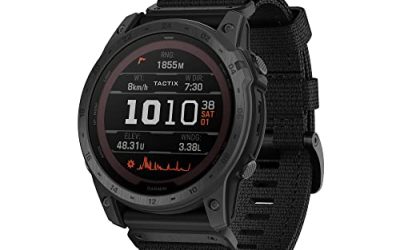
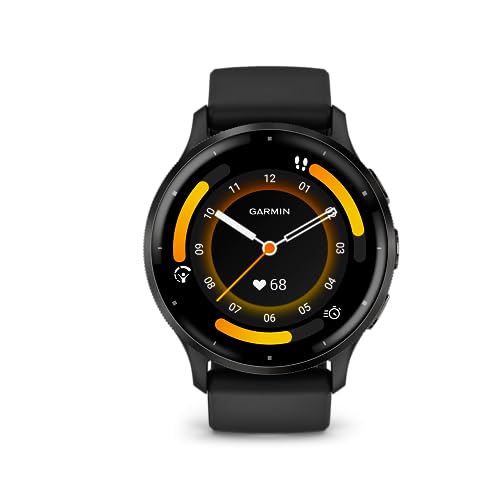
Garmin Venu 3 (45 mm, Black)
If charging every night sounds like a chore, the Garmin Venu 3 is the answer. Its headline feature is battery life of up to 14 days in smartwatch mode, which is several times longer than the other watches here, and it pairs that endurance with Garmin Pay contactless payments and some of the deepest health tracking available in a lifestyle smartwatch.
Garmin Pay lets you add supported cards from participating banks and pay by holding the watch near a contactless terminal. Bank coverage for Garmin Pay is narrower than for Apple Pay or Google Wallet, so it is worth checking that your bank is supported before you commit. Once set up, though, paying from the wrist is quick and reliable, and the watch also stores music onboard, so you can leave your phone behind on a run and still pay for a drink on the way home.
The Venu 3 is a serious health and fitness tool. It tracks sleep with a morning sleep score and coaching, monitors stress, heart rate variability, and skin temperature, and calculates Body Battery energy levels that show how recovered you are throughout the day. More than 30 built-in sports apps cover running, cycling, swimming, strength training, and more, with animated on-screen workouts for strength, cardio, yoga, and Pilates. The ECG app adds heart rhythm checks on demand.
Everyday smart features are covered too. A built-in speaker and microphone let you make and take calls from your wrist when paired with your phone, and you can reply to texts using your phone’s voice assistant. Smart notifications keep you in the loop without pulling your phone out, and the Connect IQ store adds extra apps, watch faces, and data fields.
Considerations
The 45 mm case is the only size for the standard Venu 3, so very small wrists may find it large, though a smaller Venu 3S exists in a 41 mm case. Garmin Pay supports fewer banks than the larger payment platforms, which is the main practical limitation for NFC payments here. The watch is also more fitness-focused than app-focused, so the third-party app selection is smaller than what Wear OS or watchOS provide.
Google Pixel Watch 3 (41 mm, Wi-Fi, Matte Black)
The Google Pixel Watch 3 is the most Google-centric watch in this guide, and it is the best match for Pixel phone owners and Android users who live in Google services. Google Wallet is built in from the start, and the watch combines it with Fitbit health tracking in a compact, comfortable package.
Google Wallet on the Pixel Watch 3 supports contactless payments, transit passes, and access cards, all from the wrist. Adding a card takes a few minutes in the Google Wallet app, and paying is a matter of opening Wallet on the watch and tapping the terminal. Because Google Wallet is one of the most widely supported payment platforms, most major banks work without issue, and the watch can also hold boarding passes and loyalty cards for quick access at the gate or the checkout.
The Pixel Watch 3 uses a bright Actua display that is twice as bright as the previous generation, making it easy to read in direct sunlight, and the screen is slightly larger than before despite the same 41 mm case size. Fitbit powers the health side of the watch, with advanced running features, daily readiness scores, cardio load tracking, and personalized run recommendations from Google AI. Heart rate tracking, sleep tracking, ECG, and fall detection round out a strong health package.
Wear OS 5 brings Google Assistant, offline Google Maps, and the Play Store to your wrist, plus smart home controls for Nest cameras and doorbells. Fast Pair makes connecting Pixel Buds effortless, and you can control your phone camera from the watch for group photos. The watch charges faster than the previous model, and Battery Saver mode stretches a full charge to around 36 hours.
Considerations
The Pixel Watch 3 works only with Android phones running Android 10 or newer, and it pairs best with a Pixel phone, where features like call screening and camera controls are fully supported. Battery life is around 24 hours with the always-on display active, so daily charging is still the norm, though the faster charging helps. The 41 mm case is the smaller of two sizes, with a 45 mm version available for larger wrists.
How to Choose
Start with your phone, because that decision makes itself. iPhone owners should choose the Apple Watch SE, since Apple Pay on the wrist only works with Apple hardware. Android users have more choice: the Galaxy Watch 7 suits Samsung phone owners, the Pixel Watch 3 suits Pixel owners and anyone deep in Google services, and the Garmin Venu 3 works with both iPhone and Android, making it the flexible option for households with mixed phones.
Next, check that your bank supports the payment platform on the watch you are considering. Apple Pay and Google Wallet cover most major banks and card networks, while Samsung Pay and Garmin Pay have solid but slightly narrower coverage. A quick check on your bank’s website or in the wallet app on your phone will confirm whether your card can be added before you buy.
Think about case size and comfort too. A 40 or 41 mm case suits smaller wrists and looks more discreet, while a 45 mm case gives you a bigger screen and, often, a bigger battery. Try to check the case diameter against your wrist before buying, and remember that third-party bands are widely available for all four watches if the included strap is not to your taste.
Finally, consider which health features actually matter to you. All four watches cover heart rate, sleep, steps, and workouts. The differences sit at the edges: ECG on the Garmin and Pixel, crash detection on the Apple Watch SE, Energy Score on the Galaxy Watch 7, and advanced running metrics on the Pixel Watch 3. Match those extras to your own routine rather than choosing sensors you will never open.
Fit and Installation
Getting a smartwatch with NFC ready for payments is straightforward, and the whole process takes about fifteen minutes. First, pair the watch with your phone using the companion app: Galaxy Wearable for the Samsung watch, the Watch app for the Apple Watch SE, Garmin Connect for the Venu 3, or the Pixel Watch app for the Pixel Watch 3. Follow the on-screen prompts to sign in and sync your settings.
Next, set up the payment wallet. On the Apple Watch SE, open the Wallet app on your iPhone and add a card, then choose the watch as a destination. On the Galaxy Watch 7 and Pixel Watch 3, open the wallet app on the watch or the companion app on your phone and follow the prompts to add a card, which usually involves verifying the card with your bank by text or through your banking app. On the Garmin Venu 3, open Garmin Connect, head to the Garmin Pay section, and add a supported card there.
Fit matters as much as setup. The watch should sit snugly on the top of your wrist, just behind the wrist bone, tight enough that the sensors stay in contact with your skin but loose enough to slide a finger underneath the band. A band that is too loose gives unreliable heart rate readings, while one that is too tight becomes uncomfortable during sleep.
For the most reliable tap-to-pay experience, hold the watch flat against the payment terminal for a second or two rather than waving it past. Some terminals need the watch to be closer than a card would, and holding it steady avoids failed taps. If a payment fails, check that the wallet is open on the watch first, as some watches require you to open the wallet or double-click a button before the terminal will accept the tap.
Frequently Asked Questions
Do all smartwatches with NFC support contactless payments?
No. Some watches include an NFC chip only for pairing with accessories or for quick Bluetooth setup, and those cannot be used to pay. The four watches in this guide all pair their NFC hardware with a payment platform, which is what makes tap-to-pay work. When shopping, look for a named payment system such as Apple Pay, Google Wallet, Samsung Pay, or Garmin Pay rather than just the letters NFC on a spec sheet.
Can I use my smartwatch to pay if my phone is not with me?
Yes, once your card is added to the watch. The card details are stored securely on the watch itself, so payments work independently of your phone. That is one of the main advantages of paying from your wrist: you can leave your phone at home on a run or at the gym and still pay for a drink or a bus fare afterward.
Does my bank need to support the watch’s payment platform?
Yes. Your bank or card issuer must support the payment platform on your watch before you can add a card to it. Most major banks support Apple Pay and Google Wallet, while Samsung Pay and Garmin Pay have good but slightly smaller lists of supported banks. Check your bank’s website or ask in the wallet app if you are unsure.
Is paying with a smartwatch secure?
Yes. Payments from a smartwatch use tokenization, which means the terminal receives a one-time code instead of your actual card number. Your card number is never stored on the watch or shared with the merchant. The watch also requires authentication, such as a PIN or wrist detection, before a payment goes through, and you can remotely lock or erase a lost watch from your phone.
Conclusion
The best smartwatch with NFC is the one that matches your phone, supports your bank, and feels comfortable enough to wear all day. iPhone owners get the simplest experience from the Apple Watch SE (2nd Gen), with Apple Pay, crash detection, and a clean, familiar interface. Android users can pick between the Samsung Galaxy Watch 7 for the fullest feature set, the Google Pixel Watch 3 for the tightest Google and Fitbit integration, and the Garmin Venu 3 for anyone who wants payments plus two weeks of battery life.
Whichever you choose, set up the wallet before your first outing, check that your bank is supported, and wear the watch for a few days to get used to the tap-to-pay gesture. Once paying from your wrist becomes a habit, reaching for your wallet starts to feel like an unnecessary step.
As an Amazon Associate, we earn from qualifying purchases.
FAQ
Do all smartwatches with NFC support contactless payments?
Can I use my smartwatch to pay if my phone is not with me?
Does my bank need to support the watch’s payment platform?
Is paying with a smartwatch secure?
More from Amazon
Programs that pair well with the guide above. Offers and eligibility are set by Amazon and may change.
Free shipping on eligible items, Prime Video and more. Eligible new members can start with a free trial.
Start a Prime free trialAd-free music streaming. Eligible new subscribers can start with a free trial.
Try Music Unlimited freeA Prime membership for ages 18-24 with a trial period. Eligibility is set by Amazon.
See Prime for Young AdultsAudiobooks and podcasts to listen to on the go. Eligible new members can start with a free trial.
Try Audible freeAs an Amazon Associate we earn from qualifying purchases.