Our Top Picks

As an Amazon Associate, we earn from qualifying purchases made through links on this page.


Apple sells four iPad families at the same time, and the names alone do not tell you which one fits your life. The standard iPad, the iPad mini, the iPad Air in two sizes and the iPad Pro all run the same iPadOS, open the same App Store and pair with an Apple Pencil of some kind — yet they differ in chip speed, screen quality, port speed and which accessories they accept. Picking the wrong tier usually means paying for power you never touch, or discovering too late that the keyboard or Pencil you wanted is not supported by the tablet you bought.
This guide walks through the current lineup as Apple specifies it: the iPad with the A16 chip, the iPad mini with the A17 Pro, the 11-inch and 13-inch iPad Air with the M4 chip, and the 11-inch iPad Pro with the M5 chip. Every pick below is a Wi-Fi model in its base storage configuration, which is the version most buyers choose; each product section names the exact variant the link leads to, because every combination of storage, colour and connectivity is a separate listing. All five are Apple iPads — if you want an Android tablet instead, this is the wrong page, and the differences below assume you have already decided on iPadOS.
What to look for in an iPad
Chip and memory. The A16 in the standard iPad handles browsing, video, schoolwork and casual games comfortably, but it does not support Apple Intelligence features. The A17 Pro in the mini and the M4 in the Air add that support along with much faster graphics, and the M5 in the Pro is a desktop-class chip aimed at heavy creative work such as multilayered illustration and 4K video editing. Memory follows the same ladder, from 6GB in the base iPad to 12GB in the current Air and in the 256GB Pro.
Screen size and panel type. The mini’s 8.3-inch display is the only one designed for one-handed reading. The 11-inch models are the carry-everywhere middle ground, and the 13-inch Air gives you a laptop-sized canvas without moving to the Pro. Only the Pro uses an OLED panel — Apple’s Ultra Retina XDR — with ProMotion adaptive refresh up to 120Hz; every other model here uses an LCD Liquid Retina panel at 60Hz.
Apple Pencil support. This is the easiest place to make an expensive mistake. The base iPad works with the Apple Pencil (USB-C) and the first-generation Pencil, but not the Apple Pencil Pro. The mini, Air and Pro all support the Apple Pencil Pro, which adds squeeze gestures, barrel roll and magnetic charging. If drawing or handwriting is central to your purchase, that support line matters more than raw speed.
Keyboard options. The base iPad pairs with the Magic Keyboard Folio, a two-piece design with a detachable keyboard. The Air and Pro use their own floating Magic Keyboard designs with a cantilevered stand, and the two are not interchangeable — an Air keyboard does not fit a Pro. The mini has no Apple keyboard case at all, so heavy typing on a mini means a separate Bluetooth keyboard.
Port and storage. Every current iPad charges over USB-C, but the transfer speed behind the port differs: the base iPad runs at USB 2 speeds, the mini and Air reach 10Gb/s, and the Pro’s Thunderbolt port reaches 40Gb/s and can drive high-resolution external displays. Base storage is 128GB on the iPad, mini and Air, and 256GB on the Pro; none of them accept memory cards, so choose capacity for the life of the device.
The picks
Apple iPad (A16, 11-inch) — the default iPad for most people
See it on Amazon — this link is the 128GB Wi-Fi model in Blue (Apple part MD4A4LL/A); other colours and capacities are separate listings on the same page.
The standard iPad is the one to buy when the job is everyday tablet work: streaming, browsing, reading, video calls, school apps and light games. Its A16 chip, borrowed from a recent iPhone generation, keeps iPadOS fluid for those tasks, and the 11-inch Liquid Retina display (2360 x 1640, 500 nits) is bright and sharp enough for indoor use and shaded outdoor reading. The 12MP front camera sits on the landscape edge, which finally makes video calls look natural when the tablet is propped up in a case, and Touch ID in the top button handles unlocking and purchases.
Its limits are spec-sheet limits. The A16 does not run Apple Intelligence, the display is not fully laminated and has no anti-reflective coating, so glare is more noticeable than on the Air. Pencil support stops at the Apple Pencil (USB-C) and the first-generation model — no Pencil Pro gestures — and data transfers over the USB-C port run at USB 2 speeds. None of that matters for a family or student tablet; all of it matters if you plan to draw seriously or edit video.
Apple iPad mini (A17 Pro, 8.3-inch) — the small one that is not a compromise
See it on Amazon — this link is the 128GB Wi-Fi model in Space Gray (Apple part MXN63LL/A).
The mini is built around a single idea: a tablet you can hold in one hand for hours. At 8.3 inches and roughly two-thirds the weight of the 11-inch models, it disappears into a jacket pocket or a small bag, which makes it the natural pick for reading, note-taking on the move, travel entertainment and a dedicated gaming handheld for Apple Arcade and App Store titles. Inside, the A17 Pro chip with 8GB of memory is far stronger than the size suggests — it supports Apple Intelligence and hardware-accelerated ray tracing in games, and the USB-C port transfers at up to 10Gb/s.
It supports the Apple Pencil Pro, so sketching and marking up documents work properly despite the small canvas. The compromises are physical: the screen is genuinely small for split-screen multitasking or long documents, there is no Apple keyboard case, and the speakers and battery are sized for the chassis — Apple rates it for up to 10 hours of web or video use, the same as the larger models, but the smaller display draws you closer for reading. If your tablet mostly lives on a desk with a keyboard, buy the Air instead; if it mostly lives in your hand, this is the one.
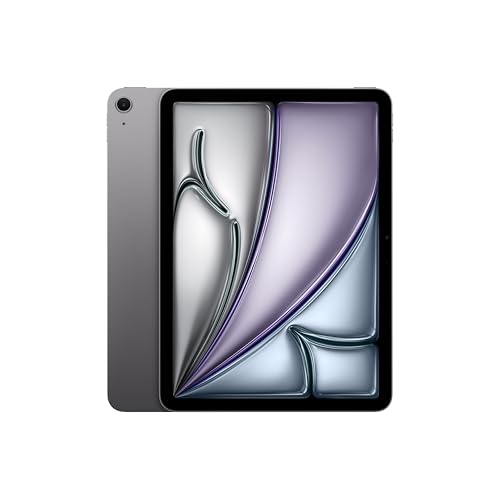
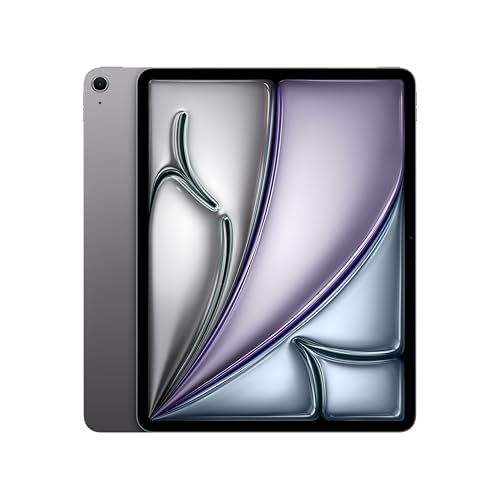
Apple iPad Air 11-inch (M4) — the balanced pick for work and play
See it on Amazon — this link is the 128GB Wi-Fi model in Space Gray (Apple part MH304LL/A).
The 11-inch Air is where the lineup turns serious. The M4 chip — 8-core CPU, 9-core GPU, 12GB of memory — is fast enough for photo editing, layered drawing apps, console-style games and the full Apple Intelligence feature set, and it will stay responsive for years of iPadOS updates. The 11-inch Liquid Retina display (2360 x 1640, 500 nits) is fully laminated with an anti-reflective coating and P3 wide colour, a visible step up from the base iPad in glare and drawing feel. Wi-Fi 7 via Apple’s N1 chip and Bluetooth 6 keep it current, and the USB-C port moves files at up to 10Gb/s.
Accessory support is the other half of the appeal: the Air takes the Apple Pencil Pro and the Magic Keyboard for iPad Air, turning it into a credible laptop stand-in for writing and office work. What it does not have is the Pro’s OLED screen, ProMotion, Face ID or Thunderbolt — unlocking is by Touch ID in the top button, and the display refreshes at 60Hz. For most people who work on their tablet as well as relax with it, those are the right things to give up.
Apple iPad Air 13-inch (M4) — the big screen without the Pro step
See it on Amazon — this link is the 128GB Wi-Fi model in Space Gray (Apple part MH5N4LL/A).
Everything said about the 11-inch Air applies here, with one change that alters how the tablet feels: a 13-inch Liquid Retina display (2732 x 2048) at 600 nits. That extra space is what split-screen multitasking, sheet music, comics, magazines and side-by-side document work actually need, and it makes the Air a far better drawing surface for artists who want room to rest a hand. The M4 chip, 12GB of memory, Wi-Fi 7, Apple Pencil Pro support and the 13-inch Magic Keyboard for iPad Air all carry over unchanged.
The trade-offs are portability and handling. The 13-inch Air is noticeably heavier and wider than the 11-inch — it is a desk and sofa tablet more than a train tablet — and the larger glass is still a 60Hz LCD, so if smooth scrolling and HDR video are your priorities, the Pro’s OLED panel is a different class entirely. Choose this model when screen area is the feature you will use every day and the Pro’s extras are not.
Apple iPad Pro 11-inch (M5) — the maximum iPad
See it on Amazon — this link is the 256GB Wi-Fi model in Silver with standard glass (Apple part MDWL4LL/A).
The Pro exists for buyers who will actually use its headroom. The Ultra Retina XDR display is a tandem OLED panel (2752 x 2064) with ProMotion adaptive refresh from 10Hz to 120Hz, 1,000 nits of full-screen brightness and 1,600 nits peak for HDR content — for drawing, photo work and HDR video it is simply in another league from the LCD models. The M5 chip in this 256GB configuration pairs a 9-core CPU and 10-core GPU with 12GB of memory, and the Thunderbolt port (up to 40Gb/s) drives external displays and fast storage for genuine desk workflows. Face ID replaces Touch ID, a LiDAR scanner supports 3D and AR work, and it pairs with the Apple Pencil Pro and the aluminium Magic Keyboard for iPad Pro.
The honest limitations: iPadOS still is not macOS, so professional apps remain the tablet versions; the nano-texture glass option is reserved for the 1TB and 2TB models, not this one; and much of the M5’s power sits idle in ordinary browsing and streaming. If your work is notes, documents and media, the Air gives you the same software experience in a lighter-spending package. If your work is colour-critical, performance-hungry or display-driven, this is the iPad built for it.
Comparison table
| Model (linked variant) | Display | Chip / memory | Apple Pencil | Keyboard | Port |
|---|---|---|---|---|---|
| iPad (A16), 128GB Wi-Fi | 11-inch Liquid Retina LCD, 500 nits | A16 / 6GB | Pencil (USB-C), Pencil 1 | Magic Keyboard Folio | USB-C (USB 2 speeds) |
| iPad mini (A17 Pro), 128GB Wi-Fi | 8.3-inch Liquid Retina LCD, 500 nits | A17 Pro / 8GB | Pencil Pro, Pencil (USB-C) | None from Apple | USB-C, up to 10Gb/s |
| iPad Air 11-inch (M4), 128GB Wi-Fi | 11-inch Liquid Retina LCD, 500 nits | M4 / 12GB | Pencil Pro, Pencil (USB-C) | Magic Keyboard for iPad Air | USB-C, up to 10Gb/s |
| iPad Air 13-inch (M4), 128GB Wi-Fi | 13-inch Liquid Retina LCD, 600 nits | M4 / 12GB | Pencil Pro, Pencil (USB-C) | Magic Keyboard for iPad Air (13-inch) | USB-C, up to 10Gb/s |
| iPad Pro 11-inch (M5), 256GB Wi-Fi | 11-inch Ultra Retina XDR OLED, ProMotion 120Hz | M5 / 12GB | Pencil Pro, Pencil (USB-C) | Magic Keyboard for iPad Pro | Thunderbolt / USB 4, up to 40Gb/s |
FAQ
Which iPad is best for gaming?
For handheld play, the iPad mini’s A17 Pro and one-hand size make it the natural gaming pick, and it supports hardware-accelerated ray tracing. For a bigger screen, the Air’s M4 and the Pro’s M5 handle demanding titles at higher settings; the base iPad’s A16 runs popular games well but without Apple Intelligence or ray tracing.
Does the base iPad support the Apple Pencil Pro?
No. The iPad (A16) works with the Apple Pencil (USB-C) and the first-generation Apple Pencil only. Apple Pencil Pro support starts with the iPad mini (A17 Pro) and continues through the Air and Pro lines.
Is the iPad Air M4 a big step up from the M3 Air?
On paper the changes are internal: the M4 chip, 12GB of memory instead of 8GB, and Wi-Fi 7 with Apple’s N1 chip instead of Wi-Fi 6E. The design, displays and accessory support are unchanged, so the M4 models are the ones to buy new; the M3 models only make sense while existing stock lasts.
Should I choose Wi-Fi or cellular?
Every model here is sold in a Wi-Fi + Cellular version with 5G and eSIM. If the tablet will mostly live at home, at school or in an office, Wi-Fi is enough and a phone hotspot covers the occasional trip. Choose cellular if you regularly work in places without trustworthy Wi-Fi and do not want to tether.
How much storage do I need?
The base capacities — 128GB on the iPad, mini and Air, 256GB on the Pro — suit streaming, browsing, documents and a healthy app library. Step up if you keep large game installs, download lots of video for offline viewing, or work with big photo and video files, because no iPad accepts expandable storage.
Conclusion
The current iPad lineup divides cleanly once you match it to a job. The iPad (A16) is the sensible default for everyday use and families. The iPad mini is the reader’s and traveller’s tablet, small without being weak. The iPad Air — 11-inch for portability, 13-inch for screen space — is the balanced choice for people who also work, draw or study on their tablet. And the iPad Pro (M5) earns its place only when its OLED display, Thunderbolt port and top-end chip map to work you actually do. Decide which of those descriptions sounds like you, pick the storage you will still be comfortable with in three years, and the rest of the spec sheet falls into place.
More from Amazon
Programs that pair well with the guide above. Offers and eligibility are set by Amazon and may change.
Free shipping on eligible items, Prime Video and more. Eligible new members can start with a free trial.
Start a Prime free trialAd-free music streaming. Eligible new subscribers can start with a free trial.
Try Music Unlimited freeA Prime membership for ages 18-24 with a trial period. Eligibility is set by Amazon.
See Prime for Young AdultsAudiobooks and podcasts to listen to on the go. Eligible new members can start with a free trial.
Try Audible freeAs an Amazon Associate we earn from qualifying purchases.