
Our Top Picks
 Logitech G29 Racing Wheel and Pedals for PS5/PS4/PC10.24 x 10.94 x 10.63 inches10 PoundsDVD-ROMCheck on Amazon
 Logitech G920 Racing Wheel and Pedals for Xbox10.94 inches10.24 x 10.94 x 10.63 Inches4.96 poundsCheck on Amazon
American Truck Simulator launched on February 2, 2016, and this indie simulation remains one of the friendliest games in the hobby for older PCs. You drive legendary American trucks and deliver cargoes across sunny California, sandy Nevada and the Grand Canyon State of Arizona, and the engine behind it all is light enough that the official minimum is a GeForce GTX 660, Radeon RX 460 or Intel HD 630 with 2 GB of VRAM, an Intel Core i5-6400 or AMD Ryzen 3 1200, 8 GB of RAM and just 25 GB of disk space. The published recommended spec — a GTX 1660 or RX 590, a Core i5-9600 or Ryzen 5 3600 and 12 GB of RAM — is modest by modern standards too. This guide explains what those numbers mean in practice, which graphics cards make sense at 1080p, 1440p and 4K, and which builds suit a relaxing trucking sim rather than a brand-new blockbuster.
How Demanding Is American Truck Simulator?
Not very. American Truck Simulator is a 2016 simulation built around long highway drives rather than dense action, and its official requirements reflect that: the minimum GPU is a GTX 660-class card, and the recommended card, a GTX 1660 or RX 590, is a mid-range part from around 2018–2019. In practical terms, almost any discrete GPU sold in the last several years will run the base game at 1080p with high settings, and even the integrated graphics named in the minimum spec, such as Intel HD 630, can handle it at lowered settings. 1440p and 4K mostly ask for more VRAM and shading headroom rather than a flagship card, and a modest quad-core CPU is enough — this is not a CPU-heavy simulation the way a large strategy game is, although heavy map mods and dense traffic can add load. The one figure worth planning around is storage: the base game needs 25 GB, and map DLCs and mods can push that much higher.
Logitech G29 Racing Wheel and Pedals for PS5/PS4/PC | Stainless steel paddle shifters, leather steering wheel cover, real force feedback, for PS5, PS4, PC, Mac
One of the home product options compared in this guide.
View on AmazonLogitech G920 Racing Wheel and Pedals for Xbox X|S/Xbox One/PC | Real force feedback, stainless steel paddle shifters, leather steering wheel cover, for Xbox Series X|S, PC, Mac
One of the home product options compared in this guide.
View on Amazon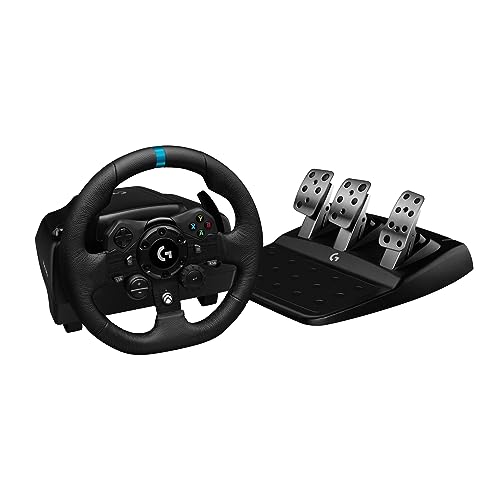
Logitech G923 Racing Wheel and Pedals for Xbox X|S, Xbox One and PC Featuring TRUEFORCE up to 1000 Hz Force Feedback, Responsive Pedal, Dual Clutch Launch Control, and Genuine Leather Wheel Cover
One of the home product options compared in this guide.
View on Amazon
Logitech G Gaming Driving Force Shifter for G29 and G920 Driving Wheels for PS4, Xbox One, and PC (Renewed)
One of the home product options compared in this guide.
View on AmazonAmerican Truck Simulator Official PC System Requirements
| Component | Minimum (official) | Recommended (official) |
|---|---|---|
| OS | Windows 10 64-bit | Windows 10 64-bit |
| Processor | Intel Core i5-6400 or AMD Ryzen 3 1200 or similar | Intel Core i5-9600 or AMD Ryzen 5 3600 or similar |
| Memory | 8 GB RAM | 12 GB RAM |
| Graphics | NVIDIA GeForce GTX 660 or AMD Radeon RX 460 or Intel HD 630 (2GB VRAM) | NVIDIA GeForce GTX 1660 or AMD Radeon RX 590 (2GB VRAM) |
| Storage | 25 GB available space | 25 GB available space |
Source: the official American Truck Simulator Steam store listing (app 270880), checked October 2026. Publishers can update these specs after patches.
Best GPU for American Truck Simulator by Resolution
1080p
At 1080p the officially recommended hardware is already the sweet spot: a GeForce GTX 1660 or Radeon RX 590 paired with a Core i5-9600 or Ryzen 5 3600 will run American Truck Simulator at high settings. Older cards that meet or beat the minimum — GTX 660, GTX 1050 Ti, RX 460, RX 570 — are still usable at medium detail. If you want a card that will also handle newer games, the AMD Radeon RX 7600 is a comfortable 1080p choice, and current-generation options such as the RTX 5060 or RX 9060 XT sit even further above what this sim requires.
1440p
1440p is where a little more GPU helps, mainly because of the higher pixel count. A GTX 1660 or RX 590 can still manage 1440p if you trim a few settings, while a modern mid-range card is well into set-and-forget territory. The AMD Radeon RX 7600 is a solid 1440p pick for American Truck Simulator, and an RTX 5060, RX 9060 XT or RTX 5070-class card gives you plenty of headroom for high refresh rates. Because the game is light, you do not need a high-end GPU here the way you would for a demanding AAA release.
4K
4K is the one resolution that asks for a genuinely strong card, but even then American Truck Simulator is far from punishing. An NVIDIA GeForce RTX 4060 is a realistic entry point at 4K with upscaling or slightly reduced settings, and an RTX 5070 or Radeon RX 9070 makes high settings at 4K much more comfortable. VRAM matters more than raw speed here: the official spec lists 2 GB at both minimum and recommended, and 8 GB or more leaves room for high-resolution textures and mods.
CPU, RAM and Storage for American Truck Simulator
American Truck Simulator is not a CPU-hungry simulation. The official minimum is an Intel Core i5-6400 or AMD Ryzen 3 1200 and the recommended is a Core i5-9600 or Ryzen 5 3600, both several generations old. Any modern quad-core or better — including the AMD Ryzen 5 7600 — is more than enough, and the AMD Ryzen 7 7800X3D or Intel Core i5-14600K are only worth considering if you also play heavier games. CPU load does rise with heavy traffic, complex map mods and long draw distances, so a faster chip is not wasted, but it is not the priority for this title.
Memory is similarly modest: 8 GB is the official minimum and 12 GB is recommended. 16 GB is a comfortable target that leaves room for mods and background apps, while a 32 GB kit such as the Corsair Vengeance DDR5 32GB is future-proofing rather than a requirement. Storage is where the game actually asks for something: 25 GB of available space for the base game, with map DLCs and mods adding many more gigabytes. An SSD such as the Samsung 990 Pro 2TB NVMe SSD cuts loading times and helps scenery stream in smoothly on long highway runs.
Recommended PC Builds for American Truck Simulator
1080p budget build: AMD Radeon RX 7600 + AMD Ryzen 5 7600 + 16 GB DDR5 — far above the official recommended spec, and enough for high settings at 1080p with room to spare.
1440p sweet-spot build: AMD Radeon RX 7600 + AMD Ryzen 7 7800X3D + 32 GB DDR5 + 2TB NVMe SSD — comfortable 1440p at high settings, and a good base if you also play more demanding games.
4K high-end build: NVIDIA GeForce RTX 4060 + AMD Ryzen 7 7800X3D + 32 GB DDR5 + fast NVMe SSD — a 4K entry build for American Truck Simulator with scaling enabled; an RTX 5070 or RX 9070 is the better pick if you want 4K at high settings without compromise.
Matching the official spec: if this sim is all you play, a GeForce GTX 1660 or RX 590 with a Core i5-9600 or Ryzen 5 3600 and 12 GB of RAM hits the published recommended requirements and is the honest answer for American Truck Simulator. A GTX 660 or RX 460-class card with 8 GB of RAM meets the minimum and will still get you driving at 1080p with adjusted settings.
Is It Worth Upgrading Your PC for American Truck Simulator?
Because American Truck Simulator is light, upgrading purely for this game is rarely necessary — a GTX 660-class card still meets the minimum and a GTX 1660-class card meets the recommended spec. The usual advice still applies if you do want more: the graphics card delivers the biggest jump, so upgrade the GPU first. A CPU from the last several years will not hold back a modern GPU in this sim, so you can normally keep it. Moving the game to an SSD, and going from 8 GB to 12 GB or 16 GB of RAM, are inexpensive changes that help most with load times, mods and heavy traffic. If you only drive in American Truck Simulator, spend as little as you can get away with; if you also play demanding games, buy for those and the sim will simply run better.
Can You Play American Truck Simulator on a Laptop or Handheld?
Gaming laptops handle American Truck Simulator easily. A mobile GPU roughly equivalent to the recommended GTX 1660 is plenty for 1080p at high settings, and an RTX 4060 laptop is well beyond what the sim needs. Expect the usual laptop trade-offs — fan noise, heat and shorter battery life when unplugged. Handhelds are a natural fit for a game like this: the Steam Deck, ROG Ally and similar devices run it comfortably at sensible settings, which makes it an excellent pick for playing on the move. If portability matters, prioritise a device with a decent GPU and enough internal storage, since the 25 GB base install plus map DLCs and mods adds up quickly.
How to Boost FPS in American Truck Simulator
If frame rates are lower than you want, the most effective lever is resolution: dropping the internal render resolution or the game’s scaling option, where available, gives the biggest single gain. After that, trim the expensive visual extras — shadows, reflections, mirror detail and distance drawing — before you touch anything else. Cap your frame rate to something your hardware holds consistently, keep GPU drivers current, close background applications, and install the game on an SSD rather than a mechanical drive. Because American Truck Simulator is not demanding, most stutter comes from mods, insufficient RAM or a slow drive rather than from the GPU, so fix those first. A steady frame rate always feels better than maxed-out settings that hitch.
Frequently Asked Questions
Can my PC run American Truck Simulator?
Very likely. The official minimum is an Intel Core i5-6400 or AMD Ryzen 3 1200, 8 GB of RAM, 25 GB of storage and a GeForce GTX 660, Radeon RX 460 or Intel HD 630 with 2 GB of VRAM, which describes a lot of older and budget systems. For high settings at 1080p, aim for the recommended spec: a Core i5-9600 or Ryzen 5 3600, 12 GB of RAM and a GTX 1660 or RX 590.
Is American Truck Simulator demanding on PC?
No. It is a 2016 simulation with modest official requirements, and mid-range or even entry-level modern hardware runs it comfortably at 1080p and 1440p. It only becomes heavier if you pile on large map mods or drive through dense traffic.
What GPU do I need for American Truck Simulator at 1440p 60fps?
A modern mid-range card is more than enough: the AMD Radeon RX 7600, RTX 5060 or RX 9060 XT has ample headroom for 1440p at high settings. Even the officially recommended GTX 1660 or RX 590 can reach 1440p if you adjust a few settings.
How much RAM does American Truck Simulator need?
8 GB is the official minimum and 12 GB is recommended. 16 GB is a comfortable figure for a modern system, especially if you use mods or keep other applications open; 32 GB is not necessary for this game alone.
Do I need an SSD for American Truck Simulator?
The game needs 25 GB of free space and will run from a mechanical drive, but an SSD is strongly recommended because it cuts loading times and helps scenery stream in smoothly. A drive like the Samsung 990 Pro is far faster than this sim needs, but it is a good choice if you also play larger titles.









