Storage fills up fast when modern games routinely demand 100GB or more, and a sluggish drive can mean longer load screens, stuttering textures, and frustrating install queues. If you’re building a new rig, upgrading a console, or just tired of juggling files between drives, a 2TB NVMe SSD solves the capacity problem while delivering the speed today’s games and applications expect.
This guide breaks down what actually matters when shopping for a 2TB NVMe drive, reviews six of the top options on the market, and answers the questions we hear most from gamers and PC builders. Whether you want the fastest PCIe 4.0 drive available or a budget-friendly option that still performs, you’ll find a solid recommendation below.
Our top picks
 WD_Black SN7100 2TB NVMe SSD
- This product has been replaced by our latest…
- OCTANE GAMING
- BUILT
 Samsung SSD 990 PRO 2TB
Sequential speeds up to 7450 MB/s suit heavy workloads
Improved random performance aids faster everyday load times
Compact M.2 2280 form factor fits most modern motherboards
Requires a PCIe 4.0 slot to reach full speed
Capacity tops out lower than some rival 4TB drives
 Silicon Power 2TB NVMe M.2 PCIe Gen3x4
- PCIe Gen 3x4 interface with read speeds up…
- TBW=1200
- The warranty terms on all of its SSDs…
| Product | Key specs | |
|---|---|---|
| WD_Black SN7100 2TB NVMe SSD | This product has been replaced by our latest… OCTANE GAMING BUILT | Check price |
| Samsung SSD 990 PRO 2TB | Check price | |
| Silicon Power 2TB NVMe M.2 PCIe Gen3x4 | PCIe Gen 3x4 interface with read speeds up… TBW=1200 The warranty terms on all of its SSDs… | Check price |
 Crucial P310 2TB SSD Crucial P310 2TB SSD | PCIe 4.0 Performance: Delivers up to 7,100 MB/s… Spacious 2TB SSD: Provides space for AAA games,… Broad Compatibility: Works seamlessly with laptops, desktops, and… | Check price |
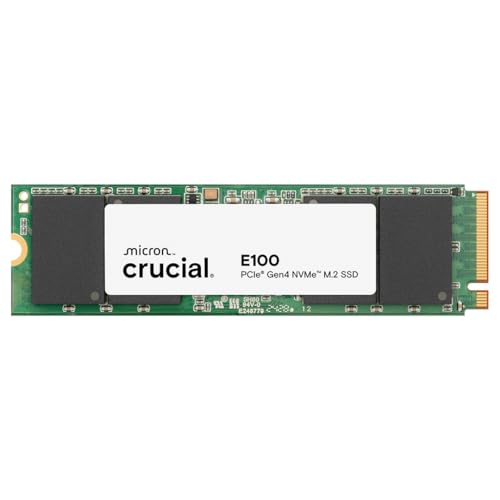 Crucial E100 2TB M.2 NVMe PCIe Gen4 Crucial E100 2TB M.2 NVMe PCIe Gen4 | Gen4 performance at 5,000MB/s is 8x faster4 than… SAVE MORE PHOTOS, VIDEOS AND MORE: Get up… Follow step-by-step instructions for easy installation and cloning | Check price |
 Kingston NV3 2TB M.2 2280 NVMe SSD Kingston NV3 2TB M.2 2280 NVMe SSD | Ideal for high speed, low power storage Gen 4x4 NVMe PCle performance Up to 6,000MB/s read, 5,000MB/s write | Check price |
 Western Digital 2TB WD Green SN350 NVMe Western Digital 2TB WD Green SN350 NVMe | Fast NVMe performance for daily computing needs SSDs offer shock-resistance against accidental bumps and drops The slim M.2 2280 form factor is ideal… | Check price |
 Acer Predator GM7 2TB SSD: M.2 2280 Acer Predator GM7 2TB SSD: M.2 2280 | PCIe 4.0 Gen4: The high-performance Predator GM7 delivers… HMB+SLC Cache: Predator GM7 supports HMB (Host Memory… Powerful controller and NAND Flash: Equipped with the… | Check price |
As an Amazon Associate we earn from qualifying purchases at no extra cost to you.
🎮 Get More From Your Setup — Free
Prime Gaming gives you free PC games every month, in-game loot, and a free Twitch channel sub — plus fast free shipping on all the gear above. New members get a 30-day free trial.
Watch: Best 2tb Nvme Ssd: Top Picks Reviewed — Video Review
How to Choose a 2tb Nvme Ssd
- Interface Generation: PCIe Gen4 drives offer roughly double the bandwidth of Gen3, but confirm your motherboard or console supports Gen4 before paying extra for speeds you can’t use.
- Sequential Read/Write Speeds: Higher MB/s ratings translate to faster game loads and file transfers; look for at least 5,000 MB/s if you want a noticeable upgrade over SATA SSDs.
- Endurance (TBW): Terabytes Written ratings indicate long-term durability. A higher TBW figure matters more if you plan to use the drive heavily for years rather than as a secondary storage pool.
- Thermal Design: Fast NVMe drives generate heat under sustained loads. Check whether your case, laptop, or handheld has adequate airflow, or whether the drive includes a heatsink.
- Compatibility with Your Device: Handheld gaming devices, laptops, and small form-factor PCs often have height or heat restrictions, so verify the drive’s physical profile fits your specific hardware.
The Best 2tb Nvme Ssds Reviewed
WD_Black SN7100 2TB NVMe SSD
The SN7100 pairs Gen4 PCIe speeds of up to 7,250 MB/s read with a slim single-sided design that fits neatly into handheld gaming devices and thin laptops. Its next-gen TLC 3D NAND delivers consistent performance whether you’re loading open-world games or transferring large media libraries.
Samsung SSD 990 PRO 2TB
Samsung’s 990 PRO pushes read speeds up to 7,450 MB/s, making it one of the fastest Gen4 drives available for high-end builds and demanding workstation tasks. It’s a go-to choice for enthusiasts who want maximum performance without stepping up to PCIe Gen5 pricing.
Silicon Power 2TB NVMe M.2 PCIe Gen3x4 SSD
This Silicon Power drive sticks to Gen3 speeds, but that keeps the price accessible for anyone upgrading an older system or adding secondary storage without needing Gen4 bandwidth. It’s a practical pick for budget-conscious builders who still want reliable NVMe performance over SATA.
Crucial P310 2TB SSD
The P310 hits up to 7,100 MB/s and is built with compatibility in mind, working smoothly across desktops, laptops, and handheld gaming consoles. Bundled Acronis data recovery software adds peace of mind for anyone worried about data loss during a system upgrade.
Crucial E100 2TB M.2 NVMe SSD
The E100 offers a more moderate 5,000 MB/s top speed, positioning it as a solid mid-range option for users who want a meaningful jump over SATA without paying flagship prices. It’s a sensible choice for general desktop and laptop upgrades rather than top-tier gaming rigs.
Frequently Asked Questions
Is 2TB enough storage for gaming?
For most gamers, 2TB comfortably holds 15-25 modern titles depending on install size, making it a sweet spot between capacity and cost. Players with extensive libraries or multiple large open-world games may still want to pair it with additional storage.
Do I need PCIe Gen4 or is Gen3 fine?
Gen4 drives offer roughly double the bandwidth of Gen3, which benefits large file transfers and some game load times, but the real-world difference in day-to-day gaming is often modest. If your motherboard only supports Gen3, a drive like the Silicon Power option still delivers a strong upgrade over SATA SSDs.
Will an NVMe SSD work in my gaming handheld?
Many handheld gaming devices support M.2 2280 NVMe drives, but thermal constraints and physical clearance vary by model, so check your device’s specifications before buying. Drives like the WD_Black SN7100 and Crucial P310 are specifically designed with handheld compatibility in mind.
How long do NVMe SSDs typically last?
Most consumer NVMe drives are rated for hundreds of terabytes written (TBW) and come with 5-year warranties, which translates to many years of typical gaming and everyday use. Drive longevity in practice usually exceeds the rated TBW unless you’re running constant heavy write workloads.
Final Thoughts
For most gamers, the Samsung SSD 990 PRO stands out as the top overall pick thanks to its exceptional speed and reliability, while the WD_Black SN7100 is the better choice if you need a compact drive for handhelds or laptops. If budget is the priority, the Silicon Power Gen3 drive still delivers dependable NVMe performance at a lower cost.