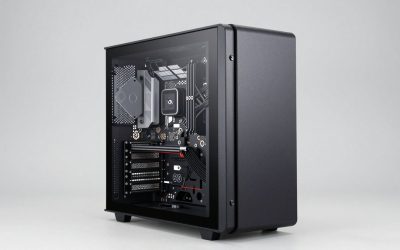
Your PC case is more than a box; it shapes your build’s airflow, noise, aesthetics, and how easy it is to work inside. A well-chosen gaming case keeps components cool, shows off your hardware, and leaves room to grow, making it one of the more satisfying parts of any build.
This roundup covers the best computer cases for gaming, from high-airflow mid-towers to striking designs with panoramic glass and pre-installed ARGB fans. Here is how to pick a case that fits your components, cooling needs, and personal style.
Our top picks
 CORSAIR 4000D RS ARGB Frame Modular Mid-Tower
- FRAME Modular Case System - The revolutionary FRAME…
- 3x CORSAIR RS ARGB PWM Fans - High-performance…
- CORSAIR InfiniRail Fan Mounting System - This steel…
 MUSETEX ATX PC Case 7 PWM ARGB
- 【MUSETEX presents the K2 gaming pc case】both a…
- 【Tower Case Powerful Space Layout】The internal structure of…
- 【Upgrade High Speed IO Panel】1 x Type-C, 2…
 Fractal Design North Charcoal Black Tempered Glass
- Enhance the look of your gaming station with…
- Designed for ATX / mATX / ITX motherboards
- Enjoy natural ventilation through an open front and…
| Product | Key specs | |
|---|---|---|
| CORSAIR 4000D RS ARGB Frame Modular Mid-Tower | FRAME Modular Case System - The revolutionary FRAME… 3x CORSAIR RS ARGB PWM Fans - High-performance… CORSAIR InfiniRail Fan Mounting System - This steel… | Check price |
| MUSETEX ATX PC Case 7 PWM ARGB | 【MUSETEX presents the K2 gaming pc case】both a… 【Tower Case Powerful Space Layout】The internal structure of… 【Upgrade High Speed IO Panel】1 x Type-C, 2… | Check price |
| Fractal Design North Charcoal Black Tempered Glass | Enhance the look of your gaming station with… Designed for ATX / mATX / ITX motherboards Enjoy natural ventilation through an open front and… | Check price |
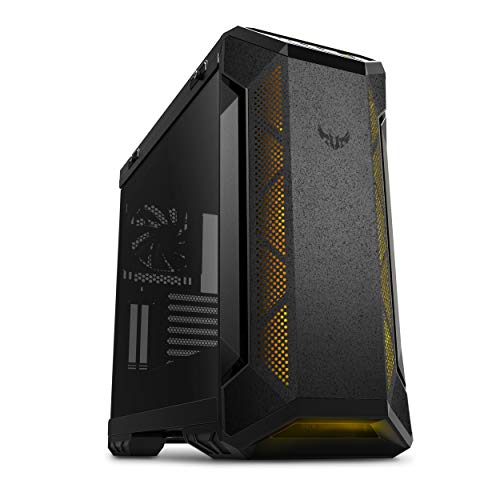 ASUS TUF Gaming GT501 Mid-Tower Gaming Case ASUS TUF Gaming GT501 Mid-Tower Gaming Case | Mid-tower with support for EATX motherboards featuring a… Keep your cool with three 120mm aura Sync… Custom Liquid Cooling ready with support for top… | Check price |
 MUSETEX Y6 PC Case MUSETEX Y6 PC Case | MUSETEX offers a standout Y6 ATX PC case… PC Case Optimized Space Layout: The internal of… ATX Case I/O Port Configuration: 1 x Type-C,… | Check price |
 Lian Li V100-ATX Mid-Tower PC Case-Black-V100RX Lian Li V100-ATX Mid-Tower PC Case-Black-V100RX | Comes with 4x pre-installed PWM-controlled 120mm ARGB fans,… Integrated 26-LED ARGB strip offers full spectrum color… Supports ATX, Micro-ATX, Mini-ITX, and back-connect ATX or… | Check price |
 MUSETEX ATX PC Case Pre-Install 6 PWM MUSETEX ATX PC Case Pre-Install 6 PWM | After view MUSETEX item description,you will be pleasantly… 6 Highly Configurable PWM ARGB Fans Pre-installed- (1)… Expensive Glass Side Door - Not only is… | Check price |
 NZXT H5 Flow NZXT H5 Flow | The PSU shroud is perforated on the side… Supports up to a 360mm radiator in front… Ultra-fine mesh on the top, front, and side… | Check price |
As an Amazon Associate we earn from qualifying purchases at no extra cost to you.
🎮 Get More From Your Setup — Free
Prime Gaming gives you free PC games every month, in-game loot, and a free Twitch channel sub — plus fast free shipping on all the gear above. New members get a 30-day free trial.
Watch: Best Computer Case For Gaming — Video Review
How to Choose a Gaming PC Case
- Airflow: Good airflow keeps components cool. Look for cases with mesh panels and multiple pre-installed fans, or room to add your own.
- Size and compatibility: Confirm the case supports your motherboard size (ATX, Micro-ATX) and has clearance for your GPU, cooler, and radiators.
- Cooling support: Check how many fans and what radiator sizes the case accepts, especially if you plan to add liquid cooling.
- Aesthetics: Tempered glass panels, ARGB lighting, and unique designs let you show off your build. Decide how much visual flair matters to you.
- Build quality and cable management: Sturdy construction and good cable routing make building easier and the result cleaner and more reliable.
The Best Gaming PC Cases Reviewed
CORSAIR 4000D RS ARGB
The CORSAIR 4000D RS ARGB is a superb high-airflow mid-tower with three pre-installed ARGB fans, a modular InfiniRail mounting system, and support for modern back-connect motherboards. Its clean design and excellent thermals make it a favorite for builders. For a reliable, well-cooled case with broad compatibility, it is an easy recommendation.
Fractal Design North Charcoal Black
The Fractal Design North stands out with a genuine walnut wood front panel and a tempered glass side, blending style with strong airflow. It includes two 140mm fans and a USB-C port. For those who want a case that looks at home in a living space while still cooling well, its distinctive design is hard to beat.
Lian Li V100-ATX
The Lian Li V100 offers four pre-installed 120mm ARGB fans, an LED RGB strip, and a display platform with tempered glass, delivering both cooling and a premium showcase. Lian Li’s build quality is excellent. For enthusiasts who want a striking, well-cooled case that displays their hardware beautifully, it is a standout option.
MUSETEX Y6
The MUSETEX Y6 packs seven pre-installed infinity mirror ARGB fans, a Type-C port, and a 270-degree panoramic tempered glass design at an aggressive price. It delivers strong airflow and eye-catching looks for the money. For builders who want maximum RGB and glass on a budget, it offers tremendous value and visual impact.
ASUS TUF Gaming GT501
The ASUS TUF Gaming GT501 is a durable steel mid-tower supporting EATX motherboards, with four pre-installed fans, smoked tempered glass, and a USB 3.0 front panel. Its rugged build and roomy interior suit larger, powerful builds. Backed by a two-year warranty, it is a dependable choice for gamers who want space and durability.
Frequently Asked Questions
How important is case airflow?
Very. Good airflow keeps your CPU and GPU cool, which protects performance and longevity. Mesh panels and multiple fans make a real difference under load.
Do I need pre-installed fans?
Pre-installed fans save money and setup time, which is why many cases here include several. You can always add more, but starting with a few is convenient.
Will my components fit in any case?
Not always. Check clearance for your GPU length, CPU cooler height, and radiator sizes, and confirm the case supports your motherboard form factor before buying.
Is tempered glass worth it?
If you want to show off your build and RGB lighting, yes. Tempered glass panels look great but do add a bit to the price compared to solid panels.
Final Thoughts
The right case ties your whole build together. The CORSAIR 4000D RS ARGB leads for airflow and compatibility, while the Fractal Design North offers unique wood-accented style. The Lian Li V100 and MUSETEX Y6 deliver striking RGB showcases, and the ASUS TUF GT501 suits larger, rugged builds. Match airflow, size, and aesthetics to your needs, and your components will stay cool and look great.