Our Top Picks
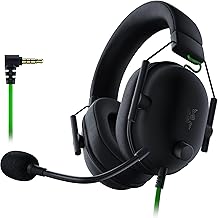
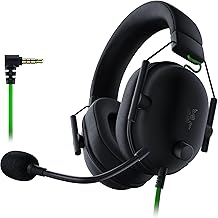
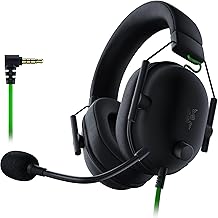
 Razer BlackShark V2 X Gaming Headset: 7.1 Surround3.5 mm7.6 x 6.76 x 3.86 inches0.5 poundsCheck on Amazon
The best gaming headsets with spatial audio for most setups in 2026 are the SteelSeries Arctis Nova Pro Wireless for cross-platform versatility, the Logitech G Astro A50 X for HDMI-switching console/PC users, and the Razer BlackShark V2 Pro (2023) for competitive PC players who want lightweight comfort and precise positional audio — the right choice depends on whether you need native 3D audio on PS5, Dolby Atmos on Xbox, or low-latency wireless on PC.
How Spatial Audio Actually Works on Headsets
Spatial audio is not a single technology. It is a processing layer that takes a 5.1, 7.1, or object-based mix and renders it into a binaural stereo signal with directional cues. The source of that processing matters more than the marketing label on the box.

HyperX Cloud III – Wired Gaming Headset, PC, PS5, Xbox Series X|S, Angled 53mm Drivers, Spatial Audio, Memory Foam, Durable Frame, Ultra-Clear 10mm Mic, USB-C, USB-A, 3.5mm – Black/Red
Chosen because it specifies Wired Gaming Headset and PS5.
View on AmazonRazer BlackShark V2 X Gaming Headset: 7.1 Surround Sound - 50mm Drivers - Memory Foam Cushion - For PC, PS4, PS5, Switch - 3.5mm Audio Jack - Black
Chosen because it specifies 50mm Drivers and Memory Foam Cushion.
View on Amazon
HyperX Cloud Alpha Wireless - Gaming Headset for PC, 300-hour battery life, DTS Headphone:X Spatial Audio, Memory foam, Dual Chamber Drivers, Noise-canceling mic, Durable aluminum frame,Red
Chosen because it specifies Gaming Headset for PC and 300-hour battery life.
View on Amazon
HyperX Cloud III S – Wireless Gaming Headset for PS5, PS4, Switch, PC, Mac, and Mobile, Up to 120-Hour (2.4GHz) / 200-Hour (Bluetooth) Battery, 53mm Angled Drivers, Detachable Mic – Black
Chosen because it specifies Wireless Gaming Headset for PS5 and PS4.
View on Amazon- Platform-level 3D audio: PlayStation 5 Tempest 3D Audio and Windows Sonic / Dolby Atmos for Headphones / DTS Headphone:X on PC and Xbox. The console or PC does the rendering, the headset just needs to deliver clean stereo.
- Headset-level virtual surround: Built-in processing via a USB dongle, base station, or software like SteelSeries Sonar or Logitech G Hub. Useful when the source is plain stereo or you want EQ and chat mix control.
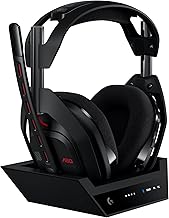
- True object-based passthrough: Headsets that accept a multichannel signal over USB or HDMI and let you choose where decoding happens. The Astro A50 X is notable here because its base station acts as an HDMI 2.1 switch.
For positional accuracy, platform-level rendering is almost always more accurate than headset virtual 7.1, because game engines already output object positions. Buying a headset for its “7.1 driver” is misleading; all headsets have two drivers. Accuracy comes from the HRTF profile and frequency response tuning.
Decision Matrix: Which Headset Type Fits Your Setup
Match your primary platform and connection priority first, then narrow by comfort and mic needs.
| Your Situation | Recommended Connection Type | Best Spatial Audio Source | Model Class to Look For |
|---|---|---|---|
| PC + PS5 + Xbox Series X (one headset for all) | 2.4GHz wireless + Bluetooth + wired USB | Tempest 3D on PS5 / Dolby Atmos for Headphones on Xbox/PC | SteelSeries Arctis Nova Pro Wireless, Corsair Virtuoso RGB Wireless XT |
| PS5 primary, competitive shooters | 2.4GHz low-latency dongle | Tempest 3D Audio (set headset to stereo mode) | Sony Inzone H9, SteelSeries Arctis Nova 7P |
| Xbox Series X|S primary | Xbox Wireless direct or licensed USB | Dolby Atmos for Headphones / DTS Headphone:X (license often included) | Turtle Beach Stealth 700 Gen 3, Razer Kaira Pro for Xbox |
| PC only, esports / positional accuracy priority | 2.4GHz wireless or wired USB | Dolby Atmos / DTS:X or in-game HRTF (e.g., CS2, Valorant, Warzone) | Razer BlackShark V2 Pro (2023), HyperX Cloud Alpha Wireless, Logitech G Pro X 2 Lightspeed |
| Living room with PS5, Xbox, and TV sharing one display | HDMI passthrough base station | Native HDMI audio + platform 3D | Logitech G Astro A50 X |
Comparison: Top Spatial Audio Headsets in 2026
All models below support spatial audio via platform rendering when set to stereo. Differences are in connection, battery, weight, and ecosystem features.
| Model | Spatial Audio Compatibility | Connection Types | Battery Life (Rated) | Weight | Driver Size |
|---|---|---|---|---|---|
| SteelSeries Arctis Nova Pro Wireless | Tempest 3D, Dolby Atmos, DTS Headphone:X, Sonar Virtual Surround | 2.4GHz (2x dongle), Bluetooth 5.0, USB, 3.5mm | 22 hours per battery (2 batteries included, hot-swap) | 337g | 40mm custom |
| Logitech G Astro A50 X | Tempest 3D, Dolby Atmos, Windows Sonic via HDMI/USB | 2.4GHz Lightspeed, Bluetooth, HDMI 2.1 passthrough (3 inputs) | 24 hours | 363g | 40mm PRO-G Graphene |
| Razer BlackShark V2 Pro (2023) | THX Spatial Audio, Dolby Atmos, DTS:X compatible | 2.4GHz HyperSpeed, Bluetooth 5.2, 3.5mm, USB | 70 hours | 320g | 50mm TriForce Titanium |
| Logitech G Pro X 2 Lightspeed | Dolby Atmos, DTS:X, Windows Sonic | 2.4GHz Lightspeed, Bluetooth 5.2, 3.5mm | 50 hours | 345g | 50mm Graphene |
| HyperX Cloud Alpha Wireless | DTS Headphone:X, Dolby Atmos compatible (stereo passthrough) | 2.4GHz, 3.5mm | 300 hours | 335g | 50mm dual chamber |
| Sony Inzone H9 | Tempest 3D optimized, Dolby Atmos compatible | 2.4GHz, Bluetooth 5.0, 3.5mm, USB | 32 hours | 330g | 40mm |
1. Positional Accuracy: What Actually Makes Footsteps Easier to Locate
Positional accuracy does not come from more drivers. It comes from three factors you can control:
- Flat, wide imaging: Headsets with less bass bloat around 100-250 Hz let directional high-frequency cues at 2-4 kHz come through. The BlackShark V2 Pro and Pro X 2 are tuned leaner for this reason, while the Nova Pro Wireless lets you apply Sonar EQ to flatten the curve.
- Correct HRTF: On PS5, go to Settings > Sound > 3D Audio > Adjust 3D Audio Profile and run the measurement. On PC with Dolby Atmos for Headphones, enable the “Performance Mode” and select the profile that places the overhead demo sound directly above you, not in front.
- Disable double processing: If you use Tempest 3D or Dolby Atmos, set the headset to stereo and turn OFF its own 7.1 button. Stacking two virtualizers smears imaging and adds reverb that hurts front/rear separation.
In practice, top-tier stereo imaging headsets with platform 3D enabled will outperform cheaper “7.1 gaming” models for front/back and vertical differentiation in games like Call of Duty: Warzone, Apex Legends, and Helldivers 2.
2. Connection Types and Latency Trade-offs
Latency determines whether spatial cues stay synced to what you see.
- 2.4GHz wireless (dongle/base station): 15-30ms typical latency. The standard for competitive play. Look for models with LC3+ or proprietary low-latency codecs, not Bluetooth.
- Bluetooth: 80-200ms depending on codec (SBC, AAC, LC3). Fine for single-player or music, not for shooters. Dual-wireless models like the Nova Pro Wireless and Pro X 2 let you mix Bluetooth chat audio while game audio stays on 2.4GHz.
- Wired USB: Lowest latency and access to full EQ/chat-mix features. Required for some spatial licenses to activate.
- Wired 3.5mm analog: Universal compatibility but bypasses most processing — you rely entirely on the console/PC for spatial rendering.
- HDMI audio (Astro A50 X): Unique option that preserves HDMI 2.1 4K 120Hz video passthrough while extracting audio for the headset, so you do not choose between high refresh and headset audio.
3. Platform Support: Getting Spatial Audio Active Correctly
Buying an “Xbox licensed” or “PlayStation” variant matters less than it used to, but activation is platform-specific:
- PS5: No Dolby Atmos license needed. Plug in via USB dongle or 3.5mm to controller. Enable 3D Audio for Headphones in Sound settings. Set headset to stereo. Tempest 3D works with any stereo headset.
- Xbox Series X|S: Download Dolby Access or DTS Sound Unbound, activate license (many headsets include a 2-year code in the box), then select Dolby Atmos for Headphones under Headset Audio. For best results, set HDMI audio to Stereo Uncompressed and let the app handle spatialization.
- PC: Most flexible. You can use Windows Sonic (free), Dolby Atmos for Headphones, DTS Headphone:X, or the game’s built-in HRTF. Disable Windows Sonic if you enable Dolby Atmos to avoid conflict. In SteelSeries Sonar or Logitech G Hub, set Spatial Audio to off if using Dolby Atmos externally.
4. Comfort and Long Sessions
Weight distribution matters more than total weight after the first hour. Suspension headbands (Arctis Nova Pro, Inzone H9) distribute pressure better for larger heads, while ski-goggle bands and memory foam (BlackShark V2 Pro, Cloud Alpha Wireless) suit smaller to medium head sizes. For glasses wearers, cloth/velour ear cushions compress less on the temples than leatherette. All 300g+ headsets will cause heat buildup with leatherette in summer — look for swappable plates or airflow channels if you play in a warm room.
Battery life also affects comfort: hot-swap batteries (Nova Pro Wireless) mean you never need to play wired while charging, while 300-hour ratings (Cloud Alpha Wireless) effectively eliminate charging anxiety but use a non-removable battery.
5. Microphone Quality
No wireless headset mic will match a standalone USB mic, but the gap has narrowed:
- Broadcast/boom clarity leader: SteelSeries Arctis Nova Pro Wireless (bidirectional noise-cancelling, retractable) and Logitech G Pro X 2 (detachable with Blue VO!CE processing) are consistently the clearest for Discord and in-game comms.
- AI noise suppression: Razer BlackShark V2 Pro and Astro A50 X include detachable mics with firmware noise gating that removes keyboard clicks without software. Turn on the gate in Synapse or G Hub and set threshold to -45dB if teammates hear background noise.
- Hidden / retractable mics: Inzone H9 and similar lifestyle-oriented models prioritize a cleaner look but are slightly more muffled at off-angles. Push the boom to within 2cm of the corner of your mouth for best pickup.
Concrete Settings for Better Spatial Audio (Without Buying Anything New)
Apply these before judging a headset’s imaging:
- PC – Dolby Atmos for Headphones: Windows Settings > System > Sound > Output > Select Headset > Spatial Sound > Dolby Atmos for Headphones > Disable “Virtual Surround” in headset app. In Dolby Access > Settings > Enable Performance Mode, turn off “Intelligent Equalizer” for shooters. Set EQ to: 125Hz -2dB, 500Hz 0dB, 2kHz +1.5dB, 4kHz +2dB, 8kHz +1dB. This lifts footstep frequencies without harshness.
- PS5 – Tempest 3D: Settings > Sound > 3D Audio for Headphones > Enable, Measure Room Acoustics if available, then in-game set Audio Mix to Headphones and dynamic range to Midnight or Low for better footstep volume. Disable any “3D” button on the headset itself.
- Xbox – DTS Headphone:X: DTS Sound Unbound > Headphone tuning > Choose “Balanced” or “Spacious” — Spacious adds width but reduces center focus. For competitive, use Balanced. Set headset EQ to flat in the companion app.
Battery Runtime Calculation: Will It Last a Weekend Session?
Rated hours are measured at 50% volume with no RGB. Your real runtime is lower. Use this quick estimate:
Real Runtime = Rated Hours x (0.85 if RGB on) x (0.75 if volume >75%) x (0.90 if using simultaneous Bluetooth + 2.4GHz)
Example for a 24-hour rated headset like the Astro A50 X at 80% volume with RGB on and Bluetooth chat active: 24 x 0.85 x 0.75 x 0.90 = 13.7 hours. That is still a full day of play, but it means a “50-hour” headset under heavy use may deliver ~32 hours. For the HyperX Cloud Alpha Wireless rated at 300 hours, the same conditions yield ~173 hours, which is why it is marketed as weeks between charges. If you play 4 hours per night, charge every 3 nights for a 24-hour class and every 10-12 weeks for a 300-hour class.
What to Buy by Budget Range
- Usually $80–$130: Wired or basic 2.4GHz models like the HyperX Cloud Alpha, Corsair HS65 Surround, or SteelSeries Arctis Nova 1. You get stereo that works perfectly with Tempest 3D or Dolby Atmos, but no hot-swap battery or pro mic features.
- Usually $150–$220: Sweet spot for spatial audio. Razer BlackShark V2 Pro (2023), SteelSeries Arctis Nova 7 Wireless, Logitech G Pro X 2 Lightspeed (when on sale). Low latency, strong software EQ, good mics.
- Usually $250–$360: Flagships with base stations and multi-platform switching. Arctis Nova Pro Wireless and Astro A50 X. You pay for HDMI switching, hot-swap batteries, Bluetooth mixing, and active noise cancellation rather than better spatial accuracy alone.
If spatial accuracy is your only priority, a $150–$220 model set to stereo with Dolby Atmos or Tempest 3D will image as well as a flagship. Pay more only if you need simultaneous multi-platform connectivity, ANC for noisy environments, or a better boom mic.
FAQ
Do I need a 7.1 headset for spatial audio?
No. All spatial audio headsets are stereo. 7.1 is virtual processing that upmixes to two drivers. For actual positional audio, leave the headset in stereo mode and let PS5 Tempest 3D or Dolby Atmos/DTS:X on Xbox/PC do the rendering.
Why does my spatial audio sound echoey or distant?
You likely have two spatializers running at once. Turn off the headset’s surround button and disable Windows Sonic if Dolby Atmos is active. Also set in-game audio to Headphones, not Home Theater or TV.
Can I use the same headset for PS5, Xbox, and PC without swapping dongles?
Only a few models allow this. The SteelSeries Arctis Nova Pro Wireless includes two USB dongles and a base station that switches between them, and the Astro A50 X switches via HDMI 2.1. Most other wireless headsets require moving the dongle or buying a platform-specific variant for Xbox Wireless.