The arrival of the Nintendo Switch 2 rewrote the rules for portable storage, because its faster hardware only accepts the new microSD Express standard rather than the ordinary UHS-I cards that served the original console. If you have tried slotting an old card into your new handheld and been met with an error, you already know why this upgrade is not optional in 2026.
microSD Express cards use an NVMe and PCIe interface crammed into the familiar tiny form factor, delivering read speeds that were unthinkable for memory cards just a couple of years ago. This roundup gathers the most reliable options and explains exactly which specifications separate a great card from a frustrating one.
Our top picks
 SANDISK 512GB microSD Express Card
- Works with Nintendo Switch 2.
- READY FOR TOMORROW
- EXPONENTIALLY FASTER PERFORMANCE
 Lexar 512GB Play PRO Micro SD Express
- Upgrade your Nintendo Switch 2 without leaving your…
- PCIe-powered microSD Express technology delivers read speeds up…
- Write speeds up to 600MB/s (with the Lexar…
 PNY microSD™ Express 256GB UHS-I U3 V30
- Engineered with next-generation PCIe Gen 3x1 microSD Express…
- Experience extreme performance up to 4.4x faster than…
- Compatible with microSD Express Host Devices, including Nintendo…
| Product | Key specs | |
|---|---|---|
| SANDISK 512GB microSD Express Card | Works with Nintendo Switch 2. READY FOR TOMORROW EXPONENTIALLY FASTER PERFORMANCE | Check price |
| Lexar 512GB Play PRO Micro SD Express | Upgrade your Nintendo Switch 2 without leaving your… PCIe-powered microSD Express technology delivers read speeds up… Write speeds up to 600MB/s (with the Lexar… | Check price |
| PNY microSD™ Express 256GB UHS-I U3 V30 | Engineered with next-generation PCIe Gen 3x1 microSD Express… Experience extreme performance up to 4.4x faster than… Compatible with microSD Express Host Devices, including Nintendo… | Check price |
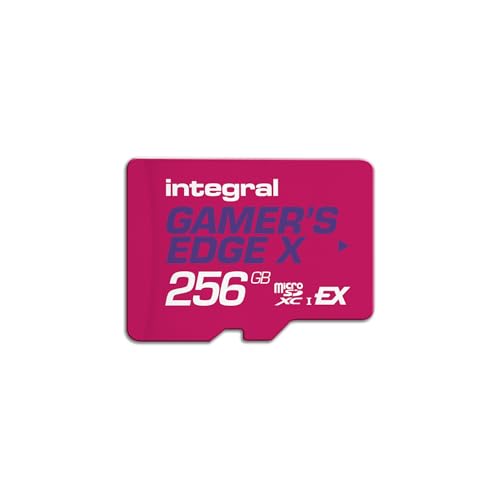 Integral 256GB Gamer's Edge X Micro SD | Blazing Fast microSD Express Performance | Check price |
 256GB microSD Express Card | Next-Gen Speed for Nintendo Switch 2 & Handhelds… Pro-Grade 600MB/s Write for 8K Video Mastery -… Backward Compatibility & Universal Versatility - While it… | Check price |
 Samsung microSD Express Card | Nintendo Switch 2 uses a new standard of… Please note: Nintendo Switch 2 is only compatible… | Check price |
 SANDISK 512GB microSD Express Card for Nintendo | EPIC WORLDS, LOADED INSTANTLY OFFICIALLY READY FOR NINTENDO SWITCH 2 CAPTURE IN STUNNING CLARITY | Check price |
 【Designed for Switch 2】 GIGASTONE 512GB microSD | Read/Write up to 880/650 MB/s, Ultra Fast Gaming… SD 7.1 Includes microSD to SD Adapter | Check price |
As an Amazon Associate we earn from qualifying purchases at no extra cost to you.
⚡ Save on Your Next PC — Amazon Prime
Prime members get fast free shipping on the systems above, plus early access to Prime Day & Black Friday PC deals. New members get a 30-day free trial.
Watch: Best MICROSD Express Card 2026 — Video Review
How to Choose a microSD Express Card
- Express standard, not UHS: Only cards explicitly labelled microSD Express will unlock the Switch 2’s full performance, so ignore any regular UHS-I or UHS-II card no matter how fast it claims to be.
- Read speed: Look for rated reads around 880 to 900MB/s, which slashes load times and makes moving large game libraries far quicker.
- Sustained write speed: A high sustained write rating matters most when downloading big titles, so cards that hold their write speed avoid stalls mid-install.
- Capacity: 256GB suits casual players, while 512GB is the comfortable choice for anyone building a large digital collection.
- Brand reliability and warranty: Storage failures cost you saves and downloads, so favour established brands with strong data-recovery or multi-year warranty coverage.
The Best microSD Express Cards Reviewed
SanDisk 512GB microSD Express
SanDisk’s 512GB microSD Express card is the go-to flagship, rated up to 880MB/s reads with a dependable 220MB/s sustained write that keeps large downloads smooth. Backed by SanDisk’s long track record, it is the card we recommend to anyone who simply wants proven reliability in their Switch 2.
Lexar Play Pro 512GB
The Lexar Play Pro pushes reads up to 900MB/s, edging out much of the field on paper, and it remains backwards compatible with older UHS devices at reduced speeds. That flexibility makes it a smart pick if you want one card that can move between a Switch 2 and other gear.
Samsung microSD Express 256GB
Samsung’s 256GB microSD Express card brings the company’s respected NAND and thermal engineering to the format. It is designed specifically for the Switch 2 and offers a trustworthy middle-capacity option for players who do not need a full 512GB but still want a premium name behind their storage.
PNY microSD Express 256GB
PNY’s 256GB Express card is a value-focused option that still hits up to 890MB/s reads and 750MB/s writes, comfortably in flagship territory. For gamers who want top-tier speed without paying for a big brand’s premium, it strikes an appealing balance.
Gigastone 512GB microSD Express
Designed for the Switch 2, the Gigastone 512GB card advertises 880/650MB/s read and write speeds along with a bundled SD adapter and a five-year data-recovery promise. It is a compelling high-capacity choice for players who want peace of mind alongside plenty of room.
Reading the Label: Speed Class Versus Peak Speed
Two different kinds of number appear on microSD Express packaging, and mixing them up is the easiest way to buy the wrong card. The “up to” figure is a peak sequential read, usually measured under ideal conditions. The SD Association also defines Express speed classes (E150, E300, E450 and E600), which promise a minimum sustained write speed in MB/s. The original microSD Express interface tops out at a 985 MB/s bus ceiling, so no card on that link can exceed it regardless of what the box says.
The makers’ stated figures for the cards in this roundup look like this:
| Card | Capacity | Stated read (up to) | Stated write |
|---|---|---|---|
| SanDisk 512GB microSD Express | 512GB | 880MB/s | 220MB/s sustained |
| Lexar Play Pro 512GB | 512GB | 900MB/s | Not listed here |
| Samsung microSD Express 256GB | 256GB | Not listed here | Not listed here |
| PNY microSD Express 256GB | 256GB | 890MB/s | 750MB/s |
| Gigastone 512GB microSD Express | 512GB | 880MB/s | 650MB/s |
The quoted read speeds sit within roughly 3 percent of each other, so they should not drive the decision. Write speeds differ by more than a factor of three. Loading a game is mostly reading, so the gap matters most when you copy large downloads or move data between storage locations. Treat every figure here as a manufacturer claim rather than a guaranteed result.
Worked Example: How Many Games Fit?
Card makers count a gigabyte as 1,000,000,000 bytes, while operating systems often report gibibytes (1,073,741,824 bytes). That is why a card never shows its full label capacity. The arithmetic below uses stated assumptions, not measured values.
- Convert the label. 512GB is 512,000,000,000 bytes, which is about 476.8 GiB. A 256GB card works out to about 238.4 GiB.
- Reserve free space. Assume you keep 10 percent empty for updates, patches and save data. That leaves roughly 429 GiB on the larger card and 215 GiB on the smaller one.
- Pick an average game size. Assume 20 GB per title. This is an illustrative figure, and real titles vary widely.
- Divide. The 512GB cards hold about 21 such games and the 256GB cards about 10. File-system overhead is ignored, so the real count may be one lower.
If your library already runs past ten large titles, the 512GB class is the sensible starting point. Nintendo states that the console accepts Express cards up to 2TB, so there is also headroom to grow later.
Spotting a Weak Listing
- No Express marking. Nintendo states that ordinary microSD cards cannot be used for games on the Switch 2. A card sold only with U3, V30 or A2 markings is a UHS-class card, however fast it sounds.
- “Switch 2 compatible” with no read speed. A genuine Express card publishes a read figure in the hundreds of MB/s.
- Capacity that seems too good. Very large cards offered at very low asking amounts follow a classic counterfeit pattern.
- Vague warranty terms. Reputable makers state the coverage period clearly. Gigastone, for example, is listed here with a five-year data-recovery promise.
Before Swapping Cards: A Short Checklist
- Run the console’s system update first, since Nintendo notes an internet update is required the first time an Express card is used.
- Import screenshots and videos from any older Switch microSD card. Nintendo says importing captures is the one job a standard card still has on the Switch 2.
- Format the new card from the system settings if the console prompts you to.
- Move or redownload games to the new card and confirm they launch before wiping anything.
Picking by Priority
| Your priority | Card to look at first | Why, based on stated figures |
|---|---|---|
| Fastest stated read | Lexar Play Pro 512GB | Lists up to 900MB/s |
| Fastest stated write | PNY microSD Express 256GB | Lists 750MB/s writes alongside 890MB/s reads |
| Large library with solid writes | Gigastone 512GB microSD Express | 512GB with 650MB/s stated writes |
| Large library from a long-established brand | SanDisk 512GB microSD Express | 512GB with 880MB/s reads, though stated writes are lower |
| Smaller library, familiar brand | Samsung microSD Express 256GB | Built for the Switch 2 in the 256GB size |
No single row wins on every measure, so rank your own priorities first. Someone who rarely downloads games gains little from a higher write figure, while someone with a growing library gains more from capacity.
Frequently Asked Questions
Will a normal microSD card work in the Switch 2?
Only for limited system tasks, not for storing and running games. The Switch 2 requires the microSD Express standard for game storage, so a standard UHS card will either be rejected or restricted.
Why are Express cards so much more expensive?
They pack an NVMe and PCIe controller into the microSD form factor, essentially shrinking a tiny SSD into a card. That advanced engineering delivers the huge speed jump but also raises the manufacturing cost.
What capacity should I buy?
256GB is fine for a handful of games and eShop downloads, but 512GB is the safer long-term choice given how large modern Switch 2 titles have become.
Do these cards get hot during play?
They run warmer than old UHS cards because of their higher speeds, but reputable brands manage the heat well within the console. Sticking to the established names in this list keeps thermals in check.
Final Thoughts
A microSD Express card is now an essential companion for the Switch 2 rather than a nice-to-have accessory. The SanDisk 512GB card is our overall recommendation for its blend of speed and reliability, while the Lexar Play Pro tempts speed chasers and the Gigastone offers the most generous capacity-to-value ratio for growing libraries.
FAQ
Worked Example: How Many Games Fit?
Will a normal microSD card work in the Switch 2?
Why are Express cards so much more expensive?
What capacity should I buy?
Do these cards get hot during play?
More from Amazon
Programs that pair well with the guide above. Offers and eligibility are set by Amazon and may change.
Free shipping on eligible items, Prime Video and more. Eligible new members can start with a free trial.
Start a Prime free trialAd-free music streaming. Eligible new subscribers can start with a free trial.
Try Music Unlimited freeA Prime membership for ages 18-24 with a trial period. Eligibility is set by Amazon.
See Prime for Young AdultsAudiobooks and podcasts to listen to on the go. Eligible new members can start with a free trial.
Try Audible freeAs an Amazon Associate we earn from qualifying purchases.