Our Short List of 3

- Best for: AMD AM5 gaming builds where EXPO is the intended one-step setup.
- Capacity: 32GB (2x16GB)
- Speed: DDR5-6000MT/s
- Timings: CL30-38-38-96
- Voltage: 1.35V
- Best for: Intel gaming builds where XMP 3.0 is the intended one-step setup.
- Capacity: 32GB (2x16GB)
- Speed: DDR5-6000MT/s
- Timings: CL30-40-40-96
- Voltage: 1.35V

- Best for: builders who want one kit that is listed for both AMD EXPO and Intel XMP 3.0.
- Capacity: 32GB (2x16GB)
- Speed: Up to 6000MHz
- Timings: CL30-36-36-76
- Voltage: 1.40V
All 5 Picks at a Glance
| Product | Specs | Action |
|---|---|---|
| G.SKILL Trident Z5 Neo RGB |
| Check price on Amazon |
| G.SKILL Trident Z5 RGB |
| Check price on Amazon |
| CORSAIR Vengeance RGB |
| Check price on Amazon |
 Kingston FURY Beast |
| Check price on Amazon |
 TEAMGROUP T-Force Delta RGB |
| Check price on Amazon |
Our Top Picks
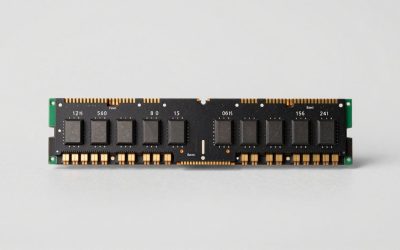
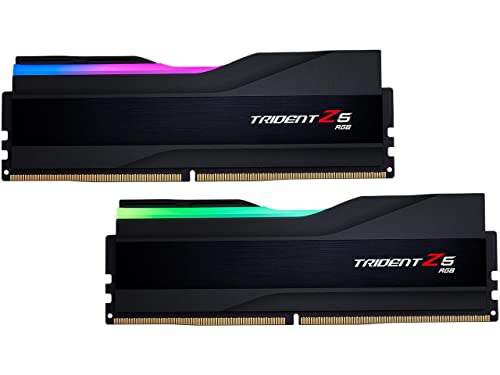
- G.SKILL Trident Z5 Neo RGB Series DDR5 RAM32GB (2x16GB)1.1 x 9.7 x 6.5 inches0 poundsCheck on Amazon
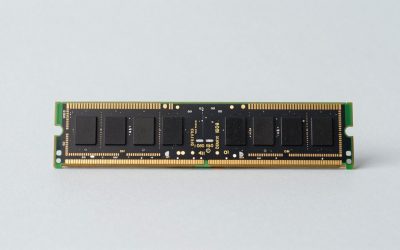
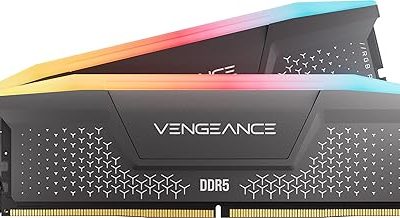
- CORSAIR Vengeance RGB DDR5 RAM 32GB32GB (2 x 16GB)5.43 x 0.27 x 1.77 inches0.11 poundsCheck on Amazon
Buying DDR5 memory for a gaming PC is a decision about balance, not about chasing the largest number on the box. A kit built for a very high transfer rate can still run at a slower speed if the motherboard never enables its profile, while a well-matched 6000 MT/s kit with tight timings can feel smoother in everyday play. Capacity matters too, because a system that constantly swaps data to storage will stutter no matter how fast the memory is on paper.
This guide is for three groups of builders. First-time builders on AMD AM5 or Intel boards want a kit that works after one BIOS setting. Upgraders moving from 16GB want headroom for a browser, voice chat and a game running together. Builders with a large air cooler want memory that fits underneath it. The five kits below were chosen from their Amazon product titles and listed specifications.
Quick Picks
As an Amazon Associate we earn from qualifying purchases.
| Product | Best for | Key spec from title |
|---|---|---|
| G.SKILL Trident Z5 Neo RGB | AMD AM5 builds with EXPO | 32GB (2x16GB), DDR5-6000, CL30-38-38-96, 1.35V |
| G.SKILL Trident Z5 RGB | Intel builds with XMP 3.0 | 32GB (2x16GB), DDR5-6000, CL30-40-40-96, 1.35V |
| CORSAIR Vengeance RGB | Mixed AMD and Intel builds | 32GB (2x16GB), 6000MHz, CL30-36-36-76, 1.40V |
| Kingston FURY Beast | Low-profile builds without lighting | 32GB (2x16GB), 6000MT/s DDR5, CL30, AMD EXPO |
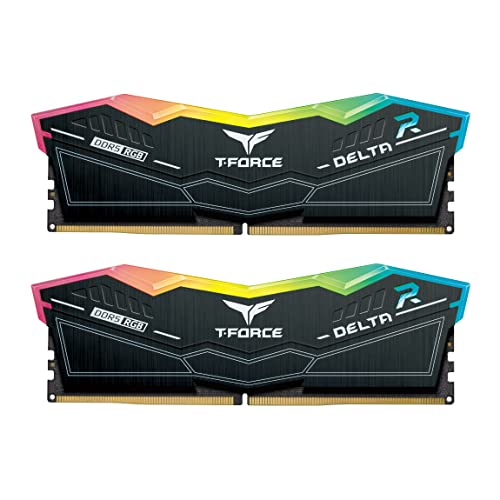
| TEAMGROUP T-Force Delta RGB | Bright RGB builds on either platform | 32GB (2x16GB), 6000MHz, CL30, XMP 3.0 and AMD Expo |
How to Choose
Start with capacity, not speed
For most gaming PCs in 2026, 32GB made from two 16GB modules is the sensible starting point. Two modules let the memory controller run in dual channel, which matters more than a small speed increase on a single module. Sixteen gigabytes can still run many games, but it leaves little room once a browser, a voice app and a launcher are open alongside the game. Sixty-four gigabytes suits streaming, video editing and heavy multitasking, yet it adds cost and can be harder for some boards to run at the listed speed. Check the motherboard manual for the supported capacities per slot, and buy a matched kit rather than adding a single module later.
Read speed and timings together
A DDR5 speed figure such as 6000 MT/s describes how many million transfers the memory can make per second, while the CAS latency figure, written as CL30, describes how many cycles the memory waits before delivering data. A 6000 MT/s kit at CL30 generally responds faster than a 6400 MT/s kit at CL40 in latency-sensitive games, because the extra cycles cancel out much of the speed gain. Look at the full timing string when the listing gives it, for example CL30-38-38-96, and compare kits at the same speed before deciding. Remember that the listed speed is a profile speed, not the speed the kit runs at out of the box.
Match the profile to your platform
DDR5 kits carry a factory profile that sets speed, timings and voltage in one step: AMD EXPO for AM5 boards and Intel XMP 3.0 for Intel boards. Some kits carry both profiles, which helps if you switch platforms later, while others are tuned for one side only. A kit tuned for AMD may still work on an Intel board, but the listed profile is the one the maker validated. After installing the memory, open the BIOS, enable EXPO or XMP, save, and confirm in Task Manager that the memory is running at the listed speed. If the system fails to boot, the board may need a BIOS update or a slightly lower setting.
Check clearance and the motherboard list
Memory height is a practical problem that catches many builders. Tall RGB heat spreaders can collide with a large tower air cooler, especially when the cooler overhangs the first memory slot. Low-profile kits without lighting usually clear tall coolers, while taller RGB kits often need the cooler fan raised or a different cooler entirely. Measure from the motherboard surface to the lowest point of the cooler fan, and compare that with the module height in the listing. Then check the motherboard maker’s memory compatibility list, often called the QVL, for the exact model number. A kit on that list has been run on that board, which removes a common source of boot failures.
The 5 Best Options
G.SKILL Trident Z5 Neo RGB
- Best for: AMD AM5 gaming builds where EXPO is the intended one-step setup.
- Capacity: 32GB (2x16GB)
- Speed: DDR5-6000MT/s
- Timings: CL30-38-38-96
- Voltage: 1.35V
AMD AM5 gaming builds where EXPO is the intended one-step setup.
confirm the exact model number on the motherboard memory list, since Trident Z5 Neo kits come in several speeds and timings.
This is the AMD-focused kit in the group, and it suits a Ryzen 7000 or 9000 build where the owner wants to enable one EXPO profile and be done. The matte black finish and RGB light bar sit comfortably in a windowed case, and the 6000 MT/s figure with CL30 timings lines up with the speed range AMD publishes for AM5. It is a natural fit for a builder who has already chosen an AM5 board and wants memory that was tuned for that platform from the start.
Watch out for: confirm the exact model number on the motherboard memory list, since Trident Z5 Neo kits come in several speeds and timings.
G.SKILL Trident Z5 RGB
- Best for: Intel gaming builds where XMP 3.0 is the intended one-step setup.
- Capacity: 32GB (2x16GB)
- Speed: DDR5-6000MT/s
- Timings: CL30-40-40-96
- Voltage: 1.35V
Intel gaming builds where XMP 3.0 is the intended one-step setup.
the secondary timings differ from the AMD-tuned Trident Z5 Neo kit, so do not assume the two kits are interchangeable.
This Intel-tuned kit suits a builder on a Z690, Z790 or newer Intel board who wants XMP 3.0 support and a familiar RGB design. Its CL30-40-40-96 timings at DDR5-6000 and 1.35V give it the same headline speed as the AMD kit above, with a profile aimed at Intel platforms. The matte black heat spreaders and light bar make it a straightforward choice for a windowed Intel build where the memory should look finished without dominating the case.
Watch out for: the secondary timings differ from the AMD-tuned Trident Z5 Neo kit, so do not assume the two kits are interchangeable.
CORSAIR Vengeance RGB
- Best for: builders who want one kit that is listed for both AMD EXPO and Intel XMP 3.0.
- Capacity: 32GB (2x16GB)
- Speed: Up to 6000MHz
- Timings: CL30-36-36-76
- Voltage: 1.40V
builders who want one kit that is listed for both AMD EXPO and Intel XMP 3.0.
the listed voltage is 1.40V, higher than the 1.35V kits here, so confirm the board supports that profile before enabling it.
This Corsair kit is the flexible pick of the five, because its listing names both AMD EXPO and Intel XMP support. That makes it useful for a builder who has not yet settled on a platform, or who may move the memory to a different system later. The CL30-36-36-76 timings are the tightest secondary timings in this group at 6000MHz, and the grey finish with RGB lighting gives a windowed build a distinct look without going over the top.
Watch out for: the listed voltage is 1.40V, higher than the 1.35V kits here, so confirm the board supports that profile before enabling it.
Kingston FURY Beast
- Best for: air-cooled builds and owners who want no lighting and a low heat spreader.
- Capacity: 32GB (2x16GB)
- Speed: 6000MT/s DDR5
- Latency: CL30
- Voltage: 1.35 Volts
air-cooled builds and owners who want no lighting and a low heat spreader.
this is the non-RGB CL30 model, so check the model number carefully, since the FURY Beast line also ships in RGB and CL36 versions.
This is the plain, low-profile option, and that is exactly its strength. The Kingston FURY Beast kit in this listing has no RGB lighting, a low heat spreader and an AMD EXPO profile at 6000MT/s with CL30 timings. It suits a build with a large tower air cooler, a small case with limited clearance, or an owner who simply does not want lighting software running in the background. Two 16GB modules give the 32GB total that most gaming builds need, and the kit of two keeps dual-channel operation.
Watch out for: this is the non-RGB CL30 model, so check the model number carefully, since the FURY Beast line also ships in RGB and CL36 versions.
TEAMGROUP T-Force Delta RGB
- Best for: RGB builds where the owner wants a kit listed for both Intel XMP 3.0 and AMD Expo.
- Capacity: 32GB (2x16GB)
- Speed: 6000MHz, PC5-48000
- Latency: CL30
- Profiles: Intel XMP 3.0 and AMD Expo
RGB builds where the owner wants a kit listed for both Intel XMP 3.0 and AMD Expo.
the Delta RGB line also ships in CL38 and white versions, so match the model number to the black CL30 kit before ordering.
This TEAMGROUP kit suits a builder who wants a bright RGB look and a profile for either platform. Its listing names both Intel XMP 3.0 and AMD Expo at 6000MHz with CL30 timings, so it covers the same dual-profile ground as the Corsair kit while offering a different light bar design. The black finish works in most cases, and the 32GB capacity from two 16GB modules fits the same dual-channel setup as the other kits here.
Watch out for: the Delta RGB line also ships in CL38 and white versions, so match the model number to the black CL30 kit before ordering.
Which One Fits Your Situation
A first AMD AM5 build
Pick the G.SKILL Trident Z5 Neo RGB, because its AMD EXPO profile is the one validated for AM5 and its 6000 MT/s speed with CL30-38-38-96 timings matches the range AMD targets for Ryzen gaming builds. Enable EXPO in the BIOS, confirm the speed in Task Manager, and the memory is ready. If you prefer no lighting, the Kingston FURY Beast is the quieter alternative with the same EXPO support and a lower heat spreader.
A first Intel build
Pick the G.SKILL Trident Z5 RGB, because its Intel XMP 3.0 profile is tuned for Intel boards and its DDR5-6000 speed with CL30 timings is a solid match for current Intel gaming systems. The Corsair Vengeance RGB is the backup choice here, since it also lists XMP 3.0, and it adds EXPO support if the kit ever moves to an AMD system later.
A build with a large air cooler
Pick the Kingston FURY Beast, because its low-profile, non-RGB heat spreader is the least likely to collide with a tower cooler fan overhanging the first memory slot. Measure the gap between the motherboard and the cooler fan first, and check the module height against that gap. The RGB kits in this guide are taller, so they are a weaker fit when clearance is already tight.
A windowed build where lighting matters
Pick the Corsair Vengeance RGB or the TEAMGROUP T-Force Delta RGB, because both carry RGB light bars and both list EXPO and XMP 3.0, so the lighting choice does not lock you to one platform. The Corsair kit has the tighter secondary timings at CL30-36-36-76, while the TEAMGROUP kit offers a different light bar style in black. Choose on looks and on which model number appears on the motherboard memory list.
Common Mistakes
- Buying a single 32GB module instead of a matched 2x16GB kit, which gives up dual-channel operation for no real benefit.
- Leaving EXPO or XMP off in the BIOS, so a 6000 MT/s kit runs at a much slower default speed and the builder never notices.
- Mixing two different kits, or adding a second kit later, and then wondering why the system will not boot at the listed speed.
- Choosing tall RGB memory for a build with a large tower air cooler, then finding the cooler fan will not fit over the first slot.
- Ordering by brand name alone and receiving a CL36 or CL38 version of the same product line, when the listing the builder meant to buy was the CL30 version.
Frequently Asked Questions
Is 32GB of DDR5 enough for gaming in 2026?
Yes, 32GB is enough for most gaming in 2026. A game, a browser, a voice app and a launcher can run together without the system constantly moving data to storage. Builders who also stream, edit video or run virtual machines may want 64GB, but for gaming alone, 32GB from two 16GB modules is the balanced choice.
Do I need to enable EXPO or XMP after installing DDR5?
Yes. DDR5 kits run at a slower default speed until the profile is enabled, so the listed speed on the box does not apply out of the box. Open the BIOS, enable AMD EXPO or Intel XMP, save the setting, and then check the memory speed in the BIOS or in Task Manager to confirm it changed.
Does DDR5-6000 CL30 beat a faster kit with looser timings?
Often, yes, for gaming. Latency matters as much as transfer rate, so a 6000 MT/s kit at CL30 can respond faster than a higher-speed kit at CL40. The difference is usually small in most games, so treat speed and timings as a pair and compare kits at the same speed before paying extra for a higher number.
Will DDR5 memory fit under my CPU cooler?
It depends on the module height and the cooler. Low-profile kits such as the Kingston FURY Beast clear most tower coolers, while tall RGB kits can collide with a fan that overhangs the first slot. Measure the gap under the cooler fan, compare it with the module height, and check the cooler manual for its memory clearance figure before ordering.
FAQ
Is 32GB of DDR5 enough for gaming in 2026?
Do I need to enable EXPO or XMP after installing DDR5?
Does DDR5-6000 CL30 beat a faster kit with looser timings?
Will DDR5 memory fit under my CPU cooler?
More from Amazon
Programs that pair well with the guide above. Offers and eligibility are set by Amazon and may change.
Free shipping on eligible items, Prime Video and more. Eligible new members can start with a free trial.
Start a Prime free trialAd-free music streaming. Eligible new subscribers can start with a free trial.
Try Music Unlimited freeA Prime membership for ages 18-24 with a trial period. Eligibility is set by Amazon.
See Prime for Young AdultsAudiobooks and podcasts to listen to on the go. Eligible new members can start with a free trial.
Try Audible freeAs an Amazon Associate we earn from qualifying purchases.