Our Top Picks
 Plugable USB C Power Meter Tester for MonitoringCompact (3x3x1 inches)3 x 3 x 1 Inches0.04 poundsCheck on Amazon
If your goal is to measure what a 240W USB-C cable is really carrying, the Plugable USB-C power meter is the best overall pick in this roundup, because it is the one listing here that states monitoring for connections up to 240W. Most inexpensive USB-C testers top out near 28 to 32 volts, and the top of the USB Power Delivery 3.1 range is 48 volts at 5 amps, which is where a 240W cable earns its rating. That gap is the most important thing to understand before you buy. A meter that reads 12 amps at 30 volts can still be useful for checking a cable’s current handling, a charger’s output, or a power bank’s capacity, but it cannot show you the full 240W handshake. The FNIRSI FNB58 is the strongest choice for reading a cable’s E-marker chip and logging data, and the Klein Tools ET920 is the straightforward, rugged choice for everyday USB-A and USB-C checks. The sections below explain which meter fits which job.
Top 3 Picks
Best overall for 240W cables: Plugable USB-C Power Meter
It is the only listing in the group that explicitly says it monitors connections up to 240W. Plugable’s published specifications describe a pass-through design with an input range reaching 50 volts, which is what the extended power range needs.

YEREADW USB C Tester Power Meter, 4-30V 0-12A Type-C PD Tester Digital Multimeter, Voltage and Current Tester Meter Voltmeter, Power Bank Capacity USB Cable Charger Detector (KWS-2303C)
One of the consumer electronics options compared in this guide.
View on Amazon
Eversame 2 in 1 Type C USB Tester Color Screen LCD Digital Multimeter, USB C Voltage Current Voltmeter Amp Volt Ammeter Detector USB Cable Charger Indicator, DC3.6-30V/0-5.1A
One of the consumer electronics options compared in this guide.
View on Amazon
Klein Tools ET920 USB Power Meter, USB-A and USB-C Digital Meter for Voltage, Current, Capacity, Energy and Resistance
One of the consumer electronics options compared in this guide.
View on Amazon
YOJOCK 360W USB C Tester Power Meter, 4-30V 0-12A Type-C PD Tester Digital Multimeter, Power Voltage and Current Tester Meter, Power Bank Capacity Voltmeter USB Cable Charger Detector (KWS-2303C)
One of the consumer electronics options compared in this guide.
View on Amazon
240W USB C Adapter Power Meter Tester (2 Pack) - Wattage, Voltage, Amperage LED Digital Display, Type C Male to Female Extension Connector for iPhone 15/16, MacBook, iPad & More USB C Cables/Devices
One of the consumer electronics options compared in this guide.
View on AmazonPlugable USB C Power Meter Tester for Monitoring Connections up to 240W | Digital Multimeter Tester for USB Type C Cables, Laptops, Phones, Chargers - Driverless
One of the consumer electronics options compared in this guide.
View on Amazon
YOJOCK USB C Tester USB Power Meter 2 in 1 Digital Multimeter 3.6-32V 0-8.0A Voltage and Current Tester, Type C Voltmeter Battery Capacity Volt Ammeter Power Bank USB Cable Charger Detector
One of the consumer electronics options compared in this guide.
View on Amazon
UT01C USB Tester, POROMETISTO 3.3-40V 0-12A USB C Cable Detector | Voltage and Current Tester Meter, Fast Charging Protocol Detection Ripple Measurement, PD2.0/3.1, QC2.0/3.0/4.0 (Purple)
One of the consumer electronics options compared in this guide.
View on Amazon
diymore USB C Tester Power Meter,Digital Multimeter, Type C Voltage and Current Tester Meter, Power Bank Capacity,Working Time Ammeter Voltmeter USB Cable Charger Detector LED Display
One of the consumer electronics options compared in this guide.
View on Amazon
FNIRSI FNB58 USB Tester, PD/QC, USB-C E-Marker Reader, 28V 7A, USB-A/C | PD2.0/3.0 & QC2.0/3.0, Voltage/Current/Power Monitoring, Real-Time Graphs, Capacity, Ripple, PD Trigger, App/PC Software
One of the consumer electronics options compared in this guide.
View on AmazonBest for cable detail and logging: FNIRSI FNB58 USB Tester
This tester reads E-marker data from USB-C cables, supports many fast-charge protocols, and records data. Its 28V, 7A limits mean it cannot measure the top of the 240W range, but it tells you a great deal about a cable.
Best rugged everyday meter: Klein Tools ET920
Klein’s meter covers both USB-A and USB-C and measures voltage, current, capacity, energy, and resistance in a simple, trade-grade package. It is built for 3 to 20 volts, so it suits phones, tablets, and many laptops but not high-voltage EPR chargers.
Quick Comparison
| Product | Best for | Key specs |
|---|---|---|
| YEREADW USB-C Tester | Entry-level PD checks | 4-30V, 0-12A, Type-C PD tester, digital multimeter functions |
| Eversame 2-in-1 USB Tester | Color-screen readings on USB-A and USB-C | 2-in-1, color LCD, voltage and current |
| Klein Tools ET920 | Rugged everyday use | USB-A and USB-C, voltage, current, capacity, energy, resistance; 3-20V |
| YOJOCK 360W USB-C Tester | Higher-current PD checks | 4-30V, 0-12A, labeled 360W |
| 240W USB-C Power Meter (2 Pack) | Inline checks on two cables | 240W label, LED display, male-to-female, two units |
| Plugable USB-C Power Meter | 240W EPR cable monitoring | Up to 240W, wide voltage range, pass-through |
| YOJOCK 2-in-1 USB-C Tester | Compact 2-in-1 checks | 3.6-32V, 0-8A, 2-in-1 |
| UT01C USB Tester | Cable detector with wider voltage | 3.3-40V, 0-12A, cable detection |
| diymore USB-C Tester | Capacity and working-time readings | Digital multimeter, capacity and time |
| FNIRSI FNB58 | E-marker reading and logging | 28V, 7A, PD and QC protocols, E-marker reader |
How We Chose
We started with the question the keyword asks: can this meter deal with a 240W cable? The 240W rating belongs to USB Power Delivery 3.1 Extended Power Range, which uses up to 48 volts at 5 amps, so we compared each listing’s stated voltage and current range against that. We also weighed practical features such as display type, inline pass-through design, E-marker reading, capacity measurement, and data logging. Brand and form factor mattered too, because a rugged meter and a bare circuit board are not equal for daily use. We relied on listing details and published specifications, not on bench measurements, and we flag every place where a title implies more than the numbers support. Always confirm the exact input range on the product page before assuming a meter can handle a high-voltage charger.
1. YEREADW USB-C Tester – Best for Entry-Level PD Checks
As an Amazon Associate we earn from qualifying purchases at no extra cost to you.

The YEREADW is a compact Type-C PD tester that works like a small digital multimeter. Its listing gives a measurement range of 4 to 30 volts and 0 to 12 amps and mentions voltage and current readings, a voltmeter function, and power bank capacity. On paper, 30 volts times 12 amps would be 360 watts, but a USB-C charger does not reach that limit in practice. The useful reading is that this meter can display current well above the 5 amps that standard USB-C cables carry.
It cannot display the 48-volt level that defines a 240W Extended Power Range connection. What it can do is show you the voltage and current of a laptop charger at 20 volts, a 28-volt charger up to its range, or a power bank in operation. For checking whether a 100W charger really delivers what it claims, it is a reasonable tool.
Key specs from the listing
- 4-30V and 0-12A measurement range
- Type-C PD tester with digital multimeter features
- Voltage, current, and power bank capacity readings
- Check the product page for the display type and input and output connectors
Strengths
The wide current range gives headroom for charging and discharging checks, and the small size is easy to keep in a laptop bag. Capacity readings are useful for confirming how much energy a power bank can actually deliver.
Pros
- Handles current above the standard 5A cable limit
- Compact and portable
- Includes capacity and working time readings
- Good for general charger checks
Cons
- Cannot read the 48V EPR level
- Brand has limited published documentation
- Accuracy specifications are not clear from the name
How it compares
It is nearly a twin of the diymore and YOJOCK 360W testers in range. Compared with the Plugable, it lacks the 240W claim and the extended voltage range. Compared with the FNB58, it lacks the E-marker reader and the logging feature set listed for that device.
Before using any in-line meter with a high-power charger, remember that the meter adds a small extra contact resistance to the circuit. Use short, good-quality cables, and never exceed the meter’s stated limits. If a device feels hot or smells unusual, unplug it at once.
Who should skip it
Skip it if you want to measure a 240W EPR charger or cable, since 30V is below the 48V extended range. Choose the Plugable for that job.
One more practical note: meters in this class are usually powered from the line they measure, so the screen lights up as soon as you plug the source in. If nothing appears, check that the source end and the load end are not swapped, and try another cable before assuming the meter is faulty.
2. Eversame 2-in-1 USB Tester – Best for Color-Screen Readings on USB-A and USB-C
The Eversame is a 2-in-1 Type-C USB tester with a color LCD screen, aimed at reading voltage and current, and described as a digital multimeter and cable detector. The 2-in-1 label generally means it handles both USB-A and USB-C plugs in a single body, which is handy because many chargers, cables, and power banks still use both ports.
Color LCDs are easier to read at a glance than single-color LED displays, especially when you want voltage, current, and power on the screen together. The listing does not state a high-voltage range in the visible title, so treat it as a tool for the standard 5, 9, 12, 15, and 20 volt levels used by most phone and laptop chargers, and confirm the maximum on the product page.
Key specs from the listing
- 2-in-1 USB tester for USB-A and USB-C
- Color LCD screen
- Voltage and current readings, with ammeter and voltmeter functions
- Marketed as a cable detector
Strengths
The color display and dual-port design make it a convenient everyday tool. If you often check an older USB-A charger one minute and a USB-C one the next, a 2-in-1 tester saves you from carrying two meters.
Pros
- Readable color screen
- Works with USB-A and USB-C
- Compact and affordable class
- Useful for quick cable checks
Cons
- Maximum voltage and current are not shown in the title
- Not designed for 240W EPR measurement
- Older model design
How it compares
Compared with the YOJOCK 2-in-1, it is a very similar tool, so choose based on screen quality and product page details. Compared with the Klein ET920, it has a color screen but is a lighter-duty product. It does not rival the Plugable for 240W use.
With USB-A and USB-C ports on one meter, keep an eye on which side is the input and which is the output. Most 2-in-1 meters work only in one direction, with the power source on one end and the load on the other. Plugging in the wrong way round may show no reading or negative values, so check the product page for orientation guidance.
Who should skip it
Skip it if you need to measure high-voltage USB PD levels or want long-term data logging. The Plugable and the FNB58 are better for those jobs.
What a cable detector label usually means
On a budget tester, cable detector often means the meter shows voltage drop and current so you can judge a cable indirectly. Run the same load through two cables, one at a time, and compare the voltage shown at the meter. The cable that holds the voltage higher at the same current has lower resistance. That kind of side-by-side comparison does not need laboratory accuracy, only consistent conditions, which makes a simple color-screen meter well suited to the task.
3. Klein Tools ET920 – Best for Rugged Everyday Use

The Klein Tools ET920 is a USB digital meter that handles USB-A and USB-C and measures voltage, current, capacity, energy, and resistance. Klein’s published specifications give a voltage range of 3 to 20 volts DC, a current range of 0.05 to 3 amps on the USB-A side and 0.05 to 5 amps on the USB-C side, and a stored-readings feature. It will not show current below 50 milliamps, so a very light load can read as zero.
The 20-volt ceiling means it fits the 5, 9, 12, 15, and 20 volt levels common on phones, tablets, and laptops up to about 100 watts, but it does not suit 28, 36, or 48 volt chargers. For 240W cable work it is the wrong meter, yet it remains one of the most dependable tools for everyday USB power checking.
Key specs from the listing and manufacturer
- USB-A and USB-C digital meter
- Voltage, current, capacity, energy, and resistance readings
- 3-20V DC range; USB-C current up to 5A
- Draws power from the source, with no battery required
Strengths
It is a trade-grade product from a respected tool maker, with clear documentation and a build designed for job-site use. The resistance reading is useful for judging the quality of a cable.
Pros
- Rugged, trusted tool brand
- Clear documentation
- Covers USB-A and USB-C
- Multiple readings including resistance and energy
Cons
- 20V limit rules out EPR chargers
- Low-current readings below 50mA show zero
- No 240W support
How it compares
It is simpler than the FNB58 and lacks E-marker reading and protocol detection. Compared with the cheaper generic testers, it offers better documentation and build. Compared with the Plugable, it covers a narrower voltage range but adds capacity and resistance readings.
If you are checking a cable, put the meter between the charger and the cable, load the far end with a device, and read the voltage at the meter. A big drop in voltage as current rises indicates a high-resistance cable. Always stay within the meter’s stated range.
Who should skip it
Skip it if you own or plan to buy a charger or cable that uses voltages above 20 volts, because the Klein is not designed for that.
Using the resistance and energy readings
The resistance reading lets you compare cables by feel and by number, while the energy and capacity readings accumulate over time. To check a power bank, connect it through the meter to a steady load, such as a phone running a video, and let the meter count watt-hours until the bank stops. Press the stored-readings button to save a result so you can compare packs later. Because the meter draws its power from the source, there is nothing to charge and no battery to replace, which suits a tool that sits in a drawer for months between uses.
Keep in mind that the meter is rated for ordinary USB voltage, so do not use it with any charger that negotiates above 20 volts. If a laptop charger supports higher levels, the meter may be exposed to voltages outside its range.
4. YOJOCK 360W USB-C Tester – Best for Higher-Current PD Checks

The YOJOCK 360W is a Type-C PD tester that lists 4 to 30 volts, 0 to 12 amps, and uses the 360W label that follows from the product of those two maxima. It is a digital multimeter-style tester with voltage, current, power bank capacity, and working time features. The 360W figure is a headline calculation of voltage times current, not a statement that the meter supports a 360-watt USB charger.
It is useful for charger checks, quick cable comparisons, and power bank capacity. Because it stops at 30 volts, it cannot display the 48V level required for 240W cables, so a buyer reading the 360W label should interpret it carefully.
Key specs from the listing
- 4-30V, 0-12A
- 360W headline rating
- Type-C PD tester and digital multimeter
- Voltage, current, capacity, and working time
Strengths
The wide current range can handle heavy loads below the 30V limit, and the capacity feature is handy for power banks.
Pros
- Large current range
- Compact format
- Capacity and time readings
- Reasonable for general PD checks
Cons
- The 360W label may mislead buyers
- Cannot read 48V EPR
- Limited documentation
How it compares
It matches the YEREADW and diymore in range. The difference is mostly branding and product page details. Compared with the Plugable it lacks the 240W specification, and compared with the FNB58 it lacks the E-marker reader.
When a title shows a large wattage number, always check the voltage and current limits in the body of the listing. A watt figure that comes from multiplying maximums is not a guarantee that the meter can safely measure that power in a real circuit.
Who should skip it
Skip it if you want to monitor a true 240W EPR connection, or if you are buying based solely on the 360W label.
Reading the display with confidence
On a tester like this, the voltage and current readings change as the charger and device negotiate. Wait a few seconds after plugging in so the connection settles before you write down a number. If the readings jump around, the cable may be loose or damaged. Try a second cable, and if the problem follows the cable, retire it, because intermittent connections at high current generate heat at the connector.
It also helps to build a small log. Note the charger, the cable, the device, the voltage, and the current for each setup you try. Over a few sessions you will see patterns, such as one cable that always drops more voltage than another, which is useful when deciding which cable to keep in your travel bag.
If you also use the tester to examine a power bank, remember that many banks reduce their output when they are nearly empty or warm. A falling current reading at the end of a discharge is normal behavior and not necessarily a fault.
5. 240W USB-C Power Meter, 2 Pack – Best for Inline Checks on Two Cables

This listing is a two-pack of 240W USB-C adapter power meters with an LED display showing wattage, voltage, and amperage, using a Type-C male-to-female extension design. The pairing of two units is useful if you want to monitor two cables or two ports at the same time, such as the input and output of a dock.
The key question is whether the unit actually supports the 48V EPR level. The title uses the 240W label, but the details that matter are the maximum voltage and current in the specifications. Read the product page for the stated voltage range and the number of amps, and compare it with 48 volts and 5 amps before relying on it for EPR work.
Key specs from the listing
- Pack of two meters
- 240W label
- LED display for wattage, voltage, and amperage
- Type-C male-to-female in-line design
Strengths
Having two units means you can compare two cables side by side or monitor two devices at once. The in-line design is convenient because you simply plug the meter between the charger and the cable.
Pros
- Two units in one pack
- In-line pass-through shape
- Displays power, voltage, and current
- 240W positioning
Cons
- Specifications need to be verified
- Generic brand with limited documentation
- Display type is basic LED
How it compares
Compared with the Plugable, it offers more units but less documentation. Compared with the bare circuit-style testers, it has a more convenient in-line form. If the voltage range on the product page reaches 48 volts or higher, it is a strong value; if it stops lower, treat the 240W label as marketing.
For an in-line meter to give meaningful results, plug it into the charger directly and add the cable on the output side, so you measure the charger and cable combined. Keep the connectors fully seated, and note that a loose fit adds resistance and heat.
Who should skip it
Skip it if you cannot confirm the voltage range, or if you want logged data and E-marker reading.
Making sense of a two-pack
A pair of meters opens up comparisons that a single meter cannot do. Put one at the charger end and one at the device end of the same long cable, and the difference in voltage between the two shows how much the cable itself drops. This is a clear way to see how cable length and quality affect a high-current connection. Label the two meters so you do not swap them, and note the readings at the same moment.
It also lets you keep one meter permanently with a travel charger and another with a desk dock. Because they are small, leaving them in place does no harm, but remember that each in-line adapter adds a connector, and every extra connector is another place for resistance and wear. Remove meters when you are not using them.
6. Plugable USB-C Power Meter – Best for 240W EPR Cable Monitoring
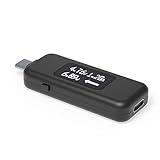
Plugable’s USB-C power meter is the pick for this keyword because its listing states monitoring for USB-C connections up to 240W. Plugable’s published specifications for the model describe a bidirectional meter that can be connected in either direction, an operating range of roughly 4.5 to 50 volts and 50 milliamps to 6.5 amps, support for USB Power Delivery 3.1 Extended Power Range, and pass-through of USB data, video alt mode, and charging. The wide voltage window is what lets it sit in the path of a 48-volt EPR connection.
It works as a transparent interposer: it taps the power and ground lines and leaves the data lines untouched, so a dock or monitor connection keeps working while you watch the numbers. The manufacturer says it does not support Thunderbolt 3 devices and is not a replacement for professional-grade instruments. It is meant for quick, clear readings of voltage, current, and the direction of flow on an OLED display.
Key specs from the listing and manufacturer
- Monitors connections up to 240W
- Roughly 4.5-50V and 50mA-6.5A operating range
- USB PD 3.1 EPR support
- Bidirectional with orientation button for the display
- Passes USB data and video alt mode
Strengths
The extended voltage range and the transparent pass-through are unique in this group. It lets you check what a real 240W charger and cable pair are doing under load, in the actual setup, rather than in a bench-only arrangement.
Pros
- Designed for connections up to 240W
- Works in either direction
- Passes data and video through
- Small, clean OLED readout
Cons
- Not for Thunderbolt 3 devices, per the manufacturer
- E-marker reading is not advertised
- Logging and capacity features are not advertised
- Meant for quick readings, not professional measurement
How it compares
Next to the FNB58, it can handle higher voltage but advertises fewer features: no E-marker reader, no data logging, and no protocol triggering. Next to the Klein ET920, it covers a wider voltage range but has no capacity or resistance measurement. For the specific job of watching a 240W cable and charger pair, it is the best fit.
A good use case is to connect the meter between a 240W charger and a laptop that supports the extended range, then watch the voltage step up as the laptop and charger negotiate. If you see the voltage sit at 20 volts under heavy load, the cable, charger, or laptop may not be using the extended range, and you can investigate which link is the limit.
Who should skip it
Skip it if you want to read cable E-marker details or log data over time. The FNB58 is better for that. Also skip it if all you need is a basic check of a phone charger.
7. YOJOCK 2-in-1 USB-C Tester – Best for Compact 2-in-1 Checks

This YOJOCK tester is a 2-in-1 digital multimeter for USB with a stated range of 3.6 to 32 volts and 0 to 8 amps, with voltage and current readings and battery capacity features. The 8-amp limit is above the 5-amp rating of standard USB-C cables but below what a 240W charger needs to be fully stressed, and the 32-volt ceiling is below the 48-volt level of the extended power range.
It is a sensible meter for people who check chargers and power banks and want the convenience of a small body. The 2-in-1 label points to USB-A and USB-C connections on one device.
Key specs from the listing
- 3.6-32V, 0-8A range
- 2-in-1 design with USB-C voltage and current readings
- Digital multimeter functions
- Battery capacity feature
Strengths
The range is adequate for common charging up to 28-volt PD levels, and the compact size keeps it handy. Capacity measurement is useful for power banks.
Pros
- Compact and portable
- Covers common PD levels
- Capacity and time readings
- Works for USB-A and USB-C
Cons
- Cannot measure 48V EPR
- 8A limit is lower than the 12A models
- Limited published documentation
How it compares
It is almost a sibling to the YOJOCK 360W, with narrower current. Compared with the Eversame, it adds capacity features. Compared with the Plugable, it falls short for 240W use. Choose it for everyday phone and laptop charger checks.
When a meter claims support for a PD range, remember that the charger and the device decide the voltage. The meter only reports it. If the display shows 5 volts when you expect 20, the device may not be asking for more, or the cable may not support the higher level.
Who should skip it
Skip it if you plan to use the meter near 100W or higher loads for long periods or want to measure a 240W connection.
Where an 8-amp meter fits
Most phones, tablets, and ultrabooks draw well under 5 amps, so an 8-amp ceiling is comfortable for them. Even a 100W laptop charger at 20 volts delivers 5 amps, which leaves headroom. The limitation matters only for very high-power setups, and those usually involve voltage above this meter’s 32-volt limit as well. If you are tempted to push a meter beyond its stated range, do not; the stated limits exist because the internal shunt and traces are built for them.
For everyday use, the most helpful habit is keeping a small notebook of results for your own chargers. Once you know what a healthy reading looks like for each, an unusual reading becomes an early warning of a worn cable or a failing adapter.
8. UT01C USB Tester – Best as a Cable Detector With Wider Voltage

The UT01C from POROMETISTO is a USB tester with a stated range of 3.3 to 40 volts and 0 to 12 amps and a cable-detector label. The 40-volt ceiling is higher than the other budget testers, which end at 28 to 32 volts, but it is still below the 48-volt level used by 240W EPR connections.
The cable-detector wording suggests it can identify cable characteristics, but listings use that term loosely. Confirm whether the meter reads E-marker data, or just shows voltage drop and current. If it reads E-marker information, it can report the cable’s rated current and voltage; if not, it behaves like a standard tester.
Key specs from the listing
- 3.3-40V and 0-12A range
- USB-C tester with cable-detector positioning
- Compact build
- Confirm E-marker and protocol features on the product page
Strengths
The wider voltage window covers 28-volt and 36-volt PD levels, which several other testers miss. That broadens the range of chargers you can check.
Pros
- Wider voltage range than most budget testers
- High current limit
- Compact
- Possible cable-detection features
Cons
- Still below 48V
- Limited brand documentation
- Cable-detector claim needs verification
How it compares
It sits between the generic 30V testers and the Plugable. Compared with the FNB58, it lacks the clearly named E-marker reader and logging. Compared with the Plugable, it cannot see the top of the EPR range.
Verify claims about voltage limits before applying a high-voltage source. Exceeding a meter’s stated maximum can damage it and create a hazard, so know your charger’s maximum output voltage before you connect the meter.
Who should skip it
Skip it if your charger or laptop uses 48V, or if you want well-documented E-marker reading.
Why the wider range is useful
Many modern laptop chargers and docks can request 28 volts, which gives 140 watts at 5 amps. A meter whose range stops at 20 or 30 volts may be unable to handle that safely or display it correctly. A 40-volt window covers that level with room to spare, so this tester is better matched to newer 140W chargers than the narrower models in this list. It remains below the 48 volts of a full 240W connection, so it is a step up, not a final answer.
When you use any tester with a source that can step up its voltage, plug the meter in before the load, not after. That ensures the meter sees the voltage ramp from the start and avoids a sudden jump when you connect the device. Be patient, because chargers sometimes take a couple of seconds to complete their negotiation.
One more detail worth checking on the product page is the connector arrangement. Some compact testers have a single USB-C plug and socket, while others add USB-A or extra pins for data readings. The photos usually show which version you are buying, and the number of buttons tells you how much menu navigation to expect. A model with one button and a single screen is easier to use for quick checks.
9. diymore USB-C Tester – Best for Capacity and Working-Time Readings

The diymore USB-C tester is a digital multimeter-style meter that reads voltage and current and lists power bank capacity and working-time features. It follows the same pattern as the YEREADW and YOJOCK testers, and it is aimed at the hobbyist who wants to see how much energy a power bank delivers or how long a charge takes.
Capacity measurement works by integrating current over time: the meter adds up the energy that flows through it while a load drains a power bank. That makes it useful for judging whether a battery pack delivers what its label implies, with the caveat that real-world capacity at the output is lower than the cell rating because of conversion losses.
Key specs from the listing
- USB-C voltage and current tester
- Digital multimeter-style display
- Power bank capacity and working time
- Confirm voltage and current limits on the product page
Strengths
It is a simple tool for measuring how a battery behaves over time. Keep it connected through a full discharge, and it will show the energy delivered.
Pros
- Capacity and time readings
- Compact and portable
- Useful for power banks
- Maker-community brand
Cons
- Voltage and current limits are not shown in the title
- No 240W support
- Limited documentation
How it compares
It is similar to the YEREADW. Compared with the Klein, it lacks the brand heft but offers a similar set of readings at a simpler level. Compared with the Plugable, it cannot monitor high-voltage connections.
For an accurate capacity check, start with a fully charged power bank, connect a steady load, and let the meter run until the bank shuts off. Record the result and compare it with the label. Measured output is usually noticeably lower than the label figure, because of voltage conversion and efficiency losses, so judge the pack by whether the result is reasonable and consistent.
Who should skip it
Skip it if you need to monitor high-power EPR connections or read E-marker data.
Turning readings into a power bank check
To estimate usable capacity, note the energy in watt-hours shown after a full discharge and compare it with the label. If the label lists milliamp-hours at the cell voltage, convert it first: multiply the milliamp-hours by the nominal cell voltage, typically about 3.7 volts, and divide by 1,000 to get watt-hours. For example, a label of 10,000 mAh at 3.7 volts equals 37 watt-hours. Output at 5 volts is lower than this because of conversion losses. If the meter’s total is somewhat below the label figure, that is not necessarily a defect; a very low result compared with the label deserves a closer look at the product page.
Run the discharge at a moderate, steady current for the most consistent result, and avoid charging or discharging a battery pack that is swollen, hot, or damaged. If a power bank behaves oddly, stop using it and contact the maker.
10. FNIRSI FNB58 – Best for E-Marker Reading and Logging

The FNIRSI FNB58 is a feature-rich USB tester with a 28V, 7A rating, USB-A, Micro-USB, and Type-C interfaces, PD and QC protocol support, and an E-marker reader. Published write-ups and the maker’s manual describe a 2.0-inch color display, an orientation sensor, capacity and energy measurement, a cable-resistance function, ripple recording, and Bluetooth in some versions. Power ranges are listed as 120W or 140W depending on the source, so confirm the current listing.
For 240W cable work, the key feature is the E-marker reader. A cable rated for 240W contains an electronic marker chip that tells chargers and devices what the cable can carry. The FNB58 can read that chip, so you can see what the cable claims to support, even though the meter cannot carry the full 48-volt load itself.
Key specs from the listing
- 28V and 7A measurement limits
- PD2.0, PD3.0, QC2.0, and QC3.0 support
- USB-C E-marker reader
- USB-A and USB-C interfaces
- Real-time voltage, current, and power monitoring
Strengths
This is the most capable tester in the group for understanding what a cable and charger can do. It combines trigger functions, cable resistance, ripple capture, and logging in one pocket-sized device.
Pros
- E-marker chip reading
- Protocol support for many chargers
- Logging and display features
- Strong community documentation
Cons
- 28V and 7A limit means it cannot carry 240W
- More complex to use than a simple meter
- Features vary between versions
How it compares
Compared with the Plugable, it has more features but cannot sit in a 48V connection. Compared with the Klein ET920, it has a wider voltage range and E-marker reading but is less rugged. For understanding cables, it is the one to choose.
A good workflow is to read the cable’s E-marker first, see whether it reports 5A and 240W capability, and then use a 240W meter such as the Plugable to watch the real connection. Each tool answers a different question: what the cable says it can do, and what it is doing now.
Who should skip it
Skip it if you want a simple plug-in monitor for a high-power connection or if you do not want to learn a menu system.
Getting started with the FNB58
Begin with the home screen, which shows live voltage, current, and power, then explore the toolbox menu for the E-marker and cable resistance functions. If you want to log data, check the manual for how to connect it to a computer, since the maker and community sites describe a companion program and, on some versions, Bluetooth. Take care with the PD switch setting: the maker recommends leaving PD negotiation by the tester switched off except when you intentionally want it to request a specific voltage, so that it does not interfere with a normal charging session.
Because the tester has several connectors, always plug the source into the input side and the load into the output side as the markings indicate, and keep within the 28 volt and 7 amp limits. When working near its limits, give the tester airflow and let it cool between long sessions.
How to Choose a USB-C Power Meter for 240W Cables
Know what 240W means
The 240W rating belongs to USB Power Delivery 3.1 Extended Power Range. Standard USB-C power tops out at 20 volts and 5 amps, which equals 100 watts. EPR adds 28, 36, and 48 volt levels, with 48 volts at 5 amps giving 240 watts. To reach it, three things must agree: the charger must support EPR, the device must request it, and the cable must be rated for 5 amps and 240W with an E-marker chip.
Worked calculation: can a meter see 240W?
Power equals voltage times current. At 48 volts and 5 amps, the power is 48 x 5 = 240 watts. A meter listed at 4 to 30 volts and 0 to 12 amps can show at most 30 x 12 = 360 watts on paper, but it cannot be used at 48 volts at all, because 48 is above its 30-volt limit. A meter with a 28V, 7A rating tops out at 28 x 7 = 196 watts and cannot safely handle 48 volts either. Only a meter whose voltage range reaches at least 48 volts and whose current range reaches at least 5 amps can sit in a 240W connection. Plugable’s stated range of about 50 volts and 6.5 amps meets both conditions, because 50 is above 48 and 6.5 is above 5.
Check voltage, current, and connector rating
Before you buy, read three numbers on the product page: the maximum voltage, the maximum current, and the connector current rating. Do not rely on a wattage figure in the title. A title that says 360W may come from simple multiplication of the two maxima. Also check whether the meter is pass-through, which keeps the data lines connected, or an adapter-style inline meter with its own limits.
Cable length and quality
Long or thin cables lose more voltage to resistance. A 240W-rated cable is built with thicker conductors for 5 amps, and its length is normally limited for that reason. When you are comparing cables, change one thing at a time: same charger, same load, same meter, different cable. Voltage at the load that is a volt or more below the voltage offered by the charger points to a cable or connector that deserves scrutiny, particularly at high current.
E-marker reading
Cables rated above 3 amps include an E-marker chip. A meter that reads it tells you what the cable declares, such as its maximum current and voltage. This is separate from measuring what flows through the cable at the moment. Both pieces of information are useful, but they come from different tools in this group.
Capacity, energy, and logging
If you want to evaluate power banks, look for capacity, energy, and working-time readings. If you want to study how a charger behaves over time, look for logging and graphing. Simple 240W meters rarely have these; multi-feature testers like the FNB58 do.
Display, size, and ergonomics
A meter that you cannot read is a meter you will not use. Color screens and OLED panels are easier to read at an angle than basic LED digits, and an orientation button or sensor that flips the display helps when the meter hangs from a cable behind a desk. Consider the physical size as well: a long in-line meter on a laptop port acts as a lever and can strain the connector, so support the weight or lay it on the desk. Small inline meters that sit flush are kinder to the port.
If you plan to carry the meter, look for a body that is protected from bumps and has no exposed contacts. A drawstring pouch or small case prevents the connector from collecting lint, which can cause poor contact.
Safety with high-power connections
At 48 volts and 5 amps a connection carries real energy. Use only certified chargers and cables, and never exceed the meter’s stated limits. Do not use a damaged cable or connector. Keep the setup on a hard, non-flammable surface and unplug it if anything gets hot or smells unusual. An in-line meter adds a small contact resistance, so seat all connectors firmly. If you are unsure, ask a qualified electrician or the product maker before measuring high-power equipment.
Reading Your Meter: A Short Walkthrough
Start with a known charger and a short cable so you have a baseline. Plug the charger into the wall, the meter into the charger, the cable into the meter, and the device on the far end. After the device begins charging, note the voltage and current. A phone on a fast charger might show 9 volts at about 2 amps, while a laptop on a 100W charger might show 20 volts at close to 5 amps. Multiply them to confirm the wattage the meter reports: 9 x 2 = 18 watts, and 20 x 5 = 100 watts.
Next, swap the cable for a different one without changing anything else. If the voltage at the meter is lower with the new cable, or the current is lower, the new cable is the weaker link. Repeat with the longest cable you own to see how length affects the result. Finally, try the same cable with a second charger to see how each charger negotiates. Keep notes so you can identify problems later.
Watch for common misreadings. A meter placed at the device end of a long cable reports the voltage after the drop, not the charger’s voltage. A meter placed at the charger end reports the voltage before the drop. Both are valid, but they answer different questions. Also remember that the charger decides what voltage to offer based on what the device asks for, so a low reading on a laptop that is nearly full is normal.
Which Meter for Which Situation
| Your situation | Best pick | Why |
|---|---|---|
| Checking a 240W charger and laptop in real use | Plugable USB-C Power Meter | Voltage range reaches 50V, pass-through design |
| Reading what a cable’s E-marker declares | FNIRSI FNB58 | E-marker reader plus logging |
| Everyday phone and laptop checks up to 100W | Klein Tools ET920 | Rugged and well documented |
| Comparing two cables at once | 240W USB-C Power Meter, 2 Pack | Two units; verify the range |
| Power bank capacity checks | diymore or YEREADW | Capacity and working-time readings |
| Both USB-A and USB-C devices | Eversame or YOJOCK 2-in-1 | Two connector types |
| Wider voltage window, still below 48V | UT01C USB Tester | Stated range to 40V |
Frequently Asked Questions
Why do most USB-C meters stop below 240W?
Most are built for the standard 5 to 20 volt range, where the highest power is 100 watts. A 240W connection needs 48 volts, so the meter must be designed for a higher voltage range.
Can I measure a 240W cable without a 240W meter?
You can read the cable’s E-marker chip with a meter such as the FNB58, which tells you what the cable says it can carry. You cannot watch the 48V load without a meter that supports the voltage.
What is an E-marker?
It is a small chip inside certain USB-C cables that reports the cable’s current and voltage capability to chargers and devices. Cables rated above 3 amps include one.
Will a power meter slow down charging?
An in-line meter adds a small amount of resistance, which can cause a slight voltage drop. For most uses the effect is minor, but poor-quality meters or loose connectors can cause problems.
Does a 5-amp USB-C cable always support 240W?
Not necessarily. A 240W cable must also be rated for 48 volts. Look for a cable labeled for USB PD 3.1 EPR or 240W, and check the E-marker data when you can.
Can I use these meters to measure a wall outlet?
No. These meters are for low-voltage USB circuits only. Never connect them to mains power.
How accurate are inexpensive USB testers?
Accuracy varies. Manufacturers may state a percentage plus a few digits, and generic brands often publish little. For comparing cables or chargers against each other, consistent readings are more valuable than absolute precision.
Do I need a meter at all?
If you only want fast charging, you probably do not. A meter helps when you need to confirm a cable’s capability, diagnose slow charging, or verify a power bank’s output.
Our Recommendation by Situation
For a 240W connection, buy the Plugable USB-C power meter. For reading cable details and logging, buy the FNIRSI FNB58. For rugged everyday USB checks, choose the Klein Tools ET920. For simple capacity checks on power banks, any of the 30V-class testers will do. Whatever you choose, read the voltage and current limits on the product page and make sure they are higher than your charger’s output.