If your desktop lives far from the router and running Ethernet is not an option, a quality USB Wi-Fi adapter is your ticket to stable online play. Many prebuilt and older PCs ship with weak or nonexistent wireless, and the tiny stock adapters that come bundled often deliver frustrating lag and dropped connections at exactly the wrong moment.
A good gaming-grade adapter changes that with modern Wi-Fi standards, high-gain antennas, and enough bandwidth to keep your ping low even across the house. The market ranges from pocket-sized dongles to antenna-laden powerhouses. Here is how to choose the right USB Wi-Fi adapter and which models perform best for gamers.
Our top picks
 Nineplus Wireless USB WiFi Adapter for PC
- Fast 1300Mbps USB WiFi Adapter - Nineplus wifi…
- Dual-band 5.8GHz and 2.4GHz Bands - 5.8Ghz wifi…
- Two 5dBi High Gain Wifi Antenna
 NETGEAR Nighthawk WiFi 6E USB 3.0 Adapter
- Access the exclusive WiFi 6E band for superior…
- Fast AXE3000 WiFi speed, up to 3Gbps, 2.5x…
- Find the strongest WiFi signal and best coverage…
 BrosTrend AX1800 USB WiFi 6 Adapter Long
- Speed Up PC WiFi: The latest 1800Mbps USB…
- Upgrade Dual-band Speeds: Get 1201Mbps on 5GHz or…
- Broader Range: 2 pieces of 5dBi high gain…
| Product | Key specs | |
|---|---|---|
| Nineplus Wireless USB WiFi Adapter for PC | Fast 1300Mbps USB WiFi Adapter - Nineplus wifi… Dual-band 5.8GHz and 2.4GHz Bands - 5.8Ghz wifi… Two 5dBi High Gain Wifi Antenna | Check price |
| NETGEAR Nighthawk WiFi 6E USB 3.0 Adapter | Access the exclusive WiFi 6E band for superior… Fast AXE3000 WiFi speed, up to 3Gbps, 2.5x… Find the strongest WiFi signal and best coverage… | Check price |
| BrosTrend AX1800 USB WiFi 6 Adapter Long | Speed Up PC WiFi: The latest 1800Mbps USB… Upgrade Dual-band Speeds: Get 1201Mbps on 5GHz or… Broader Range: 2 pieces of 5dBi high gain… | Check price |
 BrosTrend BE6500 USB WiFi 7 Adapter for BrosTrend BE6500 USB WiFi 7 Adapter for | WiFi 7 Upgrade for Speed & Reliability: Supercharge… Unmatched Tri-Band Speeds: Experience blazing wireless speeds up… Focused Signal, Smooth Connection: Equipped with dual external… | Check price |
 TP-Link WiFi 6 USB Adapter for Desktop TP-Link WiFi 6 USB Adapter for Desktop | 1800Mbps High WiFI SPEED 5G/2.4G - Upgrade to… Dual band 5GHz and 2GHz - 5GHz wifi… Plug and Play Easy Setup - This pc… | Check price |
 TP-Link AC600 USB WiFi Adapter for Desktop TP-Link AC600 USB WiFi Adapter for Desktop | 𝐋𝐨𝐧𝐠 𝐑𝐚𝐧𝐠𝐞 𝐀𝐝𝐚𝐩𝐭𝐞𝐫 𝐒𝐦𝐨𝐨𝐭𝐡 𝐋𝐚𝐠 𝐅𝐫𝐞𝐞 𝐂𝐨𝐧𝐧𝐞𝐜𝐭𝐢𝐨𝐧𝐬 𝐃𝐮𝐚𝐥-𝐛𝐚𝐧𝐝 𝟐.𝟒 𝐆𝐇𝐳 𝐚𝐧𝐝 𝟓 𝐆𝐇𝐳 𝐁𝐚𝐧𝐝𝐬 | Check price |
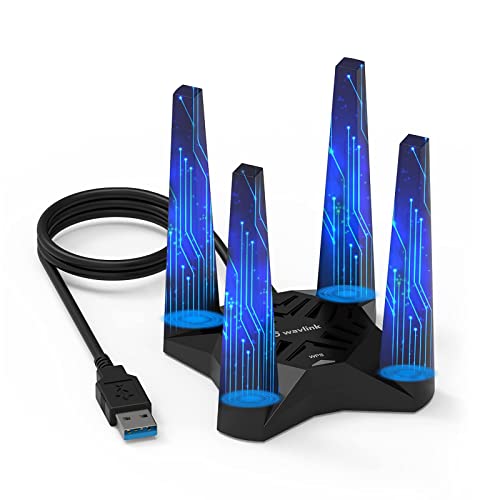 USB WiFi 6 Adapter for Desktop PC USB WiFi 6 Adapter for Desktop PC | 【Upgrade Your PC WiFi Performance】WAVLINK 𝐔𝐒𝐁 𝟑.𝟎 𝐖𝐢𝐅𝐢… 【Increased WiFi Coverage & Stability】Equipped with 𝟒𝐱𝟑𝐝𝐁𝐢 𝐡𝐢𝐠𝐡-𝐠𝐚𝐢𝐧… 【Soft AP Mode & WiFi Mode】This WiFi adapter… | Check price |
 TP-Link AC1300 USB WiFi Adapter TP-Link AC1300 USB WiFi Adapter | AC1300 Dual Band Wi-Fi Adapter for PC, Desktop… Archer T3U also provides MU-MIMO, which delivers Beamforming… Usb 3.0 provides 10x faster speed than USB… | Check price |
As an Amazon Associate we earn from qualifying purchases at no extra cost to you.
🎮 Get More From Your Setup — Free
Prime Gaming gives you free PC games every month, in-game loot, and a free Twitch channel sub — plus fast free shipping on all the gear above. New members get a 30-day free trial.
Watch: Best USB Wifi Adapter For Gaming — Video Review
How to Choose a Gaming USB Wi-Fi Adapter
- Wi-Fi standard: Wi-Fi 6 or 6E adapters offer lower latency and access to cleaner bands than older Wi-Fi 5 dongles; prioritize newer standards.
- USB version: A USB 3.0 connection provides the bandwidth fast wireless needs, so avoid USB 2.0 adapters for high-speed plans.
- Antennas: External high-gain antennas dramatically improve range and stability compared to compact antenna-less dongles.
- Band support: Dual or tri-band adapters let you use the less congested 5GHz or 6GHz bands for gaming, avoiding crowded 2.4GHz.
- Security and OS support: WPA3 and confirmed compatibility with your Windows version ensure a secure, hassle-free connection.
The Best Gaming USB Wi-Fi Adapters Reviewed
NETGEAR Nighthawk A8000 (WiFi 6E)
This tri-band Wi-Fi 6E adapter hits up to 3Gbps and unlocks the clean 6GHz band via USB 3.0. It is our top pick for gamers wanting the fastest, least congested connection.
BrosTrend BE6500 (WiFi 7)
A cutting-edge tri-band Wi-Fi 7 adapter with high-gain antennas, the BE6500 future-proofs your wireless. It is the premium pick for the newest routers and lowest latency.
BrosTrend AX1800 (WiFi 6)
With dual-band Wi-Fi 6, high-gain antennas, and USB 3.0, this adapter balances performance and price. It is a great value for solid gaming and 4K streaming.
TP-Link Archer TX20U Plus (WiFi 6)
This AX1800 Wi-Fi 6 adapter pairs dual-band support with high-gain 5dBi antennas and WPA3. It is a reliable, well-supported mainstream choice.
Nineplus 1300Mbps Dual-Band
An affordable dual-band adapter with dual 5dBi antennas, the Nineplus covers the basics for budget gaming setups. It is the entry point for adding decent wireless cheaply.
Frequently Asked Questions
Can a USB adapter really handle gaming?
Yes, a quality Wi-Fi 6 or 6E adapter with external antennas on the 5GHz or 6GHz band delivers stable, low-latency play for most gamers.
Do I need USB 3.0?
For fast wireless standards, yes. USB 2.0 bottlenecks bandwidth, so a USB 3.0 adapter ensures you get the speeds your plan offers.
Are external antennas worth it?
Absolutely. High-gain external antennas significantly improve range and connection stability over compact antenna-less dongles.
Which band should I game on?
Use 5GHz or 6GHz for gaming, as they are faster and less congested than the crowded 2.4GHz band most household devices use.
Final Thoughts
The NETGEAR Nighthawk A8000 is our top pick for its Wi-Fi 6E speed and clean 6GHz access, while the BrosTrend BE6500 leads for Wi-Fi 7 future-proofing. Budget builders should grab the BrosTrend AX1800 for its strong value.