The right video conferencing webcam can transform how your team communicates. Whether you are hosting one-on-one calls or filling a huddle room, a dedicated conferencing camera delivers the sharp image, wide framing, and clear audio that built-in laptop cameras simply cannot match. From compact personal webcams to all-in-one room systems, there is a solution for every meeting space.
We have gathered a strong lineup of conferencing cameras, spanning personal 1080p and 4K webcams to AI-powered room systems with speaker tracking and multi-microphone arrays. Below we explain how to choose and which of these best fits your setup.
Our top picks
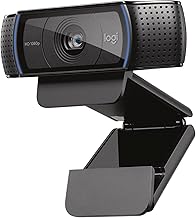
 Logitech C920x HD Pro PC Webcam Full
Automatic lighting adjustment helps in low-light calls
Dual mics capture stereo audio during recordings
Works with the Nintendo Switch 2 GameChat mode
No physical privacy shutter is included
1080p 30fps trails higher-frame-rate webcam options
 Logitech MX Brio Ultra HD 4K Webcam
- Compatible with Nintendo Switch 2’s new GameChat mode
- Ultra HD 4K webcam: meet or stream in…
- AI-enhanced image quality: Experience 2x better face visibility…
 Logitech BCC950 Desktop Video Conferencing Webcam &
- All-in-one design combines HD video with high-quality audio…
- The built-in, full duplex speakerphone and noise-cancelling microphone…
- Plug-and-play USB connectivity Professional-grade certifications: Optimized for Microsoft…
| Product | Key specs | |
|---|---|---|
| Logitech C920x HD Pro PC Webcam Full | Check price | |
| Logitech MX Brio Ultra HD 4K Webcam | Compatible with Nintendo Switch 2’s new GameChat mode Ultra HD 4K webcam: meet or stream in… AI-enhanced image quality: Experience 2x better face visibility… | Check price |
| Logitech BCC950 Desktop Video Conferencing Webcam & | All-in-one design combines HD video with high-quality audio… The built-in, full duplex speakerphone and noise-cancelling microphone… Plug-and-play USB connectivity Professional-grade certifications: Optimized for Microsoft… | Check price |
 Yealink UVC34 4K Video Conference Camera System Yealink UVC34 4K Video Conference Camera System | Impress Everyone in Every Meeting - Yealink UVC34… Immersive Video Experience - By automatically framing participants,… All-in-one Design, Plug and Play - Easy And… | Check price |
 COOLPO Camera 360 COOLPO Camera 360 | [360° View and 4K Resolution] The COOLPO AI… [Voice Tracking & 8 Mics] With advanced AI,… [Secure USB Plug and Play Connect] The COOLPO… | Check price |
 Yealink 4K Video Conference Camera System for Yealink 4K Video Conference Camera System for | Equipped with an extra-long 7m USB-B to USB-A… Designed with enterprise-grade privacy protection, the built-in electric… Functions as an all-in-one conference room camera and… | Check price |
 OBSBOT Tiny 2 Webcam 4K Voice Control OBSBOT Tiny 2 Webcam 4K Voice Control | 【OBSBOT Tiny 2 - New Era of Webcam】Our… 【Superior AI-Tracking, Up 4 Tracking Modes】Our Tracking Webcam… 【Breakthrough Voice & Gesture Control】Our Webcam with Microphone… | Check price |
 TONGVEO All-in-One Conference Room Video Camera System TONGVEO All-in-One Conference Room Video Camera System | ✈【All-in-1 video and audio conferencing solution】TONGVEO conference room… ✈【Full HD Video and Audio】3x optical Zoom AI… ✈【AI auto-tracking PTZ Camera with USB3.0 HDMI Output】Leveraging… | Check price |
As an Amazon Associate we earn from qualifying purchases at no extra cost to you.
🎮 Get More From Your Setup — Free
Prime Gaming gives you free PC games every month, in-game loot, and a free Twitch channel sub — plus fast free shipping on all the gear above. New members get a 30-day free trial.
Watch: Best Video Conferencing Webcam — Video Review
How to Choose a Conferencing Webcam
- Room size: Personal webcams suit desks; wide-angle room systems fit huddle and conference rooms.
- Field of view: A wider angle captures more people; a narrower one keeps focus on a single presenter.
- Audio: Multi-mic arrays and speakerphones matter for group calls; noise reduction keeps voices clear.
- Smart features: AI auto-framing and speaker tracking keep the active talker centered.
- Certification: Look for Teams and Zoom certification for guaranteed compatibility.
The Best Conferencing Webcams Reviewed
Logitech C920x HD Pro
The C920x is a proven personal conferencing choice, delivering reliable 1080p/30fps video, clear audio, and light correction. It works flawlessly across Teams, Meet, and Zoom, making it an affordable, dependable pick for individual desks and home offices.
Logitech MX Brio Ultra HD 4K
For sharper personal video, the MX Brio shoots in 4K and adds a Show Mode for presenting documents. Ideal for collaboration and streaming, it brings premium image quality to professionals who want to look their best on every call.
Logitech BCC950 Webcam & Speakerphone
The BCC950 combines a 1080p webcam with a noise-reducing speakerphone in one unit, purpose-built for small rooms and groups of one to four people. It is a tidy, all-in-one solution that eliminates the need for separate audio gear in a huddle space.
Yealink UVC34 4K Room System
For dedicated meeting rooms, the Yealink UVC34 is an all-in-one 8MP 4K webcam with an 8-microphone array, AI auto-framing, and a 120-degree wide angle. Certified for Teams and Zoom Rooms, it delivers professional-grade video and audio for huddle and conference spaces.
COOLPO AI Huddle Pana 360
The COOLPO Camera 360 offers a unique 360-degree smart view with AI-driven speaker tracking and noise cancellation, capturing everyone around a table. Its plug-and-play setup and Zoom and Meet compatibility make it a standout for collaborative, in-the-round meetings.
Frequently Asked Questions
Do I need a room system or a personal webcam?
For individual desks, a personal webcam like the C920x or MX Brio is ideal. For meeting rooms with multiple people, a wide-angle system like the Yealink UVC34 or COOLPO 360 works far better.
What makes AI auto-framing useful?
AI framing, as on the Yealink and COOLPO, automatically keeps the active speaker or group centered, so remote participants always see who is talking without manual adjustment.
Is 4K necessary for conferencing?
Not always. 1080p is fine for most calls, but 4K models like the MX Brio and Yealink offer extra clarity for presentations and larger displays.
Are these compatible with Teams and Zoom?
Yes. Every model here works with Teams, Zoom, and Meet, and the room systems are specifically certified for Teams and Zoom Rooms.
Final Thoughts
The best conferencing webcam depends on your meeting space. For personal desks, the Logitech C920x and MX Brio deliver reliable, sharp video, while the BCC950 adds handy built-in audio for small groups. For full meeting rooms, the Yealink UVC34 and COOLPO 360 bring AI framing and multi-mic audio that keep everyone seen and heard. Match one to your room size, and your video meetings will run smoother and look more professional.