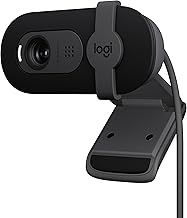
A good webcam does more than make you visible on a Zoom call, it makes you look present, professional, and easy to talk to. If you’re still relying on a grainy laptop camera, upgrading to a dedicated webcam is one of the highest-impact, lowest-effort improvements you can make to your remote work setup.
This roundup gathers the best webcams for Zoom, Teams, and Google Meet, from dependable 1080p workhorses to 4K models with smart framing. I’ll explain what actually matters for meeting quality, then highlight five picks that deliver clear video and crisp audio for every kind of call.
Our top picks
 Logitech C920x HD Pro PC Webcam Full
Automatic lighting adjustment helps in low-light calls
Dual mics capture stereo audio during recordings
Works with the Nintendo Switch 2 GameChat mode
No physical privacy shutter is included
1080p 30fps trails higher-frame-rate webcam options
 Logitech MX Brio Ultra HD 4K Webcam
- Compatible with Nintendo Switch 2’s new GameChat mode
- Ultra HD 4K webcam: meet or stream in…
- AI-enhanced image quality: Experience 2x better face visibility…
 Logitech Brio Ultra 4K HD Webcam for
- Spectacular video quality: superb resolution, frame rate, color,…
- Look great in any light: RightLight 3 automatically…
- Adjustable field of view: Choose from three dFOV…
| Product | Key specs | |
|---|---|---|
| Logitech C920x HD Pro PC Webcam Full | Check price | |
| Logitech MX Brio Ultra HD 4K Webcam | Compatible with Nintendo Switch 2’s new GameChat mode Ultra HD 4K webcam: meet or stream in… AI-enhanced image quality: Experience 2x better face visibility… | Check price |
| Logitech Brio Ultra 4K HD Webcam for | Spectacular video quality: superb resolution, frame rate, color,… Look great in any light: RightLight 3 automatically… Adjustable field of view: Choose from three dFOV… | Check price |
 Logitech C920e HD 1080p Mic Enabled Webcam Logitech C920e HD 1080p Mic Enabled Webcam | With a 78° fixed field of view, the… The C920e webcam features two integrated omnidirectional microphones… Built-in HD autofocus ensures you’re seen clearly throughout… | Check price |
 Logitech Brio 101 Full HD 1080p Webcam Logitech Brio 101 Full HD 1080p Webcam | Compatible with Nintendo Switch 2’s new GameChat mode Auto-Light Balance: RightLight boosts brightness by up to… Privacy with a Slide: The integrated webcam cover… | Check price |
 EMEET C960 4K Webcam for PC EMEET C960 4K Webcam for PC | Unmatched Clarity with True 4K Resolution - Experience… PDAF Focus & Auto Light Correction - Equipped… Dual Omnidirectional Mics - The built-in dual microphones… | Check price |
 NexiGo N60 1080P Webcam with Microphone NexiGo N60 1080P Webcam with Microphone | 【Full HD 1080P Webcam】Powered by a 1080p FHD… 【Wide Compatibility】Works with USB 2.0/3.0, no additional drivers… 【Built-in Noise-Cancelling Microphone】The built-in noise-canceling microphone reduces ambient… | Check price |
 EMEET NOVA 4K Webcam for PC EMEET NOVA 4K Webcam for PC | Unrivaled 4K Performance - Experience unparalleled clarity with… Precise Autofocus, Clear Display Superior Audio Clarity, Unmatched Compatibility | Check price |
As an Amazon Associate we earn from qualifying purchases at no extra cost to you.
🎮 Get More From Your Setup — Free
Prime Gaming gives you free PC games every month, in-game loot, and a free Twitch channel sub — plus fast free shipping on all the gear above. New members get a 30-day free trial.
Watch: Best Webcam For Zoom Meetings — Video Review
How to Choose a Webcam for Meetings
- Resolution vs. reality: 1080p is the practical standard for meetings; 4K adds sharpness and lets you crop in, but most video calls compress heavily anyway.
- Low-light correction: Automatic light adjustment keeps you looking natural in dim home offices, a feature worth prioritizing.
- Microphone quality: Built-in mics vary widely. Dual-mic noise reduction makes a real difference if you don’t use a headset.
- Field of view: A narrower FOV flatters solo callers; a wider one suits group shots or showing your workspace.
- Certification and compatibility: Look for cameras certified for Zoom and Teams to ensure smooth plug-and-play operation.
The Best Webcams for Zoom Reviewed
Logitech C920x HD Pro
The C920x remains the reference-standard 1080p webcam for a reason. It delivers clean, color-accurate video at 30fps, automatic light correction, and clear audio, all with effortless compatibility across Zoom, Meet, and Teams. For most people, it’s the smart, no-overthinking choice.
Logitech MX Brio Ultra HD 4K
The MX Brio is the premium pick, offering true 4K clarity, excellent low-light performance, and a Show Mode for presenting documents. If you want the sharpest possible image and features aimed at collaboration and streaming, this is Logitech’s flagship for a reason.
Logitech Brio 101 Full HD 1080p
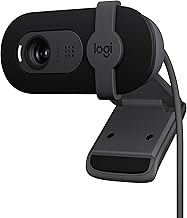
The Brio 101 is a modern, affordable 1080p option with auto light correction, a built-in mic, and a privacy shutter. Its USB-A connection and broad certification make it an easy upgrade for any meeting-focused setup without the flagship price.
Logitech C920e HD 1080p
Built for business, the C920e is certified for Zoom and Teams and adds a privacy shutter plus TAA compliance. It strips away streaming extras to focus on reliable, professional meeting video, making it a great fit for corporate and IT-managed environments.
EMEET C960 4K
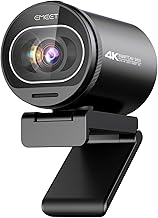
The EMEET C960 4K brings autofocus, dual omnidirectional mics, and auto light correction at a friendly price. Its plug-and-play USB-A setup and privacy cover suit anyone who wants sharper-than-1080p video and solid audio without stretching the budget.
Frequently Asked Questions
Is 4K overkill for Zoom?
For most meetings, yes, video calls compress heavily, so 1080p looks nearly identical on the other end. 4K shines if you crop the image or also stream and record.
Do I still need a separate microphone?
Not necessarily. Cameras with dual mics and noise reduction, like the EMEET C960, sound good enough for meetings, though a headset still wins in noisy rooms.
Why does low-light correction matter?
Home offices are often dimly lit, and automatic light adjustment prevents you from looking dark or washed out, keeping your image natural throughout a call.
USB-A or USB-C, does it matter?
Functionally no, both work fine. USB-A remains the most universally compatible; just confirm your computer has the right port before buying.
Final Thoughts
For the best all-around value, the Logitech C920x is still the webcam I’d hand most people for Zoom calls. If you want top-tier 4K clarity, the MX Brio is the upgrade to make, while the EMEET C960 4K is the budget-friendly way to get sharper video and good audio in one package.