Key takeaways
- Armrests that adjust in height, and ideally depth and angle, let you keep your shoulders relaxed and wrists neutral while gaming or typing.
- A recline function with a locking tilt lets you shift positions and lean back during breaks, easing pressure on your spine.
- Reliable height adjustment via a quality gas lift ensures your feet rest flat and your eyes meet the monitor at the right level.
- A footrest, found on many models above, is a genuine comfort bonus for leaning back between matches or during longer breaks.
You will spend more hours in your gaming chair than with almost any other piece of gear you own, yet it is the part most people rush. A poor chair does not just feel uncomfortable, it quietly wrecks your posture, leaves your lower back aching after long sessions, and turns a marathon raid or ranked grind into a battle against your own body. The right chair, by contrast, disappears beneath you and lets you focus entirely on the game.
This guide walks you through everything that actually matters when buying a gaming chair, from ergonomics and build quality to sizing for your body and separating useful features from marketing gimmicks. You will learn what lumbar support really does, which adjustments are worth paying for, and how to avoid a chair that looks great in photos but sags within a year. To ground the advice, the gaming chairs below are the models we recommend across a range of budgets and body types.
Our top picks
 GTPLAYER Gaming Chair
- Most Comfortable And Relaxing: Equipped with headrest and…
- More Stable Than Others: Common gaming chairs are…
- Liberate Your Feet: Will you feel tired for…
 Gaming Chair for Adults with Footrest
- [52cm Wide Seat with 4-Layer Pocket Spring Cushion]…
- [Full-Body Ergonomic Support for Neck & Waist] Long…
- [Linkage Armrests That Move with the Backrest] The…
 WOTSTA Gaming Chair with Massage
- Easy Height & Recline Control:Easily adjust your seating…
- Pull-Out Footrest for Instant Relaxation:Quickly extend the built-in…
- Full-Body Ergonomic Support:Designed with three-zone support for the…
| Product | Key specs | |
|---|---|---|
| GTPLAYER Gaming Chair | Most Comfortable And Relaxing: Equipped with headrest and… More Stable Than Others: Common gaming chairs are… Liberate Your Feet: Will you feel tired for… | Check price |
| Gaming Chair for Adults with Footrest | [52cm Wide Seat with 4-Layer Pocket Spring Cushion]… [Full-Body Ergonomic Support for Neck & Waist] Long… [Linkage Armrests That Move with the Backrest] The… | Check price |
| WOTSTA Gaming Chair with Massage | Easy Height & Recline Control:Easily adjust your seating… Pull-Out Footrest for Instant Relaxation:Quickly extend the built-in… Full-Body Ergonomic Support:Designed with three-zone support for the… | Check price |
 Kslysuty Desk Computer Gaming Chair Kslysuty Desk Computer Gaming Chair | 【Sofa-Level Comfort System】Redefine your seating with our Ergonomic… 【Therapeutic Massage & Recline】Banishes fatigue instantly with our… 【Smart Adaptive Armrests】Experience seamless transitions with our Interlocking… | Check price |
 Gaming Chair for Adults Gamer Game Ergonomic Gaming Chair for Adults Gamer Game Ergonomic | 【7-Point Precision Support 【51cm Wingless Seat 【Sofa-Grade Cushioning | Check price |
 Gaming Chair Gamer Game Ergonomic with Footstool Gaming Chair Gamer Game Ergonomic with Footstool | 【Targeted Support for Neck & Lower Back】 Extended… 【52cm Wingless Cushion 【All-Steel Construction | Check price |
 N-GEN GAMING Gaming Chair with Footrest N-GEN GAMING Gaming Chair with Footrest | Full-Body Ergonomic Comfort: Designed to promote better posture… Built-In Retractable Footrest: Easily extend the footrest to… Effortless Adjustability: Find your ideal seating position with… | Check price |
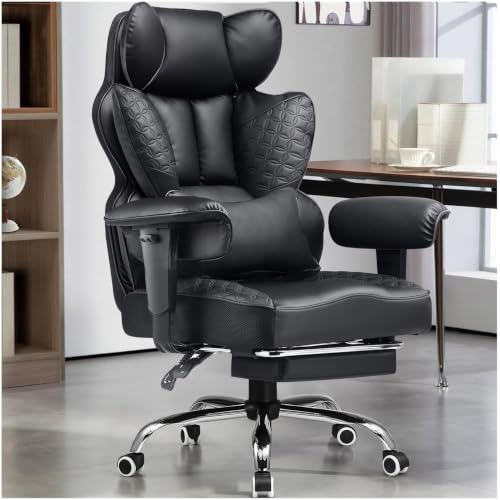 GTPLAYER Big and Tall Gaming Chair 400lbs GTPLAYER Big and Tall Gaming Chair 400lbs | 【400LBS Big and Tall Office Chair】Designed specifically for… 【Spring Lumbar Support & Upgraded Cloud-like Seat Cushion】… 【Premium PU Leather】This office chair features a elegant… | Check price |
As an Amazon Associate we earn from qualifying purchases at no extra cost to you.
⚡ Save on Your Next PC — Amazon Prime
Prime members get fast free shipping on the systems above, plus early access to Prime Day & Black Friday PC deals. New members get a 30-day free trial.
Watch: Gaming Chair Buying Guide — Video Review
Prioritize Ergonomics and Support
The whole point of a gaming chair is to hold your body in a healthy position for hours, so ergonomics come first. Look for genuine lumbar support that fills the curve of your lower back, ideally adjustable so you can tune it to your spine rather than a fixed lump that fights you. A supportive headrest takes strain off your neck during long sessions, and a seat with enough depth and cushioning distributes your weight instead of concentrating it. Many of the chairs above include adjustable lumbar and headrest pillows plus contoured backs, which is exactly the combination that keeps your posture upright without you having to think about it.
Check the Adjustments That Matter
- Armrests that adjust in height, and ideally depth and angle, let you keep your shoulders relaxed and wrists neutral while gaming or typing.
- A recline function with a locking tilt lets you shift positions and lean back during breaks, easing pressure on your spine.
- Reliable height adjustment via a quality gas lift ensures your feet rest flat and your eyes meet the monitor at the right level.
- A footrest, found on many models above, is a genuine comfort bonus for leaning back between matches or during longer breaks.
Judge Build Quality and Materials
A chair is only as good as the parts you cannot see in a product photo. The frame should be sturdy metal rather than flimsy plastic, and the gas lift should carry a recognized safety rating, since that component bears your full weight every day. Upholstery matters for both comfort and longevity: breathable fabric stays cooler over long sessions, while PU leather wipes clean easily but can trap heat. Check the density of the seat foam, because cheap foam flattens within months and leaves you sitting on the base. Solid casters and a stable five-point base round out a chair that will still feel firm and safe years after you buy it.
Size the Chair to Your Body
A chair that fits someone else may punish you, so match it to your own frame. Check the weight capacity and leave comfortable margin, choosing a big-and-tall model rated for higher loads if you need one, like the heavier-duty options above. Seat width and depth should suit your hips and thigh length, letting you sit fully back with a few fingers of space behind your knees. Taller users should confirm the backrest is high enough to support the shoulders and that the height range lifts them to the desk properly. Buying to your measurements rather than to a photo is the difference between a chair that supports you and one that constantly reminds you it does not fit.
Separate Useful Features From Gimmicks
Gaming chairs love flashy extras, and some are worth it while others are pure marketing. A built-in massage or lumbar-heat function can be a pleasant bonus, but it should never be the reason you overlook poor core ergonomics. Aggressive racing-style bolsters look dramatic yet can dig into wider users, so comfort should win over aesthetics. RGB lighting and bold branding add nothing to support, so treat them as tie-breakers, not selling points. Focus your money on the fundamentals, a strong frame, real lumbar support, quality foam, and useful adjustments, and let the gimmicks be a nice surprise on top rather than the core of your decision.
Tips
- Sit fully back into the chair so the lumbar support meets your spine, since even a great chair fails if you perch on the front edge.
- Set the height so your feet rest flat and your thighs sit parallel to the floor, then align armrests to keep shoulders relaxed.
- Check the weight rating and seat dimensions against your own body before buying, not just the marketing photos.
- Prioritize adjustable lumbar and armrests over cosmetic extras, because those are the features you will feel every single session.
Frequently Asked Questions
Are gaming chairs actually good for your back?
A well-designed one can be, provided it has real lumbar support and you set it up correctly. The support and adjustability encourage an upright posture during long sessions. A cheap chair with token support, however, offers little benefit, so the quality of the ergonomics matters far more than the gaming label.
Is a footrest worth having on a gaming chair?
For many people, yes. A footrest lets you recline and take pressure off your legs and lower back during breaks between matches. It is a comfort bonus rather than an ergonomic necessity, but if two chairs are otherwise equal, the one with a footrest adds real everyday value.
How much should I spend on a gaming chair?
You can get a solid, supportive chair without buying the most expensive model. Focus your budget on frame strength, foam quality, and adjustability rather than branding or lights. Spending a bit more for a big-and-tall or better-built model pays off if you sit for many hours or need a higher weight rating.
Fabric or PU leather, which is better?
It comes down to your climate and habits. Fabric breathes better and stays cooler over long sessions, while PU leather looks sleek and wipes clean of spills and dust easily. If you run warm or game for hours, breathable fabric usually feels more comfortable, whereas leather suits those who prioritize easy cleaning.
Conclusion
A gaming chair is a long-term investment in your comfort and posture, so buy it like one. Put ergonomics and genuine lumbar support first, insist on a sturdy frame and quality foam, and confirm the size and weight rating actually fit your body. Treat massage functions, bold styling, and lighting as bonuses rather than deciding factors. Get the fundamentals right and you will barely notice the chair at all, which is exactly what a great one should do.