
Key takeaways
- Hold the blades still: Use a finger or brush to stop each fan from spinning while you blow it; free-spinning under compressed air can damage the bearing or generate reverse voltage.
- Short bursts, from behind: Blow dust off the blades in short bursts, working from the clean side toward the dusty side to push debris out of the case.
- Wipe stubborn grime: A lightly dampened microfiber cloth removes caked-on dust the air will not shift; let blades dry fully before powering on.
Dust is the silent killer of PC performance. Over months it coats fan blades, clogs radiator fins, and blankets dust filters, choking airflow until your components run hotter, throttle, and get louder. A thorough clean every few months restores temperatures and quiets your system, and it costs almost nothing beyond a can of compressed air and a little time. It is the easiest maintenance task with the biggest payoff.
This guide covers how to clean your PC fans and filters safely, without damaging bearings or components, plus how to keep dust out in the first place with quality filters. We will reference magnetic and clip-on dust filters like MoKo and ThreeBulls sets that make ongoing maintenance far easier, so cleaning becomes a quick wipe rather than a full teardown.
Our top picks
 ThreeBulls 12 Pcs 120mm PVC Black PC
- 100% brand new and high quality Suitable for.
- For the home computer chassis fan dust, speaker…
- Help to keep your PC and PC components…
 IMSurQltyPrise 120mm Computer Fan Filter Grills
- Brand New PC Case Fan Vent Filter Finger…
- Black Color
- Compatible with: Most of Standard 120mm Fan /…
 MoKo 400x300mm DIY PC Case Dust Mesh
- 400 x 300mm DIY Filter: This DIY PC…
- 8 x 400mm Magnetic Strips: Come with 8…
- Dustproof and Ventilation: 1mm hole not only prevent…
| Product | Key specs | |
|---|---|---|
| ThreeBulls 12 Pcs 120mm PVC Black PC | 100% brand new and high quality Suitable for. For the home computer chassis fan dust, speaker… Help to keep your PC and PC components… | Check price |
| IMSurQltyPrise 120mm Computer Fan Filter Grills | Brand New PC Case Fan Vent Filter Finger… Black Color Compatible with: Most of Standard 120mm Fan /… | Check price |
| MoKo 400x300mm DIY PC Case Dust Mesh | 400 x 300mm DIY Filter: This DIY PC… 8 x 400mm Magnetic Strips: Come with 8… Dustproof and Ventilation: 1mm hole not only prevent… | Check price |
 Dust Filter PC 120mm for Computer Cooler/PSU/Routers Dust Filter PC 120mm for Computer Cooler/PSU/Routers | 【DELIVERY LIS】YIMATEECO Provides: 2 x 120*120mm PC Dust… 【PRODUCT DESIGN】Weak magnetic design, Easy to install and… 【CHOICE OF PETS FAMILIES】The ultra-small aperture as low… | Check price |
 MoKo 400x300mm DIY PC Case Dust Mesh MoKo 400x300mm DIY PC Case Dust Mesh | 400x300mm DIY Filter: This DIY PC case dust… 16 x 400mm Magnetic Strips: Come with 16… Dustproof and Ventilation: 1mm hole not only prevent… | Check price |
| ThreeBulls 12 Pcs 140mm PVC Black PC | 100% brand new and high quality Suitable for. For the home computer chassis fan dust, speaker… Help to keep your PC and PC components… | Check price |
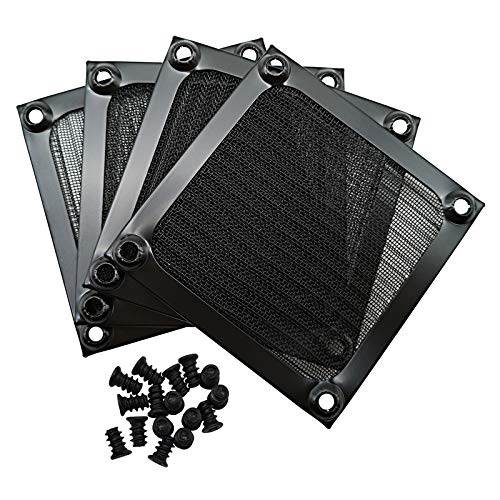 IMSurQltyPrise 80mm Computer Fan Filter Grills IMSurQltyPrise 80mm Computer Fan Filter Grills | Brand New PC Case Fan Vent Filter Finger… Black Color Compatible with: Most of Standard 80mm Fan /… | Check price |
 Adyoney 4 Pcs 120mm Black Square Plastic Adyoney 4 Pcs 120mm Black Square Plastic | 【Packaging & Size】: Our 4 Pcs Black Cooling… 【Unique Design】: These fan filters feature a unique… 【High-Quality Materials】: Made from durable plastic materials, these… | Check price |
As an Amazon Associate we earn from qualifying purchases at no extra cost to you.
⚡ Save on Your Next PC — Amazon Prime
Prime members get fast free shipping on the systems above, plus early access to Prime Day & Black Friday PC deals. New members get a 30-day free trial.
Watch: How to Clean Your PC Fans and Filters — Video Review
Power Down and Prepare
Shut down the PC, switch off and unplug the power supply, and move the case somewhere ventilated, ideally outdoors or in a garage, because you are about to blow a lot of dust around. Gather compressed air, a soft brush, microfiber cloths, and something to hold fan blades still. Never clean a powered-on system, and ground yourself to avoid static.
Clean the Fans Correctly
- Hold the blades still: Use a finger or brush to stop each fan from spinning while you blow it; free-spinning under compressed air can damage the bearing or generate reverse voltage.
- Short bursts, from behind: Blow dust off the blades in short bursts, working from the clean side toward the dusty side to push debris out of the case.
- Wipe stubborn grime: A lightly dampened microfiber cloth removes caked-on dust the air will not shift; let blades dry fully before powering on.
Deep-Clean Radiators and Heatsinks
CPU cooler fins and AIO radiators trap dust between their dense fins, restricting airflow badly. Blow compressed air straight through them from the intake side to clear the channels, and use a soft brush on the outer surface. This is where a lot of hidden heat problems live, so do not skip it even though it takes patience.
Clean and Reinstall Filters
Remove your case’s dust filters and clean them separately. Magnetic filters like MoKo DIY mesh or clip-on ThreeBulls fan filters pop off easily; rinse washable ones under water and dry them completely, or blow out non-washable types. Clean filters are your first line of defense, so getting them spotless keeps the interior cleaner for longer.
Prevent Future Buildup
Fit dust filters on every intake if you have not already; a full set of magnetic 120mm and 140mm filters stops the majority of dust at the door. Run slightly positive air pressure (more intake than exhaust) so unfiltered gaps do not suck in dust. Then a quick monthly filter wipe keeps deep cleans to just a couple of times a year.
Tips
- Never spin fans with air: Always immobilize blades before blowing them to protect the bearings.
- Use short compressed-air bursts: Steady blasts can over-spin fans and moisture can condense; short bursts are safer and just as effective.
- Filter every intake: Magnetic mesh filters on intakes cut interior dust dramatically and are easy to remove for cleaning.
- Set up monthly checks: A quick filter inspection each month prevents the heavy buildup that forces full teardowns.
Frequently Asked Questions
How often should I clean my PC fans?
Deep-clean fans and radiators every three to six months, depending on your environment. Pets, carpet, and smoking speed up buildup. Wipe removable filters monthly to stretch the interval.
Can I use a vacuum to clean my PC?
It is risky; vacuums generate static that can damage components. Compressed air is safer. If you must use suction, keep the nozzle away from the boards and never touch components directly.
Why shouldn’t fans spin while I clean them?
Spinning a fan with compressed air can exceed its rated speed, damaging the bearing, and a motor spun externally can generate a small reverse voltage. Hold the blades still to be safe.
Do dust filters reduce airflow?
Slightly, but the trade is worth it. Clean filters have minimal impact and keep your interior far cleaner, which preserves airflow better than an unfiltered, dust-clogged system over time.
Conclusion
Cleaning your fans and filters is the cheapest, most effective maintenance you can do: it lowers temperatures, quiets the system, and extends component life. Power down, immobilize the blades, blow dust out in short bursts, deep-clean the radiator, and wash the filters. Fit magnetic filters on every intake and do quick monthly checks, and heavy cleaning becomes a rare chore rather than a regular battle.









