Our Top Picks
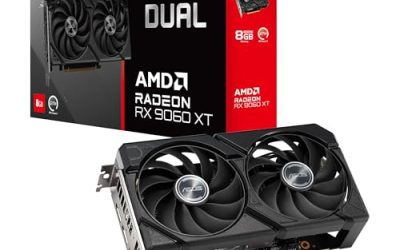
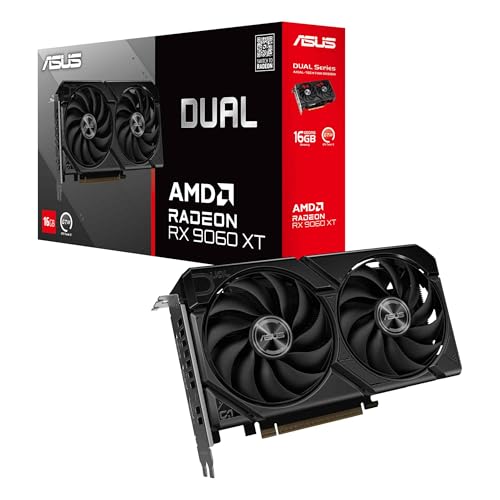 ASUS Dual Radeon RX 9060 XT 16GB GDDR6RX9060XT|16GB|Black8 x 4.7 x 1.9 inches1.3 poundsCheck on Amazon


Efficiency is not the same as raw speed. A card that draws far more power for a small gain in smoothness can be the wrong choice for a compact case, a quiet room, or a power supply that is already close to its comfortable limit. The real decision is how much playable performance you get for the heat, noise, and power draw you accept, and whether that trade stays sensible at the resolution you actually play.

This guide is for owners of small or quiet PCs, builders upgrading an older card, and players who run long sessions and want less waste heat in the room. The five cards below are ranked qualitatively from the generation, VRAM, memory type, and power details listed on their Amazon product pages. No lab measurements or watts-per-frame figures are used here, because those depend on the game, the settings, and the rest of the system, and a single number would hide that variation.
Quick Picks
As an Amazon Associate we earn from qualifying purchases
| Product | Best for | Key spec from title |
|---|---|---|
| ASUS Prime GeForce RTX 5060 8GB GDDR7 OC Edition | Quiet 1080p gaming in a compact PC | RTX 5060, 8GB GDDR7, PCIe 5.0, Dual BIOS |
| PNY GeForce RTX 5060 Ti OC Dual Fan 16GB GDDR7 | 1440p gaming with generous VRAM in a small case | RTX 5060 Ti, 16GB GDDR7, 128-bit, boost 2692 MHz |
| ASUS Dual Radeon RX 9060 XT 16GB GDDR6 | Long sessions at 1440p with 16GB of VRAM | RX 9060 XT, 16GB GDDR6, boost up to 3250 MHz |
| PNY GeForce RTX 5070 Epic-X ARGB OC Triple Fan 12GB GDDR7 | Smooth 1440p play with heavier effects turned on | RTX 5070, 12GB GDDR7, 192-bit, boost 2685 MHz |
| PowerColor Hellhound AMD Radeon RX 9070 16GB GDDR6 | High-detail 1440p and 4K-oriented play in a large case | RX 9070, 16GB GDDR6, 1x HDMI 2.1, 3x DisplayPort 2.1 |
How to Choose
Start with your resolution, not the card name
A card that is efficient at 1080p can become a poor match at 4K, because the higher resolution asks for more memory and more sustained work from the chip. If you play mostly competitive titles at 1080p, a lighter card with 8GB of fast memory can stay cool and quiet while still delivering smooth play. If your monitor is 1440p and you like detailed textures, the 16GB cards in this guide give you more headroom before texture settings need to be cut back. Match the card to the monitor you already own, and check the display outputs on the product page so the card connects to your screen without an adapter you did not plan to buy.
Read VRAM and memory type together
VRAM capacity and memory type work as a pair. A 16GB card using GDDR6 can hold larger texture packs and keep more game data close to the chip, which helps when a game streams in new areas without pausing. A card with GDDR7, such as the RTX 5060, RTX 5060 Ti, and RTX 5070 here, uses a newer and faster memory type, so even a smaller capacity can move data quickly for its class. Do not judge a card by capacity alone. Look at the full listing: the chip name, the memory amount, the memory type, and the interface width together tell you far more about how the card will behave in a demanding scene.
Check the power and connector details before you buy
Efficiency only helps if the card fits the power supply you have. The PNY RTX 5070 listing states a 250W TDP, which is a clear signal to check your power supply capacity and its available connectors before ordering. The PowerColor RX 9070 listing states a minimum system power of 700W and two 8-pin PCIe power connectors, so that card belongs in a build with a capable supply and room for two separate power leads. A smaller card may still need a single connector, and a compact case may leave little slack in the cable run. Read the connector count, the card length, and the slot width on the listing, then measure the space inside your case.
Treat cooler size and case airflow as part of efficiency
A card that runs hot in a closed case will slow itself down to stay within safe temperatures, and that lost performance is wasted power in practice. A triple-fan card such as the PNY RTX 5070 moves heat away from the chip, but it also needs intake air and an exhaust path, so blocked front vents will undo much of that design. A dual-fan card such as the PNY RTX 5060 Ti suits a compact build, yet it still needs clear space around the fans. Leave space behind the case, keep cables away from the intake, and clean the dust filters so airflow stays steady.
The 5 Best Options
ASUS Prime GeForce RTX 5060 8GB GDDR7 OC Edition
This is the lightest card in the ranking, and that is its main strength. The RTX 5060 chip, 8GB of GDDR7 memory, and a compact 2.5-slot design make it a natural fit for a small desktop that should stay quiet during long evenings of play. It suits a first upgrade from integrated graphics or an older entry-level card, especially when the monitor is 1080p and the owner values low heat and low noise more than maximum detail settings in every new release.
Specs
- Graphics coprocessor: NVIDIA GeForce RTX 5060
- Graphics card RAM: 8GB GDDR7
- GPU clock speed: 2565 MHz, OC mode 2595 MHz
- Graphics card interface: PCI-Express x16, PCIe 5.0
- Video output interface: DisplayPort, HDMI
- Maximum display resolution: 7680 x 4320
- Design: 2.5-slot, Axial-tech fans, Dual BIOS
- Architecture and features: NVIDIA Blackwell architecture, DLSS 4
Best for: A quiet compact PC used mainly for 1080p gaming, browsing, and everyday tasks.
Watch out for: The 8GB of VRAM can become a limit if you raise texture settings sharply in newer large games, so check the texture options for the games you play most.
PNY GeForce RTX 5060 Ti OC Dual Fan 16GB GDDR7
This card earns its place by pairing a mid-range Blackwell chip with 16GB of GDDR7 memory in a 2-slot, SFF-ready body. That combination matters for players who want to step up to 1440p without moving to a large tower or a much larger power supply, because the extra VRAM gives texture-heavy games more room while the dual-fan cooler keeps the card practical for smaller cases. It is the most balanced choice in this guide for a builder who wants longevity from memory capacity rather than from a bigger chip alone.
Specs
- Graphics coprocessor: NVIDIA GeForce RTX 5060 Ti
- Graphics card RAM: 16GB GDDR7
- Memory interface: 128-bit
- GPU clock speed: boost speed 2692 MHz
- Graphics card interface: PCIe 5.0
- Video output interface: HDMI, DisplayPort
- Maximum display resolution: 7680 x 4320
- Design: 2-slot, SFF-Ready, dual fan
- Architecture and features: NVIDIA Blackwell architecture, DLSS 4
Best for: A compact 1440p build where 16GB of VRAM and a slim 2-slot card matter more than a triple-fan cooler.
Watch out for: The 128-bit memory interface means the card relies on fast GDDR7 to move data, so check that your case still gives the dual fans clear intake air.
ASUS Dual Radeon RX 9060 XT 16GB GDDR6
The ASUS Dual RX 9060 XT is the AMD entry in this ranking, and its case rests on 16GB of GDDR6 memory and a high boost clock of up to 3250 MHz as listed on the product page. That memory capacity helps at 1440p when games use large texture packs, and the dual-fan design with 0dB Technology is aimed at quiet operation when the card is under a light load. It suits a player who wants a straightforward AMD card for long sessions, without the larger cooler and higher power needs of the strongest card in this guide.
Specs
- Graphics coprocessor: AMD Radeon RX 9060 XT
- Graphics card RAM: 16GB GDDR6
- GPU clock speed: boost clock up to 3250 MHz
- Graphics card interface: PCIe 5.0
- Video output interface: HDMI 2.1b, DisplayPort 2.1a
- Maximum display resolution: 7680 x 4320
- Design: 2.5-slot, Axial-tech fan design, 0dB Technology
Best for: Long 1440p sessions where 16GB of VRAM and quiet dual-fan cooling are the priorities.
Watch out for: The card uses GDDR6 rather than GDDR7, so compare the full listing with the NVIDIA cards here if fast memory movement is a priority for your games.
PNY GeForce RTX 5070 Epic-X ARGB OC Triple Fan 12GB GDDR7
The RTX 5070 is the step up for players who want heavier effects and smoother 1440p play, and the PNY Epic-X version states the details that explain why it sits higher in this ranking. Its listing gives 6,144 CUDA cores, a 2.16 GHz base clock, 12GB of GDDR7 memory on a 192-bit interface, memory speed of 28 Gbps, and bandwidth of up to 672 GB/s, with a stated 250W TDP. The triple-fan cooler and SFF-ready design help manage that extra work, but this card belongs in a build where the power supply and airflow have already been checked.
Specs
- Graphics coprocessor: NVIDIA GeForce RTX 5070
- Graphics card RAM: 12GB GDDR7
- Memory interface: 192-bit, memory speed 28 Gbps, bandwidth up to 672 GB/s
- CUDA cores: 6,144, base clock 2.16 GHz
- GPU clock speed: boost speed 2685 MHz
- Graphics card interface: PCIe 5.0
- Video output interface: 3x DisplayPort 2.1b, HDMI 2.1b
- Maximum display resolution: 7680 x 4320
- Design: 2.4-slot, SFF-Ready, triple fan, ARGB
- Architecture and features: NVIDIA Blackwell architecture, DLSS 4
- Power: 250W TDP as stated on the product page
Best for: A 1440p player who wants stronger effects and smoother play and has already confirmed the power supply and case airflow.
Watch out for: The stated 250W TDP means you must confirm your power supply capacity and connector availability before buying, and leave room for the triple-fan cooler.
PowerColor Hellhound AMD Radeon RX 9070 16GB GDDR6
The RX 9070 is the most powerful card in this guide, and its efficiency case is different from the others: it trades higher power needs for the ability to hold high detail settings at 1440p and to stretch toward more demanding resolutions. The listing gives 16GB of GDDR6 memory, a 20 GHz memory speed, three DisplayPort 2.1 outputs and one HDMI 2.1 output, two 8-pin power connectors, and a card length of 327 mm. Those details make it a poor fit for a small case, and a strong fit for a large tower with a capable power supply and good airflow.
Specs
- Graphics coprocessor: AMD Radeon RX 9070
- Graphics card RAM: 16GB GDDR6
- Memory speed: 20 GHz
- GPU clock speed: 2120 MHz
- Video output interface: 1x HDMI 2.1, 3x DisplayPort 2.1
- Maximum display resolution: 7680 x 4320
- Power connectors: two 8-pin PCI Express power connectors
- Minimum system power: 700W as stated on the product page
- Card dimensions: 327 x 128 x 41 mm
Best for: A large-tower build aimed at high-detail 1440p play, where the owner has space, airflow, and a capable power supply.
Watch out for: The 327 mm length and two 8-pin connectors need to be measured and confirmed in your case and power supply before ordering.
Which One Fits Your Situation
A small, quiet PC for 1080p play
Choose the ASUS Prime RTX 5060. Its 8GB of GDDR7 memory, Dual BIOS, and 2.5-slot design suit a compact case that should stay quiet in a bedroom or shared living room. The card is aimed at smooth 1080p play rather than maximum settings in every new title, so it works best when the owner values low heat and low noise over the highest texture settings.
A compact build that needs 16GB of VRAM
Choose the PNY RTX 5060 Ti. Its 16GB of GDDR7 memory gives texture-heavy games more room, while the 2-slot, SFF-ready body fits cases where a triple-fan card would be too wide. This is the pick for a builder who wants to stay at 1440p for longer without changing the case, the cooler layout, or the overall size of the PC.
Long 1440p sessions with quiet cooling
Choose the ASUS Dual RX 9060 XT. Its 16GB of GDDR6 memory and boost clock of up to 3250 MHz suit steady play at 1440p, and the dual-fan design with 0dB Technology is aimed at quiet operation during lighter loads. It is a good match for a player who spends long evenings in one or two main games and wants the card to stay out of the way.
Heavier effects and a larger, well-ventilated case
Choose the PNY RTX 5070 if your power supply and airflow are already suitable, or the PowerColor RX 9070 if you have a large tower and want the strongest card in this guide. The RTX 5070 pairs 12GB of GDDR7 memory with a triple-fan cooler, while the RX 9070 pairs 16GB of GDDR6 memory with a long 327 mm body and two 8-pin connectors. Both need a careful check of power, space, and ventilation before they are ordered.
Common Mistakes
- Buying the strongest card in a ranking and then placing it in a case with blocked intake vents, so the cooler cannot move warm air out and the card slows down under load.
- Judging efficiency by the chip name alone, without reading VRAM capacity, memory type, interface width, and the power details stated on the product page.
- Ordering a long card such as the 327 mm RX 9070 without measuring the case, the drive cage, and the cable run in front of the card.
- Ignoring the power connector count and the minimum system power stated on the listing, then discovering the power supply has no spare lead for the new card.
- Raising every texture and effects setting to the maximum on an 8GB card, then blaming the card when the game needs more memory than the listing provides.
Frequently Asked Questions
What does performance per watt actually mean for a graphics card?
It means how much playable smoothness you get for the power the card draws and the heat it produces. A card with strong performance per watt can deliver smooth play at your resolution without a very large cooler or power supply. Here the ranking is qualitative, based on the generation, VRAM, memory type, and power details listed on each product page.
Is an 8GB graphics card still enough for gaming in 2026?
It can be enough for 1080p play, especially with fast GDDR7 memory and settings chosen for that resolution. The ASUS RTX 5060 in this guide is aimed at that use. If you play at 1440p or use large texture packs, a 16GB card such as the PNY RTX 5060 Ti or the ASUS RX 9060 XT gives you more headroom before settings need to be reduced.
Does a triple-fan card always run cooler than a dual-fan card?
Not always. A triple-fan cooler can move more air, as on the PNY RTX 5070, but it still needs intake air and an exhaust path. A dual-fan card in a clean case with clear airflow can run quietly, while a triple-fan card in a closed cabinet can still trap warm air. Check the vents and leave space behind the case.
How do I know if my power supply can handle a new graphics card?
Read the power details on the product page first, then check your own supply. The PNY RTX 5070 listing states a 250W TDP, and the PowerColor RX 9070 listing states a minimum system power of 700W with two 8-pin connectors. Compare those figures with your supply, count the available PCIe leads, and measure the card length before you order.
FAQ
What does performance per watt actually mean for a graphics card?
Is an 8GB graphics card still enough for gaming in 2026?
Does a triple-fan card always run cooler than a dual-fan card?
How do I know if my power supply can handle a new graphics card?
More from Amazon
Programs that pair well with the guide above. Offers and eligibility are set by Amazon and may change.
Free shipping on eligible items, Prime Video and more. Eligible new members can start with a free trial.
Start a Prime free trialAd-free music streaming. Eligible new subscribers can start with a free trial.
Try Music Unlimited freeA Prime membership for ages 18-24 with a trial period. Eligibility is set by Amazon.
See Prime for Young AdultsAudiobooks and podcasts to listen to on the go. Eligible new members can start with a free trial.
Try Audible freeAs an Amazon Associate we earn from qualifying purchases.