Pro: Large displays and Dolby Atmos speakers make for immersive casual gaming.
Pro: Long battery life supports extended play and streaming sessions.
Pro: Expandable storage accommodates growing game libraries.
Pro: The A11+ lineup offers strong value with slim, light designs.
Con: Galaxy Tab A11+ chips suit casual and cloud gaming more than demanding titles.
Con: Serious mobile gamers may want a more powerful flagship tablet.
Samsung’s Galaxy Tab lineup has become a popular choice for mobile gaming, offering large displays, Dolby Atmos sound, and long battery life at prices that undercut premium rivals. If you want a tablet that handles casual games, cloud streaming, and everyday entertainment, the current Galaxy Tab A11+ range is worth a serious look.
We examined Samsung’s Galaxy Tab A11 and A11+ models, along with a high-end Android alternative, to help you find the right gaming tablet for your budget and play style.
As an Amazon Associate we earn from qualifying purchases at no extra cost to you.
🎮 Get More From Your Setup — Free
Prime Gaming gives you free PC games every month, in-game loot, and a free Twitch channel sub — plus fast free shipping on all the gear above. New members get a 30-day free trial.
Watch: Samsung Tablet For Gaming: Review & Buyer’s Guide — Video Review
Design & Build
The Galaxy Tab A11+ models strike a nice balance of slim, light construction and a large, immersive display. Available in gray and silver, they feel modern and comfortable to hold during long sessions, with expandable storage a welcome practicality for game libraries. The compact 8.7-inch Galaxy Tab A11 is more pocketable, while a high-end 12.2-inch Android alternative with a 2.5K QHD display targets those wanting maximum screen size and premium specs for gaming and art.
Performance
Performance here suits casual and cloud gaming rather than demanding native titles. The Galaxy Tab A11+ with up to 8GB of RAM and 256GB of storage delivers smooth everyday performance, long battery life, and Dolby Atmos audio that enhances immersion. The 5G A11+ model adds an upgraded chipset and multi-window multitasking. For heavier gaming, the 12.2-inch Android alternative with an octa-core chip, up to 48GB of combined memory, and Widevine L1 pushes further, offering QHD visuals and a large 10,000mAh battery.
Pros & Cons
Pro: Large displays and Dolby Atmos speakers make for immersive casual gaming.
Pro: Long battery life supports extended play and streaming sessions.
Pro: Expandable storage accommodates growing game libraries.
Pro: The A11+ lineup offers strong value with slim, light designs.
Con: Galaxy Tab A11+ chips suit casual and cloud gaming more than demanding titles.
Con: Serious mobile gamers may want a more powerful flagship tablet.
Alternatives to Consider
If you play graphically demanding games, the 12.2-inch Android alternative with its octa-core chip and QHD display outperforms the A11+ range. Buyers wanting the best Samsung value should compare the 8GB Galaxy Tab A11+ with 256GB against the 6GB model, choosing more RAM for smoother multitasking. Those needing mobile connectivity should look at the 5G Galaxy Tab A11+ for gaming and streaming on the go.
What to Look For in a Samsung Gaming Tablet
Processor class and what it can run
Samsung sells tablets across very different performance tiers, and the label “Galaxy Tab” alone says little about gaming ability. Entry-level A-series models use mid-range or budget chips that handle casual puzzle games, card games, and many mid-weight 3D titles at reduced settings. Heavier games with detailed 3D worlds ask for the flagship chips found in the pricier S-series. For the Galaxy Tab A11+, listings point to a MediaTek octa-core processor, though sources describe the exact chip name inconsistently, so confirm it on the product page before buying.
RAM and storage
The Galaxy Tab A11+ is listed in two memory configurations: 6GB of RAM with 128GB of storage, or 8GB of RAM with 256GB. For gaming, the 8GB option gives more room to keep a game in memory while a chat app or browser runs in the background. Storage labels also overstate what you can use, because Android and preinstalled apps occupy a share of the space. Samsung lists a microSD slot with support for cards up to 2TB on this model, which is a real advantage for large game libraries.
Display, refresh rate, and sound
The A11+ has an 11-inch screen at 1920×1200 with a 90Hz refresh rate, according to Samsung’s published specifications. A higher refresh rate makes scrolling and motion look smoother, but it only helps games that actually run above 60 frames per second. The tablet also has quad speakers and a 3.5mm headphone jack, which matters for wired, low-latency audio.
Battery and charging
A 7,040mAh battery with 25W charging is the published figure for the A11+. Gaming drains a battery far faster than video playback, so treat Samsung’s playback estimates as the ceiling, not a gaming estimate. Charging at 25W requires a compatible charger, which is often sold separately.
Which Samsung Tablet Tier Fits Your Games?
If you mostly play…
Choose…
Puzzle, card, idle, and casual games
Galaxy Tab A11+ in the 6GB configuration
Mid-weight 3D games at medium settings, plus multitasking
Galaxy Tab A11+ in the 8GB configuration
Cloud gaming from Xbox, GeForce Now, or similar services
Galaxy Tab A11+, because the stream does the heavy lifting
Demanding 3D titles at high settings and frame rates
A higher-tier Galaxy Tab S model, since the A series is not built for that workload
Setting Up a Tablet for Gaming
Update Android and the Play Store apps first, since game patches often depend on current system components.
Insert a microSD card if you plan to install large games, then move apps to it in storage settings where the game allows it.
Pair a Bluetooth controller from Android’s Bluetooth menu, and test it in a game that supports gamepads.
Turn on the highest refresh-rate option in the display settings, then check each game’s own frame-rate setting.
Connect to a 5GHz Wi-Fi network for cloud gaming and stay close to the router.
Cloud Gaming on a Tablet
Cloud gaming shifts the workload to a remote server, which makes a mid-range tablet look much stronger. Services publish their own bandwidth guidance, which generally runs from roughly 10 to 25 Mbps depending on the resolution, so check the service’s help page for current numbers. Wi-Fi quality matters more than raw speed: a stable 5GHz connection with low latency beats a faster but congested one. A wired controller or Bluetooth gamepad is also far more comfortable than touch controls for streamed console games.
Common Mistakes When Buying a Samsung Tablet for Gaming
Assuming every Galaxy Tab plays everything: A-series models target casual and mid-range play, not maximum-settings 3D.
Buying the smallest storage option: a few large games can fill 128GB quickly, so plan on a microSD card or the larger model.
Ignoring the case and grip: an 11-inch tablet is heavy in the hands during long sessions, and a stand or controller clip changes the experience.
Expecting a long battery under load: plan on a charger being nearby for heavy sessions.
Using weak Wi-Fi for cloud gaming: lag and compression artifacts usually come from the network, not the tablet.
Troubleshooting Common Tablet Gaming Problems
Stutter in a game: close background apps, lower the graphics preset, and let the tablet cool, because sustained load triggers throttling.
Controller not recognized: unpair and re-pair it, and confirm the game itself supports gamepads.
MicroSD card errors: reformat the card in the tablet after backing up, and try a different card if it keeps failing.
Cloud stream pixelation: switch to a 5GHz network or lower the stream quality in the service’s settings.
Controller Options for a Tablet Gaming Setup
Setup
Good for
Trade-off
Touch controls only
Casual and puzzle games
Fingers cover part of the screen in action titles
Bluetooth gamepad with a stand
Cloud gaming and console-style play
Needs its own battery and a place to rest the tablet
Clamp-style controller
Portable handheld-style play
Size limits mean an 11-inch tablet may not fit
USB-C wired gamepad
Lowest latency
Cable ties up the charging port
For an 11-inch tablet like the Galaxy Tab A11+, a Bluetooth gamepad and a small stand is the arrangement most likely to be comfortable, since clamp designs are built around phone-sized screens. Always check that a game lists gamepad support before assuming a controller will work.
Keeping a Tablet Cool During Long Sessions
Tablets have no fans, so sustained gaming heats the back panel and the processor eventually lowers its speed to protect itself. Taking the case off during long sessions helps heat escape, and propping the tablet on a stand keeps air moving behind it. Avoid gaming while the tablet charges if it feels warm, because charging adds heat of its own. If frame rates start to drop after twenty minutes or so, lowering the graphics preset one step usually brings steadier performance than leaving it on the highest setting.
It’s well-suited to casual games, cloud gaming, and streaming, with a large display and great sound. For demanding native titles, a more powerful tablet is a better fit.
How much RAM do I need for tablet gaming?
8GB, as in the higher A11+ configuration, offers smoother multitasking and gaming than 6GB. More RAM helps keep games and apps running fluidly.
Does expandable storage matter for games?
Yes. Modern games take up significant space, so the A11+’s expandable storage lets you keep a larger library without filling the built-in memory.
Is cloud gaming a good option on these tablets?
Absolutely. Cloud services let the Galaxy Tab A11+ stream demanding games that its own chip couldn’t run natively, making a solid connection the main requirement.
Verdict
The Galaxy Tab A11+ with 8GB of RAM and 256GB of storage is our top pick for casual and cloud gaming value, while the 12.2-inch Android alternative is the choice for those wanting maximum screen size and power.
We compare specs, materials and verified owner reviews before a product earns a spot. Rankings are never paid.
FAQ
Is the Galaxy Tab A11+ good for gaming?
It’s well-suited to casual games, cloud gaming, and streaming, with a large display and great sound. For demanding native titles, a more powerful tablet is a better fit.
How much RAM do I need for tablet gaming?
8GB, as in the higher A11+ configuration, offers smoother multitasking and gaming than 6GB. More RAM helps keep games and apps running fluidly.
Does expandable storage matter for games?
Yes. Modern games take up significant space, so the A11+’s expandable storage lets you keep a larger library without filling the built-in memory.
Is cloud gaming a good option on these tablets?
Absolutely. Cloud services let the Galaxy Tab A11+ stream demanding games that its own chip couldn’t run natively, making a solid connection the main requirement.
Affiliate disclosure. As an Amazon Associate we earn from qualifying purchases at no extra cost to you. Prices accurate as of the date shown.

 Samsung Galaxy Tab A11+ 6GB RAM
 Samsung Galaxy Tab A11+ 8GB RAM
 Samsung Galaxy Tab A11 WiFi Model
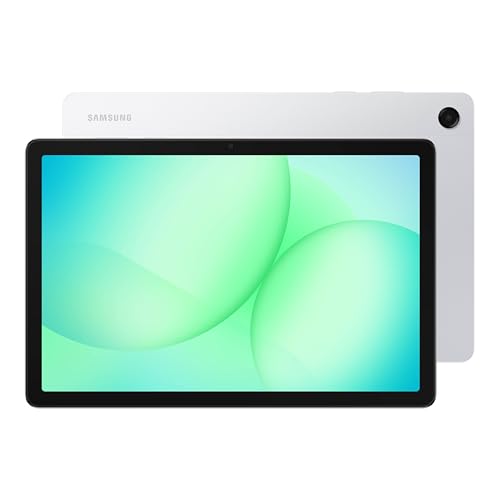 Samsung Galaxy Tab A11+ 8GB RAM
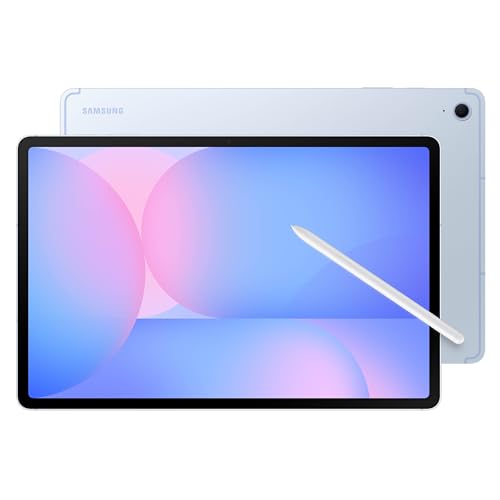 Samsung Galaxy Tab S10 FE+ 13.1” 256GB
 2026 Upgraded 12.2 inch Tablet
 Samsung Galaxy Tab S10 Lite
 A Senior’s Guide to the Samsung Galaxy