Our Top Picks
 Sapphire 11310-01-20G Pulse AMD Radeon RX 6600 Gaming10.5 x 6.5 x 2.5 inches1.6 poundsCheck on Amazon


Buying a graphics card in this band is less about finding the fastest chip on a chart and more about deciding what kind of risk you are willing to accept. A new card gives you a sealed box, a manufacturer warranty and a listing you can check line by line, while a used card can offer a stronger chip for the same outlay and can also hide worn fans, a mined past life or a missing warranty. The right choice depends on your power supply, your case, the games you play and how much uncertainty you can live with.
This guide is for first-time builders putting together a 1080p machine, owners upgrading an older prebuilt, and small-case builders who need a card that fits without a rebuild. The four cards below were chosen from the names and specifications on their Amazon product pages, and the sections that follow explain how to judge a used alternative against them before you spend anything.
Quick Picks
As an Amazon Associate we earn from qualifying purchases
| Product | Best for | Key spec from title |
|---|---|---|
| XFX Speedster SWFT 210 Radeon RX 6600 CORE | A first 1080p build that needs 8GB of memory | AMD RX 6600, 8GB GDDR6, boost clock up to 2491 MHz |
| Sapphire Pulse AMD Radeon RX 6600 | A compact 1080p build with a clear spec sheet | AMD RX 6600, 8GB GDDR6, game clock up to 2044 MHz |
| ASRock Intel Arc A580 Challenger 8GB OC | A modern 1080p card with wide memory and upscaling | Intel Arc A580, 8GB GDDR6, 256-bit interface, 2000 MHz clock |
| ASRock Intel Arc A380 Challenger ITX 6GB OC | A small case or media PC that also plays games | Intel Arc A380, 6GB GDDR6, 2250 MHz GPU, single fan |
How to Choose
Check new stock against used condition first
Begin by deciding whether you want a new card or a used one, because that choice changes every check that follows. A new listing should name the exact model, the memory size and the warranty terms. A used listing needs different questions: ask for a photo of the card itself rather than a stock image, ask whether the fans spin quietly at idle, and ask whether the original box and receipt are included. If the seller cannot answer, treat the listing as a gamble. Many cards in this band are no longer in production, so new stock can come from third-party sellers, and the same model name can hide a renewed unit or an open-box return.
Match VRAM and resolution before chasing clocks
Memory capacity decides which games stay smooth long before a small clock difference matters. At 1080p, 8GB of GDDR6 gives you room for higher texture settings in modern titles, while 6GB still works well for esports games and older releases but forces more compromises when a new game wants large textures. A 1080p display is the natural home for every card in this guide, and stepping up to 1440p asks more of the memory bus and the chip than these cards were designed for. Compare bus width and memory speed alongside the headline clock, because a card with a modest clock and generous memory often feels better than a card with a higher clock and a narrow bus.
Count power connectors and PSU headroom
Power is the check that most often turns a simple upgrade into an extra purchase. Open your case, look at the power supply label, then count the spare PCIe cables you actually have, because a card that needs two 8-pin connectors will not run on a single cable split in two. The listings in this guide name different requirements: some cards ask for a single 8-pin connector, while others ask for two 8-pin connectors and a larger supply. Leave headroom for the rest of the system too, since the processor, storage and fans all draw from the same supply.
Measure length, slots and outputs before ordering
A card that looks right on a listing can still fail the simplest check of all: fitting in the case. Measure the clear space from the rear bracket to the nearest obstruction, usually a drive cage or a front fan, and compare it with the card length in the listing. Then count the slots the cooler occupies, because a thick cooler can block the slot below it and crowd a small motherboard. Check the outputs as well: count your monitors, note whether each one uses HDMI or DisplayPort, and confirm the card has the right mix before you order. In a tight mini-ITX build, a short card with a single fan can be the only sensible choice.
The 4 Best Options
XFX Speedster SWFT 210 Radeon RX 6600 CORE
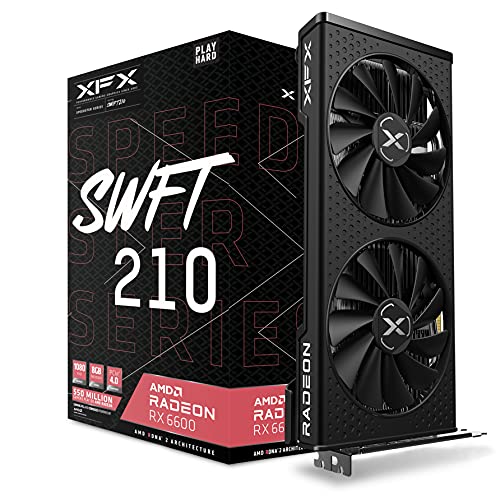
The XFX Speedster SWFT 210 is the straightforward pick for a first 1080p build, because it pairs the Radeon RX 6600 chip with 8GB of GDDR6 and a dual-fan cooler that suits a standard mid-tower case. Its listing names a boost clock up to 2491 MHz and a memory speed of 14 Gbps, which gives it room for modern titles at 1080p with higher texture settings. Three DisplayPort outputs plus HDMI make it easy to run a main gaming monitor and a second screen for chat or a browser. It suits a builder who wants a simple, well-understood card rather than a newer architecture with driver quirks.
Specs
- GPU: AMD Radeon RX 6600, RDNA 2 architecture
- Memory: 8GB GDDR6, 14 Gbps memory speed
- Boost clock: up to 2491 MHz
- Outputs: HDMI and 3x DisplayPort
- Cooling: XFX Speedster SWFT 210 dual-fan cooling
- Interface: PCI-Express x16
- Minimum power supply requirement: 550 watt
Best for: A first 1080p build that needs 8GB of memory and three DisplayPort outputs.
Watch out for: This is an older-generation card, so confirm the seller, the condition field and the warranty terms on the listing before ordering.
Sapphire Pulse AMD Radeon RX 6600
The Sapphire Pulse is the clearest-documented Radeon RX 6600 in this guide. Its Amazon listing names a game clock up to 2044 MHz, a boost clock up to 2491 MHz and a 128-bit memory interface, alongside 8GB of GDDR6 and RDNA 2 architecture, so you can check the card against your power supply and your case without guessing. The compact dual-fan design suits a smaller mid-tower or a build where a long triple-fan card would crowd the front intake. It is a good match for a builder who values a clean spec sheet and a single 8-pin power connector.
Specs
- GPU: AMD Radeon RX 6600, RDNA 2 architecture
- Memory: 8GB GDDR6, 128-bit memory interface
- Game clock: up to 2044 MHz
- Boost clock: up to 2491 MHz
- Power connector: 1 x 8-pin
- Model number: 11310-01-20G
Best for: A compact 1080p build where a clear spec sheet and a single 8-pin connector matter.
Watch out for: The 128-bit memory interface limits headroom above 1080p, so keep this card on a 1080p monitor for the best experience.
ASRock Intel Arc A580 Challenger 8GB OC
The ASRock Arc A580 Challenger is the modern alternative in this group, built around Intel Xe HPG architecture with 8GB of GDDR6 on a wide 256-bit interface. That wide bus gives it an edge when a game moves large textures, and its listing names a 2000 MHz clock, PCIe 4.0 support, dual-fan cooling and 0dB silent cooling, which means the fans can stop when the card is idle. It also supports DisplayPort 2.0, so it suits a builder who wants current outputs and upscaling support in a budget card. It is best for someone comfortable with Intel graphics drivers and willing to keep them updated.
Specs
- GPU: Intel Arc A580, Intel Xe HPG architecture
- Memory: 8GB GDDR6, 256-bit interface, 16 Gbps memory speed
- Clock: 2000 MHz
- XMX engines: 384
- Interface: PCIe 4.0
- Cooling: Dual fans, 0dB silent cooling
- Outputs: DisplayPort 2.0
- Power connectors: 2 x 8-pin
Best for: A modern 1080p build that wants a wide memory bus, current outputs and upscaling support.
Watch out for: It needs two 8-pin power connectors and a larger power supply, so confirm your supply and spare cables before ordering.
ASRock Intel Arc A380 Challenger ITX 6GB OC
The ASRock Arc A380 Challenger ITX is the small-card answer in this guide, and it earns its place by fitting where the other cards cannot. Its listing describes a 2-slot ITX card measuring 169.9 x 123.5 x 39.2 mm, with a single fan and 0dB silent cooling, so it suits a mini-ITX case, a home theatre PC or a media machine that also plays games. The 6GB of GDDR6 on a 96-bit bus is modest next to the 8GB cards above, but the card adds hardware AV1 encoding, which makes it useful for streaming and media work as well as light gaming.
Specs
- GPU: Intel Arc A380, Intel Xe architecture
- Memory: 6GB GDDR6, 96-bit bus
- GPU clock: 2250 MHz
- Interface: PCIe 4.0
- Cooling: Single fan, 0dB silent cooling
- Outputs: 3x DisplayPort 2.0, 1x HDMI 2.0b
- Dimensions: 169.9 x 123.5 x 39.2 mm, 2-slot ITX card
- Power connector: Single 8-pin, recommended 500W power supply
Best for: A small case or media PC that needs a short card with strong encoding support.
Watch out for: The 96-bit memory bus and 6GB of memory limit it at higher resolutions, so keep it at 1080p and confirm the 8-pin connector fits your small supply.
Which One Fits Your Situation
A first 1080p build on a tight limit
Choose the XFX Speedster SWFT 210 Radeon RX 6600 CORE if this is your first build and you want the simplest path to 1080p gaming. Its 8GB of GDDR6 handles higher texture settings, its dual-fan cooler suits a standard case, and its three DisplayPort outputs leave room for a second monitor later. Check that your supply meets the 550 watt note on the listing, then spend the time you save on cable management instead of hunting for a used card.
A compact build where space is the real limit
Choose the ASRock Intel Arc A380 Challenger ITX if your case is small and a full-length card will not fit. At under 170 mm long with a single fan, it slides into mini-ITX cases and media PCs that the other cards cannot enter, and its AV1 encoding helps if the machine also records or streams video. Accept the 6GB memory limit, keep the monitor at 1080p, and confirm the single 8-pin connector before ordering.
A modern card with upscaling and current outputs
Choose the ASRock Intel Arc A580 Challenger if you want the most modern feature set in this group. Its 8GB of GDDR6 on a 256-bit bus, DisplayPort 2.0 support and upscaling support suit a builder who plays newer titles and wants headroom for texture-heavy games. The trade is power: you need two 8-pin connectors and a larger supply, so open the case and count cables before you commit.
A used card that looks tempting
Use the Sapphire Pulse RX 6600 as your yardstick when a used listing catches your eye. Compare the used card against the Sapphire listing: same 8GB of memory, same 128-bit interface and same single 8-pin connector. If the used card cannot match that clarity, or the seller cannot show the card running, the new Sapphire is the safer buy. A stronger used chip with a clean history and a return option can still win, but only after that comparison.
Common Mistakes
- Buying a used card from a stock photo instead of asking for a photo of the actual card, its fans and its outputs.
- Choosing a card by its boost clock alone while ignoring memory size, bus width and the resolution of the monitor it will drive.
- Ordering a card that needs two 8-pin connectors for a prebuilt that has no spare PCIe cable.
- Measuring only the case length and forgetting the cooler thickness, which can block the slot below or press against a side panel.
- Skipping the driver and Resizable BAR check on an Intel Arc card, then blaming the hardware for a setting the motherboard never enabled.
Frequently Asked Questions
Is a used graphics card worth it at this level?
A used card can be worth it when it offers a stronger chip and the seller can show the actual card, its condition and a return option. It is a poor choice when the listing uses a stock photo, hides the model string or offers no way back if the card is unstable. Compare every used listing against a new card here, and walk away when answers are vague.
Is 6GB of VRAM enough for 1080p gaming?
Yes, 6GB is enough for esports titles, older games and many modern games at 1080p with medium settings, especially when you lower texture quality one step. It becomes a limit when a new game asks for large textures at high settings, because the card must swap data more often. If you play mostly new releases at high settings, an 8GB card from this guide is the safer choice.
Do I need a new power supply for one of these cards?
It depends on the card and the supply you already own. The Sapphire Pulse and the ASRock A380 ask for a single 8-pin connector, while the ASRock A580 asks for two 8-pin connectors and a larger supply, and the XFX listing names a 550 watt minimum. Open the case, read the supply label and count spare PCIe cables before ordering.
Will these cards work in a PCIe 3.0 motherboard?
Yes, all four cards use a PCIe x16 slot and will run in a PCIe 3.0 motherboard, because the interface is backwards compatible. The Intel Arc cards benefit most from a motherboard with Resizable BAR enabled, so check that setting in the BIOS if you choose the A580 or the A380. On an older board without that option, the Radeon cards are the simpler choice.
FAQ
Is a used graphics card worth it at this level?
Is 6GB of VRAM enough for 1080p gaming?
Do I need a new power supply for one of these cards?
Will these cards work in a PCIe 3.0 motherboard?
More from Amazon
Programs that pair well with the guide above. Offers and eligibility are set by Amazon and may change.
Free shipping on eligible items, Prime Video and more. Eligible new members can start with a free trial.
Start a Prime free trialAd-free music streaming. Eligible new subscribers can start with a free trial.
Try Music Unlimited freeA Prime membership for ages 18-24 with a trial period. Eligibility is set by Amazon.
See Prime for Young AdultsAudiobooks and podcasts to listen to on the go. Eligible new members can start with a free trial.
Try Audible freeAs an Amazon Associate we earn from qualifying purchases.