Key takeaways
- Resolution and frame rate: 1080p at 60fps looks smooth for gameplay, while 4K adds detail and cropping flexibility for high-end streams.
- Autofocus: Phase-detection autofocus keeps you sharp as you lean and move, which is essential for dynamic content.
- Microphones: Dual noise-reduction mics capture clear voice and cut background hum.
- Field of view: A moderate FOV keeps focus on you, while wider angles suit multi-person or full-desk setups.
- Privacy and extras: Built-in privacy covers and auto light correction add convenience and peace of mind.
What's inside
For streamers, the webcam is your window to the audience, and a great one makes the difference between looking amateur and looking professional. Sharp video, accurate color, clean autofocus, and solid built-in audio all help viewers connect with you. Whether you stream gameplay, live commerce, or just-chatting content, investing in the right camera pays off quickly.
We rounded up a lineup of streaming-focused webcams from trusted names like Logitech, EMEET, and AOC, spanning reliable 1080p all the way to crisp 4K. Below you will find a buyer’s guide, our top picks, and answers to common questions, so you can choose the camera that makes your stream shine.
As an Amazon Associate we earn from qualifying purchases.


🎮 Get More From Your Setup — Free
Prime Gaming gives you free PC games every month, in-game loot, and a free Twitch channel sub — plus fast free shipping on all the gear above. New members get a 30-day free trial.
Watch: Best Webcam For Streaming Video — Video Review
How to Choose a Streaming Webcam
- Resolution and frame rate: 1080p at 60fps looks smooth for gameplay, while 4K adds detail and cropping flexibility for high-end streams.
- Autofocus: Phase-detection autofocus keeps you sharp as you lean and move, which is essential for dynamic content.
- Microphones: Dual noise-reduction mics capture clear voice and cut background hum.
- Field of view: A moderate FOV keeps focus on you, while wider angles suit multi-person or full-desk setups.
- Privacy and extras: Built-in privacy covers and auto light correction add convenience and peace of mind.
The Best Streaming Webcams Reviewed
Logitech Brio 101
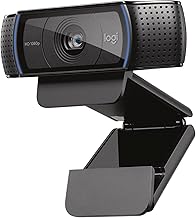
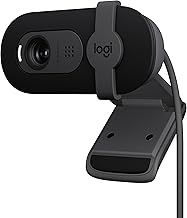
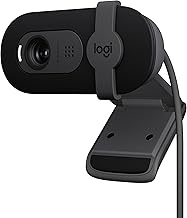
An accessible starting point, the Brio 101 delivers reliable 1080p video with auto light correction, a built-in mic, and a privacy shutter. It plugs in via USB-A and works instantly with Teams, Zoom, and streaming apps, making it a dependable everyday choice.
EMEET S600 4K
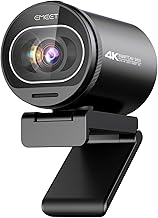
Built specifically for streaming, the S600 features a Sony sensor, phase-detection autofocus, 1080p at 60fps, dual noise-reduction mics, and a built-in privacy cover. Its 73-degree FOV is ideal for live commerce, gaming, and beauty content.
Logitech MX Brio 4K
Logitech’s premium MX Brio captures ultra-HD 4K video and includes a clever Show Mode for demonstrations. It is tailored for collaboration and high-quality streaming, working seamlessly with major conferencing and streaming platforms.
EMEET NOVA 4K
The NOVA 4K brings ultra-sharp resolution, phase-detection autofocus, dual omni mics, and auto light correction in a compact body with a privacy cover. It suits both high-end business meetings and detailed live streams.
AOC 4K Webcam
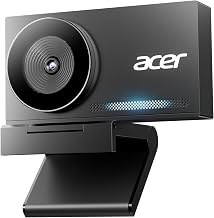
Rounding out the list, the AOC 4K offers a wide 90-degree FOV, noise-canceling mic, privacy cover, and plug-and-play simplicity. Its included USB-C to USB-A adapter and broad compatibility make it a flexible pick.
Frequently Asked Questions
Is 4K necessary for streaming?
Not strictly. Many top streamers use 1080p at 60fps, which looks smooth and is easier on your PC. 4K helps if you crop in, want maximum detail, or produce polished, close-up content.
Do I still need a separate microphone?
The dual-mic webcams here, like the EMEET S600 and NOVA, capture clear voice for casual streaming. Dedicated microphones remain the gold standard for professional audio, but built-in mics are a solid start.
Why does autofocus matter for streaming?
Streamers move around, and phase-detection autofocus keeps you crisp as you lean, gesture, or hold up products. It prevents the distracting focus hunting seen on cheaper cameras.
Will these work with OBS and Streamlabs?
Yes. All of these webcams connect via USB and are recognized by OBS, Streamlabs, and conferencing apps, so you can start streaming with no extra drivers.
Final Thoughts
The best streaming webcam depends on how polished you want your broadcast to look. The Logitech Brio 101 is a reliable, budget-friendly entry, while the EMEET S600 hits a sweet spot for streamers with its 60fps and dual mics. For maximum detail, the Logitech MX Brio, EMEET NOVA, and AOC 4K cameras deliver stunning clarity. Pick the resolution and features that match your content, and your stream will stand out.