Key takeaways
- Game library and ownership: Some services like GeForce NOW stream games you already own, while others such as Xbox Game Pass bundle a rotating catalog; pick based on whether you value your existing library or all-you-can-play access.
- Internet requirements: Cloud gaming lives and dies on a stable connection, so a wired or strong 5GHz Wi-Fi link with low latency matters far more than raw download speed.
- Supported devices: Confirm the service runs on your preferred screen, whether that is a TV, phone, browser, or a dedicated handheld like the OnePro or Mangmi Pocket Max.
- Streaming quality tiers: Higher subscription tiers unlock better resolution, higher frame rates, and priority access to servers, which noticeably improves the experience on a fast connection.
- Controller and input support: Check for native support of your gamepad; touchscreen handhelds and Bluetooth controllers vary in how well they map to each service.
What's inside
Cloud gaming has matured from a promising experiment into a genuinely viable way to play the latest titles without owning expensive hardware. In 2026, services stream high-fidelity games straight to a phone, TV, laptop, or dedicated handheld, letting you jump into a demanding release seconds after pressing play. The catalog choices, image quality, and input latency have all improved to the point where cloud is now a real alternative rather than a compromise for many players.
This roundup looks at the leading cloud gaming platforms and the devices that make them shine, from subscription services with sprawling libraries to portable handhelds purpose-built for remote play. We break down what separates a great cloud experience from a frustrating one, then walk through five standout picks so you can match a service and a screen to how and where you actually like to play.
As an Amazon Associate we earn from qualifying purchases at no extra cost to you. Product prices and availability are accurate as of the date shown and are subject to change.


⚡ Save on Your Next PC — Amazon Prime
Prime members get fast free shipping on the systems above, plus early access to Prime Day & Black Friday PC deals. New members get a 30-day free trial.
Watch: Best Cloud Gaming Services 2026 — Video Review
How to Choose a Cloud Gaming Service
- Game library and ownership: Some services like GeForce NOW stream games you already own, while others such as Xbox Game Pass bundle a rotating catalog; pick based on whether you value your existing library or all-you-can-play access.
- Internet requirements: Cloud gaming lives and dies on a stable connection, so a wired or strong 5GHz Wi-Fi link with low latency matters far more than raw download speed.
- Supported devices: Confirm the service runs on your preferred screen, whether that is a TV, phone, browser, or a dedicated handheld like the OnePro or Mangmi Pocket Max.
- Streaming quality tiers: Higher subscription tiers unlock better resolution, higher frame rates, and priority access to servers, which noticeably improves the experience on a fast connection.
- Controller and input support: Check for native support of your gamepad; touchscreen handhelds and Bluetooth controllers vary in how well they map to each service.
The Best Cloud Gaming Services Reviewed
GeForce NOW
GeForce NOW remains the enthusiast favorite because it streams games from your own libraries on Steam, Epic, and more at up to RTX-class quality. There is no need to rebuy titles you already own, and the higher tiers deliver low-latency, high-frame-rate streaming that feels remarkably close to running a powerful gaming PC locally.
Xbox Game Pass Premium
For sheer value, Xbox Game Pass Premium bundles cloud streaming with a huge rotating catalog of games playable on console, PC, and cloud devices from a single membership. It is the easiest way to sample dozens of titles, including day-one releases, without buying anything individually, making it the best all-in-one subscription for most players.
Amazon Luna
Amazon Luna keeps things simple with channel-based subscriptions and tight integration across Fire devices, browsers, and phones. Its straightforward setup and Prime-linked offerings make it an approachable entry point for casual players, and streaming quality on a solid connection is smooth enough for the mainstream and family-friendly catalog it targets.
OnePro Cloud Handheld
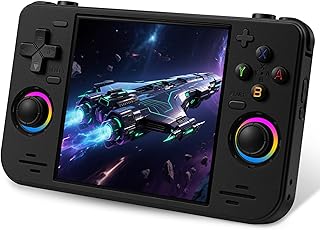
If you want dedicated hardware, the OnePro Cloud Handheld is built specifically for remote and cloud play across Xbox Cloud Gaming, GeForce NOW, and PlayStation. Its 7-inch 1080p touchscreen, long battery life, and lightweight design make it a comfortable way to take your cloud subscriptions anywhere without draining a phone.
Mangmi Pocket Max
The Mangmi Pocket Max is the premium handheld pick, running Android 13 on a Snapdragon 865 with a 7-inch 144Hz AMOLED display, Wi-Fi 6, and an 8000mAh battery. That combination handles cloud streaming beautifully while also playing native Android and emulated titles, giving you a versatile portable that covers far more than cloud alone.
Frequently Asked Questions
What internet speed do I need for cloud gaming?
Most services recommend a stable 15 to 25 Mbps connection for 1080p streaming, but consistency matters more than headline speed. A wired Ethernet connection or a strong 5GHz Wi-Fi signal with low latency and minimal packet loss will give a far better experience than a fast but unstable link.
Do I have to buy games again to play them in the cloud?
It depends on the service. GeForce NOW streams games you already own on stores like Steam and Epic, so there is nothing to rebuy. Subscription catalogs like Xbox Game Pass instead give you access to a rotating library for a monthly fee, which does not require individual purchases.
Is a dedicated handheld better than using my phone?
A dedicated handheld like the OnePro or Mangmi Pocket Max offers built-in controls, a larger screen, and a battery sized for gaming, which makes long sessions far more comfortable than a phone with a clip-on controller. Phones remain the most convenient option if you already carry one everywhere.
Can I use cloud gaming on my TV?
Yes. Most major services offer apps for smart TVs or streaming sticks, letting you play with a Bluetooth controller and no console at all. Just ensure your TV or the room it sits in has a strong, low-latency connection, ideally wired, for the smoothest results.
Final Thoughts
Cloud gaming in 2026 gives you real freedom to play demanding games on almost any screen. GeForce NOW is the best pick for players with existing libraries, Xbox Game Pass Premium wins on catalog value, and dedicated handhelds like the Mangmi Pocket Max make portable cloud play a joy. Start with a service that matches your library and connection, then add hardware once you know how you like to play.