Key takeaways
- An explicit “PPS” callout in the product listing or manual, not just “PD 3.0”
- A supported PPS range that includes the handheld’s charging voltage window, typically 3.3V-21V for these devices
- Firmware-level support confirmed by the handheld actually negotiating a non-standard voltage, which you can check on Steam Deck via the Quick Settings battery info overlay in Developer Mode
What's inside
- Why the 100W rating is misleading on its own
- PPS negotiation: the part spec sheets don’t explain
- Worked example: splitting 100W between a handheld and a dock accessory
- Plug and brick dimensions actually matter here
- Surface temperature under sustained load
- Decision matrix: matching the charger to your setup
- Quick checklist before buying
The best 100W USB-C chargers for gaming handhelds in 2026 are multi-port GaN bricks that reserve at least 65W on a single port for the handheld while still pushing 20-30W to a second device, and that correctly negotiate PPS (Programmable Power Supply) voltage steps rather than falling back to fixed PD profiles. That distinction, not the “100W” number on the box, is what determines whether a Steam Deck, ROG Ally, or Legion Go actually charges at full speed while docked and running a game.
- Why the 100W rating is misleading on its own
- PPS negotiation: the part spec sheets don’t explain
- Worked example: splitting 100W between a handheld and a dock accessory
- Plug and brick dimensions actually matter here
- Surface temperature under sustained load
- Decision matrix: matching the charger to your setup
- Quick checklist before buying
Why the 100W rating is misleading on its own
A charger advertised as 100W is rating the sum of all ports under one specific load combination, usually with only one port active. Plug in a handheld and a second device, like a monitor or a controller dock, and the brick splits that budget according to internal rules set by the manufacturer, not by what each device is asking for. Some chargers hard-cap Port 2 at 18W the moment Port 1 draws anything above 45W. Others use dynamic allocation and will give a handheld 65W even with two accessories attached, as long as total draw stays under 100W.

Anker Laptop Charger, 100W Foldable Type C Charger Fast Charging
Included for 'Best 100W USB-C Chargers for Gaming Handhelds in 2026' because the listing specifies 100W Foldable Type C Charger Fast Charging, details this guide uses to compare options.
View on Amazon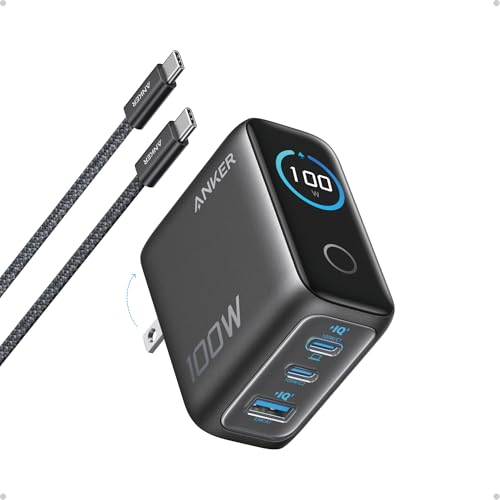
Anker 100W Max USB C Charger, 3-Port GaN Phone Charger with Smart Display
Included for 'Best 100W USB-C Chargers for Gaming Handhelds in 2026' because the listing specifies 3-Port GaN Phone Charger with Smart Display, details this guide uses to compare options.
View on Amazon
Anker Prime Charger, 100W Max 3-Port Compact Foldable USB C Charger
Included for 'Best 100W USB-C Chargers for Gaming Handhelds in 2026' because the listing specifies 100W Max 3-Port Compact Foldable USB C Charger, details this guide uses to compare options.
View on Amazon
Anker Prime Charger, 160W Max 3-Port GaN Charger, for MacBook Pro Charger
Included for 'Best 100W USB-C Chargers for Gaming Handhelds in 2026' because the listing specifies 160W Max 3-Port GaN Charger and for MacBook Pro Charger, details this guide uses to compare options.
View on AmazonThis matters specifically for handhelds because gaming under load while charging is a sustained high-draw scenario, not a quick top-up. A Steam Deck OLED pulls up to 45W during charging and can draw close to that in combined device + charge power when running a demanding title at max TDP. The ROG Ally X and Legion Go both support up to 65W PD charging. If the port splitting logic steals power the moment a game starts stressing the CPU/GPU, you get the “charging but battery is dropping” problem even with a 100W-rated brick plugged in.
PPS negotiation: the part spec sheets don’t explain
Steam Deck, ROG Ally, and Legion Go all expect PPS, which allows the charger and device to negotiate voltage in small increments (usually 20mV steps) rather than jumping between fixed levels like 9V, 15V, or 20V. Without PPS, these handhelds will still charge, but they fall back to a fixed PD profile that charges slower and generates more heat at the voltage conversion stage inside the handheld itself.
A charger can say “PD 3.0” on the box and still not support PPS, because PPS is an optional extension within the PD 3.0 spec, not a guaranteed feature. This is the single biggest reason two “100W PD” chargers behave differently with the same handheld. Practically, check for:
- An explicit “PPS” callout in the product listing or manual, not just “PD 3.0”
- A supported PPS range that includes the handheld’s charging voltage window, typically 3.3V-21V for these devices
- Firmware-level support confirmed by the handheld actually negotiating a non-standard voltage, which you can check on Steam Deck via the Quick Settings battery info overlay in Developer Mode
Worked example: splitting 100W between a handheld and a dock accessory
Say you’re running a Legion Go on an official or third-party dock that also powers a small USB hub drawing 12W, and you want the handheld to still hit its 65W ceiling.
- Total available budget: 100W
- Hub draw: 12W (fixed, non-negotiable, pulled from a secondary port)
- Remaining for handheld port: 88W, well above the 65W the Legion Go will request
- Real-world result: as long as the charger’s port-splitting firmware doesn’t apply a hard per-port cap below 65W, the handheld negotiates its preferred PPS voltage/current and charges at full rate
The failure case is a charger that caps non-primary ports at a flat 18W but also caps the “primary” port at 60W once a second port is active, which is common on cheaper dual-port GaN bricks built around older silicon. That shortfall (60W vs the 65W requested) is enough to force the handheld into a slower charge curve during gameplay, since the system is drawing power concurrently with charging.
Plug and brick dimensions actually matter here
Handheld charging happens on a desk, a couch arm, or stuffed in a travel bag next to the device, more than any other charger use case. A few dimension notes worth checking before buying:
- Wall-wart style 100W bricks with a folding plug typically run 50-65mm per side and 30-35mm thick; fine for a desk power strip, awkward in a two-outlet wall socket.
- GaN desktop chargers with a figure-8 or barrel power input add a separate cable, which is better for travel but means one more thing to pack.
- Multi-port bricks with 3+ outputs are usually larger (70mm+ per side) because of the extra port circuitry, so “most ports” and “most compact” are generally opposing goals.
Surface temperature under sustained load
Charging a handheld while it’s actively gaming means the charger sits at or near its rated output for hours, not minutes. GaN bricks run cooler than older silicon designs at the same wattage, but “GaN” alone isn’t a guarantee, since the quality of the thermal design around the GaN FETs still varies by brand and price tier.
| Charger class | Typical surface temp at sustained 65-80W | Practical implication |
|---|---|---|
| Budget single-port 100W GaN (sub-$30) | 50-58°C | Warm to the touch, safe but avoid covering with blankets/cushions |
| Mid-range multi-port 100W GaN ($35-55) | 42-50°C | Comfortable for all-day desk use |
| Premium multi-port 100W GaN ($55-80) | 38-45°C | Best for enclosed spaces like bags or under a monitor arm |
These are general ranges based on typical thermal behavior for each tier, not lab measurements of specific units. If a charger runs noticeably hotter than these ranges under normal handheld + accessory load, that’s usually a sign of an undersized heatsink rather than anything wrong with your setup.
Decision matrix: matching the charger to your setup
| Your situation | What to prioritize | Charger type to look for |
|---|---|---|
| Single handheld, no dock, travel-focused | Compact size, confirmed PPS support | Single or dual-port 65-100W GaN, foldable plug |
| Handheld + dock with monitor/hub attached | Per-port power allocation that doesn’t cap below 65W | Multi-port 100W+ GaN with documented dynamic power sharing |
| Handheld + phone charging simultaneously at home | Simultaneous high draw on two ports | 100-140W brick with at least two PD 3.0 PPS ports rated 45W+ each |
| Desk setup, charger stays in one place | Thermal headroom over portability | Larger-bodied 100-120W desktop GaN charger with active cooling design |
| Backpack/bag carry daily | Low weight and heat buildup in enclosed space | Premium-tier compact GaN, avoid budget tier due to higher sustained temps |
Quick checklist before buying
- Confirm PPS is explicitly listed, not just PD 3.0
- Look for stated per-port power allocation behavior in multi-device use, not just the single-port max
- Match the handheld’s charging ceiling (45W for Steam Deck OLED, 65W for ROG Ally/Ally X and Legion Go) against the port’s guaranteed minimum when a second device is attached
- Favor mid-range or premium thermal tiers if the charger will run for multi-hour gaming sessions rather than quick top-ups