Key takeaways
- Connectivity: USB mics are plug-and-play and ideal for beginners, while XLR requires an audio interface or mixer but offers more control and upgrade potential; hybrid USB/XLR mics give you both options as your setup grows.
- Polar pattern: A tight cardioid or supercardioid pickup pattern keeps your voice focused and minimizes keyboard, mouse, and fan noise leaking into your stream.
- On-mic controls: Look for a physical mute button, gain knob, and headphone jack with zero-latency monitoring so you can adjust levels and check your sound without digging through software.
- Build and mounting: A included boom arm and shock mount save you extra purchases and reduce desk thumps and vibration noise from reaching your recordings.
- Extra features: RGB lighting, reverb effects, and noise cancellation are nice bonuses, but prioritize clean voice capture over flashy extras if you have to choose.
What's inside
Choosing a microphone for streaming or gaming voice chat is trickier than it looks. Cheap USB mics pick up keyboard clatter, fan noise, and room echo, while high-end studio condensers are often too sensitive for a battle station and require a mixer most streamers don’t have. Dynamic microphones solve this by focusing tightly on your voice and rejecting background noise, but not all dynamic mics are built the same, and picking the wrong one means muddy audio or a complicated setup.
This guide breaks down six popular dynamic streaming microphones, what separates a good one from a great one, and which models are worth your money depending on your setup and budget.
As an Amazon Associate we earn from qualifying purchases at no extra cost to you.


🎮 Get More From Your Setup — Free
Prime Gaming gives you free PC games every month, in-game loot, and a free Twitch channel sub — plus fast free shipping on all the gear above. New members get a 30-day free trial.
Watch: Best Dynamic Streaming Microphone: Top Picks Reviewed — Video Review
How to Choose a Dynamic Streaming Microphone
- Connectivity: USB mics are plug-and-play and ideal for beginners, while XLR requires an audio interface or mixer but offers more control and upgrade potential; hybrid USB/XLR mics give you both options as your setup grows.
- Polar pattern: A tight cardioid or supercardioid pickup pattern keeps your voice focused and minimizes keyboard, mouse, and fan noise leaking into your stream.
- On-mic controls: Look for a physical mute button, gain knob, and headphone jack with zero-latency monitoring so you can adjust levels and check your sound without digging through software.
- Build and mounting: A included boom arm and shock mount save you extra purchases and reduce desk thumps and vibration noise from reaching your recordings.
- Extra features: RGB lighting, reverb effects, and noise cancellation are nice bonuses, but prioritize clean voice capture over flashy extras if you have to choose.
The Best Dynamic Streaming Microphones Reviewed
FIFINE AmpliTank K688CT
The K688CT stands out for pairing USB and XLR connectivity with a full boom arm kit right out of the box, making it a genuinely complete streaming setup rather than just a microphone. The mute button, gain knob, and headphone jack put real-time control at your fingertips, which is exactly what you want when you’re live and can’t fumble through settings.
HyperX QuadCast 2 S
The QuadCast 2 S brings striking RGB lighting and on-board controls to a mic that’s clearly designed with streamers in mind, and the removable shock mount does a solid job taming desk vibration. USB-C connectivity and Mac/PC compatibility make it an easy drop-in upgrade for anyone wanting better audio without learning a mixer.
PUPGSIS XLR/USB Podcast Microphone
This mic punches above its price point by including reverb effects and active noise cancellation alongside a full boom arm stand, giving budget-conscious streamers studio-like polish. The mute button and headphone jack round out a feature set that’s rare to find this affordably.
FIFINE AmpliTank K688
Built with a metal body and included windscreen, the K688 feels sturdier than most mics in its class and delivers clean, focused vocal capture for voice-over and gaming commentary alike. Its monitoring volume control and mute switch make it easy to manage on the fly, and the XLR/USB flexibility means it can grow with a future mixer setup.
FIFINE AmpliGame AM8
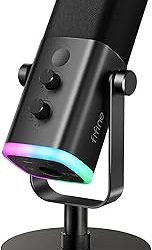
The AM8 blends dynamic mic reliability with gamer-friendly RGB lighting and a compact desktop stand, making it a great fit for smaller desk setups that still want personality. Its USB/XLR flexibility and headphone jack keep it practical, not just decorative.
Frequently Asked Questions
Why choose a dynamic microphone over a condenser for streaming?
Dynamic microphones are less sensitive to background noise, meaning they pick up your voice clearly while ignoring keyboard clicks, PC fan hum, and room echo, which is exactly the environment most streamers record in.
Do I need an XLR mixer, or is USB enough?
USB is enough for most streamers and offers simple plug-and-play setup; XLR becomes valuable if you want more precise gain control or plan to expand into a multi-input audio setup later, which is why hybrid USB/XLR mics are a popular middle ground.
Does RGB lighting affect audio quality?
No, RGB lighting is purely cosmetic and has no impact on sound quality, so choose it based on aesthetic preference rather than performance concerns.
Is a boom arm necessary, or can I use a desktop stand?
A boom arm keeps the mic closer to your mouth at a consistent distance and frees up desk space, while a desktop stand works fine for smaller setups or when the mic will stay in a fixed position.
Final Thoughts
For most streamers, the FIFINE AmpliTank K688CT offers the best all-around value with its complete boom arm kit and dual connectivity, while the HyperX QuadCast 2 S is the pick for those who want a more polished, ready-to-stream aesthetic. Budget-focused buyers should take a close look at the PUPGSIS XLR/USB Podcast Microphone, which delivers surprising features without the premium price tag.