Our Top Picks
For smooth high-settings gaming in 2026 you need an RTX 4060 / RX 7600-class GPU with a 6-core CPU and 16GB RAM for 1080p, an RTX 4070 Super / RX 7800 XT / RTX 5070-class GPU with a Ryzen 5 7600 or Core i5-14400F-class CPU and 32GB RAM for 1440p, and an RTX 4070 Ti Super / RX 7900 XT / RTX 5080-class GPU or higher with a Ryzen 7 7800X3D / 9800X3D or Core i7-14700F-class CPU and 32GB RAM for 4K.
Buying by resolution instead of by hype saves you hundreds and avoids the classic bottleneck: an overkill CPU paired with an underpowered GPU, or 64GB of RAM that never gets used. Below is what to target for each resolution, why it matters, and how to size your power supply correctly.

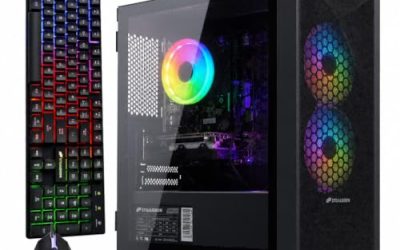
YAWYORE Gaming PC, AMD Ryzen 7 5700X, GeForce RTX 5060 Desktop Computer | 32GB DDR4 RAM, 1TB M.2 NVMe SSD,, ARGB Fans, WiFi+BT
Chosen because it specifies AMD Ryzen 7 5700X and GeForce RTX 5060 Desktop Computer.
View on Amazon
Skytech Gaming PC Desktop, Ryzen 7 9850X3D, RX 9070 XT, 32GB RAM, 2TB SSD | Windows 11, Gen4 NVMe SSD, DDR5 5600, 850W GOLD ATX 3 PSU, 360 ARGB AIO , Wi-Fi 5, Azure 3 Series
Chosen because it specifies Ryzen 7 9850X3D and RX 9070 XT.
View on Amazon
Alienware Aurora Gaming Desktop, RTX 5070, Intel Core Ultra 7 265F | 1TB SSD, 32GB DDR5, Wi‑Fi 7, Bluetooth, Killer 2.5Gb Ethernet, Windows 11 Home, Wired Keyboard, ACT1250
Chosen because it specifies RTX 5070 and Intel Core Ultra 7 265F.
View on Amazon
Skytech Gaming Azure 3 Gaming PC, AMD Ryzen 7 9700X 3.8GHz, NVIDIA RTX 5060, 1TB NVMe SSD, 16GB DDR5 RAM 6000, 850W Gold ATX 3 PSU, 360 ARGB AIO, Wi-Fi, Win 11, Desktop
Chosen because it specifies AMD Ryzen 7 9700X 3.8GHz and NVIDIA RTX 5060.
View on AmazonGaming PC Specs by Resolution: The Sensible Targets
| Target | GPU Class (High Settings) | CPU Class | RAM | VRAM Target | PSU Wattage |
|---|---|---|---|---|---|
| 1080p 100-144Hz | GeForce RTX 4060 / RTX 4060 Ti, Radeon RX 7600 / RX 7600 XT | Ryzen 5 5600 / 7600, Core i5-12400F / 14400F | 16GB DDR4/DDR5 (2x8GB) | 8GB minimum | 550-650W |
| 1440p 100-165Hz | GeForce RTX 4070 Super / RTX 5070, Radeon RX 7800 XT / RX 7900 GRE | Ryzen 5 7600 / 7600X, Core i5-14400F / 14600K, Ryzen 7 7700 | 32GB DDR5 (2x16GB) 5600-6000 MT/s | 12GB minimum, 16GB preferred | 650-750W |
| 4K 60-120Hz | GeForce RTX 4070 Ti Super / RTX 5080 / RTX 4090, Radeon RX 7900 XT / 7900 XTX | Ryzen 7 7800X3D / 9800X3D, Core i7-14700F / 14700K | 32GB DDR5 (2x16GB) 5600-6400 MT/s | 16GB minimum | 750-850W (1000W for RTX 4090-class) |
This table assumes you want high to ultra textures without ray tracing maxed out. Adding heavy ray tracing or path tracing moves every tier up by roughly one GPU class.
How VRAM and Resolution Actually Interact
VRAM pressure scales with frame buffer size, texture resolution, and render targets. It is not just the display resolution.
A worked VRAM estimate
You can estimate baseline frame buffer cost with a simple calculation:
Raw frame size = Horizontal pixels x Vertical pixels x Bytes per pixel. For a 32-bit color buffer, that is 4 bytes per pixel.
- 1080p (1920×1080): 2,073,600 pixels x 4 bytes = ~8.3 MB per buffer
- 1440p (2560×1440): 3,686,400 pixels x 4 bytes = ~14.7 MB per buffer
- 4K (3840×2160): 8,294,400 pixels x 4 bytes = ~33.2 MB per buffer
That looks tiny, but a modern game keeps 3-4 buffers for double/triple buffering, depth, shadows, and post-processing, plus the textures themselves. A high-resolution texture pack can easily allocate 6-10GB just in textures at 4K, which is why 8GB cards that are fine at 1080p regularly hit a VRAM wall at 1440p ultra and almost always at 4K. For that reason, 12GB is the practical entry point for 1440p longevity in 2026, and 16GB is the sensible minimum if you are buying for 4K.
If you already own an 8GB card and want to stay at 1440p, reduce Texture Quality from Ultra to High and turn down Shadow Quality and Ray Tracing. Those three settings are responsible for most VRAM spikes and cost 15-25% performance when the card starts swapping to system RAM.
CPU: What You Can Stop Worrying About
At higher resolutions, the GPU is almost always the limiter. That changes how you should spend your CPU budget.
- For 1080p high-refresh: The CPU matters most. A modern 6-core like the Ryzen 5 7600 or Core i5-14400F will keep 1% lows stable above 100 fps in most competitive titles. You do not need an i9 or Ryzen 9 for gaming alone.
- For 1440p: Any current 6-core or 8-core from the last two generations is sufficient. The Ryzen 7 7800X3D and 9800X3D are the fastest gaming CPUs overall, but a Ryzen 5 7600 delivers 90-95% of the performance at 1440p for much less. Put the difference into the GPU.
- For 4K: CPU choice matters least. Even a Ryzen 5 7600 or Core i5-14400F will not bottleneck a high-end GPU at 4K 60Hz in most games. Choose an X3D chip only if you also play CPU-heavy simulators or want 120Hz+ at 4K.
Avoid pairing an expensive CPU with a budget GPU for 1440p or 4K. A Ryzen 5 7600 with an RTX 4070 Super will consistently outperform a Ryzen 9 7950X with an RTX 4060 at those resolutions.
Memory and Storage: The Right Sizes and Speeds
RAM
16GB (2 sticks in dual-channel) is still enough for pure 1080p gaming, but 32GB (2x16GB) is the current sweet spot for 1440p and 4K, especially if you keep a browser, Discord, and a game open at once. Dual-channel is mandatory; single-stick configurations can cost 10-15% fps and much worse 1% lows.
For DDR5, the value plateau is 5600 to 6000 MT/s with CL30-CL36 timings. Going to 7200 MT/s and beyond adds cost and motherboard complexity for 1-3% gains in most games. For DDR4 systems, 3200 CL16 or 3600 CL18 in dual-channel remains perfectly viable for 1080p and 1440p builds.
Storage
Buy a 1TB NVMe PCIe 4.0 SSD as your minimum in 2026. Games regularly exceed 100GB, and DirectStorage titles benefit from NVMe over SATA. You do not need a PCIe 5.0 drive for gaming; load time differences versus a good PCIe 4.0 drive like a WD Black SN770 / SN850X, Samsung 980 Pro / 990 Pro, or Crucial P3 Plus class drive are 1-2 seconds in most titles. Add a second 1TB or 2TB drive if you play large live-service games, rather than paying more for a single faster drive.
Power Supply Math: A Worked Example for 1440p
Size your PSU from realistic load, not just the GPU box recommendation. Here is how to calculate headroom:
Example build: Ryzen 5 7600 (65W base, ~90W peak), RTX 4070 Super (220W TGP), motherboard + RAM + fans (~50W), NVMe SSDs (~10W), overhead for transients.
- Sum sustained peak: 90W + 220W + 50W + 10W = 370W
- Add 30% headroom for efficiency, quiet operation, and transient spikes: 370W x 1.3 = 481W
- Round up to the next standard size: 550W minimum, 650W recommended, 750W if you plan to upgrade to a 300W+ GPU later
For 4K builds with an RTX 4080 / 5080-class card (320W) or RTX 4090-class (450W), the same math pushes you to 750-850W and 850-1000W respectively. Choose a PSU with ATX 3.0 / 3.1 and a native 12VHPWR or 12V-2×6 connector if you are buying a current Nvidia GPU, and look for 80 Plus Gold efficiency or better. A quality 750W Gold unit usually falls in the $90-$140 range and is more valuable than overspending on RAM speed.
Decision Matrix: Pick Specs Based on Your Situation
Use your monitor, not your wish list, to decide:
| Your Situation | Recommended Build Logic | Why |
|---|---|---|
| 1080p 60Hz monitor, competitive shooters | RX 7600 / RTX 4060 + 6-core CPU + 16GB RAM, save money for a 144Hz monitor next | GPU is already overkill for 60Hz; a faster monitor will improve experience more than a faster GPU |
| 1080p 144-240Hz monitor | RTX 4060 Ti / RX 7600 XT + Ryzen 5 7600 / i5-14400F + 32GB | High-refresh 1080p is CPU-sensitive; prioritize fast 6-core and dual-channel RAM |
| 1440p 60-75Hz monitor | RTX 4070 Super / 5070 or RX 7800 XT + any modern 6-core + 32GB | 60Hz is easy to drive; 12GB+ VRAM matters more than an expensive CPU |
| 1440p 144-165Hz monitor | RTX 4070 Ti Super / 5070 Ti or RX 7900 GRE / XT + 7800X3D-class if budget allows | High-refresh 1440p needs both strong GPU and strong 1% lows |
| 4K 60Hz TV or monitor | RTX 4070 Ti Super minimum, ideally 7900 XTX / 5080 + 32GB + 750W PSU | 4K needs raw GPU power and 16GB VRAM; DLSS/FSR Quality is expected |
| 4K 120Hz+ or ultrawide 3440×1440 / 5120×1440 | RTX 4080 / 5080 / 4090 or RX 7900 XTX + 7800X3D / 9800X3D + 850W+ PSU | Pixel count rivals or exceeds 4K; only top-tier GPUs sustain 100 fps+ |
Settings That Stretch Any Build Further
You do not need to drop to low settings when you are short on power. These deliver the best performance-per-quality tradeoff:
- Use Upscaling on Quality: DLSS Quality, FSR Quality, or XeSS Quality adds 30-45% fps at 1440p and 50-70% at 4K with minimal visual loss. At 1080p, use it only if you need the fps, as the image softens more at lower base resolutions.
- Lock Frame Rate to Monitor Capability: Cap at 141 fps for a 144Hz display or 57 fps for 60Hz to reduce power noise and input lag versus uncapped.
- Three Settings to Lower First: Shadows from Ultra to High, Volumetrics/Fog Quality to Medium, and Ray Tracing from Ultra to Medium or Off. Together they often recover 20-35% performance for little perceptible difference during gameplay.
- Keep Textures High if VRAM Allows: Lowering textures rarely saves much fps unless you are VRAM-limited, and it noticeably hurts image quality.
Common Bottlenecks to Avoid
- Single-channel RAM (one 16GB stick instead of 2x8GB) will stutter even with a strong GPU.
- Pairing a 4K monitor with an 8GB GPU and expecting ultra textures without upscaling will cause hitching and texture pop-in.
- A 550W group-regulated PSU from an old build should not be reused with a modern 220W+ GPU. Transient spikes can shut the system down.
- Buying a PCIe 5.0 SSD for gaming instead of investing that money into moving from an 8GB to a 12GB or 16GB GPU is almost always the wrong trade.
FAQ
Is 32GB RAM overkill for gaming?
Not anymore for 1440p and 4K. While most games still run on 16GB, several recent AAA titles exceed 16GB system RAM usage when combined with background apps. 32GB in a 2x16GB configuration is the sensible buy for any new DDR5 build and usually costs only $25-$40 more than 16GB.
Do I need DDR5 for a new gaming PC?
For a new build in 2026, yes, choose DDR5. It costs nearly the same as DDR4 at mainstream speeds and gives you a viable upgrade path. For an existing DDR4 platform like AM4 or LGA1700, there is no need to switch platforms just for DDR5; spend on the GPU instead.
Can I use a 4K GPU for 1440p?
Absolutely. A 4K-class card at 1440p will run cooler, quieter, and hold 144Hz+ for longer into the future. It is often smarter to buy one tier above your current monitor if you plan to keep the GPU for 3-4 years.
How important is the CPU cooler?
A $30-$45 single-tower air cooler is enough for a 65-125W CPU like the Ryzen 5 7600 or Core i5-14400F. You only need a large dual-tower or 240mm+ AIO for overclocked i7/i9 or Ryzen 9 chips. Thermal throttling shows up as sudden drops to 80-90 fps after a few minutes, not a constant low frame rate.