Our Top Picks
 MNN 15.6" FHD 60Hz Portable Monitor USB-C HDMI15.6" 1080P14.48 x 8.85 x 0.3 inches1.53 poundsCheck on Amazon
 KYY Portable Monitor 15.6" 1080P Computer Monitor Screen15.6-inch8.85 x 14.48 x 0.35 inches1.7 poundsCheck on Amazon
The best portable monitor for a Steam Deck in this group is the cocopar 16-inch 2.5K model, because its 2560×1600 panel, 144Hz USB-C mode and 120Hz HDMI mode give the Deck the most headroom, and it comes with a metal kickstand and VESA holes. The ARZOPA 16.1-inch 144Hz panel is the budget-minded fast option, while the 15.6-inch 1080p models suit travelers who care about weight. A portable monitor here means a thin, USB-C powered external screen that a handheld can drive over DisplayPort Alt Mode or HDMI.
Quick List
- ARZOPA Z1FC 16.1-inch – best for 144Hz at 1080p on a bigger panel
- MNN 15.6-inch FHD – best for a simple 60Hz screen with a fold-over cover stand
- KYY 15.6-inch FHD – best for a metal-look body with a 3.5mm audio jack
- Yxk 15.6-inch FHD – best for the lightest 1080p carry weight with a VESA-style kickstand
- msi Pro MP165 E6 – best for a certified low-blue-light screen and a tripod mount
- cocopar 16-inch 2.5K – best overall for sharpness and refresh rate
Which One Is Right for You?
| If you… | Choose |
|---|---|
| want the sharpest picture and the highest refresh in the set | cocopar 16-inch 2.5K |
| want 144Hz at plain 1080p to match a lower-powered game load | ARZOPA Z1FC 16.1-inch |
| plan to prop the screen on a tripod or camera arm | msi Pro MP165 E6 |
| want the lightest 1080p screen and a stand built into the body | Yxk 15.6-inch |
| want a case that folds into a stand and few frills | MNN 15.6-inch |
| want a wired headphone or speaker connection on the monitor itself | KYY 15.6-inch |
Think first about how you will connect. The Steam Deck has a single USB-C port that carries both power and video, so the screen’s ports and how it handles power decide whether you can charge while you play. Then decide whether you want refresh rate or portability, because the highest-refresh panels are larger and heavier.

ARZOPA 16.1'' 144Hz Portable Gaming Monitor 106% sRGB - Z1FC | 1080P FHD Kickstand Portable Monitor with HDR, Ultra Slim, Eye Care, External Second Screen for Laptop, PC, PS5, Mac, Xbox
Chosen because it specifies Z1FC and 1080P FHD Kickstand Portable Monitor with HDR.
View on AmazonMNN 15.6" FHD 60Hz Portable Monitor USB-C HDMI IPS HDR Gaming Laptop
Picked as a relevant option in this category.
View on AmazonKYY Portable Monitor 15.6" 1080P Computer Monitor Screen Extender w/Cover
Picked as a relevant option in this category.
View on Amazon
Yxk Portable Monitor 15.6 Inch 1080P 60Hz IPS HDR Ultra-Slim Travel Monitor with Dual Speakers USB-C HDMI Second Screen for Laptop PC Mac Phone Xbox PS4/5 Switch, VESA Kickstand, Zero Frame Gaming
Chosen because it specifies VESA Kickstand and Zero Frame Gaming.
View on Amazon
msi Pro MP165 E6 Ultra Slim & Light Portable Monitor,15.6" FHD IPS 1080p, USB Type-C, HDMI, Built-in Speakers, Tripod Mount Support, Perfect for PC, Mac, PS5, PS4, Xbox, Mobile, Metal Gray
Chosen because it specifies 15.6" FHD IPS 1080p and USB Type-C.
View on Amazon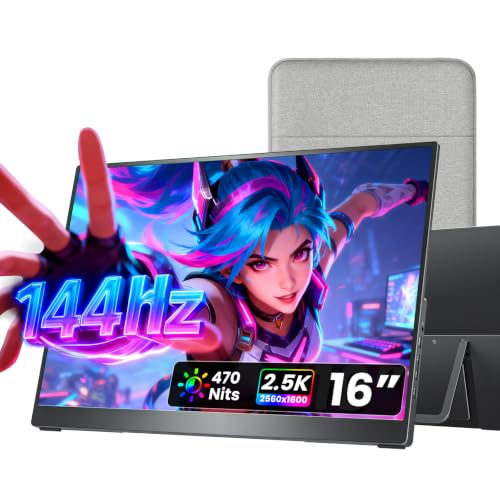
cocopar Portable Monitor 16 Inch 2.5K QHD 110% sRGB 144Hz USB-C, 120Hz HDMI, Travel Monitor with Speaker Second Screen for Laptop MacBook Surface PC Xbox PS4/5, VESA Mountable, with Kickstand
Chosen because it specifies 120Hz HDMI and VESA Mountable.
View on AmazonAll 6 Picks in Detail
1. ARZOPA Z1FC 16.1-inch – Best for 144Hz at 1080p
As an Amazon Associate we earn from qualifying purchases at no extra cost to you.

The ARZOPA Z1FC stretches to a 16.1-inch IPS panel with a 144Hz refresh rate and 1920×1080 resolution. The listing quotes 106% sRGB coverage, HDR support, a built-in kickstand and a pair of full-function USB-C ports plus a mini HDMI port. It suits players who want a faster-looking image for shooters or platformers when the Deck is docked or connected to a PC, with a screen large enough for couch or desk use.
Where this panel makes sense is as a desk or couch screen that does more than one job. Plug in a Deck for a larger picture, switch to a laptop for work, or connect a console for a second display. At 16.1 inches it feels noticeably roomier than the 15.6-inch models, and the built-in kickstand removes the need for a separate cover. Because the Deck’s own refresh options are modest and the listing says there is no adaptive sync, treat the 144Hz figure as a bonus for PC use rather than a guarantee of smoother Deck gameplay.
- Panel: 16.1-inch IPS, 1920×1080
- Refresh: 144Hz, with no adaptive sync stated (the listing says no FreeSync)
- Color: 106% sRGB
- Inputs: two USB-C and one mini HDMI
- Stand: built-in kickstand with tilt adjustment
- Weight: the listing field shows about 3.1 pounds, which may include packaging; confirm on listing
Pros
- 144Hz refresh at a bigger-than-15.6-inch size
- Kickstand included
Cons
- No adaptive sync according to the listing
- The Deck’s own output over USB-C may not feed it the full 144Hz
Compared with the cocopar, it gives up resolution and the 16:10 shape, but it keeps the high refresh in a similarly sized body.
2. MNN 15.6-inch FHD – Best for a simple 60Hz second screen

MNN’s 15.6-inch monitor is a plain 1920×1080 IPS panel at 60Hz with HDR mode, two USB-C ports and an HDMI input as described in the listing. A PU leather smart cover doubles as a stand and protects the screen in a bag. It suits someone who wants a second screen for a handheld, a laptop and a console without caring about high refresh, and who values a cover that works as a stand.
This is the screen for someone who values simplicity. A glossy IPS panel at 1080p is a good match for the Deck’s image, since the handheld renders far below that resolution to begin with, and the cover that doubles as a stand means there is one fewer accessory to pack. Gloss improves apparent contrast but picks up reflections, so it works best indoors or in shaded spots. Connect over USB-C if your source supports DisplayPort Alt Mode, or use the HDMI input through a dock for the Deck.
- Panel: 15.6-inch IPS, 1920×1080, glossy
- Refresh: 60Hz
- Inputs: two full-feature USB-C, plus HDMI (the listing names the connector only generally; confirm full-size or mini)
- Cover: PU leather smart cover that folds into a stand
- Dimensions: about 14.48 x 8.85 x 0.3 inches
- Weight: about 1.53 pounds
Pros
- Thin and light at 0.3 inches
- Four display modes including portrait
Cons
- Glossy screen shows reflections in bright rooms
- Cover-stand angles are fixed to a few grooves
It is nearly a twin of the KYY, and the choice between them comes down to the connector set and audio jack.
3. KYY 15.6-inch FHD – Best for a 3.5mm audio output

KYY’s 15.6-inch monitor uses an IPS panel at 1080p with HDR, two full-function USB-C ports, a mini HDMI port and stereo speakers. The listing also mentions a 3.5mm audio connection, a menu control wheel and a metal-look gray body. It is the better pick if you want to plug wired headphones into the screen while the Deck handles video, and its 1.7-pound weight is acceptable for a bag.
The KYY is the better option when sound matters. A monitor with its own 3.5mm audio connection lets you plug wired headphones or a small speaker into the screen, and the built-in stereo speakers cover casual use. The metal-look body and menu wheel make the on-screen settings easier to navigate than a set of tiny buttons. Its main weakness is that the listing is vague on refresh rate, so confirm on the product page whether it is a standard 60Hz panel before assuming anything faster.
- Panel: 15.6-inch IPS, 1920×1080
- Inputs: two USB-C and one mini HDMI
- Audio: two built-in speakers and a 3.5mm audio connection
- Cover: PU leather smart cover with two stand grooves
- Dimensions: about 8.85 x 14.48 x 0.35 inches
- Refresh rate: not stated in the listing name, confirm on listing
Pros
- Audio jack and speakers on the monitor
- Menu wheel for settings
Cons
- Heaviest of the 15.6-inch set at about 1.7 pounds
- Refresh rate must be confirmed on the product page
Choose it over the MNN if the audio jack matters; otherwise they overlap closely.
4. Yxk 15.6-inch FHD – Best for the lightest carry weight

The Yxk is the lightest 1080p screen in this list at roughly 1.4 pounds and about 0.3 to 0.5 inches thick depending on which listing field you read. It is a 60Hz IPS panel with HDR, low-blue-light claims, two USB-C ports, one mini HDMI port, dual speakers and a VESA-style kickstand. It fits players who carry a handheld and a screen in the same sleeve.
If you are optimizing for what fits in a bag, this is the one to weigh against the others. Weighing only a little over a pound and a third, it adds little to a handheld-and-accessories kit, and the VESA-style kickstand means it can stand on a table without a cover. Two USB-C ports and a mini HDMI port cover the connections most Deck setups need. The panel is 60Hz, which is perfectly adequate for the Deck’s typical frame rates and keeps power use modest compared with a high-refresh screen.
- Panel: 15.6-inch IPS, 1920×1080, 60Hz
- Inputs: two Type-C and one mini HDMI
- Audio: dual built-in speakers
- Stand: kickstand with VESA support per the title
- Weight: about 1.37 to 1.43 pounds depending on the listing field
- Compatibility: laptops, PCs, Macs, phones and consoles per the listing
Pros
- Lightest in the list
- Both mini HDMI and USB-C inputs
Cons
- 60Hz only
- The stand’s angle range is not detailed, so confirm on the product page
Next to the msi, it gives up a recognized brand and certification but adds a built-in stand.
5. msi Pro MP165 E6 – Best for a tripod mount and certified comfort
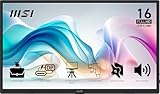
The msi Pro MP165 E6 is a 15.6-inch Full HD IPS panel at 60Hz with USB Type-C, HDMI and built-in speakers. The listing highlights TUV Rheinland certified low blue light and flicker-free operation, plus a 1/4-inch tripod mount for hands-free positioning. At about 0.78kg and 1.38cm thin it is light and slim. It suits players who set the screen at eye level on a tripod or a flexible arm.
The tripod socket is the reason to look at this model. A standard 1/4-inch thread opens up camera tripods, flexible arms and clamp mounts, so the screen can sit at eye level above a small table or on a train tray without leaning on the Deck. The comfort certifications from TUV Rheinland for low blue light and flicker-free operation are described in the listing and may appeal to people who play long sessions. As with the others, whether it charges the Deck through a pass-through port is not stated, so check before relying on a single cable.
- Panel: 15.6-inch IPS, 1920×1080, 60Hz
- Viewing angles: 178 degrees horizontal and vertical
- Inputs: USB Type-C and HDMI (port count not stated, confirm on listing)
- Mounting: 1/4-inch tripod socket
- Comfort: TUV Rheinland low blue light and flicker-free certification per the listing
- Weight and thickness: about 0.78kg and 1.38cm
Pros
- Tripod mount makes eye-level setups easy
- Recognized brand with comfort certification
Cons
- Port count and kickstand details not stated in the name
- 60Hz only
Compared with the Yxk, it trades a built-in stand for a tripod socket and a stronger comfort pedigree.
6. cocopar 16-inch 2.5K – Best overall for sharpness and refresh

The cocopar leads the set on specifications: a 16-inch 16:10 panel at 2560×1600, 144Hz over USB-C and 120Hz over HDMI, 470 nits brightness, 110% sRGB and a 1200:1 contrast ratio per the listing. A full metal chassis, an adjustable metal kickstand (0 to 90 degrees), VESA mounting holes and two 1.5W speakers round it out, and it weighs about 1.5 pounds with a fabric sleeve included. It suits players who want a Deck screen that also works as a laptop or console display.
The 16:10 aspect ratio is a natural match for the Steam Deck, whose built-in screen is also 16:10, so games drawn for the handheld fill the panel with no black bars. The listing reports 470 nits, which helps in bright rooms, and the metal body feels more substantial than the plastic shells of cheaper screens. Run the Deck at a lower internal resolution if you want smooth frame rates, because the monitor will scale the image. The extras, a protective sleeve and VESA holes, make it flexible for both travel and a permanent desk arm.
- Panel: 16-inch 16:10, 2560×1600
- Refresh: 144Hz over USB-C, 120Hz over HDMI
- Brightness and color: 470 nits, 110% sRGB, 1200:1 contrast
- Inputs: two full-function USB-C and one HDMI
- Build: metal chassis, metal kickstand, VESA holes
- Weight: about 1.5 pounds
Pros
- Highest resolution and refresh rate here
- Brightest panel stated, with sturdy metal build
Cons
- The Deck will not use the full resolution in most games without a performance hit
- More capable than a handheld alone needs
It outperforms the ARZOPA on sharpness and shape, with a similar footprint.
Specs Compared
| Monitor | Size | Resolution | Refresh | Inputs | Stand / mount | Weight |
|---|---|---|---|---|---|---|
| ARZOPA Z1FC | 16.1 in | 1920×1080 | 144Hz | 2 USB-C, mini HDMI | Built-in kickstand | confirm on listing |
| MNN | 15.6 in | 1920×1080 | 60Hz | 2 USB-C, HDMI | Smart cover stand | about 1.53 lb |
| KYY | 15.6 in | 1920×1080 | confirm on listing | 2 USB-C, mini HDMI | Smart cover stand | about 1.7 lb |
| Yxk | 15.6 in | 1920×1080 | 60Hz | 2 USB-C, mini HDMI | Kickstand, VESA | about 1.4 lb |
| msi Pro MP165 E6 | 15.6 in | 1920×1080 | 60Hz | USB-C, HDMI | 1/4-inch tripod socket | about 0.78 kg |
| cocopar | 16 in | 2560×1600 | 144Hz USB-C / 120Hz HDMI | 2 USB-C, HDMI | Metal kickstand, VESA | about 1.5 lb |
How We Chose These
This list comes from listing titles, bullet points and specification fields, not from owning or measuring the screens. We required a portable panel between 15 and 17 inches with at least one USB-C input and an HDMI path, because the Steam Deck can output video over USB-C and through a dock’s HDMI port. We favored stated resolution, refresh rate, brightness and stand details, and we flagged weights or ports that the listing leaves unclear. Where one listing contradicted another field, we noted the range. We did not rely on marketing claims about eye care beyond reporting them as the maker’s statements.
What to Look For
How the Deck actually connects
The Steam Deck’s USB-C port supports DisplayPort output, so a monitor that accepts video over USB-C using DisplayPort Alt Mode will light up from a single cable. The same port is also the Deck’s only charging input, so you cannot charge while a plain monitor occupies it unless the monitor passes power through. The alternative is to use a dock that offers HDMI, then connect the dock’s HDMI to a monitor that has an HDMI input, with power flowing to the Deck through the dock. Pass-through charging is not stated in most of these listings, so confirm on the product page.
Resolution and refresh versus what the Deck can render
The Deck’s own screen is 1280×800, so running a 1080p panel is already a step up in pixels, and running 2560×1600 asks the GPU to draw roughly four times as many pixels as the built-in screen. As a rule of thumb, drop the in-game resolution or use upscaling when you move to a bigger panel, otherwise frame rates fall. Refresh rate is similar: the Deck can cap frames at lower values to save battery, so a 144Hz panel only pays off in lighter games. Valve’s own dock lists up to 4K at 60Hz or 1440p at 120Hz, which suggests how far the handheld is meant to be pushed externally.
Power draw and brightness
A portable monitor running on bus power can draw several watts, and a brighter panel draws more. If the screen shares a laptop’s USB-C port, the laptop’s battery takes the hit. For handheld use, a power bank or wall charger on the monitor’s second USB-C port is the safer arrangement, and the supply should be a quality USB-C PD unit rather than an unknown adapter. Do not bend the panel, and never leave it in a hot car, where the backlight and battery-less electronics are stressed by heat.
Stand, size and travel
Cover-style stands usually offer only two or three angles. Kickstands and tripod sockets give more control. Weight differences of a few ounces matter in a bag but not on a desk. Worked example: a 15.6-inch screen at 1.4 pounds, a Deck at about 1.4 to 1.6 pounds and a power bank add up to roughly 4 pounds, which fits in a small daypack.
Pairing the screen with a dock or power bank
Because the Deck has one USB-C port, the cleanest setups use a dock or a screen with power pass-through. A typical arrangement is a dock that takes power in, sends video out over HDMI to the monitor’s HDMI input, and leaves the Deck charging. Another arrangement is to connect the Deck to the monitor over USB-C and feed the monitor’s second USB-C port from a wall charger. Use cables rated for video over USB-C, since charge-only cables carry no display signal and are a common cause of a black screen. Keep the cable short, avoid sharp bends at the connector and use the shortest run that reaches. As a rule of thumb, if the screen does not wake after you plug it in, try another cable before blaming the monitor, then confirm the Deck’s display output setting.
Finally, think about how long you will use the screen at a stretch. Brightness above what the room needs wastes power, so lower it indoors and raise it only near windows. If the monitor feels warm along the back, move it away from soft surfaces that block heat. Store it in its cover or sleeve, never under heavy items in a bag, and clean the panel with a dry microfiber cloth.
Questions
Can a Steam Deck drive a portable monitor over one USB-C cable?
Yes, when the monitor accepts video over USB-C DisplayPort Alt Mode, which most listed models describe. You will still need a second power path for the Deck, such as a dock or a monitor with power pass-through.
Do I need a 144Hz portable monitor for the Deck?
No. Most Deck games run well below 144 frames per second, so a 60Hz panel is enough. A faster panel helps lighter games and PC use.
Will 2.5K look better than 1080p on the Deck?
Text and interface elements will be sharper, but games must render more pixels, which costs performance. You can usually lower in-game resolution to keep frame rates up.
Does the monitor need its own power supply?
Many can run from USB-C bus power, but a dedicated charger on the second USB-C port gives steadier brightness. Check the listing for the minimum power requirement.
Is HDR meaningful on these panels?
HDR modes on portable monitors in this class are usually basic. Treat them as a nice-to-have, not as a reason to choose one model.
Can I use these with other consoles?
Listings mention laptops, phones and several game consoles, but compatibility depends on each device’s video output. Confirm that your console supports USB-C video or provides HDMI.
Update History
- October 14, 2026 – Initial publication; product set drawn from current catalog listings.
- Check the product page for current specifications and availability before buying.
Sources
- Retailer listing titles, feature bullets and specification fields for each monitor
- Manufacturer-supplied descriptions as quoted in those listings (ARZOPA, MNN, KYY, Yxk, msi, cocopar)
- Valve’s published Steam Deck dock and display output specifications, as found through web search