Our Top Picks
 Jngnpn 3-Pack Tempered Glass Screen Protector for Steam8.6 x 5.5 x 0.5 inches0.2 poundsCheck on Amazon
For most Steam Deck owners, the JSAUX 2-Pack Ultra HD Screen Protector is the best starting point: it is tempered glass, rated 9H for surface hardness, comes in a two-pack with a guide frame for alignment and is listed for both the OLED and LCD models. A tempered glass screen protector is a thin sheet of hardened glass that sits over the Deck’s display and takes scratches and light impacts so the screen itself does not. If you play outdoors or near windows, the matte Anti Glare or Obsidian AR versions are worth a look, and the multi-pack options suit anyone who expects to reinstall.
Quick List
- JSAUX Ultra HD 2-Pack – best overall for clarity and a guide-frame install on OLED and LCD
- JSAUX Anti Glare 2-Pack – best for reducing reflections with a matte finish
- JSAUX Obsidian AR 2-Pack – best for anti-reflection with a clear look
- Fourmor Steam Deck OLED 7.4-Inch – best for OLED owners who want a model-specific protector
- Jngnpn 3-Pack – best for a three-piece pack with anti-fingerprint claims
- Savage Raven by Skull and Co. 2-Pack – best for a positioner-aided install with a high-sensitivity claim
Which One Is Right for You?
| If you… | Choose |
|---|---|
| want crisp, glossy clarity and an easy alignment frame | JSAUX Ultra HD 2-Pack |
| play near windows or under bright lights and dislike glare | JSAUX Anti Glare 2-Pack |
| want reduced reflections without a frosted look | JSAUX Obsidian AR 2-Pack |
| own an OLED Steam Deck and want a model-specific listing | Fourmor Steam Deck OLED 7.4-Inch |
| want a spare or two for retries or a second device | Jngnpn 3-Pack |
| care most about touch response and an alignment positioner | Savage Raven 2-Pack |
The Steam Deck LCD has a 7-inch screen and the OLED has a 7.4-inch screen in a similar body, so check the model named in the listing against your own. Beyond that, the real choice is between glossy and matte finish, and how many pieces you want in the box.

JSAUX 2-Pack Ultra HD Screen Protector for Steam Deck OLED/LCD | with Guide Frame, Easy to Install, 99.99% Clarity, Full-Screen Coverage, 9H Glass, Anti-Fingerprint, Scratch Resistant
Chosen because it specifies with Guide Frame and Easy to Install.
View on Amazon
JSAUX 2-Pack Anti Glare Screen Protector for Steam Deck OLED/LCD | with Guide Frame, Easy to Install, Matte Finish, Full-Screen Coverage, 9H Glass, Anti-Fingerprint, Scratch Resistant
Chosen because it specifies with Guide Frame and Easy to Install.
View on Amazon
JSAUX 2-Pack Obsidian AR Screen Protector for Steam Deck OLED/LCD | with Guide Frame, Easy to Install, Anti-Reflection, Ultra Clear, Full-Screen Coverage, 10H Tempered Glass, Anti-Fingerprint
Chosen because it specifies with Guide Frame and Easy to Install.
View on Amazon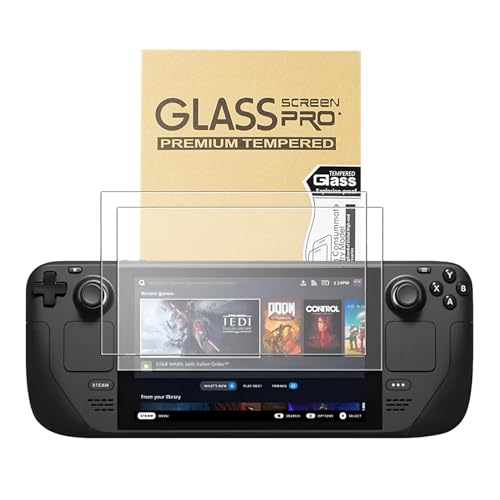
Fourmor Screen Protector for Steam Deck OLED 7.4-Inch (NEW 2023) - 9H Tempered Glass Film, Anti-Scratch HD Clear, Cowhide box professional packaging,2-Pack
Chosen because it specifies 9H Tempered Glass Film and Anti-Scratch HD Clear.
View on AmazonJngnpn 3-Pack Tempered Glass Screen Protector for Steam Deck/Steam Deck OLED,HD Clear, Anti Scratch,Anti-Fingerprint, Shatterproof,Bubble Free, Easy Installation, 9H Hardness, Ultra Thin
Chosen because it specifies Anti Scratch and Anti-Fingerprint.
View on Amazon
SAVAGE RAVEN by Skull & Co. High Transparency High Sensitivity Tempered Glass Screen Protector For Steam Deck/OLED (2-PACK) with Positioner Installation Kits - HD Clarity
Chosen because it specifies HD Clarity.
View on AmazonAll 6 Picks in Detail
1. JSAUX Ultra HD 2-Pack – Best Overall for Clarity and Easy Alignment
As an Amazon Associate we earn from qualifying purchases at no extra cost to you.

The JSAUX Ultra HD protector is a two-pack of tempered glass sheets for the Steam Deck OLED and LCD, with a guide frame, full-screen coverage, 9H hardness and a stated 99.99 percent clarity. The listing emphasizes easy installation, and the guide frame is the key feature, because a misaligned sheet on a handheld is one of the most common frustrations. Having two sheets in the box gives you a second attempt if the first one picks up dust.
Practical note: pairs of sheets are useful for another reason. A glass protector that has a deep scratch or chip can be peeled off and replaced without touching the original screen, so a spare lets you refresh the protection months later, when dust-free conditions are easier to arrange than in the middle of a trip.
Who it suits: owners who want the glossy, closest-to-bare-screen look and a forgiving install. A glossy surface is also the best for keeping colors vivid, which matters on an OLED panel.
- Tempered glass, 9H hardness
- Two sheets with a guide frame
- Stated 99.99% clarity and full-screen coverage
- Listed for Steam Deck OLED and LCD
- Thickness and edge treatment: confirm on listing
Pros
- Guide frame helps with alignment
- Two sheets for a retry
Cons
- Glossy surface reflects light in bright rooms
- Glass can show fingerprints
Compared with the Anti Glare version from the same brand, it favors clarity over glare control.
2. JSAUX Anti Glare 2-Pack – Best for Reducing Reflections

The Anti Glare version has the same two-pack format, guide frame, full-screen coverage, 9H hardness and OLED-and-LCD compatibility, with a matte finish. A matte finish scatters light so windows and lamps produce softer reflections, and it can also reduce fingerprint visibility. The trade-off is that matte surfaces usually add a slight grain or softness and can lower perceived sharpness and contrast, especially on a bright OLED.
Practical note: matte glass is a matter of taste, and the only way to know is to look at it. If you read small text in desktop mode on a Deck, remember that frosted surfaces can make fine text look slightly softer, so consider this finish a deliberate trade-off rather than a free upgrade.
Who it suits: players who often use the Deck on trains, in cars, by windows or outdoors in the shade, where reflections are a bigger problem than a slight loss of crispness.
- Tempered glass, 9H hardness, matte finish
- Two sheets with a guide frame
- Full-screen coverage
- Listed for Steam Deck OLED and LCD
- Haze or grain level: confirm on listing
Pros
- Reduces glare and reflections
- Less visible fingerprints than glossy glass
Cons
- Can look slightly grainy or soft
- May affect perceived contrast
Next to the Obsidian AR, it takes a more diffusing approach to the same glare problem.
3. JSAUX Obsidian AR 2-Pack – Best for Anti-Reflection With a Clear Look

The Obsidian AR protector uses an anti-reflection coating, described as ultra clear, in the same two-pack, guide-frame, 9H and full-coverage format. Anti-reflective coatings work by cutting the amount of light bounced off the surface rather than scattering it, which can keep the picture clear while reducing mirror-like reflections. How well it does this depends on the coating, and the visible listing does not state a reflectance number.
Practical note: coated glass can show oily smudges more visibly in certain light, so keep a microfiber cloth in your Deck case. Do not use harsh cleaners on any coated protector, and a slightly damp cloth followed by a dry one is usually enough.
Who it suits: players who want some glare reduction but dislike the frosted look of matte films. It is a middle path between the glossy Ultra HD and the matte Anti Glare.
- Tempered glass, 9H hardness
- Anti-reflection coating
- Two sheets with a guide frame
- Listed for Steam Deck OLED and LCD
- Reflectance and coating durability: confirm on listing
Pros
- Reduced reflections while staying clear
- Same easy install as other JSAUX packs
Cons
- Coatings can show smudges differently
- Stated benefits are not quantified
It is the closest match for someone choosing between the Ultra HD and Anti Glare variants.
4. Fourmor Steam Deck OLED 7.4-Inch – Best for a Model-Specific OLED Listing

The Fourmor protector is listed specifically for the Steam Deck OLED 7.4-inch (the 2023 model), as a 9H tempered glass film with anti-scratch and HD-clear claims, and it comes in a presentation box. The model-specific wording is an advantage for OLED owners who want to be sure of the fit, although it also means you should not assume it suits the LCD model. The listing does not say how many sheets are included or whether it has an alignment frame, so check the product page.
Practical note: a boxed presentation usually matters little to performance, so focus on the stated fit and the included tools. If the product page does not show a wipe, dust sticker and alignment tool, plan to supply your own lint-free cloth and tape for lifting dust.
Who it suits: OLED owners who prefer a listing that names their exact model and do not need a multi-pack.
- Listed for Steam Deck OLED 7.4-inch
- 9H tempered glass, anti-scratch, HD clear
- Presentation box packaging
- Number of sheets and alignment aids: confirm on listing
- LCD model compatibility: confirm on listing
Pros
- Clear model-specific fit statement
- 9H hardness and HD clarity claims
Cons
- Install aids and pack size are not clear in the visible text
- Not stated for the LCD model
Compared with the JSAUX packs, it offers a more specific fit statement but fewer stated install aids.
5. Jngnpn 3-Pack – Best for Three Sheets and Anti-Fingerprint Claims

The Jngnpn pack includes three tempered glass sheets for the Steam Deck and Steam Deck OLED, with HD clarity, anti-scratch, anti-fingerprint, shatterproof and bubble-free claims. Three sheets give extra margin for beginners, or let you protect a second device or replace a scratched sheet later. Terms such as shatterproof usually mean the glass is designed to hold together when it breaks, not that it cannot break.
Practical note: anti-fingerprint claims typically refer to an oleophobic coating, which wears down over time with use and cleaning. Treat the claim as a short-term benefit and judge it by how the screen feels after a few weeks, since that coating, not the glass, is the part that fades.
Who it suits: people who expect to make a mistake during installation, or who like to have a spare for a replacement months later.
- Three tempered glass sheets
- Listed for Steam Deck and Steam Deck OLED
- HD clear, anti-scratch, anti-fingerprint
- Hardness rating and guide frame: confirm on listing
- Edge treatment: confirm on listing
Pros
- Extra sheet compared with two-packs
- Anti-fingerprint claim
Cons
- Install aids are not stated in the visible text
- Claims such as shatterproof are not quantified
It is the count-focused alternative to the two-pack JSAUX range.
6. Savage Raven by Skull and Co. 2-Pack – Best for Positioner-Aided Install

The Savage Raven protector is a two-pack tempered glass option for the Steam Deck and OLED, from the accessory maker Skull and Co., with high transparency, high sensitivity and a positioner included. The sensitivity claim refers to touchscreen response, which matters because the Deck’s touchscreen is used for menus and desktop mode. A positioner works like a guide frame and helps keep the glass centered while the adhesive lays down.
Practical note: a high-sensitivity claim is hard to verify from a listing, so judge it by installing carefully. If touch response feels uneven right after install, the cause is usually a trapped bubble near the edge, which you can often press out rather than assuming the glass is the problem.
Who it suits: owners who use the touchscreen often and want help with alignment. As with all glass protectors, a thinner sheet generally preserves touch response better than a thick one.
- Two tempered glass sheets
- Listed for Steam Deck and OLED
- High transparency and touch sensitivity claims
- Includes a positioner
- Hardness rating and thickness: confirm on listing
Pros
- Positioner included
- Touch sensitivity highlighted
Cons
- Hardness rating is not in the visible text
- Marketing claims are not quantified
Compared with the Jngnpn pack, it has one fewer sheet but a clearer statement about installation help.
Specs Compared
| Protector | Pack size | Finish | Hardness | Fit (per listing) | Install aid |
|---|---|---|---|---|---|
| JSAUX Ultra HD | 2 | Glossy, 99.99% clarity | 9H | Steam Deck OLED and LCD | Guide frame |
| JSAUX Anti Glare | 2 | Matte | 9H | Steam Deck OLED and LCD | Guide frame |
| JSAUX Obsidian AR | 2 | Anti-reflection, ultra clear | 9H | Steam Deck OLED and LCD | Guide frame |
| Fourmor OLED 7.4-Inch | Confirm on listing | HD clear | 9H | Steam Deck OLED 7.4-inch | Confirm on listing |
| Jngnpn 3-Pack | 3 | HD clear, anti-fingerprint | Confirm on listing | Steam Deck and OLED | Confirm on listing |
| Savage Raven | 2 | High transparency | Confirm on listing | Steam Deck and OLED | Positioner |
How We Chose These
This guide is based on research of the listed protectors, not on applying them. We read each listing’s title and specification fields and compared pack size, finish, hardness rating, stated fit and installation aids. We also looked at published Steam Deck LCD and OLED specification comparisons to confirm the different screen sizes. Items were ordered by how clearly their listings state the facts that matter for a tempered glass protector. Where a listing did not state a value such as thickness or hardness, we mark it “confirm on listing” and avoid guessing.
What to Look For
Match the protector to your Steam Deck model
The Steam Deck LCD has a 7-inch 1280 by 800 screen, while the OLED has a 7.4-inch screen at the same resolution in a body with similar outer dimensions and slimmer bezels. Because of the bigger display and different bezels, a protector made for one model is not guaranteed to cover the other. Look for wording that names your model, such as OLED 7.4-inch or OLED and LCD, and compare the listing’s stated coverage with your device before opening the package. Some Deck configurations also have an etched anti-glare cover glass, which affects how some protectors look when applied.
Glossy, matte and anti-reflection finishes
A glossy protector gives the sharpest image and the most vivid colors, but it reflects light. A matte protector diffuses light to reduce glare and fingerprints, with a small cost in sharpness and contrast. An anti-reflection coating tries to give the best of both, though results vary by coating. A simple rule: if you play mostly indoors in dim light, pick glossy; if you play in bright rooms, vehicles or outside, consider matte or anti-reflection.
Hardness, thickness and touch response
The 9H rating refers to the pencil hardness scale and means the surface resists scratches from common items such as keys, though it does not make the glass indestructible. Most tempered glass protectors for handhelds are about 0.2 to 0.4 millimeters thick, thin enough to keep the capacitive touchscreen responsive. Thicker glass gives more impact cushioning but can slightly reduce touch sensitivity. Edge treatment matters too, because a rounded or polished edge feels better and is less likely to chip in a bag.
Installing without dust and bubbles
Installation quality determines the result more than most spec lines. Clean the screen with the supplied wipe and use the dust-removal sticker to lift specks, then align the sheet with the frame or positioner before pressing down from the center outward. Work in a bathroom after a hot shower or any room with low dust, and turn the Deck off first. Small bubbles often work out over a day, but a speck under the glass will not, so peel and retry rather than pressing hard. A pack of two or three sheets gives you room to retry.
Case compatibility and maintenance
Many Steam Deck cases, including the official carrying case and third-party shells, are designed around the bare console, and a screen protector adds a small amount of thickness. Full-coverage glass is normally thin enough not to matter, but it is worth checking that your case closes without pressure on the display. Clean the protector with a microfiber cloth and avoid abrasive pads. If the glass cracks, remove it carefully, wearing gloves if the cracks have lifted edges, and replace it; do not keep using a protector with sharp, lifted fragments. Replace the sheet when scratches or chips interfere with the image, since that is exactly what the protector is for.
Choosing between one big pack and a specific finish
If this is your first protector, a two-pack with a frame gives the best chance of a clean result. If you already know you dislike glare, pick the finish first and the pack size second, because a perfect install of the wrong finish still leaves you unhappy. A final rule of thumb is to match your usual play location: living room and bedroom usage favors glossy, commuting and outdoor play favors matte or anti-reflection, and shared devices favor the pack with the most sheets.
Touch, buttons and the edges of the screen
A full-coverage protector reaches close to the bezel, so the edges are where problems show up: a sheet pushed too far to one side can foul the frame, and a sheet that is too small leaves a gap that collects dust. After installing, run a finger around the edge to feel for a lifted corner, and check that the touchscreen responds across the whole panel, including the corners used by on-screen menus. If an edge keeps lifting, a quick press and a few hours of rest usually settle it, but a persistent gap is a reason to return the pack.
A quick buying checklist
Before you buy, confirm four things. First, that the listing names your exact Steam Deck model, OLED or LCD. Second, the finish you want: glossy for sharpness, matte for fewer reflections, or anti-reflection as a compromise. Third, how many sheets come in the box and whether the pack includes a guide frame, a dust sticker and a cleaning wipe. Fourth, whether you plan to install it yourself in a clean room or want spares for a second attempt. With those four answers, the six listings sort quickly: the JSAUX range for finish choice and install help, the Jngnpn pack for the extra sheet, the Fourmor for a model-specific OLED statement and the Savage Raven for a positioner and a touch-response focus.
Questions
Do I need a screen protector on a Steam Deck?
The Deck’s screen is glass but can still scratch from keys in a bag or from dust and grit. A protector is a low-effort way to take that wear, and it can be replaced if scratched.
Will a glass protector affect touch response?
Thin tempered glass generally keeps the touchscreen working normally. If touches feel off after installation, check for a bubble or misalignment at the edges.
Can I use an LCD protector on an OLED Steam Deck?
The screens are different sizes, so only use a protector whose listing names your model. Some packs, like the JSAUX range, state support for both.
What does 9H mean?
It is a pencil hardness rating, and 9H is at the hard end of the scale. It shows scratch resistance, not shatter resistance.
Is matte better than glossy?
Matte reduces glare and fingerprints but may look slightly softer. Glossy is sharpest but reflects more light. Choose based on where you usually play.
How do I remove bubbles after installing?
Press gently from the center toward the edge with a soft cloth, and allow a day for tiny bubbles to settle. If dust is trapped, peel and reinstall.
Update History
- October 20, 2026 – Initial publication; product set drawn from current catalog listings.
- Check the product page for current specifications and availability before buying.
Sources
- Retailer listing titles and specification fields for each listed protector
- Published Steam Deck LCD and OLED specification comparisons (screen size and resolution)