Key takeaways
- Full-size: Includes a number pad and function row — ideal if you need dedicated numeric input, like the Logitech G413 SE.
- 75% layout: Trims the numpad but keeps arrow keys and function keys in a tighter footprint, like the Keychron K2 or AULA S75 PRO — a strong balance of desk space and functionality.
- Compact/TKL or novelty layouts: Sacrifice some keys for portability or style, like the retro-inspired AULA F2088 or the compact YUNZII C98.
What's inside
- Watch: Mechanical Keyboard Buying Guide for Gamers — Video Review
- Switch Type: The Heart of Your Typing and Gaming Feel
- Layout: Full-Size, 75%, or Compact?
- Wired vs. Wireless: Latency and Convenience
- Build Quality and Keycaps
- Extra Features Worth Considering
- Tips
- Related Guides
- Frequently Asked Questions
- Conclusion
- Related Articles
- Related Guides
A mechanical keyboard is one of the few upgrades that measurably improves both your gaming performance and your day-to-day comfort. The tactile feedback, faster actuation, and durable switches translate into more consistent inputs during fast-paced matches, while features like anti-ghosting and N-key rollover ensure every keystroke registers exactly when you need it to — even mid-combo or when spamming abilities.
- Watch: Mechanical Keyboard Buying Guide for Gamers — Video Review
- Switch Type: The Heart of Your Typing and Gaming Feel
- Layout: Full-Size, 75%, or Compact?
- Wired vs. Wireless: Latency and Convenience
- Build Quality and Keycaps
- Extra Features Worth Considering
- Tips
- Related Guides
- Frequently Asked Questions
- Conclusion
- Related Articles
- Related Guides
In this guide, you’ll learn how to choose the right switch type, layout, and connection method for your setup, what features actually matter versus what’s marketing fluff, and how to match a keyboard to your budget without sacrificing the essentials. We’ll also answer the most common questions gamers have before making a purchase.
As an Amazon Associate we earn from qualifying purchases at no extra cost to you.



🎮 Get More From Your Setup — Free
Prime Gaming gives you free PC games every month, in-game loot, and a free Twitch channel sub — plus fast free shipping on all the gear above. New members get a 30-day free trial.
Watch: Mechanical Keyboard Buying Guide for Gamers — Video Review
Switch Type: The Heart of Your Typing and Gaming Feel
Switches determine how a keyboard feels and sounds under your fingers, and they’re the single most important factor in your buying decision. Linear switches (like Reds or the Redragon’s hot-swappable Red switches) actuate smoothly with no bump or click, making them a favorite for fast, repetitive gaming inputs. Tactile switches (like Keychron’s Brown-style switches or AULA’s Milk switches) give a subtle bump so you know exactly when a keypress registers — great for typing and general use. Clicky switches (like the AULA F2088’s Blue switches) add an audible click on top of the tactile bump, satisfying for typing but louder for shared spaces. If you’re unsure, hot-swappable boards like the Redragon or AULA S75 PRO let you try different switches without soldering.
Layout: Full-Size, 75%, or Compact?
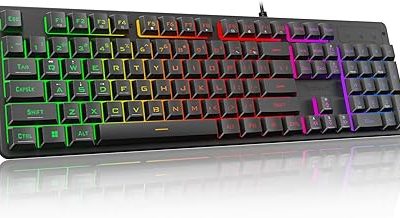
- Full-size: Includes a number pad and function row — ideal if you need dedicated numeric input, like the Logitech G413 SE.
- 75% layout: Trims the numpad but keeps arrow keys and function keys in a tighter footprint, like the Keychron K2 or AULA S75 PRO — a strong balance of desk space and functionality.
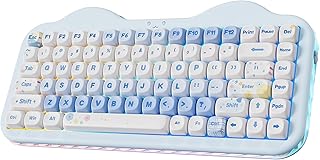
- Compact/TKL or novelty layouts: Sacrifice some keys for portability or style, like the retro-inspired AULA F2088 or the compact YUNZII C98.
Wired vs. Wireless: Latency and Convenience
Competitive gamers often prefer wired connections for the lowest possible input latency and zero risk of dropped signals mid-match. That said, modern wireless boards with 2.4GHz dongles — like the AULA S75 PRO or YUNZII C98 — offer near-wired responsiveness for most players, while Bluetooth modes are better suited for everyday typing and multi-device switching (handy on the Keychron K2, which pairs easily between Mac and Windows). If you play competitively, prioritize wired or 2.4GHz mode over Bluetooth.
Build Quality and Keycaps
Double-shot PBT keycaps resist shine and fading far longer than cheaper ABS caps, and they typically sound and feel more premium. Boards like the Redragon and AULA S75 PRO use PBT keycaps, which is a meaningful upgrade over budget ABS sets. Aluminum top plates, like on the Logitech G413 SE, add rigidity and a sturdier typing feel, while gasket-mounted designs (AULA S75 PRO, YUNZII C98) dampen vibration for a softer, quieter sound profile often described as “creamy” or “thocky.”
Extra Features Worth Considering
Backlighting isn’t just cosmetic — RGB and per-key lighting help with visibility in dark rooms and let you customize profiles per game. Media control knobs, like those on the AULA S75 PRO and AULA F2088, make volume and playback adjustments effortless without alt-tabbing. Screens (AULA S75 PRO) can display macros or system info, and wrist rests (AULA F2088) improve comfort during long sessions.
Tips
- Always check anti-ghosting and N-key rollover specs if you play games requiring multiple simultaneous key presses.
- If you’re new to mechanical keyboards, start with a hot-swappable board so you can experiment with switches later.
- Clean your keyboard regularly — dust and debris under keycaps are the leading cause of sticky or unresponsive keys.
- Match your layout to your desk space and mouse movement range; smaller layouts free up room for wider mouse swings.
Frequently Asked Questions
Are mechanical keyboards actually better for gaming than membrane keyboards?
Yes, generally. Mechanical switches offer faster, more consistent actuation, better durability (often rated for 50 million+ keystrokes), and features like anti-ghosting that membrane boards typically lack.
What’s the difference between hot-swappable and standard mechanical keyboards?
Hot-swappable keyboards let you remove and replace switches without soldering, so you can customize your feel and sound over time. Standard boards have switches permanently soldered to the PCB.
Is wireless good enough for competitive gaming now?
Modern 2.4GHz wireless technology has largely closed the latency gap with wired connections. Bluetooth is fine for casual play but wired or 2.4GHz is still preferred for competitive titles.
Do I need RGB lighting?
It’s not essential for performance, but it helps with visibility in low light and lets you personalize your setup. If it’s not a priority, boards like the Logitech G413 SE offer simpler backlighting at a lower cost.
Conclusion
The best mechanical keyboard for you depends on how you balance switch feel, layout, connectivity, and build quality against your budget — whether that’s a straightforward wired board like the Redragon or Logitech G413 SE, a feature-rich wireless option like the AULA S75 PRO, or a distinctive pick like the Keychron K2 or YUNZII C98. Focus on the switches and layout first, since those affect your daily experience the most, and treat extras like screens and knobs as welcome bonuses rather than must-haves.