Our Top Picks
 acer Nitro 5-17.3" Laptop Intel i5-9300H 2.4GHz 8GB17-30.99 inches11 x 15.9 x 1 inches5.73 PoundsCheck on Amazon
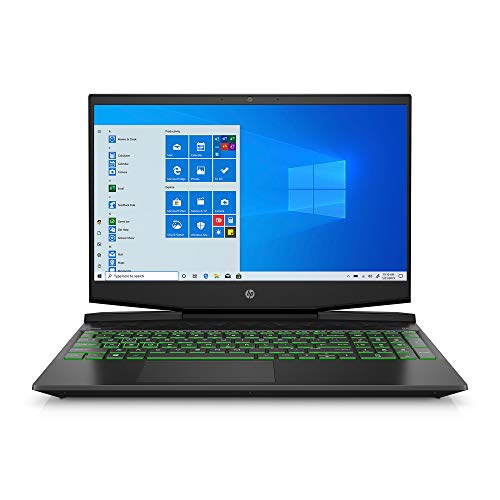 HP Pavilion Gaming Laptop 15-dk0096wm8GB | 256GB SSD14.09 x 10.04 x 0.93 Inches7.48 poundsCheck on Amazon
 MSI GF63 Thin 11SC-693 15.6" Gaming Laptop8GB RAM I 256GB SSD14.13 x 0.94 x 10.2 inches4.1 PoundsCheck on Amazon
Cheap laptops with an NVIDIA graphics card are mostly built around the GeForce GTX 1650 family, and every listing that names a GPU on this page falls in that bracket, with the ASUS TUF F15 offering the best mix of screen, storage and operating system. A dedicated NVIDIA chip changes what a cheap laptop can do compared with integrated graphics, but it also brings heat, battery drain and a question about video memory. Below are eight listings from entry-level makers, a ladder explaining the MX, GTX and RTX tiers, and a simple video-memory calculation. We leave out prices because they vary by seller and week.
Comparison at a glance

Acer Nitro 5 Gaming Laptop, 9th Gen Intel Core i5-9300H, NVIDIA GeForce GTX 1650, 15.6" Full HD IPS Display, 8GB DDR4, 256GB NVMe SSD, Wi-Fi 6, Backlit Keyboard, Alexa Built-in, AN515-54-5812
One of the money options compared in this guide.
View on Amazonacer Nitro 5-17.3" Laptop Intel i5-9300H 2.4GHz 8GB Ram 512GB SSD W10H
One of the money options compared in this guide.
View on AmazonHP Pavilion Gaming Laptop 15-dk0096wm - Core i5-9300H - 8 GB RAM - 256 GB SSD - GTX 1650 4 GB Graphics Card - 15.6"" Full HD 1920x1080 LCD - Webcam - Wireless - Bluetooth - Windows 10, Black
One of the money options compared in this guide.
View on AmazonMSI GF63 Thin 11SC-693 15.6" Gaming Laptop, Intel Core i5-11400H, NVIDIA GeForce GTX 1650, 8GB Memory, 256GB NVMe SSD, Windows 11
One of the money options compared in this guide.
View on Amazon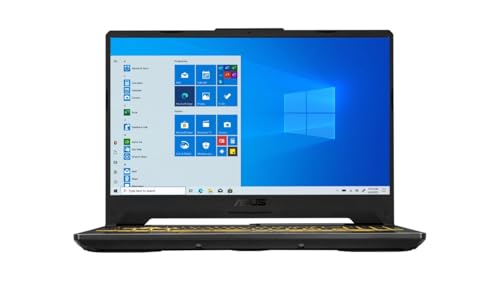
ASUS TUF F15 Gaming Laptop, 15.6" 144Hz FHD IPS-Type Display, Intel Core i5-10300H Processor, GeForce GTX 1650, 8GB DDR4 RAM, 512GB PCIe SSD, Wi-Fi 6, Windows 11 Home, FX506LH-AS51
One of the money options compared in this guide.
View on Amazon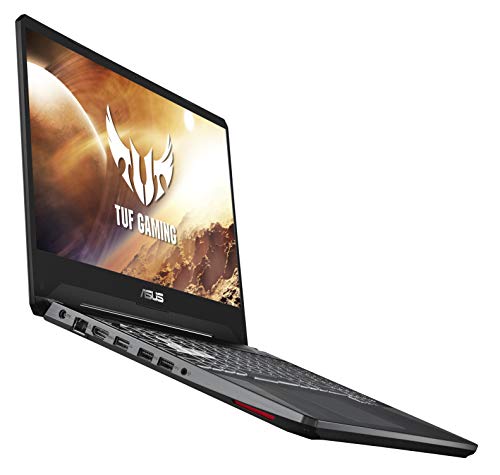
ASUS TUF Gaming Laptop, 15.6” Full HD IPS-Type, Intel Core i5-9300H, GeForce GTX 1650, 8GB DDR4, 512GB PCIe SSD, Gigabit Wi-Fi 5, Windows 10 Home, FX505GT-US52
One of the money options compared in this guide.
View on Amazon
ASUS TUF Gaming F17 Gaming Laptop, 17.3” 144Hz FHD IPS-Type Display, Intel Core i5-10300H, GeForce GTX 1650 Ti, 8GB DDR4, 512GB PCIe SSD, RGB Keyboard, Windows 10, Bonfire Black, FX706LI-ES53
One of the money options compared in this guide.
View on Amazon
HP Pavilion Gaming 15.6-Inch Micro-EDGE Laptop, Intel Core i5-9300H Processor, NVIDIA GeForce GTX 1650 (4 GB), 8 GB SDRAM, 256 GB SSD, Windows 10 Home (15-dk0020nr, Shadow Black/Acid Green)
One of the money options compared in this guide.
View on Amazon| Model | Key point from the title | Price tier | Best for |
|---|---|---|---|
| Acer Nitro 5 AN515-54 | GTX 1650, i5-9300H, FHD IPS, 8GB, 256GB NVMe | Budget | Entry NVIDIA gaming |
| Acer Nitro 5 17.3-inch | i5-9300H, 8GB, 512GB (GPU not named in title) | Budget | Only after GPU is confirmed |
| HP Pavilion Gaming 15-dk0096wm | GTX 1650 4GB, i5-9300H, 8GB, 256GB | Budget | Clear 4GB VRAM spec |
| MSI GF63 Thin 11SC | GTX 1650, i5-11400H, 8GB, 256GB, Windows 11 | Mid-range | Newest CPU of the group |
| ASUS TUF F15 | GTX 1650, 144Hz FHD, i5-10300H, 8GB, 512GB, Wi-Fi 6 | Mid-range | Best-rounded value |
| ASUS TUF FX505GT | GTX 1650, i5-9300H, 8GB, 512GB PCIe SSD | Budget | Storage at a low tier |
| ASUS TUF Gaming F17 | GTX 1650 Ti, 17.3-inch 144Hz, i5-10300H, 8GB, 512GB | Mid-range | Big, fast screen |
| HP Pavilion Gaming 15-dk0020nr | GTX 1650 4GB, i5-9300H, 8GB, 256GB, Windows 10 | Budget | Compact budget pick |
The eight laptops, one by one
Acer Nitro 5 AN515-54: the cheapest way in
The title names a GeForce GTX 1650, a 9th-generation Core i5-9300H, a 15.6-inch Full HD IPS screen, 8GB DDR4 and a 256GB NVMe SSD, plus Wi-Fi 6 and Alexa built in. It is a straightforward entry to dedicated NVIDIA graphics. The main limit is the 256GB drive, which a couple of big games will fill, and the older CPU generation, which matters in titles that lean on the processor.
- Pros: Dedicated GTX 1650 at a low tier.
- Wi-Fi 6 and a backlit keyboard.
- Cons: 256GB storage is small.
- Older 9th-generation processor.
Who it’s for: Shoppers who just want an NVIDIA chip at the lowest tier.
Acer Nitro 5 17.3-inch: GPU unconfirmed
The title lists an i5-9300H, 8GB RAM, a 512GB SSD and Windows 10 Home on a 17.3-inch Nitro 5, but it never states a graphics card. That makes it a poor fit for a page about NVIDIA laptops until you verify the GPU on the live listing. Treat it as an unconfirmed candidate, not a pick.
- Pros: 512GB SSD in the title.
- Large 17.3-inch display.
- Cons: NVIDIA GPU is not stated.
- Bulky for a cheap laptop.
Who it’s for: Only buyers who confirm the GPU in writing.
HP Pavilion Gaming 15-dk0096wm: the clearest spec sheet
The title states an i5-9300H, 8GB, a 256GB SSD, a GTX 1650 with 4GB, a 15.6-inch Full HD LCD, a webcam, Bluetooth and Windows 10. It is one of the few titles that spell out the video memory, which helps you compare. A smaller SSD and an older operating system are the trade-offs.
- Pros: 4GB of video memory is spelled out.
- Webcam and Bluetooth included.
- Cons: 256GB drive.
- Windows 10 listed.
Who it’s for: Buyers who prefer a listing that names the specs.
MSI GF63 Thin 11SC: newest processor
This listing shows an i5-11400H, a GTX 1650, 8GB, a 256GB NVMe SSD and Windows 11 on a thin 15.6-inch body. It carries the newest processor of the GTX 1650 group, which can matter for CPU-bound titles, though storage remains small. Slim chassis can run warm under long sessions, so a flat surface and clean vents matter, and it is worth reading buyer comments on fan noise.
- Pros: 11th-generation CPU.
- Windows 11.
- Cons: 256GB storage.
- Thin body may run warm.
Who it’s for: Buyers who want the newer CPU.
ASUS TUF F15: the best-rounded value
The title lists a 15.6-inch 144Hz Full HD IPS-type display, i5-10300H, GTX 1650, 8GB DDR4, a 512GB PCIe SSD, Wi-Fi 6 and Windows 11 Home. It pairs a fast panel with double the storage of several rivals, making it the easiest recommendation here. The GPU is still entry-class, so expect to lower settings in newer games, and check the listing for the exact thermal design and the battery claims.
- Pros: 144Hz screen and 512GB SSD.
- Windows 11 and Wi-Fi 6.
- Cons: 8GB of RAM may need a boost.
- Entry-class GPU.
Who it’s for: Most buyers who want a sensible default.
ASUS TUF FX505GT: storage on a low tier
The title names an i5-9300H, GTX 1650, 8GB DDR4, a 512GB PCIe SSD, Gigabit Wi-Fi 5 and Windows 10 Home with a 15.6-inch IPS-type screen. The drive is bigger than most budget rivals, while the wireless and operating system are a generation behind the F15.
- Pros: 512GB PCIe SSD.
- Full HD IPS-type panel.
- Cons: Wi-Fi 5.
- Windows 10 listed.
Who it’s for: Buyers who need space for games.
ASUS TUF Gaming F17: big-screen option
The title lists a 17.3-inch 144Hz Full HD IPS-type screen, i5-10300H, GTX 1650 Ti, 8GB, a 512GB PCIe SSD, an RGB keyboard and Windows 10. The Ti variant sits a step above the plain 1650 by name, but verify memory and specs. A 17-inch body is heavier and harder to carry, and its larger charger adds to the load if you travel.
- Pros: Large 144Hz display.
- 512GB SSD.
- Cons: Heavy and bulky.
- Windows 10 listed.
Who it’s for: Desk-based users who want a big screen.
HP Pavilion Gaming 15-dk0020nr: compact budget pick
The title lists an i5-9300H, a GTX 1650 with 4GB, 8GB SDRAM, a 256GB SSD, a 15.6-inch Micro-EDGE display and Windows 10 Home. It is nearly the same class as the other HP entry, so compare listings and choose the cheaper or better-supported one.
- Pros: Compact Micro-EDGE display.
- 4GB video memory named.
- Cons: Near-duplicate of the other HP.
- 256GB storage.
Who it’s for: Buyers deciding between HP variants.
How we picked these
The set is based on product titles, published specifications, manufacturer documentation and buyer reviews. Nobody on the team used or measured these units. Anything beyond a title is labeled a general estimate. Seven listings name a GTX-class chip, and one does not, so it is flagged. Titles do not say whether a unit is new, open-box or refurbished, so confirm that on the listing.
What an NVIDIA GPU tier actually buys
The tier ladder: MX, GTX, RTX
As general knowledge, MX-series chips are light entry graphics, GTX chips such as the 1650 are the usual cheap gaming tier, and RTX chips add newer features at higher cost. All eight listings here that name a GPU are in the GTX 1650 family, which suits 1080p with settings lowered. Older or heavy titles may need compromises. If a listing mentions a Ti variant, treat it as a small step up by name only, and confirm the memory amount and clock behaviour in the manufacturer documentation, since laptop versions of GPUs can differ from desktop cards with the same name and from each other depending on power limits.
Video memory
Video memory limits texture settings. Four gigabytes is common at this tier and enough for many esports and older games, but less so for newer ones. Only two titles here spell out 4GB, so check the rest.
Power and heat
A dedicated GPU draws more power, so battery life under load is short, and fans spin up. Use a hard surface and plan to game plugged in. As a rough estimate, a battery that lasts several hours on web browsing can drain in a fraction of that time during a game, so keep the charger in your bag and check that it is the one named on the listing.
RAM and storage
Eight gigabytes is the floor; see cheap 8GB RAM laptops for what that means in practice. A 256GB drive fills quickly, so 512GB is more comfortable.
Integrated graphics as an alternative
If you mostly play light games, integrated graphics can be enough and save money. A dedicated chip makes sense when you want higher settings or heavier titles.
A video-memory and storage calculation
Use these labeled estimates. At 1080p, a game at medium texture settings often asks for roughly 3-4GB of video memory, so a 4GB card has little spare. If you also run a second monitor or overlays, headroom shrinks. For storage, a 256GB drive leaves about 160GB after Windows and drivers; two large installs of 50-70GB each consume most of it. A 512GB drive roughly doubles that room. Choose by the games you own rather than the headline number, and remember that updates and patches can grow an install over time, so leave at least 15 to 20 percent of the drive free as a rough working margin.
Refurbished, open-box and used-condition caveats
Cheap NVIDIA laptops often come from older stock, and some sellers offer renewed or refurbished units. The titles on this page do not state condition, so do not assume. Ask whether the unit is new, what the seller’s return window is, and whether the battery has been replaced or its health reported. A gaming laptop that has run hot for years may have dried thermal paste and clogged fans, which show up as loud fans and throttled performance. Look at buyer comments about fan noise and temperatures, and keep the return window in mind in case the unit disappoints.
A short pre-purchase checklist
- The title or specification list names the NVIDIA GPU and its memory.
- Condition is stated: new, open-box or refurbished.
- Storage is 512GB, or the drive can be swapped.
- RAM is 8GB with an upgrade route, or 16GB.
- The operating system is current and licensed.
- You know whether the charger and battery are original.
Mistakes buyers make
The first is assuming every cheap gaming laptop has a dedicated NVIDIA chip: one listing here never names it. The second is ignoring storage and operating system. A third is buying a refurbished unit without checking the return terms and battery condition. Others forget that 17-inch models are heavy, or treat a Ti suffix as a large jump. Read the live listing in full before buying, and keep a note of what each seller promises on returns, so you can act quickly if the laptop arrives with a missing GPU, a worn battery or a drive smaller than described.
Verdict
The ASUS TUF F15 is the best-rounded cheap NVIDIA laptop on this page, the FX505GT is the storage-friendly alternative and the Acer Nitro 5 AN515-54 is the lowest-cost route in. Verify the GPU on the 17.3-inch Nitro 5 before considering it.
Related guides
- How To Extend Battery Life On A Handheld Gaming Pc
- Gen4 Nvme M2 Ssds For High Performance Pc
- Travel Backpack With Laptop Compartment
Frequently asked questions
What is the cheapest way to get an NVIDIA GPU in a laptop?
Look for older GTX 1650-class models, which several listings here use. They cost less than newer RTX models but come with older processors and small drives. Check the live listing for the exact GPU, memory, storage and whether the unit is new or refurbished before you buy.
Is a GTX 1650 laptop good enough for gaming?
It handles many esports and older titles at 1080p with settings lowered, but newer demanding games can force low settings. The 4GB video memory common at this tier is a limit. Treat it as an entry gaming card rather than a long-term high-settings solution.
Should I worry about refurbished NVIDIA laptops?
Check the condition grade, battery health, warranty and return window. The titles here do not say whether a unit is new or refurbished, so confirm it on the listing. A cheaper refurbished unit can be fine if the seller offers clear terms.
How much video memory do I need?
Four gigabytes is common at this tier and works for many games at 1080p, though newer titles can exceed it. More video memory gives room for higher texture settings. Several titles here do not state it, so check the listing.
Why is one listing flagged?
The Acer Nitro 5 17.3-inch title does not name a graphics card. Without a stated NVIDIA GPU, you cannot rely on it for gaming. Confirm the GPU on the live listing, or choose a listing that names it.