Our Top Picks
 Logitech G F310 Wired Gamepad Controller ConsoleOne Size6.78 x 2.94 x 8.06 inches0.9 PoundsCheck on Amazon
The best wireless controller for a laptop is a gamepad with a 2.4GHz USB receiver or Bluetooth, because both work without extra software. In this set the Logitech G F710 is the plain laptop choice, the GameSir Nova Lite is the pick for Bluetooth and cross-device play, and the Guil Vim two-pack suits couch co-op. Two listings are wired and two others use wired control on PC, so they are flagged clearly below.
Nine controllers at a glance

Guil Vim 2.4G USB Wireless game Controller Gamepad Joystick for pc | compatible With WIN98/2000/X/2003VISTA/PC Windows 7/8/10 Built-in battery, six-axis gyroscope(2PCS)
One of the money options compared in this guide.
View on AmazonLogitech G F310 Wired Gamepad Controller Console - Blue/Black | Console-like layout, 4-switch D-pad
One of the money options compared in this guide.
View on Amazon
Logitech G F710 Wireless Gamepad with USB Nano Receiver - Grey/Black | 2.4 GHz wireless, USB nano-receiver, dual vibration feedback, 4-switch D-pad, PC compatible
One of the money options compared in this guide.
View on Amazon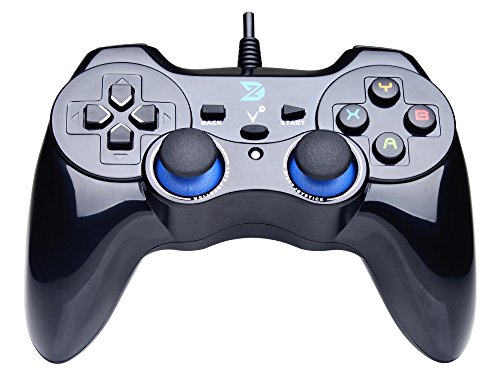
ZD-V+ USB Wired Gaming Controller Gamepad For PC/Laptop Computer(Windows XP/7/8/10/11) & PS3 & Android & Steam - [Black]
One of the money options compared in this guide.
View on Amazon
GameSir Nova Lite Wireless Controller for PC,Hall Effect Sticks & Trigger | Bluetooth Controller Gamepad with Hall Effect Trigger,Turbo,Rumble Vibration,Android, Switch & Steam Deck
One of the money options compared in this guide.
View on Amazon
RARELEMON Wireless Gamepad for PC Laptop Android Steam – Blue USB & Bluetooth Game Controller with Phone Mount Compatible with Windows 7/10 Steam Deck Switch via Adapter Android TV Box & OTG
One of the money options compared in this guide.
View on Amazon
DOYO Wireless PC Gaming Controller, Dual-Vibration Steam Joystick Gamepad Computer Game Controller for PC Windows 7/8/10/11
One of the money options compared in this guide.
View on Amazon
Bcofo Wireless Mobile Gaming Controller for iPhone/Android/Switch/Laptop, Wired Control for PC/Steam, Programmable Game Gamepad with Phone Clip for Gamer, with RGB Lighting Effect/Turbo/Vibration
One of the money options compared in this guide.
View on Amazon
Bcofo Wireless Mobile Game Controller for iOS/iPhone/Android/Cell Phone/Switch/Laptop, Gaming Gamepad with Phone Clip for Gamers, Hall Effect Triggers, Wired PC Control, with RGB LED Lighting/Vibration/6-Axis Gyro/Turbo (Black)
One of the money options compared in this guide.
View on Amazon| Model | Key point from title | Price tier | Best for |
|---|---|---|---|
| Guil Vim 2.4G USB Wireless Controller (2-Pack) | 2.4G USB, built-in battery, gyro, 2-pack | Budget | Two-player sets |
| Logitech G F310 (Wired) | Wired, console-like layout, 4-switch D-pad | Budget | Reliable wired fallback |
| Logitech G F710 Wireless Gamepad | 2.4GHz, nano receiver, dual vibration | Mid-range | Plain wireless |
| ZD-V+ USB Wired Gamepad | USB wired, PC/PS3/Android/Steam | Budget | Cheap wired |
| GameSir Nova Lite | Hall Effect, Bluetooth, multi-platform | Mid-range | Cross-device use |
| RARELEMON Wireless Gamepad | USB + Bluetooth, phone mount | Budget | Phone and laptop |
| DOYO Wireless PC Controller | Wireless, dual vibration, Windows | Budget | Simplest budget |
| Bcofo Wireless Mobile Controller (RGB) | Mobile-first, wired PC, RGB, turbo | Premium | Phone-first |
| Bcofo Wireless Mobile Controller (Hall Effect Triggers) | Hall Effect triggers, gyro, wired PC | Premium | Upgraded mobile |
Controller by controller
Guil Vim 2.4G USB Wireless Controller (2-Pack)
The title describes a 2.4G USB wireless gamepad with a built-in battery and a six-axis gyroscope, sold as two pieces. The long compatibility list that starts at WIN98 reads like generic marketing, so check the listing for what actually works with a current laptop. A two-pack suits couch co-op on one machine. If you only ever need one pad, the second unit is spare capacity, so look at how the two are packed and whether each has its own receiver.
Pros
- Two controllers in the listing
- 2.4G USB wireless
- Built-in battery
Cons
- Vague compatibility text
- Unfamiliar brand
- Gyro support depends on the game
Who it’s for: Two-player local games on one laptop.
Logitech G F310 (Wired)
The title says Wired Gamepad with a console-like layout and a four-switch D-pad. It is not wireless, so it does not match the keyword by itself. It is here as a plug-in-and-forget option for a laptop that sits on a desk. It suits a fixed setup better than a couch, since the cable also keeps latency out of the conversation entirely.
Pros
- Wired, so no battery to charge
- Console-like layout
- Simple USB connection
Cons
- Not wireless
- Cable limits seating distance
Who it’s for: Desk play where reliability matters more than freedom.
Logitech G F710 Wireless Gamepad
The title lists 2.4GHz wireless, a USB nano receiver, dual vibration feedback, a four-switch D-pad and PC compatibility. This is the most clearly laptop-oriented wireless listing in the set. The nano receiver takes a USB port, which matters for thin laptops. Dual vibration and a standard layout mean most games on PC recognise it without custom setup, though the listing is the place to confirm mode switches.
Pros
- 2.4GHz receiver, no pairing menus
- Dual vibration
- Clear PC positioning
Cons
- Uses a USB port for the receiver
- Older design with no Hall Effect mention
Who it’s for: Laptop players who want a dependable wireless pad.
ZD-V+ USB Wired Gamepad
A wired pad for PC and laptop, PS3, Android and Steam, per the title. It is wired, so treat it as a budget alternative rather than a true match for this keyword. The long compatibility line covers many systems, but verify the exact fit for your laptop. The title lists PS3 and Android, which says little about modern PC behaviour, so treat the wide platform list as a convenience rather than a promise.
Pros
- Low cost
- Wide platform list
- No batteries
Cons
- Wired only
- Cable length unknown
Who it’s for: Cheap desk-side gaming.
GameSir Nova Lite
The title names Hall Effect sticks and trigger, Bluetooth, turbo, rumble, and support for Android, Switch and Steam Deck, plus PC. Hall Effect parts are marketed as less prone to stick drift, so this is a seller claim. It is a Bluetooth-first design, so a laptop without Bluetooth needs an adapter. Because Bluetooth pairing is per device, switching between a laptop and a handheld means re-pairing unless the listing describes a quick-switch feature.
Pros
- Hall Effect sticks and trigger
- Bluetooth plus multi-platform
- Rumble and turbo
Cons
- Needs Bluetooth on the laptop
- Title does not state battery life
Who it’s for: Players who also use the controller with a phone or handheld.
RARELEMON Wireless Gamepad
The title lists USB and Bluetooth connection, a phone mount, and Windows 7/10, Steam Deck, Switch via adapter, Android TV box and OTG compatibility. The phone mount suggests it doubles as a mobile controller. The compatibility list is long, so check the listing for what works without an adapter. If you do not play on a phone, the mount is dead weight in a bag, and the extra plastic is the first thing to snap on a cheap pad.
Pros
- USB and Bluetooth options
- Built-in phone mount
- Broad device list
Cons
- Mount adds bulk for laptop-only users
- Some devices need an adapter
Who it’s for: Anyone who plays on a laptop and a phone.
DOYO Wireless PC Controller
A wireless PC controller with dual vibration for Windows 7 through 11, according to the title. The title does not state the connection type, so confirm whether it uses a receiver or Bluetooth. It is the lowest priced of the set. With so few details, the main questions to settle on the listing are the connection type, the battery and the return terms.
Pros
- Lowest tier
- Dual vibration
- Windows-focused
Cons
- Connection type not in the title
- Little detail overall
Who it’s for: Budget laptop play without extras.
Bcofo Wireless Mobile Controller (RGB)
The title positions this as a mobile controller for iPhone, Android and Switch, with laptop use listed and wired control for PC and Steam. That wording suggests the PC connection is wired, so it may not be wireless on a laptop. Programmable buttons, RGB, turbo and vibration are listed. For laptop-only use, a standard pad with a receiver will usually be less awkward than a clip-on mobile controller.
Pros
- Programmable buttons
- Phone clip
- Turbo and vibration
Cons
- PC use is wired per the title
- Phone-first design
- RGB may be unneeded
Who it’s for: Mobile gamers who sometimes use a laptop.
Bcofo Wireless Mobile Controller (Hall Effect Triggers)
A close sibling of the first Bcofo listing. The title adds Hall Effect triggers and a six-axis gyro, with wired PC control. Because the two Bcofo titles are so alike, treat them as near-duplicates and compare the listings carefully. It has the highest price in the set. Check whether both Bcofo listings really differ in the triggers and gyro, since the shared wording makes it easy to buy the wrong one.
Pros
- Hall Effect triggers
- Gyro and RGB
- Phone clip
Cons
- PC control wired
- Near-duplicate of the other Bcofo
- Highest tier here
Who it’s for: Phone-first players who want upgraded triggers.
Basis for this list
The picks draw on published specifications, manufacturer documentation and buyer reviews, read from listing titles. Nobody on the team used or measured these units, so feel, latency and stick accuracy are not ranked. The F310 and ZD-V+ are wired, and the two Bcofo models connect to a PC by cable per their titles, so only five of the nine are wireless on a laptop.
What matters on a laptop
Bluetooth or 2.4GHz dongle
A 2.4GHz receiver plugs in and works without pairing menus, but uses a USB port. Bluetooth needs no port, but you must pair the pad, and not every laptop has Bluetooth. Pads that offer both give you a fallback if one connection is flaky. Interference from other wireless devices can affect either type, so keep the dongle on the near side of the laptop with a clear line to the pad.
Battery
Titles rarely give battery life. Built-in rechargeable batteries avoid buying cells but need a cable at the end of the session. Pads that use disposable batteries are easy to swap but add recurring cost. Look for any sign of auto-sleep in the listing, which saves charge when the pad is idle between sessions.
Laptop USB ports
Thin laptops often have two ports. A receiver, a mouse dongle and a charger can use all of them. Count ports before you pick a dongle-based pad, and consider a small hub if your laptop is short on ports. A hub adds one more thing to carry, so a Bluetooth pad can be the neater travel choice.
Steam Input and compatibility
Steam can remap many pads through its own input settings, and several titles here name Steam. Confirm that the pad is recognised as a standard controller, since some listings use XInput-style modes and others use generic ones, which can change button mapping in some games. Check buyer comments for your launcher before ordering.
Handheld grips and phone mounts
Phone mounts add bulk and weight. They help if you also play on a phone, but add nothing for a laptop-only setup. A pad with a standard layout and comfortable grips is the better choice for long sessions on a desk or lap.
Battery planning example
Planning with assumptions: say a pad holds about 15 hours per charge, which no title here states. At three 2-hour sessions a week, that is 6 hours, so a charge lasts about two and a half weeks. If you play 10 hours every weekend instead, you would charge about every ten days. If the listing gives a different figure, substitute it and redo the sum. The point is to match charging to your habit before buying, since a pad that needs a charge mid-session is more annoying than one with a slightly smaller battery.
Mistakes buyers make
- Buying a wired pad by mistake. The F310 and ZD-V+ titles say wired.
- Assuming phone controllers work wirelessly on PC. The Bcofo titles say wired PC control.
- Skipping the Bluetooth check. Not all laptops have it.
- Counting on Hall Effect as a cure-all. It is a seller claim about stick wear.
- Ignoring the return window. Feel is personal and unknown from titles.
- Overbuying features. Turbo, RGB and gyro add cost and are not needed for most PC games.
Verdict
For a plain wireless laptop pad, the Logitech G F710 is the clearest fit. For Bluetooth and cross-device play, the GameSir Nova Lite. For two players, the Guil Vim pair. If cost matters most, the DOYO is the cheapest, but read its connection details first. Avoid buying the Bcofo mobile pads for laptop use unless you want a phone controller as well, and keep the return window in mind whichever you choose.
Related guides
- How To Extend Battery Life On A Handheld Gaming Pc
- Gen4 Nvme M2 Ssds For High Performance Pc
- Travel Backpack With Laptop Compartment
Frequently asked questions
Is Bluetooth or a 2.4GHz dongle better for a laptop?
Both work. A 2.4GHz dongle plugs in and works without pairing menus, but occupies a USB port. Bluetooth needs no port, but your laptop must have it and the pad must be paired. If the controller offers both, as the RARELEMON does, you have a fallback if one connection acts up.
Are wired controllers a good alternative?
Yes, if you sit at a desk. Wired pads like the Logitech F310 avoid batteries, pairing and latency worries. The cable limits where you can sit, though, and takes a USB port. They are not wireless, so do not choose one if freedom of movement is the point. For a laptop on a desk, though, they are a low-cost, low-fuss option.
Will a phone controller work on my laptop?
It may, but read the listing. The Bcofo titles list wired control for PC and Steam, so the PC connection is by cable. Phone clips and mobile-first layouts add bulk with no benefit on a laptop. If you only play on a laptop, choose a pad with a receiver or Bluetooth.
What does Hall Effect mean on a controller?
It refers to a sensor type used in sticks and triggers that is marketed as less prone to drift from wear. The GameSir Nova Lite and one Bcofo model name it in their titles. It is a seller claim, so check buyer comments over time rather than assuming drift will never appear.
How many USB ports do I need?
A dongle pad needs one port. If you also use a mouse receiver or a charger, thin laptops can run out quickly. A Bluetooth pad avoids using a port, and a hub can add ports. Count your ports before ordering a receiver-based controller, and check the listing and your model for details.