Our Top Picks
 SANDISK 128GB High Endurance Video microSDXC Card with128 GB0.4 x 0.6 x 0.1 inches0 poundsCheck on Amazon


A Raspberry Pi is only as pleasant to use as the card it boots from. Pick the wrong microSD and a desktop install feels sluggish, updates crawl, and a card that was never built for constant small writes can wear out under the steady stream of logs and swap traffic a Pi generates around the clock. The real decision is not raw capacity — it is whether you need fast random access for apps, or sheer writing stamina for a board that never switches off.
That is why this shortlist splits into two camps. Everyday desktop and coding users get A2-rated cards whose random-read figures make menus, browsers and package installs respond quickly, while builders running servers, dashboards or retro handheld rigs get endurance-rated cards designed for continuous recording workloads. Every pick below is a 128GB or 256GB microSDXC card sold with an SD adapter, chosen from the speed class, app-performance rating and endurance figures printed on its Amazon product page.
Quick Picks
As an Amazon Associate we earn from qualifying purchases.
| Product | Best for | Key spec |
|---|---|---|
| SanDisk Extreme 128GB microSDXC | Fastest all-round Pi desktop use | A2 rated, up to 190MB/s read |
| Samsung EVO Select 256GB microSDXC | Doubling storage for media and games | A2 rated, 256GB capacity |
| Samsung PRO Endurance 128GB microSDXC | Always-on servers and logging | Rated up to 70,080 hours endurance |
| SanDisk High Endurance 128GB microSDXC | Budget always-on projects | Rated 10,000 hours endurance |
| SanDisk Ultra 128GB microSDXC | Light desktop and learning setups | A1 rated, up to 140MB/s read |
How to Choose
Read the A1 or A2 rating before the headline speed
Sequential read figures look impressive on a listing, but a Pi spends its day on thousands of tiny random reads and writes — launching apps, loading libraries, updating package lists. The A1 and A2 app-performance classes exist to measure exactly that. The SanDisk Extreme’s listing spells out what A2 means: 4,000 read IOPS and 2,000 write IOPS. An A1 card such as the SanDisk Ultra is a step behind on random access yet still far better suited to an operating system than a card with no app rating at all, however large its headline transfer number looks.
Match endurance to how the Pi will actually run
A desktop Pi that sleeps at night is gentle on flash memory. A Pi running a home server, a network dashboard or a security feed writes logs, caches and swap data every minute of every day, and that constant trickle is what kills ordinary cards. Endurance models are built and warrantied for it: Samsung rates the 128GB PRO Endurance at up to 70,080 hours of recording, while SanDisk’s High Endurance line is rated at 10,000 hours in the same size. If your board never powers down, the endurance figure matters more than any speed badge.
Treat U3 and V30 as the comfortable floor
The speed-class codes on a listing tell you the guaranteed minimum write rate, which is what recording and large file copies feel. U3 and V30 both promise a 30MB/s minimum sustained write, and four of the five cards here carry them. The SanDisk Ultra drops to U1, a 10MB/s floor — fine for a learning board or a media player, but it will feel slower when you image the card, copy a game library across or record video. Class 10 alone, without a U rating, is an old baseline and not enough information on its own.
Buy the capacity your project will grow into
A fresh Raspberry Pi OS install is small, but desktop images, retro game libraries, container images and months of logs expand quickly. The 128GB cards in this list are the sensible default for most builds, giving the system room to breathe without wasted space. Step up to the 256GB Samsung EVO Select if the Pi doubles as a media box or emulator with a large ROM collection. Going smaller than 64GB saves very little and invites the frustration of pruning files on a card that is awkward to swap once it lives inside a case.
The 5 Best Options
SanDisk Extreme 128GB microSDXC

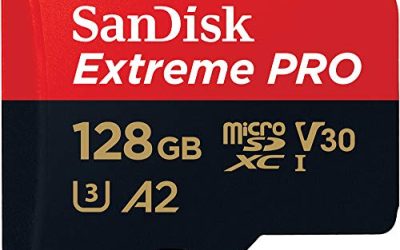
This is the card to buy when you want one answer for a Pi desktop, a coding workstation or a handheld retro build. Its A2 rating is the strongest app-performance credential in this group, and the listing backs it with up to 190MB/s reads and 90MB/s writes, so imaging the card and copying large files are quick as well. The U3 and V30 marks confirm a healthy sustained-write floor underneath the headline numbers. For a Pi 4 or Pi 5 running a full desktop, this combination makes the whole system feel noticeably more responsive than a budget card does.
Specs
- Capacity: 128GB microSDXC, sold with SD adapter
- Read speed: up to 190MB/s
- Write speed: up to 90MB/s
- App performance: A2 (4,000 read IOPS / 2,000 write IOPS as listed)
- Speed classes: C10, U3, V30
- Model: SDSQXAA-128G-GN6MA
Best for: A main Pi desktop or retro gaming build where snappy app loading matters most.
Watch out for: One secondary spec table lists this card’s read speed lower than the listing’s own 190MB/s figure — go by the product page headline, and confirm the ASIN matches before ordering.
Samsung EVO Select 256GB microSDXC
Doubling capacity is this card’s whole argument, and it makes it well. At 256GB it swallows a full desktop install, a large emulator library and a media collection without the housekeeping a smaller card demands, while its A2 rating keeps random access respectable for operating-system work. The listing quotes up to 160MB/s reads with U3 and V30 sustained-write credentials, so it is no slouch on transfers either. Choose it when storage space, not outright pace, is the constraint on your build — a Pi that serves files or games for the whole household, for instance.
Specs
- Capacity: 256GB microSDXC, sold with SD adapter
- Read speed: up to 160MB/s
- App performance: A2
- Speed classes: C10, U3, V30
- Model: MB-ME256SA/AM
Best for: Media-centre and emulation builds that need 256GB of room on one card.
Watch out for: Availability signals on this listing are mixed and current stock may sit with third-party sellers — check the live product page, confirm the seller and the offer before ordering, and make sure you are not looking at the older 130MB/s EVO Select generation.
Samsung PRO Endurance 128GB microSDXC
Samsung built this line for devices that record continuously, and that is precisely the life of an always-on Pi. The listing rates the 128GB size at up to 70,080 hours of endurance — by far the longest figure in this roundup — and backs it with a 5-year warranty. Speeds are honest rather than flashy, at up to 100MB/s reads and 40MB/s writes with U3 and V30 classes. What it deliberately does not carry is an A1 or A2 app-performance rating, so app launches will not match the Extreme; the trade is a card designed to survive years of log writes.
Specs
- Capacity: 128GB microSDXC, sold with SD adapter
- Read speed: up to 100MB/s
- Write speed: up to 40MB/s
- Endurance: rated up to 70,080 hours (128GB size)
- Speed classes: Class 10, U3, V30
- Warranty: 5-year
- Model: MB-MJ128KA/AM
Best for: Headless servers, dashboards and loggers that run 24/7 and write constantly.
Watch out for: There is no A1 or A2 rating on this card, so do not buy it expecting the snappiest desktop feel — and note the 70,080-hour figure applies to this 128GB size, not automatically to other capacities.
SanDisk High Endurance 128GB microSDXC
SanDisk’s High Endurance card brings the always-on concept down to a friendlier tier. It is rated for 10,000 hours of recording at this 128GB size — well short of the Samsung PRO Endurance, but a completely different proposition from a standard card that makes no endurance promise at all. Transfer figures match its Samsung rival at up to 100MB/s reads and 40MB/s writes, with the same U3 and V30 write credentials. Like the PRO Endurance, it carries no A1 or A2 app-performance rating. For a Pi-hole box, a weather logger or a print server that writes steadily but modestly, it covers the need.
Specs
- Capacity: 128GB microSDXC, sold with SD adapter
- Read speed: up to 100MB/s
- Write speed: up to 40MB/s
- Endurance: rated 10,000 hours (128GB size)
- Speed classes: C10, U3, V30
- Warranty: 2-year
- Model: SDSQQNR-128G-GN6IA
Best for: Budget always-on projects such as network services and data loggers.
Watch out for: The 2-year warranty and 10,000-hour rating are both well below the Samsung PRO Endurance — if the Pi is mission-critical or hard to access physically, the longer-rated card is the safer spend.
SanDisk Ultra 128GB microSDXC
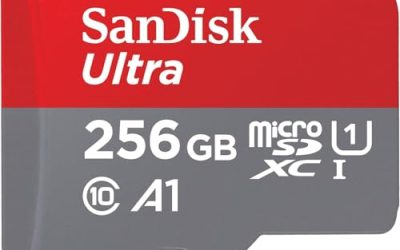
The Ultra is the familiar entry point of the microSD world, and for lighter Pi duties it remains a sensible one. Its listing quotes up to 140MB/s reads and an A1 app-performance rating, which keeps a desktop or a learning setup responsive enough for coding lessons, light browsing and media playback. The compromises are a U1 write class — a 10MB/s sustained floor — and no endurance rating for heavy logging. A 10-year limited warranty softens the risk for casual use. Pick it for a child’s first Pi, a spare card for testing images, or a kiosk-style build with modest writes.
Specs
- Capacity: 128GB microSDXC, sold with SD adapter
- Read speed: up to 140MB/s
- App performance: A1
- Speed classes: C10, U1
- Warranty: 10-year limited
- Model: SDSQUAB-128G-GN6MA
Best for: Learning setups, spare imaging cards and light media-player builds.
Watch out for: The U1 rating means sustained writes bottom out far below the U3 cards here, so imaging and big copies take longer — and check the ASIN carefully, as an older version of this listing still circulates.
Which One Fits Your Situation
You use your Pi as an everyday desktop
Choose the SanDisk Extreme 128GB. Desktop work is a storm of small random reads — exactly what its A2 rating and 4,000 read IOPS are built for — and the strong sequential figures keep updates and file copies quick. It is the only card here that pairs the top app rating with U3 write credentials and high headline speeds in one package.
Your Pi runs a server that never sleeps
Choose the Samsung PRO Endurance 128GB. A headless board writing logs and swap around the clock needs flash rated for that punishment, and its 70,080-hour endurance figure plus 5-year warranty are in a different league from standard cards. The missing A-rating barely matters when no one is sitting at a desktop waiting for apps to open.
You are building on a tight budget but the Pi stays on
Choose the SanDisk High Endurance 128GB. It costs the always-on problem some respect — a stated 10,000-hour recording rating and U3 write speeds — without paying for the Samsung’s extreme stamina. For a Pi-hole, a home automation hub or a garden weather station, that middle ground is usually the rational buy.
Your Pi is a media box or retro console
Choose the Samsung EVO Select 256GB. Game libraries and media collections are what actually fill a card, and doubling capacity removes the ceiling entirely while the A2 rating keeps menus and game lists responsive. Just verify the live listing and seller carefully before ordering, since availability on this one has been inconsistent lately.
Common Mistakes
- Judging a card by its sequential read speed alone, when a Pi’s responsiveness depends on random I/O — the A1/A2 class is the figure that predicts how the desktop feels.
- Running a 24/7 server or logger on a standard card with no endurance rating, then blaming the Pi when the card corrupts after months of log and swap writes.
- Mixing up capacities within a product line: endurance hours and sometimes speeds are quoted per size, so the figure on a 256GB listing does not transfer to the 128GB card in your basket.
- Buying a near-identical older listing — several of these lines have previous generations with lower speeds under very similar names, so check the ASIN and model number, not just the branding.
- Filling a card to the brim: a Pi needs free space for updates, caches and logs, so a card that is 95 percent full on day one will cause problems within months.
Frequently Asked Questions
Does A2 really matter for a Raspberry Pi?
Yes, for anything with a desktop or apps. A2 guarantees 4,000 read IOPS and 2,000 write IOPS, and operating systems live on small random operations like that. The difference shows up as faster app launches and less stutter. For a headless logger that mostly writes sequentially, an endurance rating matters more than the A class.
How long will a microSD card last in an always-on Pi?
It depends on the card’s design, not just its age. Endurance models publish hour ratings — up to 70,080 hours for the 128GB Samsung PRO Endurance, 10,000 hours for the SanDisk High Endurance — because they are built for continuous writing. A standard card gives no such figure and can fail far sooner under constant logging.
Is 128GB enough, or should I buy 256GB?
For a desktop, coding or server build, 128GB leaves generous headroom for the system, applications and logs. Step up to 256GB when the card must also hold a media library or a large retro game collection. What matters most is leaving free space — a nearly full card slows maintenance and risks failed updates.
Can I use one of these cards in a Pi 5?
Yes. All five are microSDXC cards, and the Pi 5 takes the same microSD format as earlier boards. The faster boards benefit most from the A2-rated cards here, since the card interface is quicker and storage becomes the bottleneck. Just image the card with the correct OS build for your board, as always.
FAQ
Does A2 really matter for a Raspberry Pi?
How long will a microSD card last in an always-on Pi?
Is 128GB enough, or should I buy 256GB?
Can I use one of these cards in a Pi 5?
More from Amazon
Programs that pair well with the guide above. Offers and eligibility are set by Amazon and may change.
Free shipping on eligible items, Prime Video and more. Eligible new members can start with a free trial.
Start a Prime free trialAd-free music streaming. Eligible new subscribers can start with a free trial.
Try Music Unlimited freeA Prime membership for ages 18-24 with a trial period. Eligibility is set by Amazon.
See Prime for Young AdultsAudiobooks and podcasts to listen to on the go. Eligible new members can start with a free trial.
Try Audible freeAs an Amazon Associate we earn from qualifying purchases.